Welcome to deployment 6, for this deployment you will need to follow the directions in the deployment6.pdf.
- Be sure to include the following below in your pull request:
Requirements:
- [x]Document issues and anything you decided to do different..
- [x]Generate a failed and passed test.
- [x]Take a screenshots of your failed and passed test.
- [x]Locate and upload cypress's screenshot and video of the headless browser test.
Deployment 6
Screenshot of a successful and a failed test
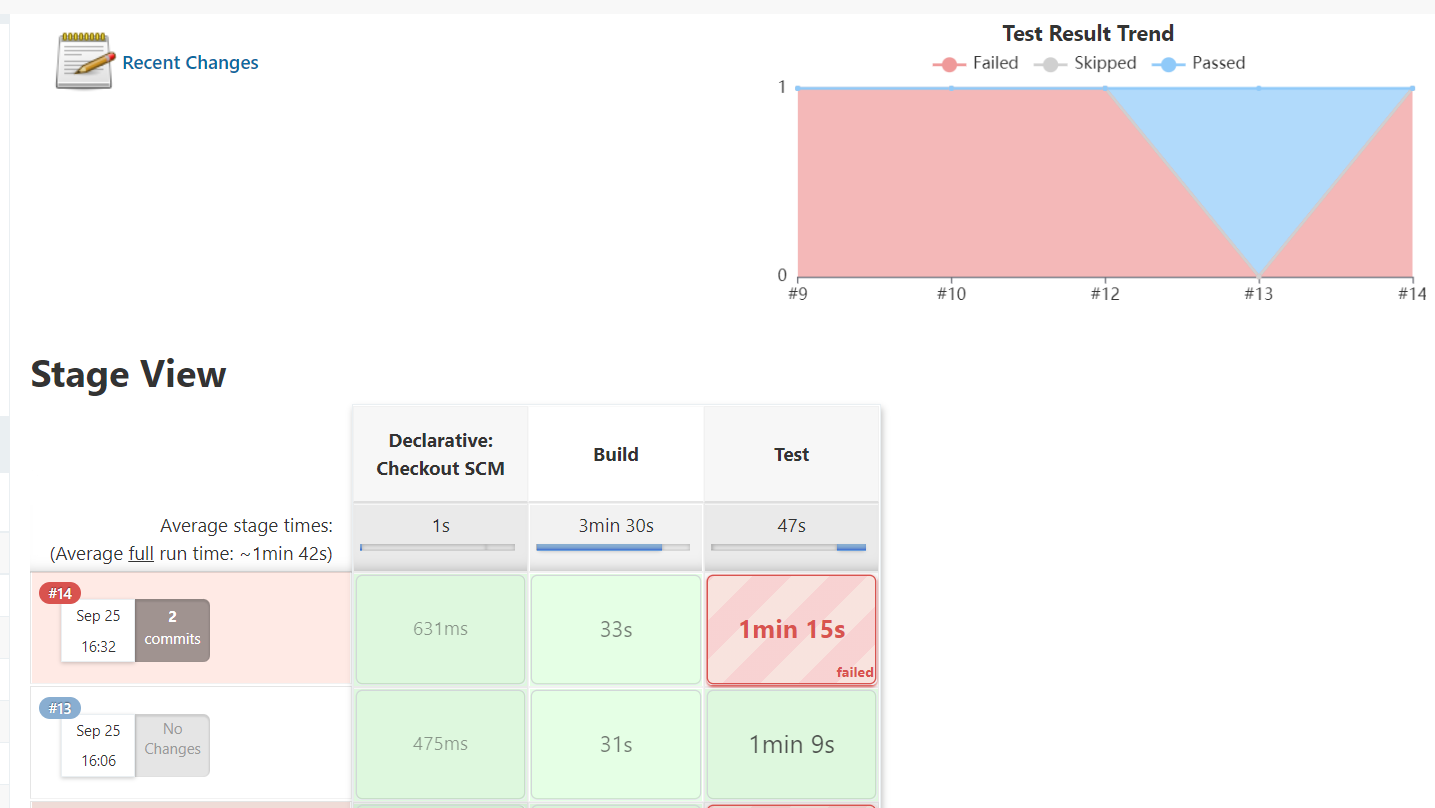
Here Be Dragons:
- “/home/ec2-user/jenkins” became “/home/ubuntu/jenkins/app”
- Bootstrap script was useless, I had to reinstall the scripts manually
- Forgot to chmod the pem file
- ssh -i file.pem ec2-user@0.0.0.0 became ssh -i file.pem ubuntu@0.0.0.0
- Jenkins configurations: hosts are the private IP address of your agent instances and you have to click non-verifying strategy or else
Things I Did Differently:
I added an “&” to the Jenkinsfile so it can build in the background. This addition also saves a lot of time. [serve -s build &]
I was able to find the screenshots and video of the cypress tests by using the command: “find /home -name *.mp4”. Then, I copied and moved the screenshots and video to my home directory and moved them again to my repo. From the repo, I SSH’d and pushed the files into my github account.