The objective of this project was to create an escape game
- 1- Created a New Level and made a house with 2 doors and a few objects in it using static meshes and importing some textures
- 2- Created a "Grabber" component and attached it to my Default_Pawn BluePrint used to make my actor grab an object
- 3- Created a Pressure Plate in which the player can place objects triggering the doors to open
- 4- Created an "OpenDoor" component and attached it to my door meshes in order to make them open when the objects were placed in the pressure plate
This readme file will point the some of the most important parts of the code. The complete code is in its separate files.
This is the level I created using box brushes for the walls, floors and ceiling, a subtractive box brush to make a whole in the wall to place the exit door, door, cube and cone meshes as objects and surfance materials and textures downloaded from texture.com and modified on Gimp to .jpg format and then Uasset to be read by Unreal Engine.d
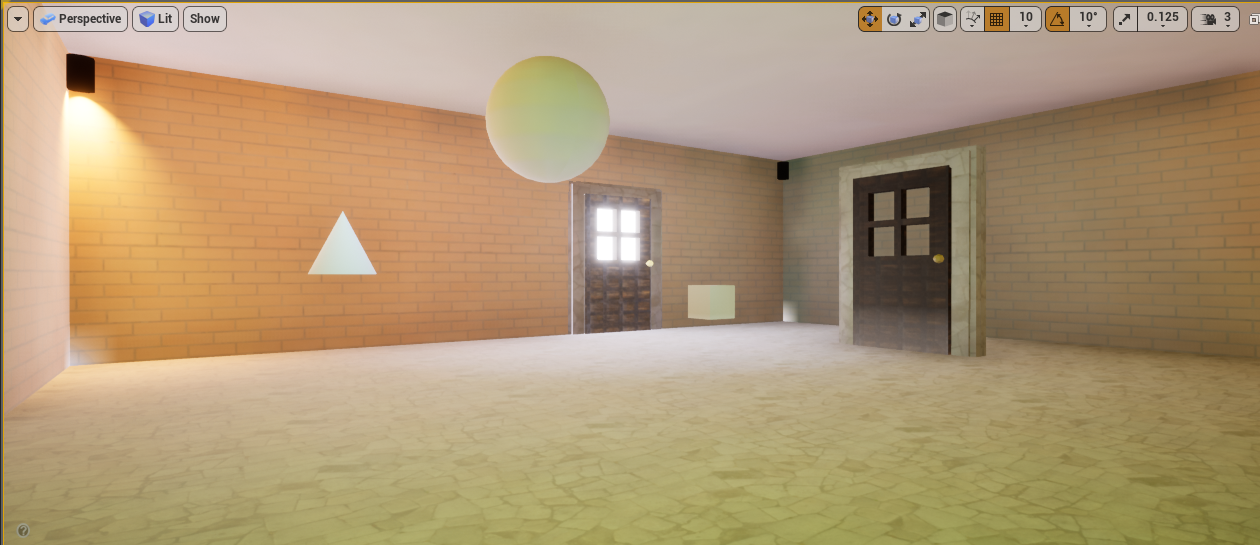
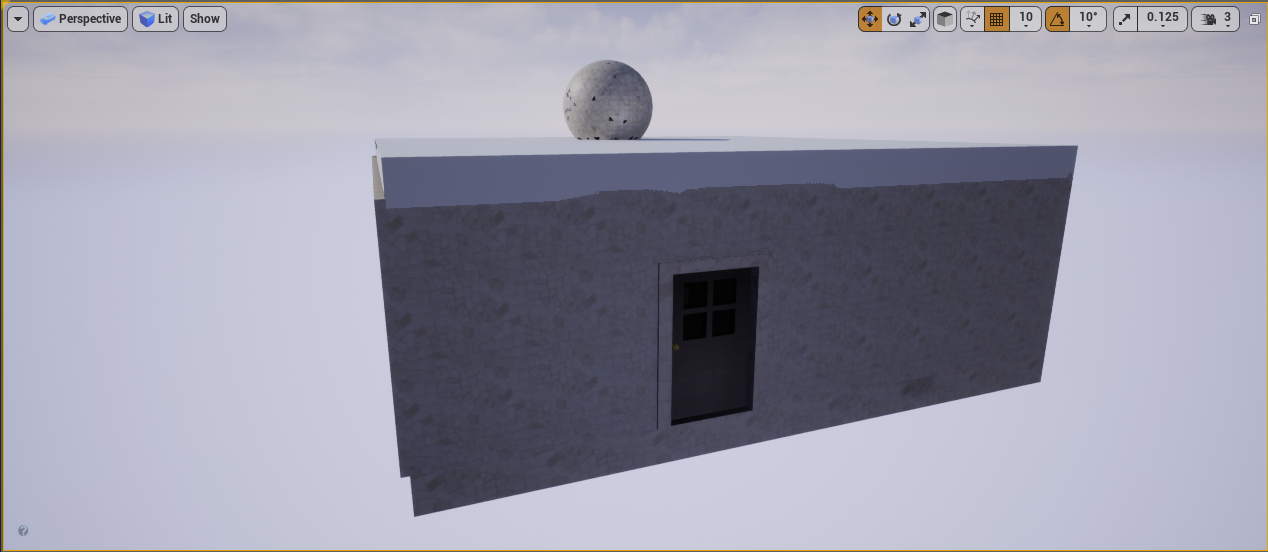
On BeggingPlay: Set up the physics handle which is a component that allows the actor to attach another object to or close to his body, like if it were holding it.
// Called when the game starts
void UGrabber::BeginPlay()
{
	Super::BeginPlay();

	FindPhysicsHandle();
	SetUpInputComponent();
}

// Check if physics handle is working
void UGrabber::FindPhysicsHandle()
{
	PhysicsHandle = GetOwner()->FindComponentByClass<UPhysicsHandleComponent>();

	if (!PhysicsHandle)
	{
		// Physics handle is not found
		UE_LOG(LogTemp, Error, TEXT("Physics Handle not found in component: %s"), *GetOwner()->GetName());
	}
}
Set up the input component:
- The SetUpInnputComponent needs first to be set in the project settings on Unreal: Engine > Input
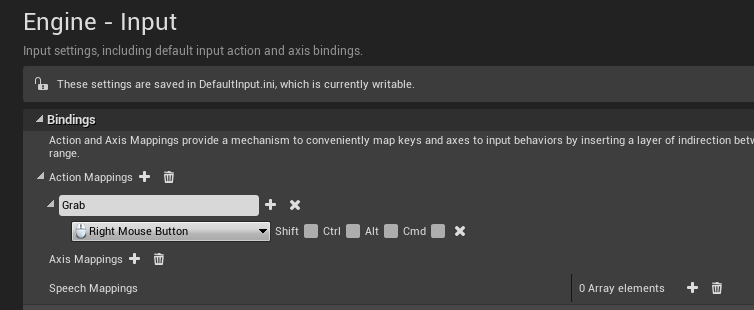
- Then it needs to be called in the code passing the parameters for the input event (button to be pressed), defining which object is calling it and the function that this input will perform - whether grab or realease, from the UGrabber function.
// Set action for pressed and release grab functions
void UGrabber::SetUpInputComponent()
{
	InputComponent = GetOwner()->FindComponentByClass<UInputComponent>();
	if (InputComponent)
	{
		InputComponent->BindAction("Grab", IE_Pressed, this, &UGrabber::Grab);
		InputComponent->BindAction("Grab", IE_Released, this, &UGrabber::Release);
	}
}
If the input is on, it will call the UGrabber::Grab() function:
The grab function will then call the GetFirstPhysicsBodyInReach() that queries which objects around the actor are being reached and assigns the result to a FHitResult variable Once we know what we hit, we then assign the component hit to a UPrimitiveComponent* variable using the GetComponent() function Then if we hit a component from the type AActor, then it will use our physics handle variable to grab our component using its GrabComponentArLocation function (it takes in a UPrimitiveComponent*)
void UGrabber::Grab()
{
	FHitResult HitResult = GetFirstPhysicsBodyInReach();

	// The component to be grabbed
	UPrimitiveComponent* ComponentToGrab = HitResult.GetComponent();

	AActor* ActorHit = HitResult.GetActor();

	// If hit something then attach physics handle
	if (ActorHit)
	{
		// Nullptr protection. if there is not a pointer object PhysicsHandle, quit the iteration and return
		if (!PhysicsHandle){return;}

		// Attach physics handle
		PhysicsHandle->GrabComponentAtLocation
			(
			ComponentToGrab,
			// Name for the bone to which the object will be attached. since we don't have bones = None
			NAME_None,
			// End of the line trace
			GetPlayersReach()
			);
	}
}
GetFirstPhysicsBodyInReach uses the LineTracingSingleByObjectType function that "draws" a line from the player to the object like an invisible arm to allow the player to grab something at a predefined distance.
FHitResult UGrabber::GetFirstPhysicsBodyInReach() const
{
	FHitResult Hit;

	// Crate a var to store the parameters of the collision query itself
	FCollisionQueryParams TraceParams(FName(TEXT("")), false, GetOwner());

	// Ray casting for the player to reach out something at a certain distance (Reach)
	GetWorld()->LineTraceSingleByObjectType(
		OUT Hit,
		GetPlayersWorldPos(),
		GetPlayersReach(),
		FCollisionObjectQueryParams(ECollisionChannel::ECC_PhysicsBody),
		TraceParams
	);

	return Hit;
}
LineTracingByObject type needs to know where the player is located in the world - GetPlayerWorldPosition() - and what is the extension of the players invisible arm - GetPlayersReach()
The player's position is defined by 2 variables: its location (FVerctor variable) and where he is looking to, or its rotation (FRotator variable) and we get those by accessing GetPlayerViewPoint()
FVector UGrabber::GetPlayersWorldPos() const
{
	// Get Players view point
	FVector PlayerViewPointLocation;
	FRotator PlayerViewPointRotation;

	// Update PlayerViewPointLocation and Rotation variables with the current value
	GetWorld()->GetFirstPlayerController()->GetPlayerViewPoint(
		OUT PlayerViewPointLocation,
		OUT PlayerViewPointRotation
		);

	return PlayerViewPointLocation;
}
To define the players arm's reach we do the same thing but we return then a line that extends from the player's location until a defined distance (reach) following a certain direction defined by a vector:
// Returns line trace end
FVector UGrabber::GetPlayersReach() const
{
	// Get Players view point
	FVector PlayerViewPointLocation;
	FRotator PlayerViewPointRotation;

	//OUT just indicates that these are out parameters. out parameters is when you pass a
	GetWorld()->GetFirstPlayerController()->GetPlayerViewPoint(
		OUT PlayerViewPointLocation,
		OUT PlayerViewPointRotation
		);

	// Players view point location. to which distance from the player the grabber object will be located?
	return PlayerViewPointLocation + PlayerViewPointRotation.Vector() * Reach;
}
The release input will use the ReleaseComponent() function from the physics handle
void UGrabber::Release()
{
	// Nullptr protection. if there is not a pointer object PhysicsHandle, quit the iteration and return
	if(!PhysicsHandle){return;}
	PhysicsHandle->ReleaseComponent();
}
The players reach will be updated in every tick
void UGrabber::TickComponent(float DeltaTime, ELevelTick TickType, FActorComponentTickFunction* ThisTickFunction)
{
	Super::TickComponent(DeltaTime, TickType, ThisTickFunction);

	// If physics handle is attached
	// Nullptr protection. if there is not a pointer object PhysicsHandle, quit the iteration and return
	if(!PhysicsHandle){return;}
	if (PhysicsHandle->GrabbedComponent)
	{
		PhysicsHandle->SetTargetLocation(GetPlayersReach());
	}
}The Pressure Plate is the place where the player needs to place the 2 objects is order for the doors to open
First we need to include a trigger volume object in our world and this will be our pressure plate
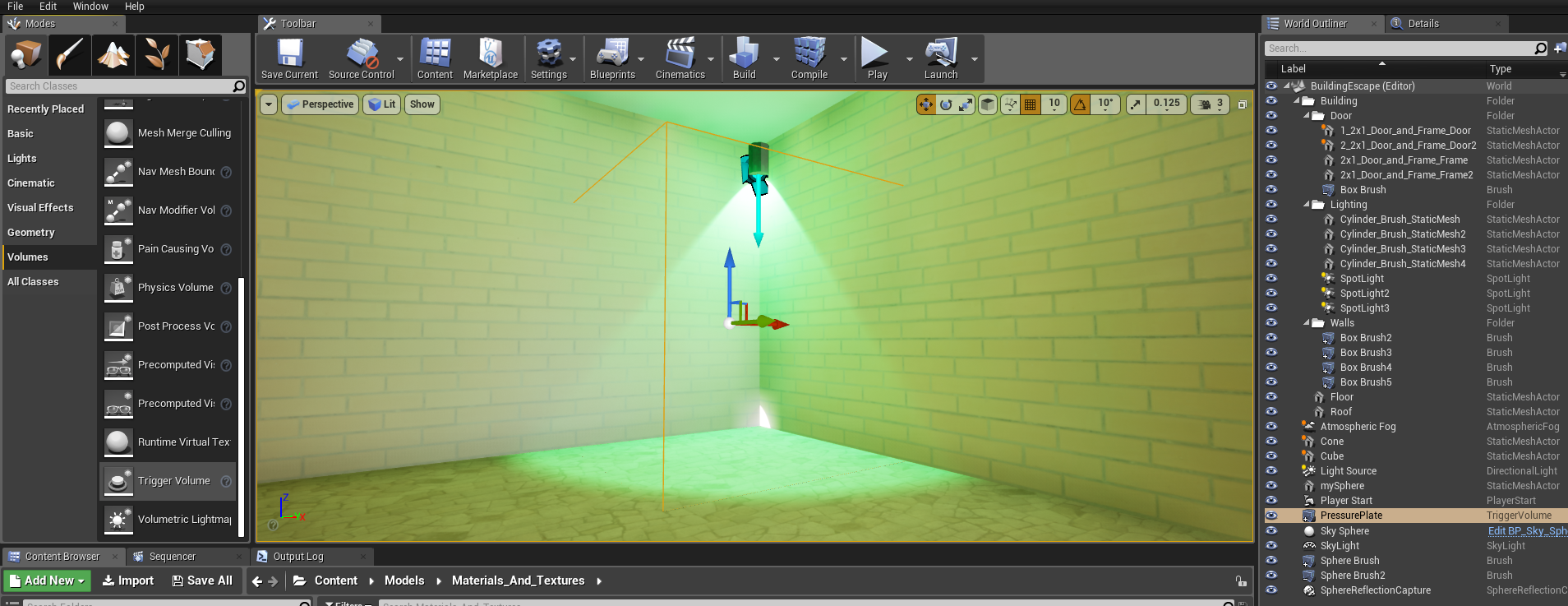
Then we need to create a OpenDoor component and instantiate a ATriggerVolume* variable in our OpenDoor header file to represent our pressure plate object in our code and expose this variable to make it editable anywhere
#include "Engine/TriggerVolume.h"

UPROPERTY(EditAnywhere)
ATriggerVolume* PressurePlate = nullptr; // use * because is a pointer
Then we add the OpenDoor component to our doors in Unreal and click on OpenDoor component and assign our PressurePlate variable in the Pressure Plate slot. This will tie the pressure plate to trigger the OpenDoor functions assigned to our door object.
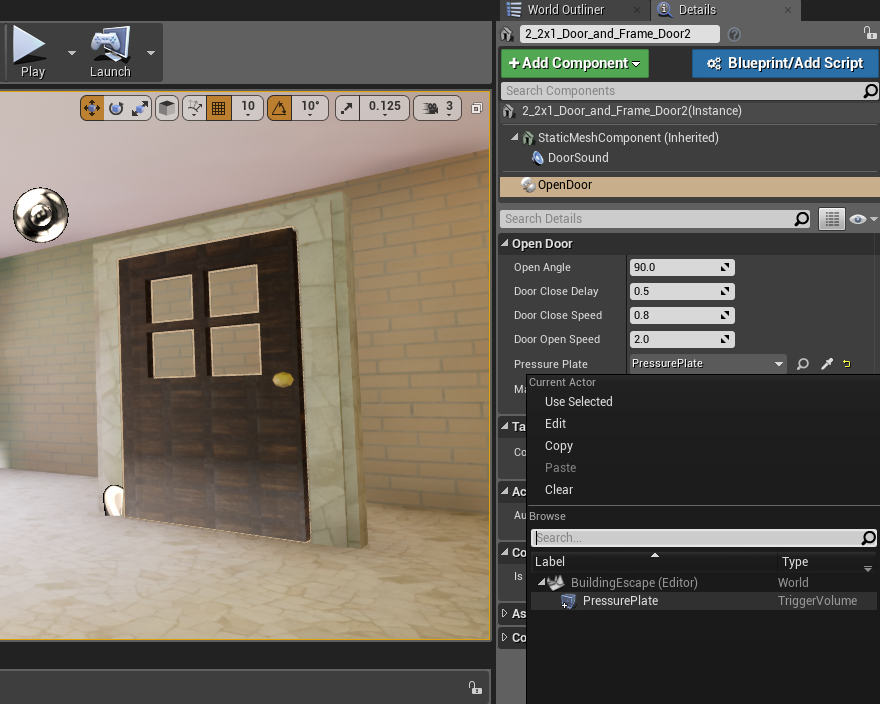
Now we need to define what triggers the trigger volume that we called PressurePlate. We do this by creating a float variable MassToOpenDoors in the OpenDoor header file that will be used as the threshold for the total mass of all the actors in that volume that is needed in order to trigger the OpenDoor function. This will also be exposed to edition:
UPROPERTY(EditAnywhere)
float MassToOpenDoors = 50.f;On Beggin Play we will: First, store the door initial position ie. the initial yaw, by using GetActorRotation().Yaw Also, create a variable to store the updated Yaw that we will call CurrentYaw and initialize as = to our initial Yaw position. Then we have to define the door's final position that will be the angle to which it will open. This will be our initial Yaw + the open angle variable (which is hardcoded in the header file but exposed to edition) Finally, we must check if we have all the components we need to perform this action, that are the pressure plate and the audio component that will be played when the door opens. We do this with the FindPressurePlate() and FindAudioComponent() verification functions that will check if components don't exist and log and error.
void UOpenDoor::BeginPlay()
{
	Super::BeginPlay();

	// Get door initial position to make it move
	InitialYaw = GetOwner()->GetActorRotation().Yaw;
	CurrentYaw = InitialYaw;

	// Define to which angle the door will open
	OpenAngle += InitialYaw;

	// Check functions to make sure we are beginning play with all components we need. otherwise, log and error.
	FindpressurePlate();
	FindAudioComponent();
}
On every tick we will: Call the function that calculates the total mass of actors in the pressure plate - TotalMassOfActors() and chec if it is larger the the threshold variable MassToOpenDoors. If so, call the open door function and store the time we did it on variable DoorLastOpen using GetTimeSeconds(). If the condition is not met, then check if the delta time of the last door opening and the current time is greated the delay threshold hardcoded in the DoorCloseDelay variable. - this is used to define for how long we will hold the door open. If so, call the CloseDoor() function.
void UOpenDoor::TickComponent(float DeltaTime, ELevelTick TickType, FActorComponentTickFunction* ThisTickFunction)
{
	Super::TickComponent(DeltaTime, TickType, ThisTickFunction);

	// Define condition to open door
	if (TotalMassOfActors() > MassToOpenDoors)
	{
		OpenDoor(DeltaTime);
		DoorLastOpened = GetWorld()->GetTimeSeconds();

	} else {
		// if we passed the time for close delay, then close the door
		if (GetWorld()->GetTimeSeconds() - DoorLastOpened > DoorCloseDelay)
		{
			CloseDoor(DeltaTime);
		}
	}
}
This is how we calculate the total mass of actors in the pressure plate: Initialize the TotalMass float to zero. Create a TArray of AActors objects to store all the actors that will be in the pressureplate Access the presure plate variable and use its functions GetOverlappingActors to update the OverlappingActors variables. - here the "OUT" descriptor doesn't do anything on the code. It is just a code description to inform that the same variable that the function is recieving as an input will be updated as returned as an output. The we will iterate inside the OverlappingActors array and update the TotalMass variable with its current value + the mass of the actor on that index in the array. We access the actors' mass by acessing the index variable - "Actor" in this specific iteration -, using the function GetMass(). We can only acess the GetMass() function by first finding the component by its class UPrimitiveComponent. UPrimitiveComponents are any type of component in our scene that have geometry and can render physics or collision.
// Function to get the total mass of the actors placed on the open door area in order to
float UOpenDoor::TotalMassOfActors() const
{
	float TotalMass = 0.f;

	// Find overlapping actors, Store them in an array
	TArray<AActor*> OverlappingActors;

	// Go to the pressure plate to see whats in it. Get overlapping actors and store them in this array
	if (!PressurePlate){return TotalMass;}
	PressurePlate->GetOverlappingActors(OUT OverlappingActors);

	// Add their masses
	for (AActor* Actor : OverlappingActors)
	{
		// += adds up each iteration and reasigns to the updated variable value:
		TotalMass += Actor->FindComponentByClass<UPrimitiveComponent>()->GetMass();
	}
	return TotalMass;
}
This is how we open de doors: First, we have to update the door's current Yaw (on every tick) by doing a linear interpolation between the "old" current Yaw and the pre defined OpenAngle. This does an linear progression between the door's initial position and its final position. We assign a DeltaTime (passed as input in this function) to be the opening speed. Then we create a FRotator variable using GetActorRotation() that well store the updated current Yaw. Finally, we will set the actual door rotation with our updated FRotator variable by using the SetActorRotation() function.
While opening the door we will play a sound: First, to ensure that the sound only plays while this function is running and doesn't overlap with the close door function, we need to create 2 boolean variables to work as light switches: OpenDoorSound and CloseDoorSound and initialize them as true. So when OpenDoor is called, we assign CloseDoorSound to false to turn it off. The we check if audio component is there, if not we return our of the function. Then if the OpenDoorSwitch is turned off (false) we Play the audio and turn the OpenDoorSwitch on (true) so that it doesn't loop indefinetely playing the same sound.
void UOpenDoor::OpenDoor(float DeltaTime)
{
	//Rotate Door based on relative position
	CurrentYaw = FMath::Lerp(CurrentYaw, OpenAngle, DeltaTime * DoorOpenSpeed); //DeltaTime to respect framerate speed. to change it, change 1.f to .5f for example
	FRotator DoorRotation = GetOwner()->GetActorRotation();
	DoorRotation.Yaw = CurrentYaw;
	GetOwner()->SetActorRotation(DoorRotation);

	// Stop close door sound and if OpenDoorSound hasn't played it then play it
	CloseDoorSound = false;
	if(!AudioComponent){return;}
	if (!OpenDoorSound)
	{
		AudioComponent->Play();
		OpenDoorSound = true;
	}
}
The Close Door function does pretty much the same:
void UOpenDoor::CloseDoor(float DeltaTime)
{
	CurrentYaw = FMath::Lerp(CurrentYaw, InitialYaw, DeltaTime * DoorCloseSpeed);
	FRotator DoorRotation = GetOwner()->GetActorRotation();
	DoorRotation.Yaw = CurrentYaw;
	GetOwner()->SetActorRotation(DoorRotation);

	OpenDoorSound = false;
	if (!AudioComponent) {return;}
	if (!CloseDoorSound)
	{
		AudioComponent->Play();
		CloseDoorSound = true;
	}
}