





Home Assistant custom Lovelace card displaying live scores, pre-game odds, win probability, TV network, and series info — one row per game, grouped by sport. Built on top of the ha-teamtracker integration.
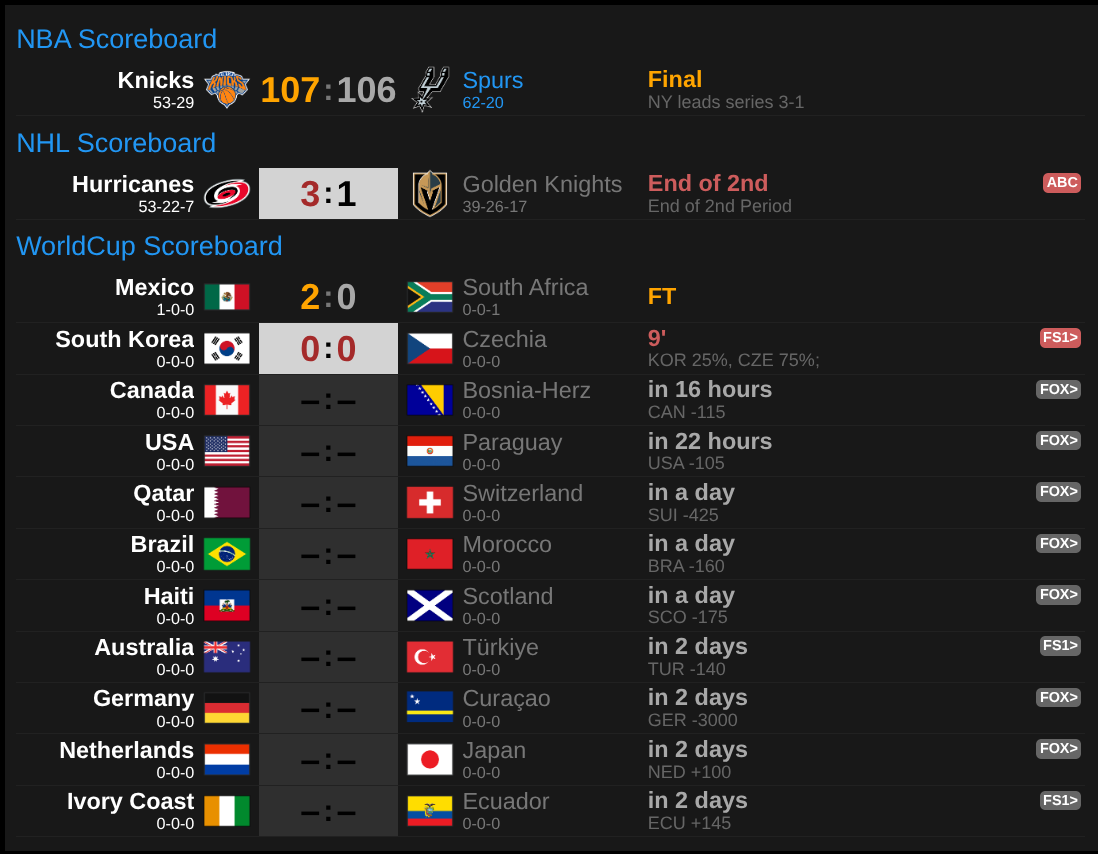
Requires ha-teamtracker (HACS Integration) — it
provides the sensor.<sport>_<team> entities this card reads. See
docs/setup-ha-teamtracker.md for sensor setup and ready-to-paste
league files.
- In HACS → Frontend → click the three-dot menu → Custom repositories
- Repository:
https://github.com/marcintk/ha-teamtracker-scoreboard-card(exact URL) - Category: Dashboard
- Repository:
- Search TeamTracker Scoreboard Card → Install
- Reload your browser
- Add the card to your dashboard (see Configuration below)
- Download
card.jsfrom the latest release - Copy it to
<config>/www/ha-teamtracker-scoreboard-card/card.js(create the folder if needed) - In Home Assistant → Settings → Dashboards → Resources → Add resource
- URL:
/local/ha-teamtracker-scoreboard-card/card.js - Resource type: JavaScript module
- URL:
- Reload your browser
Add a Manual card to your dashboard and paste:
type: custom:ha-teamtracker-scoreboard-card
sections:
  - name: NBA Scoreboard
    prefix: sensor.nba_
    limit: 10
    special_teams:
      - bos
    rank_type: win-loss
  - name: NHL Scoreboard
    prefix: sensor.nhl_
    limit: 5
    special_teams:
      - dal
    rank_type: win-loss-otl
  - name: World Cup
    prefix: sensor.wc_
    limit: 13
    special_teams:
- fra| Option | Type | Default | Description |
|---|---|---|---|
height |
string | auto | Card height (CSS value); omit to fit content |
lazy_refresh |
number | 1 |
Seconds to hold before rendering after the first event; 0 = render immediately |
fixed_refresh |
number | 60 |
Re-render every N seconds regardless of events; 0 = disabled |
sections |
list | required | One entry per sport/league |
colors |
map | — | Override team colours (see Colors) |
debug |
boolean | false |
Show performance overlay (see Debug overlay) |
| Field | Type | Default | Description |
|---|---|---|---|
name |
string | required | Header label shown above the section |
prefix |
string | required | Entity ID prefix, e.g. sensor.nba_ |
limit |
number | 10 |
Max rows to show |
special_teams |
list | [] |
Team suffixes to highlight. Use the part after the prefix — e.g. bos for sensor.nba_bos |
rank_type |
string | win-draw-loss |
Ranking formula for the regular season. See below |
score_blink |
number | 5 |
Seconds to blink the score after a goal/basket. Set to 0 to disable. |
During the regular season the card ranks all tracked teams by their win-loss record and displays them top-to-bottom from highest to lowest in the standings — i.e. first place at the top, last place at the bottom. Choose the formula that matches the league:
| Value | Points system | Record format | Use for |
|---|---|---|---|
win-loss |
W=2, L=0 | W-L |
NBA and other W/L-only leagues |
win-draw-loss |
W=3, D=1, L=0 | W-D-L |
Soccer, MLS, World Cup, … |
win-loss-otl |
W=2, OTL=1, L=0 | W-L-OTL |
NHL and leagues with overtime losses |
During playoffs, cups, and tournaments the card ignores rank_type entirely and sorts rows by
game date instead.
type: custom:ha-teamtracker-scoreboard-card
colors:
  team: white
  opponent: gray
  special: "#2196F3" # Material Blue
  header: "#2196F3" # Material Blue
  winner: orange
  loser: darkgray
  live: indianred
  leading: brown
sections:
- ...| Key | Default | Description |
|---|---|---|
team |
white |
Your tracked team name |
opponent |
#777 (Gray) |
Opponent name |
special |
#2196F3 (Material Blue) |
special_teams highlight |
header |
#2196F3 (Material Blue) |
Section header label |
winner |
orange |
POST winner score and final clock |
loser |
darkgray |
POST loser score |
live |
indianred |
IN game clock text and TV badge background |
leading |
brown |
IN score for the currently leading team |
Add debug: true to your card config to enable a live refresh performance overlay pinned to the
bottom of the card. It shows three counters — events (raw WebSocket notifications received),
accepted (events that passed the entity filter), and renders (actual DOM updates) — across
six rolling time windows (1m, 5m, 15m, 30m, 1h, 3h). The timestamp shows when the last render
completed. In debug mode the debug pane is refreshed every 5 seconds.
See CLAUDE.md for build commands, contributing guidelines, and release instructions.