
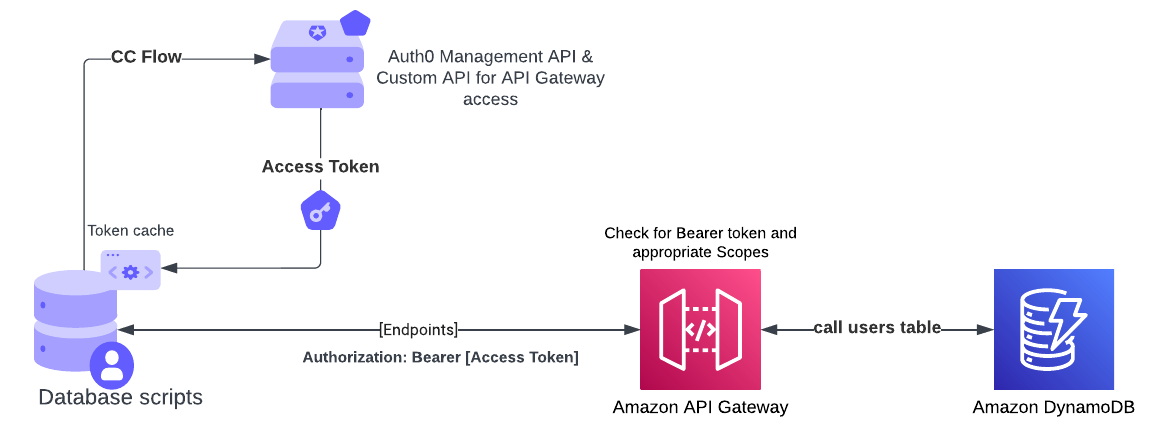
This is what we're doing in Auth0: https://auth0.com/docs/authenticate/database-connections/custom-db/overview-custom-db-connections Take a look at the custom database Action script templates to get an idea of what they might look like: (https://auth0.com/docs/authenticate/database-connections/custom-db/templates)
- Create a machine-to-machine app in Auth0 (https://auth0.com/docs/get-started/auth0-overview/create-applications/machine-to-machine-apps)
- Create an API (https://auth0.com/docs/get-started/auth0-overview/set-up-apis) and create the following permissions:
- user:get
- user:update
- user:delete
- user:create
- user:login
- Under "Machine To Machine Applications" tab, assign all the permissions to the app from STEP 1
- Create a custom database connection in Auth0 (https://auth0.com/docs/authenticate/database-connections/custom-db/create-db-connection)
- Create the following database settings (global configuration object under the Database Action Scripts on the Custom Database tab in Database Connections):
- key: AT_TOKEN , value: [empty]
- key: AT_TOKEN_RENEW_AT, value: [empty]
- key: CLIENT_ID, value: [clientid from the application in STEP 1]
- key: CLIENT_SECRET, value: [client_secret from the application in STEP 1]
- key: AUTH0_DOMAIN, value: [your Auth0 domain name without https...you can find it in the application settings tab]
- key: MANAGEMENT_API_AUDIENCE, value: [your Auth0 Management API audience value...you can find it under Applications > APIs]
- key: MANAGEMENT_TOKEN_URL, value: [https://your Auth0 tenant name/oauth/token]
- key: CONNECTION_NAME, value: [the name of your database connection from STEP 4]
- key: SELF_API_AUDIENCE, value: [audience from STEP 2]
- key: SELF_TOKEN_URL, value: [https://your Auth0 tenant name/oauth/token]
- key: API_ENDPOINT, value: [the URL of the API endpoint from the API Gateway]
API Gateway and lambda
- Create an HTTP APIs on API Gateway with the following routes:
- GET /users
- POST /users
- PUT /users
- DELETE /users
- GET /users/{email}
- POST /users/login
- Create a lambda and use the code from the lambda.js file in this repo (you might need to do a local project and upload a zip file due to bcrypt not compiling on lambda exposed bcrypt library)
- Create and attach an integration to the lambda to each endpoint on API Gateway
- Create and attach an authorizer to each endpoint on API Gateway (use appropiate scopes for the corresponding endpoint, e.g. GET /users would require user:get scope)
- Don't forget to deploy your changes!
DynamoDB
- Create a table and use email as Partition Key (you can choose to use id as a Partition Key, whatever makes sense to you, but you will need to modify the lambda code accordingly)