



SocialMapper is an open-source Python toolkit for spatial analysis, demographic mapping, and geospatial data processing. It provides comprehensive functionality for understanding community connections, accessibility patterns, and demographic insights.
The only Python library that integrates Census demographics, OpenStreetMap POIs, and travel-time analysis in one simple API.
Unlike alternatives that require assembling 3-5 separate libraries, SocialMapper provides end-to-end accessibility analysis:
| What You Need | With Other Tools | With SocialMapper |
|---|---|---|
| Census data | censusdis or census | ✅ Built-in |
| POI discovery | overpy + manual queries | ✅ Built-in (338+ categories) |
| Travel-time areas | OSMnx + custom code | ✅ Built-in (3 modes) |
| Accessibility metrics | Custom calculations | ✅ Built-in |
| Visualizations | matplotlib + geopandas | ✅ Built-in |
| Total setup | 15-20 minutes, 4+ libraries | 2 minutes, 1 library |
| Lines of code | 50-100+ lines | 5-10 lines |
- Transit Equity Analysis - Identify communities underserved by public resources
- Food Desert Research - Map grocery store accessibility and demographic patterns
- Healthcare Access Studies - Analyze hospital and clinic reachability
- Urban Planning - Quick, defensible accessibility analysis without GIS expertise
- Policy Research - Reproducible workflows with comprehensive documentation
✅ Integrated Workflow - Census + OSM + Isochrones in one toolkit (no other library does this) ✅ Practitioner-Friendly - 5 core functions cover 90% of accessibility analysis needs ✅ Production-Ready - Comprehensive test suite, NumPy-style docs, modern Python 3.11+ ✅ High Performance - 4-8x faster with concurrent processing and intelligent caching (see benchmarks) ✅ Real-Time Data - Live OSM queries and latest Census data (2023 ACS) ✅ Purpose-Built - Designed specifically for accessibility and equity analysis
- 🔧 Core Package (
socialmapper/) - Python toolkit for spatial analysis - 📚 Documentation (
docs/) - Comprehensive guides and reference - 🧪 Examples (
examples/) - Python usage examples
SocialMapper helps you understand how people connect with important places in their community by:
- Analyzing Points of Interest - Query OpenStreetMap for libraries, schools, parks, healthcare facilities, etc.
- Generating Travel Time Areas - Create isochrones showing areas reachable within travel time constraints
- Processing Demographic Data - Integrate with US Census data for community insights
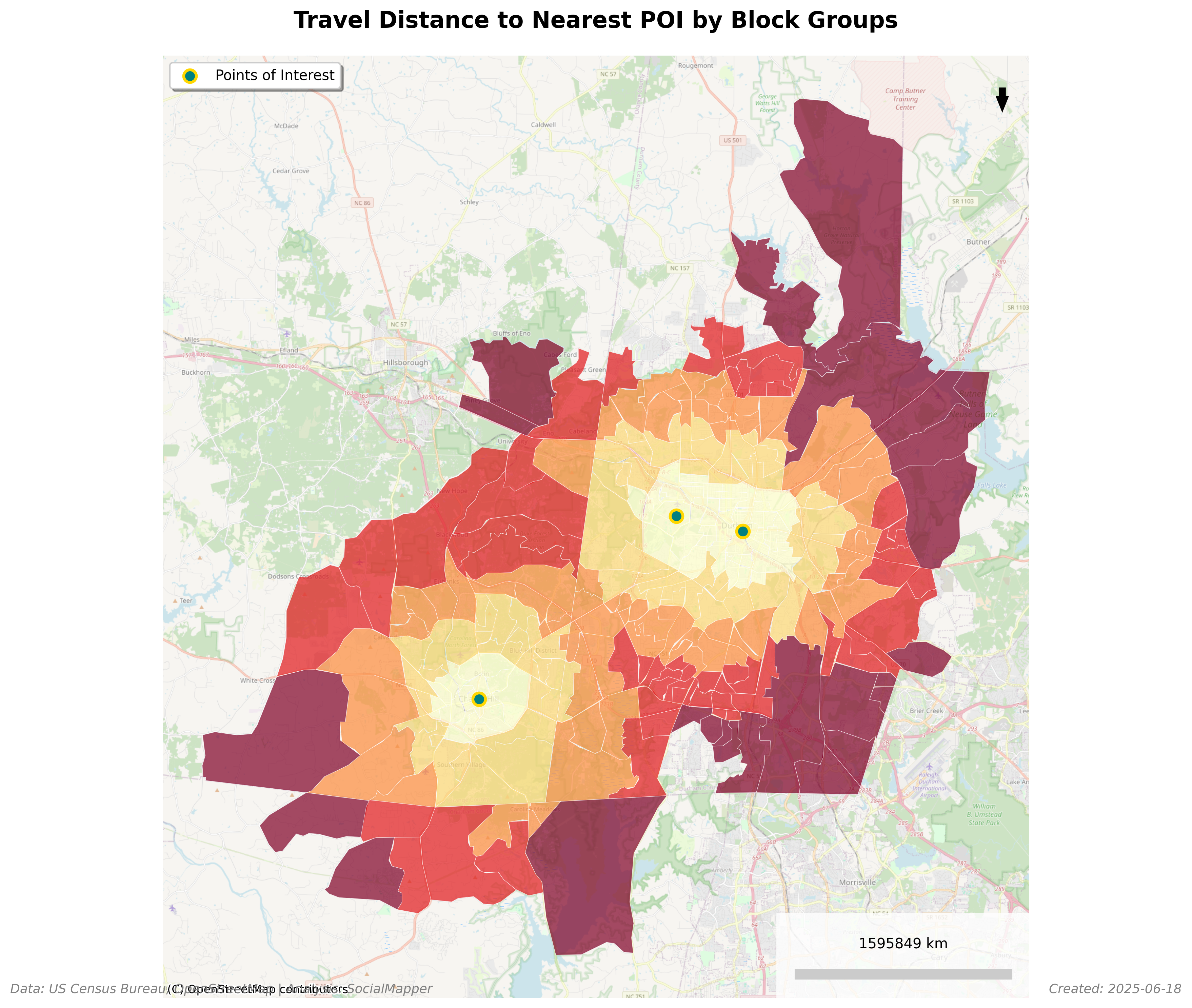
- Calculating Accessibility - Measure travel distances and identify access patterns
- Supporting Multiple Formats - Export data as CSV, GeoJSON, Parquet, and more
# Run instant demo analysis - no API keys needed!
from socialmapper import demo
result = demo.quick_start("Portland, OR")

# You just analyzed:
# ✓ 15-minute walk from downtown Portland
# ✓ Found 8 libraries within reach
# ✓ Analyzed 45,000+ people's demographics
# ✓ No API keys or setup required!
📖 2-Minute Quick Start Guide | 💻 Example Script
Total Population Within 15-Minute Walk of Libraries in Fuquay-Varina, NC
- ✅ Comprehensive Testing - Full test coverage for all API functions
- 📖 NumPy-Style Docstrings - Professional documentation across all modules
- 📚 Enhanced Documentation - Aligned with actual API implementation
⚠️ API Simplification - Replaced pipeline API with direct function calls
Old (0.8.0): SocialMapper() client with pipeline methods
New (0.9.0): Direct imports of 5 core functions
from socialmapper import create_isochrone, get_census_data, create_mapcreate_isochrone- Generate travel-time polygonsget_poi- Find points of interest near locationsget_census_blocks- Fetch census block groups for an areaget_census_data- Get demographic data from US Censuscreate_map- Generate choropleth map visualizations
📚 Full Documentation | 🐛 Report Issues
- 🔍 Nearby POI Discovery - Discover Points of Interest within travel time constraints from any location, with 10 categories and 338+ OSM tag mappings
- Finding Points of Interest - Query OpenStreetMap for libraries, schools, parks, healthcare facilities, etc.
- Generating Travel Time Areas - Create isochrones showing areas reachable within a certain travel time by walking, biking, or driving
- Identifying Census Block Groups - Determine which census block groups intersect with these areas
- Calculating Travel Distance - Measure the travel distance along roads from the point of interest to the block group centroids
- Retrieving Demographic Data - Pull census data for the identified areas
- Data Export - Export census data with travel distances to CSV for further analysis
pip install socialmapperThat's it! You can start analyzing immediately with demo mode - no API keys required.
Requirements: Python 3.11 or higher (3.11, 3.12, or 3.13)
# Clone and install in development mode
git clone https://github.com/mihiarc/socialmapper.git
cd socialmapper
pip install -e ".[dev]"SocialMapper supports environment variables for configuration. Create a .env file in your project directory:
# Copy the example file and customize
cp .env.example .env
Key environment variables:
CENSUS_API_KEY: Your Census Bureau API key (get one free at https://api.census.gov/data/key_signup.html)CENSUS_CACHE_ENABLED: Enable/disable caching (default: true)CENSUS_RATE_LIMIT: API rate limit in requests per minute (default: 60)
See .env.example for all available configuration options.
Start exploring SocialMapper's capabilities instantly with demo mode:
from socialmapper import demo

# List available demo cities
demo.list_available_demos()

# Run complete analysis
result = demo.quick_start("Portland, OR")

# Try specialized analyses
demo.show_libraries("Chapel Hill, NC")
demo.show_food_access("Durham, NC")SocialMapper provides 5 core functions for spatial analysis:
from socialmapper import create_isochrone

# Create a 15-minute drive-time polygon from Portland, OR
iso = create_isochrone("Portland, OR", travel_time=15, travel_mode="drive")

# Or use coordinates
iso = create_isochrone((45.5152, -122.6784), travel_time=20, travel_mode="walk")

# The result is a GeoJSON polygon dictionary
print(f"Polygon type: {iso['geometry']['type']}")from socialmapper import get_poi
# Find libraries near Chapel Hill, NC
pois = get_poi(
location="Chapel Hill, NC",
categories=["library"],
limit=10
)
# Find POIs within 15-minute travel time
pois = get_poi(
location="San Francisco, CA",
travel_time=15,
categories=["hospital", "school"]
)
for poi in pois:
print(f"{poi['name']}: {poi['lat']}, {poi['lon']}")from socialmapper import get_census_blocks
# Get census blocks within 5km radius
blocks = get_census_blocks(
location=(35.9132, -79.0558), # UNC Chapel Hill
radius_km=5
)
# Or get blocks within a polygon (e.g., from create_isochrone)
iso = create_isochrone("Durham, NC", travel_time=10)
blocks = get_census_blocks(polygon=iso)
print(f"Found {len(blocks)} census block groups")from socialmapper import get_census_data
# Get demographic data for a location
data = get_census_data(
location=(40.7128, -74.0060), # NYC coordinates
variables=["B01003_001E"], # Total population
year=2022
)
# Or use block group IDs
block_ids = ["360610001001", "360610001002"]
data = get_census_data(
location=block_ids,
variables=["B01003_001E", "B19013_001E"], # Population and median income
year=2022
)from socialmapper import create_map
import pandas as pd
# Assuming you have data with geometry
data_df = pd.DataFrame([
{"name": "Area 1", "population": 1000, "geometry": {...}},
{"name": "Area 2", "population": 2000, "geometry": {...}}
])
# Create a choropleth map
map_image = create_map(
data=data_df,
column="population",
title="Population Distribution",
save_path="population_map.png"
)Once you're comfortable with demo mode, getting live data is simple:
- Get your free Census API key: https://api.census.gov/data/key_signup.html
- Set the environment variable:
export CENSUS_API_KEY=your_key_here - Use the same functions with any US location
The API is nearly identical - you already know how to use it from the demos!
Here's a complete workflow combining all 5 functions:
from socialmapper import (
    create_isochrone,
    get_poi,
    get_census_blocks,
    get_census_data,
    create_map
)

# Step 1: Define the area of interest (15-minute walk from downtown)
location = "Chapel Hill, NC"
iso = create_isochrone(location, travel_time=15, travel_mode="walk")

# Step 2: Find all libraries in the area
libraries = get_poi(
    location=location,
    categories=["library"],
    travel_time=15
)
print(f"Found {len(libraries)} libraries within 15-minute walk")

# Step 3: Get census blocks in the walkable area
blocks = get_census_blocks(polygon=iso)
print(f"Found {len(blocks)} census block groups")

# Step 4: Get demographic data for these blocks
if blocks:
    block_ids = [b['GEOID'] for b in blocks if 'GEOID' in b]
    census_data = get_census_data(
        location=block_ids,
        variables=["B01003_001E"],  # Total population
        year=2022
    )

    # Step 5: Create a visualization (if you have geopandas installed)
    # Note: This requires additional data processing
    # map_image = create_map(
    #     data=blocks_with_census_data,
    #     column="population",
    #     title="Population with Library Access"
# )from socialmapper import create_isochrone, get_poi
# Use city names
iso1 = create_isochrone("Boston, MA", travel_time=20)
# Use coordinates (latitude, longitude)
iso2 = create_isochrone((42.3601, -71.0589), travel_time=20)
# POIs support the same formats
pois1 = get_poi("Seattle, WA", categories=["cafe"])
pois2 = get_poi((47.6062, -122.3321), categories=["grocery"])SocialMapper supports three travel modes, each using appropriate road networks and speeds:
- walk - Pedestrian paths, sidewalks, crosswalks (default: 5 km/h)
- bike - Bike lanes, shared roads, trails (default: 15 km/h)
- drive - Roads accessible by cars (default: 50 km/h)
from socialmapper import create_isochrone

# Compare walking vs driving access
walk_iso = create_isochrone(
    "Seattle, WA",
    travel_time=15,
    travel_mode="walk"
)

drive_iso = create_isochrone(
    "Seattle, WA",
    travel_time=15,
    travel_mode="drive"
)

# The drive isochrone will cover a much larger areaThe API functions use standard Python exceptions:
from socialmapper import create_isochrone, get_poi

try:
    # This might fail if location cannot be geocoded
    iso = create_isochrone("Invalid Location XYZ", travel_time=15)
except ValueError as e:
    print(f"Invalid location: {e}")
except Exception as e:
    print(f"Error creating isochrone: {e}")

# Functions validate inputs
try:
    pois = get_poi(
        location=(91, -122),  # Invalid latitude
        categories=["library"]
    )
except ValueError as e:
print(f"Validation error: {e}")You can specify points of interest with direct command-line parameters.
You can run the analysis using the core API functions:
from socialmapper import get_poi, create_isochrone, get_census_blocks

# Find libraries within 15-minute walk
location = "Fuquay-Varina, North Carolina"
libraries = get_poi(
    location=location,
    categories=["library"],
    travel_time=15
)

# Get the walkable area
iso = create_isochrone(location, travel_time=15, travel_mode="walk")

# Get census blocks in that area
blocks = get_census_blocks(polygon=iso)

print(f"Found {len(libraries)} libraries")
print(f"Covering {len(blocks)} census block groups")Regardless of which method you use, you'll need to specify POI types and names. Common OpenStreetMap POI combinations:
Common category names:
"library"- Public libraries"school"- Schools and educational facilities"hospital"- Hospitals and medical centers"park"- Parks and green spaces"grocery"- Grocery stores and supermarkets"restaurant"- Restaurants and dining
For the full list of 338+ supported categories, see the API reference.
If you're using direct POI parameters, you should provide the state where your analysis should occur. This ensures accurate census data selection.
For areas near state borders or POIs spread across multiple states, you don't need to do anything special - the tool will automatically identify the appropriate census data.
Choose which census variables you want to analyze. Some useful options:
| Description | Notes | SocialMapper Name | Census Variable |
|---|---|---|---|
| Total Population | Basic population count | total_population | B01003_001E |
| Median Household Income | In dollars | median_income | B19013_001E |
| Median Home Value | For owner-occupied units | median_home_value | B25077_001E |
| Median Age | Overall median age | median_age | B01002_001E |
| White Population | Population identifying as white alone | white_population | B02001_002E |
| Black Population | Population identifying as Black/African American alone | black_population | B02001_003E |
| Hispanic Population | Hispanic or Latino population of any race | hispanic_population | B03003_003E |
| Housing Units | Total housing units | housing_units | B25001_001E |
| Education (Bachelor's or higher) | Sum of education categories | education_bachelors_plus | B15003_022E + B15003_023E + B15003_024E + B15003_025E |
After specifying your POIs and census variables, SocialMapper will:
- Generate isochrones showing travel time areas
- Identify census block groups within these areas
- Retrieve demographic data for these block groups
- Create maps visualizing the demographics
- Export data to CSV for further analysis
The results will be found in the output/ directory:
- GeoJSON files with isochrones in
output/isochrones/ - GeoJSON files with block groups in
output/block_groups/ - GeoJSON files with census data in
output/census_data/ - PNG map visualizations in
output/maps/ - CSV files with census data and travel distances in
output/csv/
Here are some examples of community mapping projects you could create:
-
Food Desert Analysis: Discover food access options and analyze demographics.
from socialmapper import get_poi, create_isochrone

# Find grocery stores within walking distance
food_access = get_poi(
    "Chicago, Illinois",
    categories=["grocery"],
    travel_time=20
)
print(f"Found {len(food_access)} food stores within 20-minute walk")
-
Healthcare Access: Map hospitals and analyze accessibility patterns.
from socialmapper import get_poi, create_isochrone

# Find hospitals within 30-minute drive
hospitals = get_poi(
    "Los Angeles, California",
    categories=["hospital", "clinic"],
    travel_time=30
)

# Get the service area
service_area = create_isochrone(
    "Los Angeles, California",
    travel_time=30,
    travel_mode="drive"
)
-
Educational Resource Distribution: Analyze school accessibility.
from socialmapper import get_poi, create_isochrone

# Find schools within 15-minute walk
schools = get_poi(
    "Boston, Massachusetts",
    categories=["school"],
    travel_time=15
)

# Create walkable area map
walkable = create_isochrone(
    "Boston, Massachusetts",
    travel_time=15,
    travel_mode="walk"
)
-
Park Access Equity: Assess equitable access to green spaces.
from socialmapper import get_poi, get_census_blocks

# Find parks within 10-minute walk
parks = get_poi(
    "Miami, Florida",
    categories=["park"],
    travel_time=10
)

# Analyze which neighborhoods have access
blocks = get_census_blocks(
    location=(25.7617, -80.1918),  # Miami coordinates
    radius_km=5
)
For development, clone the repository and install with development dependencies:
git clone https://github.com/mihiarc/socialmapper.git
cd socialmapper
uv pip install -e ".[dev]"
Run tests:
uv run pytest- No POIs found: Check your POI configuration. Try making the query more general or verify that the location name is correct.
- Census API errors: Ensure your API key is valid and properly set as an environment variable.
- Isochrone generation issues: For very large areas, try reducing the travel time to avoid timeouts.
- Missing block groups: The tool should automatically identify the appropriate states based on the POI locations.
- Quick Start Guide - Get started in 2 minutes
- API Reference - Complete function documentation
- Examples - Sample scripts and use cases
- Contributing - How to contribute
Create a travel-time polygon showing reachable area.
- location: City name string or (lat, lon) tuple
- travel_time: Minutes of travel (default: 15)
- travel_mode: 'walk', 'bike', or 'drive' (default: 'drive')
- Returns: GeoJSON polygon dictionary
Find points of interest near a location.
- location: City name string or (lat, lon) tuple
- categories: List of category names like ["library", "hospital"] (optional)
- travel_time: Limit to POIs within travel time (optional)
- limit: Maximum POIs to return (default: 100)
- Returns: List of POI dictionaries with name, lat, lon, tags
Get census block groups for a geographic area.
- polygon: GeoJSON polygon from create_isochrone (optional)
- location: (lat, lon) tuple for radius search (optional)
- radius_km: Radius in kilometers if using location (default: 5)
- Returns: List of census block dictionaries with GEOID and geometry
Retrieve demographic data from US Census.
- location: GeoJSON polygon, list of GEOIDs, or (lat, lon) tuple
- variables: List of census variable codes (e.g., ["population", "median_income"])
- year: Census year (default: 2023)
- Returns: CensusDataResult with data organized by GEOID
Create choropleth map visualization.
- data: DataFrame or list of dicts with geometry
- column: Column name to visualize
- title: Map title (optional)
- save_path: Path to save image (optional)
- Returns: Map image bytes or None if saved
We welcome contributions! Please see our Contributing Guide for details.
SocialMapper is released under the MIT License. See the LICENSE file for details.
If you use SocialMapper in your research, please cite:
@software{socialmapper,
  title = {SocialMapper: Community Demographic and Accessibility Analysis},
  author = {mihiarc},
  year = {2025},
  url = {https://github.com/mihiarc/socialmapper}
}