Errors and Solutions
Got permission denied while trying to connect to the Docker daemon socket at unix:///var/run/docker.sock: Get http://%2Fvar%2Frun%2Fdocker.sock/v1.40/containers/json: dial unix /var/run/docker.sock: connect: permission denied
Add yourself as a Docker user
$ usermod -aG docker user_name
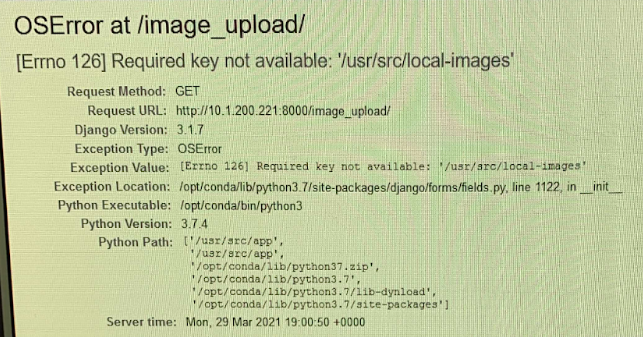
OSError at /image_upload/ [Errno 126] Required key not available: '/usr/src/local-images'
This error message was fixed by remounting the shared drive on the profile hosting the web tool and restarting the Docker containers. Make sure the path in the config.py file specified under LOCAL_IMAGE_FOLDER is one that exists, contains the expected files, and is accessible by the computer profile that is hosting the web tool.
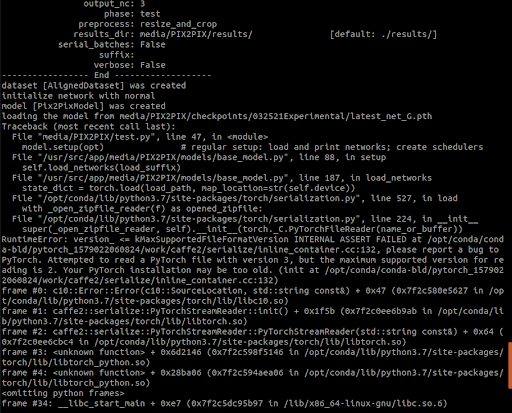
Attempted to read a PyTorch file with version 3, but maximum supported version for reading is 2. Your PyTorch installation may be too old.
This error occurred when attempting to add a new trained model to the web tool. The new trained model came from a computer with PyTorch 1.8 and cuda 11, whereas the web tool runs with PyTorch 1.4 and cuda 10.1. New models need to be trained using the same versions as the web tool in order for the web tool to be able to use the new model on images. Retrain the model within the Docker container to ensure that the versions are consistent.
OperationalError at /image_upload/
GD_app_emimage has no column named coordinates6nm
or other OperationalError message
Enter Docker container and run the following:
$ python manage.py makemigrations
$ python manage.py migrate
Some information here.
"conflicting migrations detected"
Enter Docker container and run:
python manage.py makemigrations --merge

The connection was reset. The connection to the server was reset while the page was loading.
This likely means that Django is not running. Rerun bash scripts and then reload the page.

Webtool and image upload page works but in the local folder upload dropdown no files are listed.
This likely means that the path in the config.py file to the shared drive folder needs to be updated (typo or it leads to the wrong file).
django.db.migrations.exceptions.NodeNotFoundError: Migration GDapp.0014_merge_20210106_1507 dependencies reference nonexistent parent node
Removed new migrations and deleted pycache.