Show the entry field when its being used in when needed mode#10093
Show the entry field when its being used in when needed mode#10093
Conversation


 rablador
changed the base branch from
main
to
create-automatic-location-in-location-view-ios-1510
rablador
force-pushed
the
show-the-entry-field-when-its-being-used-in-when-needed-mode-ios-1511
branch
from
rablador
changed the base branch from
main
to
create-automatic-location-in-location-view-ios-1510
rablador
force-pushed
the
show-the-entry-field-when-its-being-used-in-when-needed-mode-ios-1511
branch
from
27eed19 to
4cda4fb
Compare
rablador
force-pushed
the
create-automatic-location-in-location-view-ios-1510
branch
7 times, most recently
from
1c07877 to
25e6e91
Compare
rablador
force-pushed
the
show-the-entry-field-when-its-being-used-in-when-needed-mode-ios-1511
branch
from
4cda4fb to
7549184
Compare
rablador
force-pushed
the
create-automatic-location-in-location-view-ios-1510
branch
3 times, most recently
from
0f245e4 to
2fa1775
Compare
rablador
force-pushed
the
show-the-entry-field-when-its-being-used-in-when-needed-mode-ios-1511
branch
from
7549184 to
8a7a4d3
Compare
rablador
force-pushed
the
show-the-entry-field-when-its-being-used-in-when-needed-mode-ios-1511
branch
from
8a7a4d3 to
fb9cde5
Compare
rablador
force-pushed
the
show-the-entry-field-when-its-being-used-in-when-needed-mode-ios-1511
branch
2 times, most recently
from
5f3ff8f to
0fac9ed
Compare

 rablador
left a comment
rablador
left a comment
rablador
left a comment
There was a problem hiding this comment.
Tests have not been updated yet. Commits will be fixed shortly.
@rablador made 1 comment.
Reviewable status: 0 of 76 files reviewed, all discussions resolved.
rablador
force-pushed
the
show-the-entry-field-when-its-being-used-in-when-needed-mode-ios-1511
branch
4 times, most recently
from
99633ce to
1c81663
Compare
rablador
force-pushed
the
show-the-entry-field-when-its-being-used-in-when-needed-mode-ios-1511
branch
5 times, most recently
from
1a2b3b3 to
2219b96
Compare
rablador
left a comment
rablador
left a comment
There was a problem hiding this comment.
@rablador made 12 comments.
Reviewable status: 0 of 89 files reviewed, 12 unresolved discussions.
ios/MullvadREST/Relay/RelaySelectorWrapper.swift line 0 at r1 (raw file):
Obfuscation doesn't happen here anymore. Instead it happens in RelaySelector and we can pass in an obfuscation object to filter relays there.
ios/MullvadREST/Relay/RelayPicking/RelayPicking.swift line 0 at r1 (raw file):
Biggest change here is that we now pass in an optional obfuscation object (and use it if it's not nil) instead of checking a Bool flag.
ios/MullvadREST/Relay/RelayPicking/SinglehopPicker.swift line 0 at r1 (raw file):
Important change here is that we always pass in all relays to do obfuscation and then, in RelaySelector, filter out relays. This ensures that obfuscation follows the same flow as all the other checks we do, eg. active, filters, location, daita etc.
ios/MullvadREST/Relay/Obfuscation/RelayObfuscator.swift line 0 at r1 (raw file):
This struct no longer holds all relays, only obfuscated relays. It makes things much clearer what this struct holds and does.
ios/MullvadREST/Relay/RelaySelector.swift line 0 at r1 (raw file):
The actual check if relays are compatible or not has been moved here from RelaySelectorWrapper and other places in the relay selector code.
ios/MullvadSettings/DAITASettings.swift line 28 at r1 (raw file):
    public var daitaState: DAITAState

    public var isEnabled: Bool {
Moved the isEnabled flag from DAITAState to here. There was almost no real gain in having to call "daitaSettings.daitaState.isEnabled".
ios/MullvadVPN/View controllers/SelectLocation/Views/SelectLocationView.swift line 0 at r1 (raw file):
Mostly changes to hop views and menu.
ios/MullvadVPN/View controllers/SelectLocation/SelectLocationViewModel.swift line 0 at r1 (raw file):
This class now keeps track of multihop state, currently connected entry location (for automatic selection in .always and .whenNeeded modes, and whether to show multihop info view (previously DAITA info view).
ios/MullvadVPN/View controllers/SelectLocation/Views/MultihopSelection/HopView.swift line 0 at r1 (raw file):
Added different icons and text depending on multihop state. Also added badge for number of active filters.
ios/MullvadVPN/View controllers/SelectLocation/SelectLocationViewModel.swift line 306 at r1 (raw file):
    }

    func didFinish() {
These methods have just been moved. No changes.
ios/MullvadREST/Relay/RelayPicking/MultihopPicker.swift line 0 at r1 (raw file):
Important change here is that we always pass in all relays to do obfuscation and then, in RelaySelector, filter out relays. This ensures that obfuscation follows the same flow as all the other checks we do, eg. active, filters, location, daita etc.
ios/MullvadVPN/View controllers/SelectLocation/Views/MultihopSelection/MultihopSelectionView.swift line 119 at r1 (raw file):
                                    },
                                    onPressedChange: {
Unfortunately we can't just disable the whole button anymore, since filter buttons should be enabled if the how view button isn't. That's why we do some workarounds here and pass a "disabled" arg.

To manually select an entry server, please switch multihop mode to “Always”."
This will be indicated by the :magicmultihop: symbol. Attention: This will ignore filter settings for the entry server that is being automatically selected."
|
|
|
Interesting "bug". If DAITA is enabled and you have Multihop set to When needed. If you then go into filters for your entry filters, you have to pick a DAITA-enabled provider. This does make sense. However, no DAITA related information is shown, but list items do remained grayed out until one DAITA-enabled provider is chosen. |
rablador
force-pushed
the
show-the-entry-field-when-its-being-used-in-when-needed-mode-ios-1511
branch
from
2219b96 to
89784f4
Compare
rablador
left a comment
rablador
left a comment
There was a problem hiding this comment.
Not getting cutouts for the numbers in the filter iconography.
Coming soon
When needed empty state copy needs to be updated:
Fixed
Not getting cutouts for the numbers in the filter iconography.
Automatic info dialog copy needs to be updated:
Fixed
When needed information dialogue text needs to be updated
Will fix in next PR where the carousel is updated
Filter overridden text below filter pills need to be updated and have a leading information icon added:
Fixed
The fact that the entry and exit node does not scroll to the very top to show the filters is making the experience quite confusing as you do not actually see your individual filters.
We scroll to the selected item, which is the topmost recent item when recents are enabled. That's why we never go all the way to the top.
Filter view does not mention the fact that you need to select at least one DAITA-enabled provider [...]
Fixed
When using Australia as exit and Automatic as entry, I managed to have the Automatic entry swap [...]
Yes, that will trigger a reconnect.
Entry filter does not indicate how many filters are set when shown in When needed mode.
I think we decided to do it like this on the bug bash, no?
Multihop feature indicator should only use iconography in "When needed" mode
I thought it was decided to use on for whenNeeded and one for always + automatic location. Is this not the case?
Unique titles for entry or exit filter view are missing
Fixed
If DAITA is enabled and you have Multihop set to When needed. If you then go into filters for your entry filters, you have to pick a DAITA-enabled provider. [...]
We show the daita text as well then? I added it for now.
@rablador made 1 comment.
Reviewable status: 0 of 89 files reviewed, 12 unresolved discussions.
rablador
force-pushed
the
show-the-entry-field-when-its-being-used-in-when-needed-mode-ios-1511
branch
from
89784f4 to
bb76bd7
Compare
rablador
left a comment
rablador
left a comment
There was a problem hiding this comment.
Not getting cutouts for the numbers in the filter iconography.
Fixed
@rablador made 1 comment.
Reviewable status: 0 of 94 files reviewed, 12 unresolved discussions.
rablador
force-pushed
the
show-the-entry-field-when-its-being-used-in-when-needed-mode-ios-1511
branch
from
bb76bd7 to
c4721d4
Compare

 pinkisemils
left a comment
pinkisemils
left a comment
pinkisemils
left a comment
There was a problem hiding this comment.
@pinkisemils partially reviewed 20 files and made 4 comments.
Reviewable status: 20 of 94 files reviewed, 15 unresolved discussions (waiting on rablador).
ios/MullvadSettings/DAITASettings.swift line 28 at r1 (raw file):
Previously, rablador (Jon Petersson) wrote…
Moved the
isEnabledflag fromDAITAStateto here. There was almost no real gain in having to call "daitaSettings.daitaState.isEnabled".
Does this not interfere with the migration?
ios/MullvadREST/Relay/MultihopDecisionFlow.swift line 59 at r2 (raw file):
            closeTo: selectNearbyLocation ? exitMatch.location : nil,
            obfuscation: obfuscation,
            forceV4Address: true,
I know that we are not changing IPv6 logic, but should will we never use a OneToOne multihop decision flow to select IPv6 relays? For IPv6, only the entry relay matters.
ios/MullvadREST/Relay/RelayPicking/RelayPicking.swift line 32 at r2 (raw file):
            from: candidates,
            wireguard: relays.wireguard,
            portConstraint: obfuscation?.port ?? tunnelSettings.relayConstraints.port,
The tripple question mark begs the question - could we not encapsulate the logic here into some kind of a derivePortConstraint(with: RelayObfuscation, from: LatestTunnelSettings) or something to that effect?
ios/MullvadREST/Relay/RelayPicking/RelayPicking.swift line 95 at r2 (raw file):
        // Fall back to IPv4
        let ipv4Address =
            if let obfuscation {
The same goes for IPv6 but could we, instead of doing an if let ... here, have applyObfuscatedIpAddresses be changed to deriveEntryAddress that takes a nillable RelayObfuscation?
The function could return the regular endpoint if RelayObfuscation is nil, and otherwise do the logic that we're doing here, no?
rablador
force-pushed
the
show-the-entry-field-when-its-being-used-in-when-needed-mode-ios-1511
branch
from
c4721d4 to
c52c5f9
Compare
rablador
left a comment
rablador
left a comment
There was a problem hiding this comment.
@rablador made 4 comments.
Reviewable status: 20 of 94 files reviewed, 15 unresolved discussions (waiting on pinkisemils).
ios/MullvadREST/Relay/MultihopDecisionFlow.swift line 59 at r2 (raw file):
Previously, pinkisemils (Emīls Piņķis) wrote…
I know that we are not changing IPv6 logic, but should will we never use a
OneToOnemultihop decision flow to select IPv6 relays? For IPv6, only the entry relay matters.
Good catch, that flag must have ended up on the wrong match some time ago.
ios/MullvadREST/Relay/RelayPicking/RelayPicking.swift line 32 at r2 (raw file):
Previously, pinkisemils (Emīls Piņķis) wrote…
The tripple question mark begs the question - could we not encapsulate the logic here into some kind of a
derivePortConstraint(with: RelayObfuscation, from: LatestTunnelSettings)or something to that effect?
Sure, updated.
ios/MullvadREST/Relay/RelayPicking/RelayPicking.swift line 95 at r2 (raw file):
Previously, pinkisemils (Emīls Piņķis) wrote…
The same goes for IPv6 but could we, instead of doing an
if let ...here, haveapplyObfuscatedIpAddressesbe changed toderiveEntryAddressthat takes a nillableRelayObfuscation?The function could return the regular endpoint if
RelayObfuscationis nil, and otherwise do the logic that we're doing here, no?
Did a variant I think improves things a bit.
ios/MullvadSettings/DAITASettings.swift line 28 at r1 (raw file):
Previously, pinkisemils (Emīls Piņķis) wrote…
Does this not interfere with the migration?
Not more than code changes, but I expect settings migration to be merged first and will then update accordingly in this PR.
More concerning is the "directOnly" flag, which might need to be reintroduced as legacy in order for migration to work.
We need to change this as it also results in the "recents" title not being consistently shown either. |
rablador
left a comment
rablador
left a comment
There was a problem hiding this comment.
What's the proposal?
@rablador made 1 comment.
Reviewable status: 18 of 94 files reviewed, 15 unresolved discussions (waiting on pinkisemils).

 mojganii
left a comment
mojganii
left a comment
mojganii
left a comment
There was a problem hiding this comment.
Internetandyour deviceare clipped:
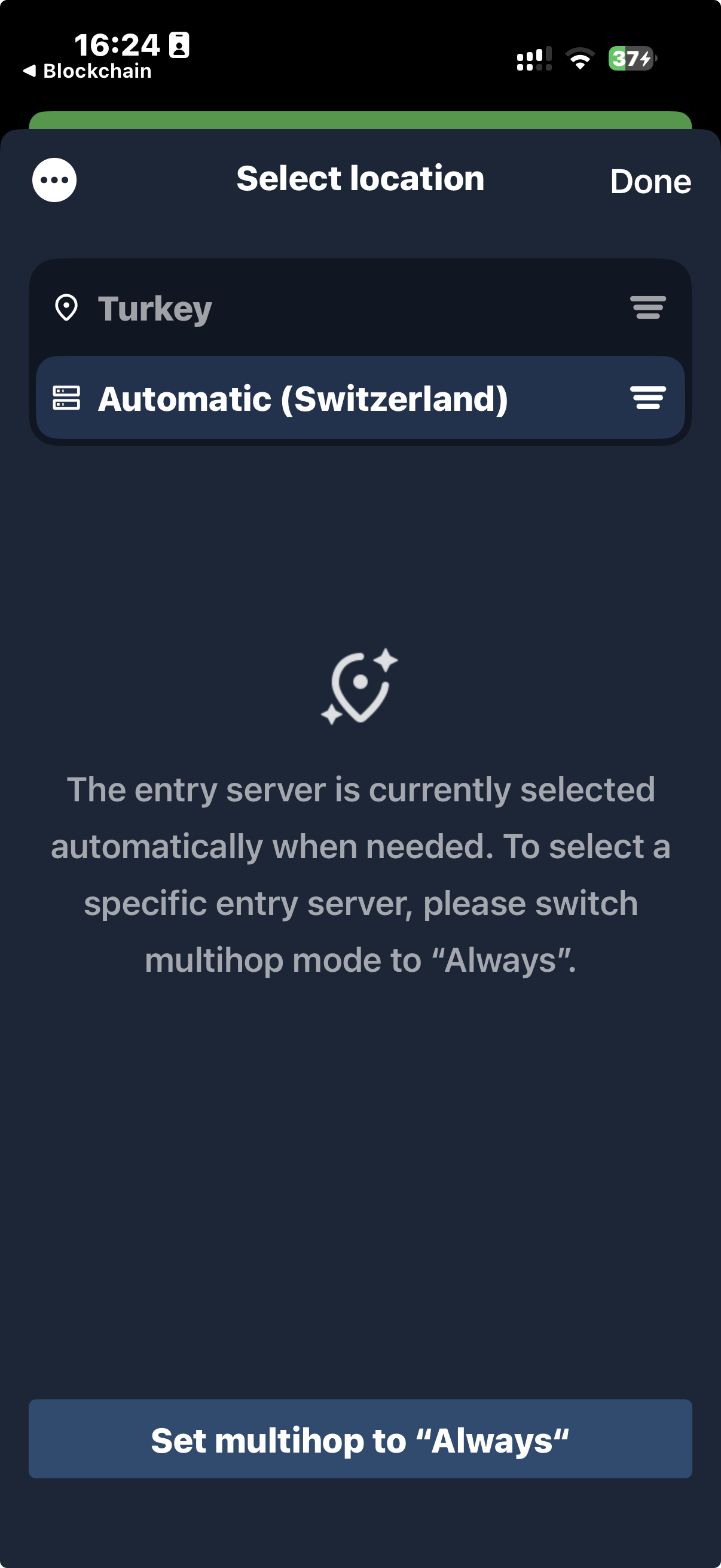
Note: It’s not scrollable yet, but I’m implementing an empty state view according to the design system. I’ll address this in an upcoming PR.
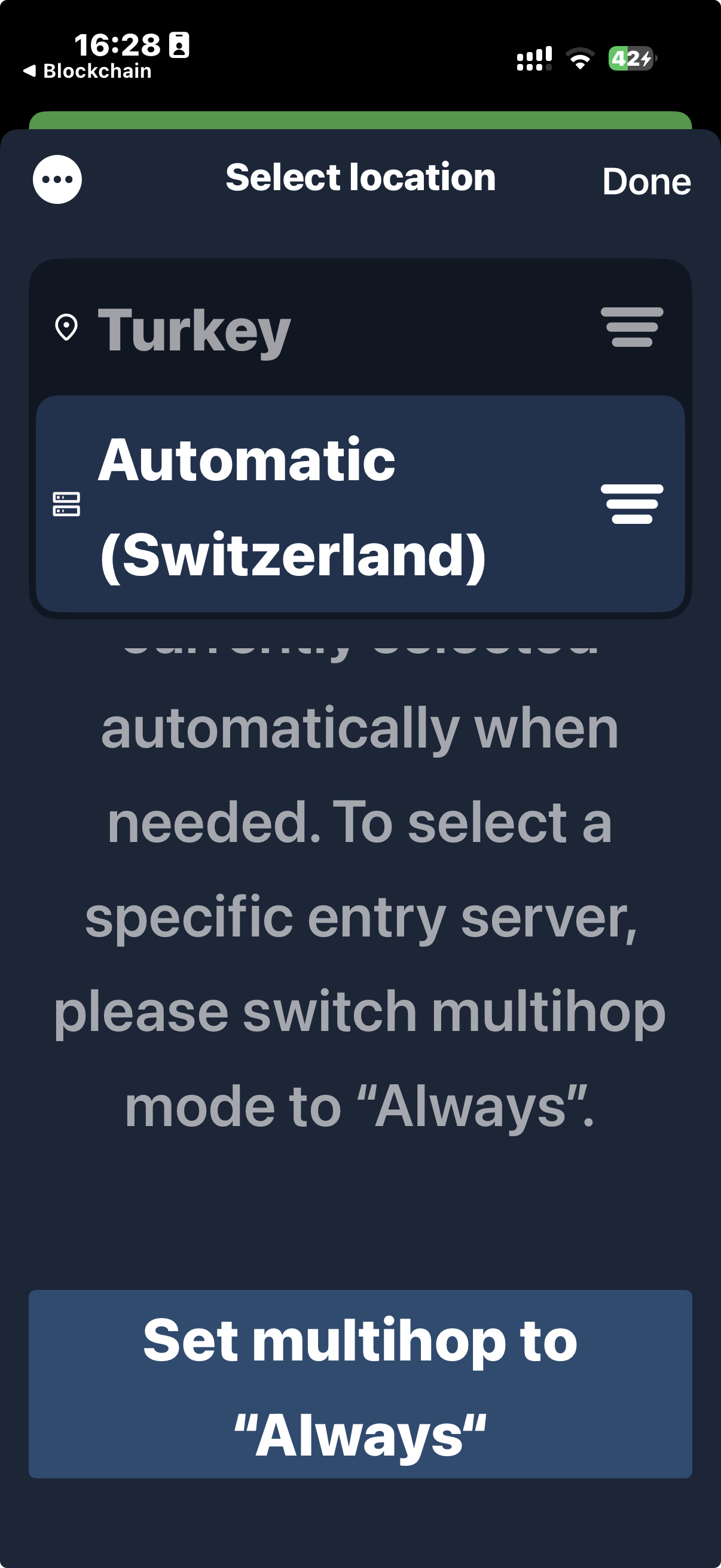
@mojganii partially reviewed 94 files and all commit messages, and made 11 comments.
Reviewable status: all files reviewed, 25 unresolved discussions (waiting on pinkisemils and rablador).
ios/MullvadVPN/Coordinators/Settings/DAITA/DAITATunnelSettingsViewModel.swift line 22 at r4 (raw file):
    var didFailDAITAValidation: ((DAITASettingsPromptItem) -> Void)?

    var value: DAITASettings {
can't we change this property to@Published and listen to it in the view instead of taking care of it manually?
ios/MullvadVPN/Coordinators/Settings/DAITA/DAITATunnelSettingsViewModel.swift line 81 at r4 (raw file):
        let relays = try? tunnelManager.selectRelays(tunnelSettings: tunnelSettings)

        // Even if the reason for not finding any relays is not DAITA specific, if both DAITA and Direct
should we keep Direct in the comment?
ios/MullvadVPN/Coordinators/Settings/DAITA/SettingsDAITAView.swift line 51 at r4 (raw file):
                            format:
                                NSLocalizedString(
                                    "By enabling “%@” you will have to manually select a server that is %@-enabled. "
please, remove stale strings from Localizable.xcstrings
ios/MullvadVPN/Extensions/UIImage+Helpers.swift line 45 at r4 (raw file):
    }

    func scaledIcon(
it's used only in SwiftUI. I think it can be replaced with below, can't we?
Code snippet:
    @ScaledMetric(relativeTo: .caption2) var iconSize = 20.0

    Image.mullvadIconFilterCutoutDisabled
                    .frame(width: iconSize, height: iconSize)
ios/MullvadVPN/View controllers/SelectLocation/SelectLocationFilter.swift line 22 at r4 (raw file):
    }

    var isOverriddenByAutomaticLocation: Bool {
how id it concluded?
ios/MullvadVPN/View controllers/SelectLocation/SelectLocationViewModel.swift line 55 at r4 (raw file):
    @Published var searchText: String = ""
    @Published var showMultihopInfo: Bool = false
    @Published var connectedEntryLocation: Location? = nil
can't we have it as a computed variable since it's loosely coupled to multihop state and entry relay?
ios/MullvadREST/Relay/Obfuscation/LwoObfuscator.swift line 15 at r4 (raw file):
    let relays: REST.ServerRelaysResponse
    let tunnelSettings: LatestTunnelSettings
    let connectionAttemptCount: UInt
do we need to keep connectionAttemptCoun and tunnelSettings in RelayObfuscating anymore?
ios/MullvadREST/Relay/Obfuscation/LwoObfuscator.swift line 17 at r4 (raw file):
    let connectionAttemptCount: UInt

    func obfuscate() throws -> RelayObfuscation {
practically it filters relays based on obfuscation type while obfuscate() implies it performs obfuscation. it can mislead to distinguish what this class is doing. I recommend revising the class names
ios/MullvadVPN/Coordinators/Settings/DAITA/DAITASettingsPromptItem.swift line 11 at r4 (raw file):
import Foundation

enum DAITASettingsPromptItem: CustomStringConvertible {
is it used?
ios/MullvadREST/Relay/RelayPicking/RelayPicking.swift line 46 at r4 (raw file):
        // Convert WireGuardObfuscationState to ObfuscationMethod
        let obfuscationMethod = try resolveObfuscationMethod(
how does it work? we first find best match without obfuscation, then we apply the obfuscation. doesn't it result in blocked state easily?
rablador
force-pushed
the
show-the-entry-field-when-its-being-used-in-when-needed-mode-ios-1511
branch
from
c52c5f9 to
bc8a0d5
Compare
rablador
left a comment
rablador
left a comment
There was a problem hiding this comment.
@rablador made 10 comments.
Reviewable status: all files reviewed, 25 unresolved discussions (waiting on mojganii and pinkisemils).
ios/MullvadREST/Relay/Obfuscation/LwoObfuscator.swift line 15 at r4 (raw file):
Previously, mojganii wrote…
do we need to keep
connectionAttemptCounandtunnelSettingsinRelayObfuscatinganymore?
Tunnelsettings is used in all obfuscators, so that needs to stay, but ``connectionAttemptCount` can go.
ios/MullvadREST/Relay/Obfuscation/LwoObfuscator.swift line 17 at r4 (raw file):
Previously, mojganii wrote…
practically it filters relays based on obfuscation type while
obfuscate()implies it performs obfuscation. it can mislead to distinguish what this class is doing. I recommend revising the class names
I agree, it's more filtering at this level. However, I think we should do this in a separate PR at some point. This PR is already full of slightly tangential work that makes it larger than it should be.
ios/MullvadREST/Relay/RelayPicking/RelayPicking.swift line 46 at r4 (raw file):
Previously, mojganii wrote…
how does it work? we first find best match without obfuscation, then we apply the obfuscation. doesn't it result in blocked state easily?
It's a bit confusing, I agree. Just like suggest further up in the review, we should revise function names a bit. But here's how it works:
- First the relay selector finds/filters appropriate candidates in
findCandidates. It uses the obfuscation object, relay constraints etc to do this. - Then the pickers select the best match from those candidates in this function (
findBestMatch). Here the actual obfuscation config is applied.
ios/MullvadVPN/Coordinators/Settings/DAITA/DAITASettingsPromptItem.swift line 11 at r4 (raw file):
Previously, mojganii wrote…
is it used?
Yes, it's used to determine what error message to show in the DAITA settings view if turning on daita would lead to blocked state.
ios/MullvadVPN/Coordinators/Settings/DAITA/DAITATunnelSettingsViewModel.swift line 22 at r4 (raw file):
Previously, mojganii wrote…
can't we change this property to
@Publishedand listen to it in the view instead of taking care of it manually?
Sure. I changed in multihop settings as well.
ios/MullvadVPN/Coordinators/Settings/DAITA/DAITATunnelSettingsViewModel.swift line 81 at r4 (raw file):
Previously, mojganii wrote…
should we keep
Directin the comment?
Nope, removed.
ios/MullvadVPN/Coordinators/Settings/DAITA/SettingsDAITAView.swift line 51 at r4 (raw file):
Previously, mojganii wrote…
please, remove stale strings from
Localizable.xcstrings
Done
ios/MullvadVPN/Extensions/UIImage+Helpers.swift line 45 at r4 (raw file):
Previously, mojganii wrote…
it's used only in SwiftUI. I think it can be replaced with below, can't we?
We can and cannot. You're right that scaledMetric works for SwiftUI, but the problem is that .frame returns a view and not and image, which makes the call site very convoluted if we need to take care of that.
ios/MullvadVPN/View controllers/SelectLocation/SelectLocationFilter.swift line 22 at r4 (raw file):
Previously, mojganii wrote…
how id it concluded?
You mean, how it's decided what should be overriden? Only "real" filters are ignored, the other settings are taken into consideration.
ios/MullvadVPN/View controllers/SelectLocation/SelectLocationViewModel.swift line 55 at r4 (raw file):
Previously, mojganii wrote…
can't we have it as a computed variable since it's loosely coupled to multihop state and entry relay?
Done
rablador
left a comment
rablador
left a comment
There was a problem hiding this comment.
Entry/exit expansion fixed.
@rablador made 1 comment.
Reviewable status: 82 of 95 files reviewed, 25 unresolved discussions (waiting on mojganii and pinkisemils).
rablador
force-pushed
the
show-the-entry-field-when-its-being-used-in-when-needed-mode-ios-1511
branch
3 times, most recently
from
051be9b to
8e0aa8c
Compare
 rablador
force-pushed
the
show-the-entry-field-when-its-being-used-in-when-needed-mode-ios-1511
branch
from
rablador
force-pushed
the
show-the-entry-field-when-its-being-used-in-when-needed-mode-ios-1511
branch
from
8e0aa8c to
2b66bfc
Compare
 Empty state view doesn't stay centered at larger font sizes or smaller screens. Also isn't scrollable
|
4 participants


Why this needs to be done
We want to be transparent to user that an entry has been selected by default due to multihop. This happens only when mode is set to When needed.
The user can navigate to the automatically added entry location but will not be able to choose an entry due to it being automatically chosen for them.
We should then explain what is happening and give them the option to choose their entry location manually by switching to Multihop mode "Always".
To accommodate the new behaviour where we simply toggle multihop, the navigation menu will need to be able to handle a tri-state selector.
How do we implement this feature?
Show Automatic (Country) as the entry when When needed mode is on and an automatic multihop has been done. Clicking on the entry field will take you to an information view.
Acceptance criteria
How should this be tested?
This change is