A robust, non-blocking WiFi configuration library for ESP32. Provides a beautiful captive portal, multi-network credential storage, automatic reconnection, and flexible connection priority modes - all with a simple API.
| Feature | Description |
|---|---|
| 📡 Captive Portal | Beautiful web UI served instantly; networks load in background via AJAX |
| 💾 Multi-Network Storage | Saves up to N credentials in NVS (Non-Volatile Storage) |
| 🔄 Auto Reconnection | Automatically retries saved networks if connection drops |
| 🎯 Connection Priorities | Last Saved (LIFO), Last Connected, or Strongest Signal |
| ⏱️ Blocking & Non-Blocking | Choose connect() (blocking) or run() loop (non-blocking) |
| 📢 Event Callbacks | onConnected() fires once when WiFi connects - no polling needed |
| ⚙️ Highly Configurable | Timeouts, retries, retry delays, auto-fallback, and more |
| 🔌 Offline-Friendly | Can initialize without blocking or forcing AP mode |
Showcased on an ESP32-S3 + ST7735 TFT (128×160) with 4-button navigation
|
Opens captive portal, saves credentials via phone, auto-stops AP, and returns to Saved Networks. 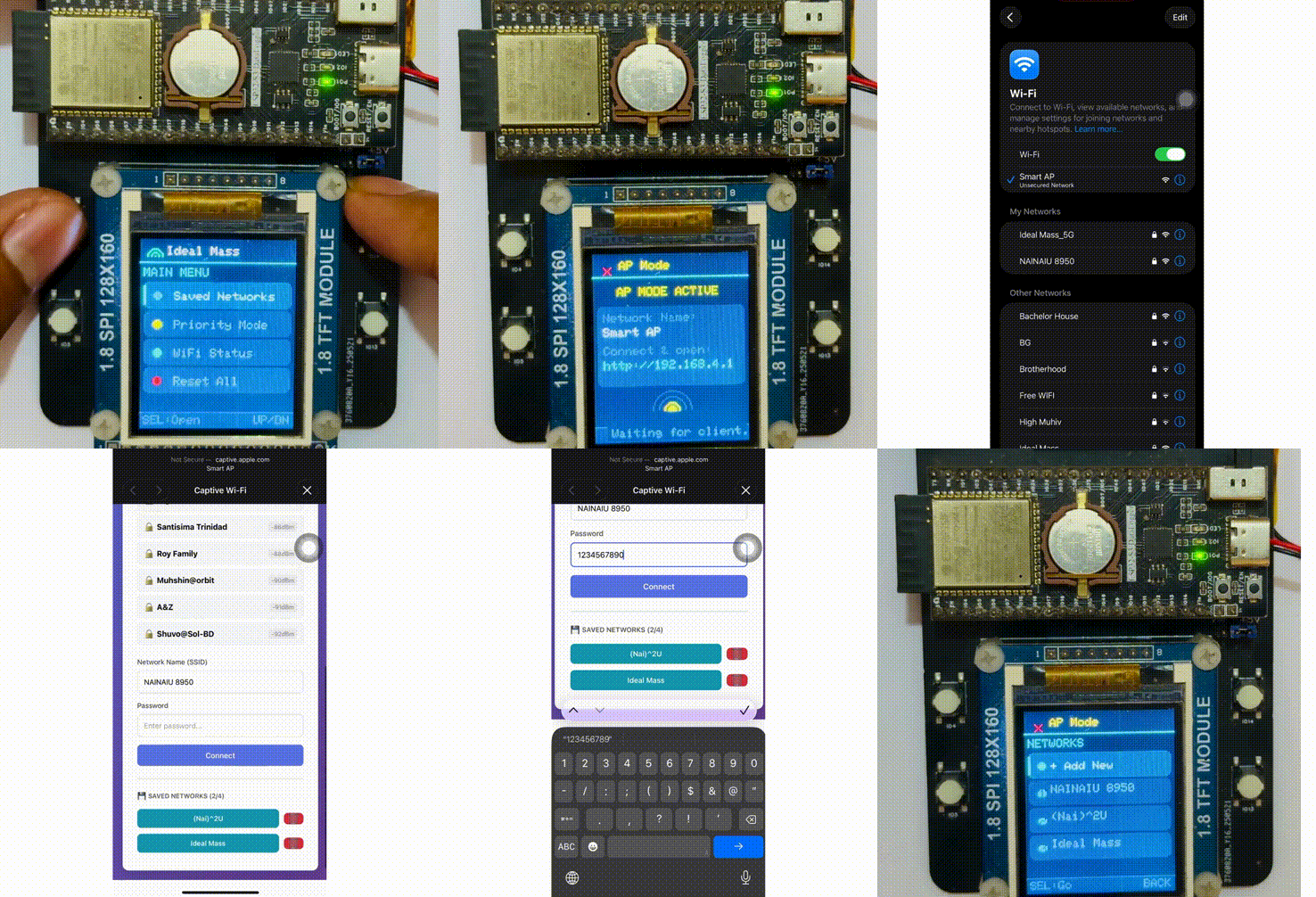
|
Browse saved SSIDs, select one, choose Connect or Delete with instant visual feedback. 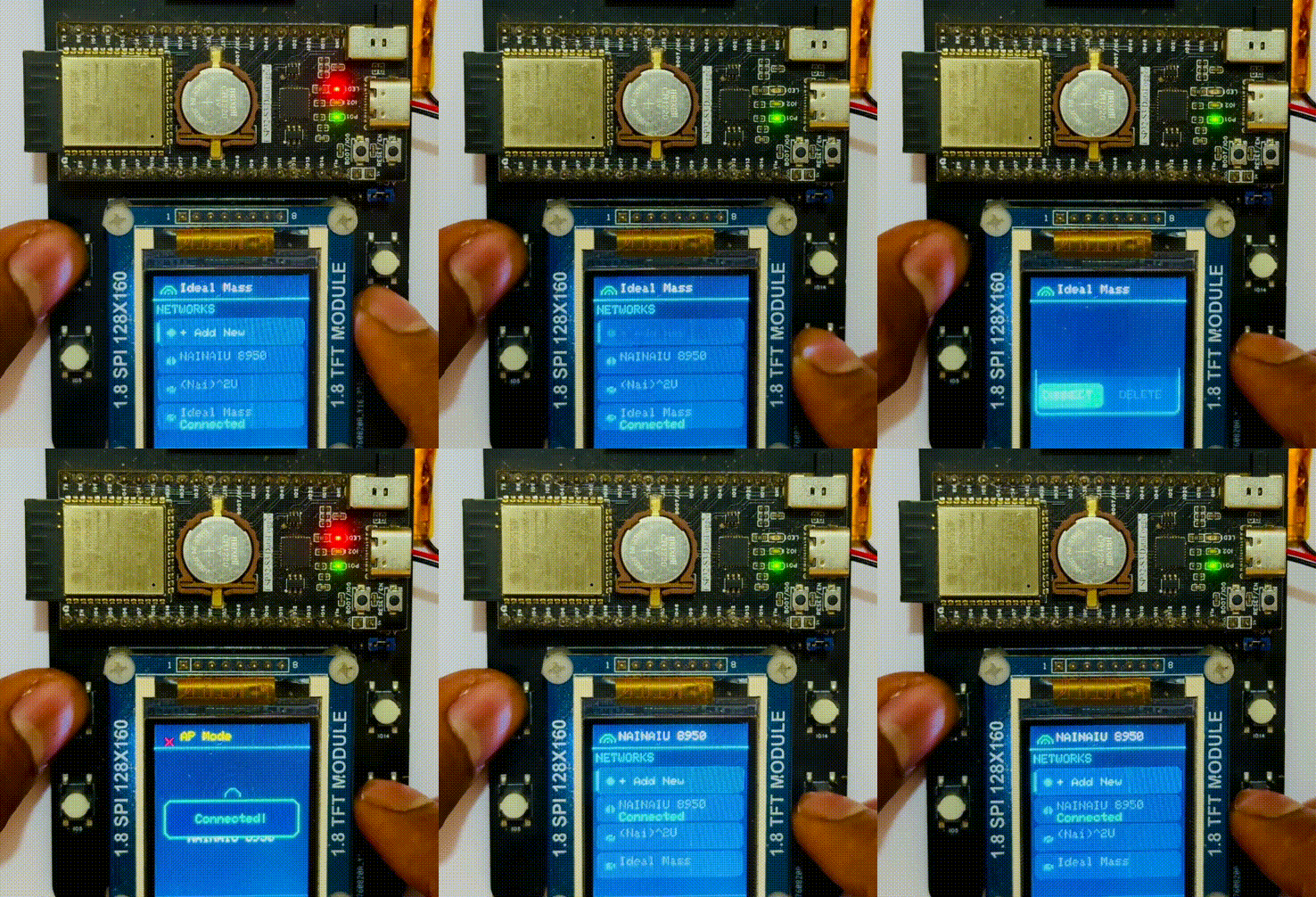
|
|
Scans nearby networks, matches saved credentials, picks the strongest, and connects live. 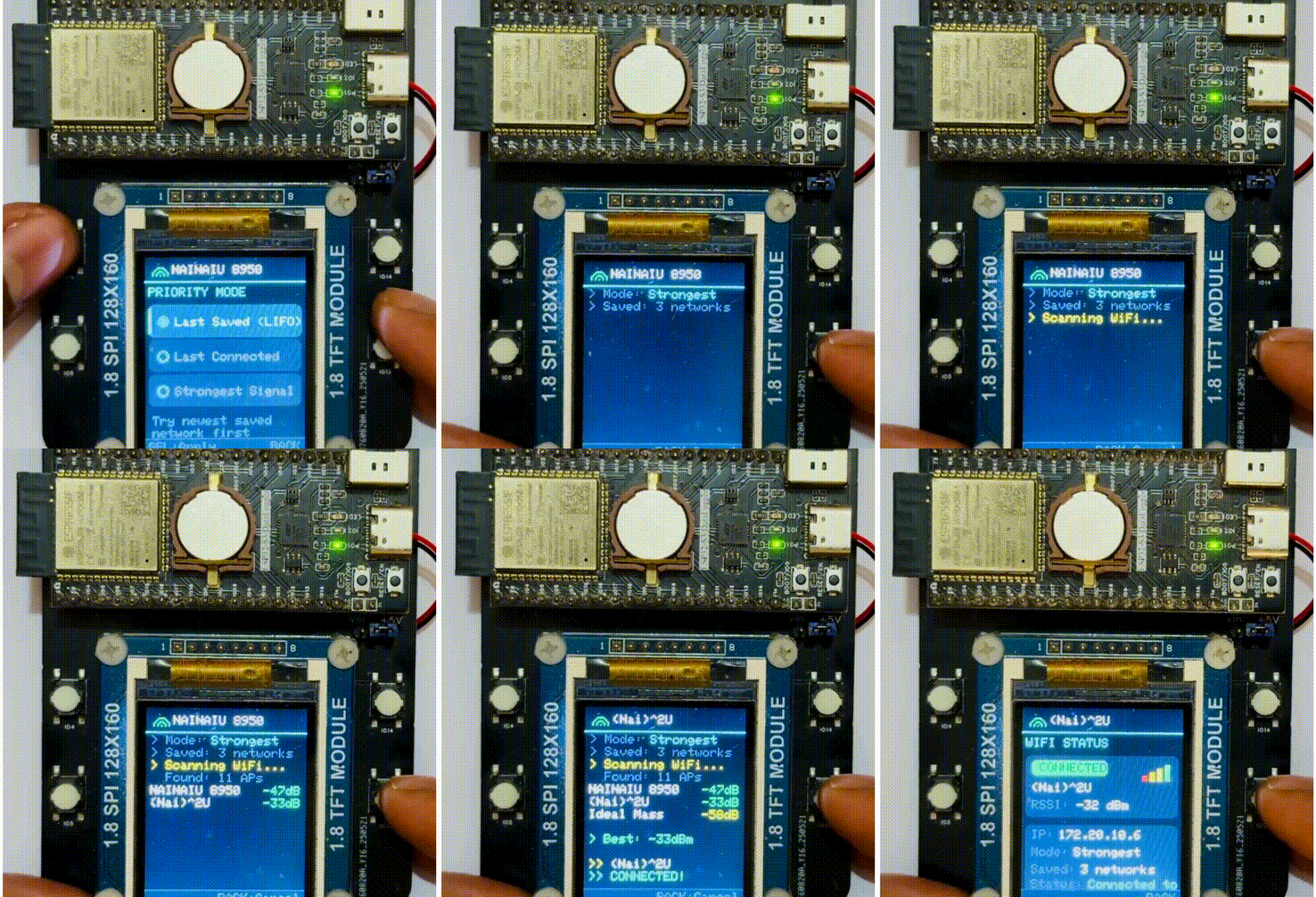
|
Connects to the most recently saved network first. 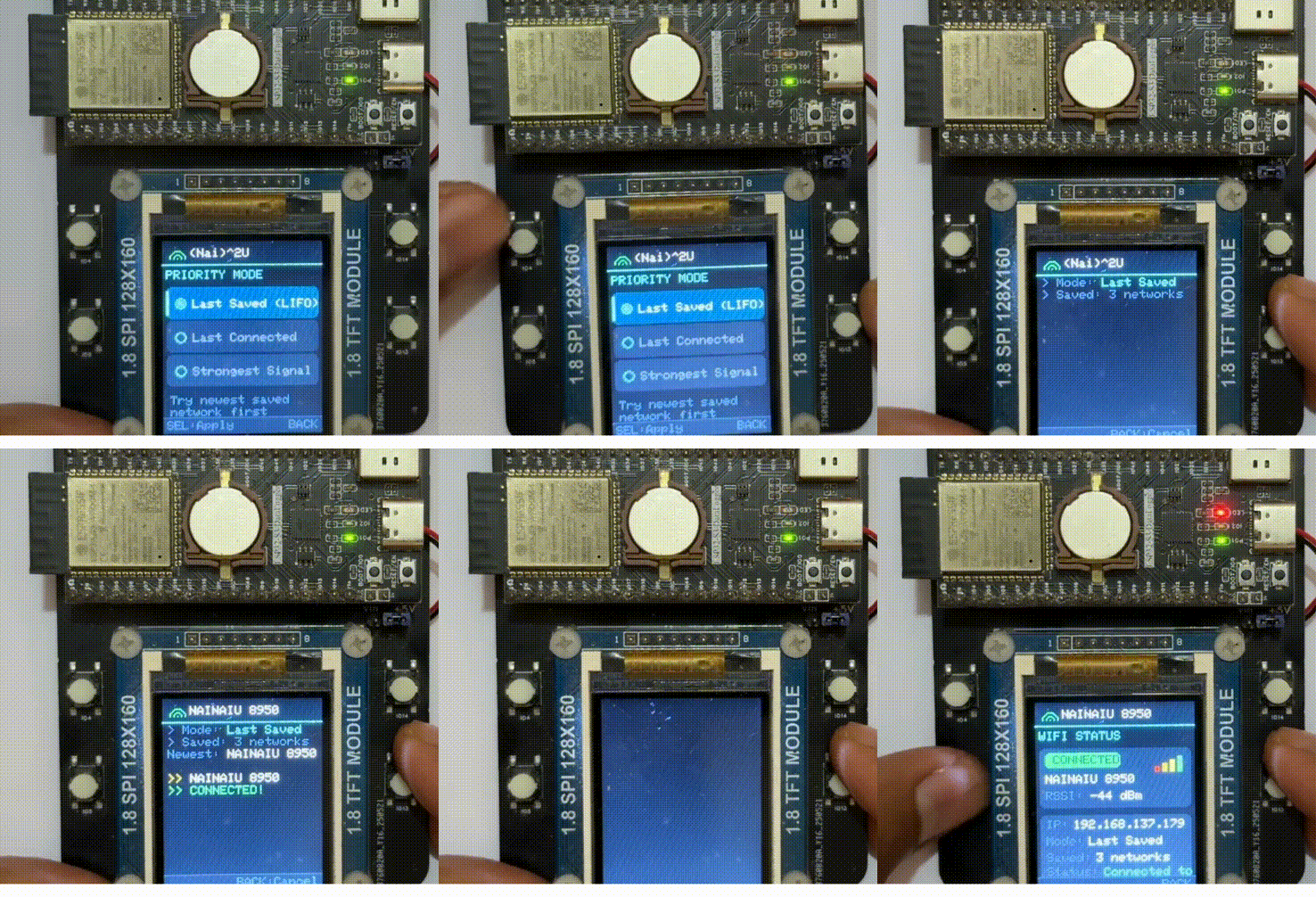
|
|
Remembers last successful connection and reconnects in one tap. 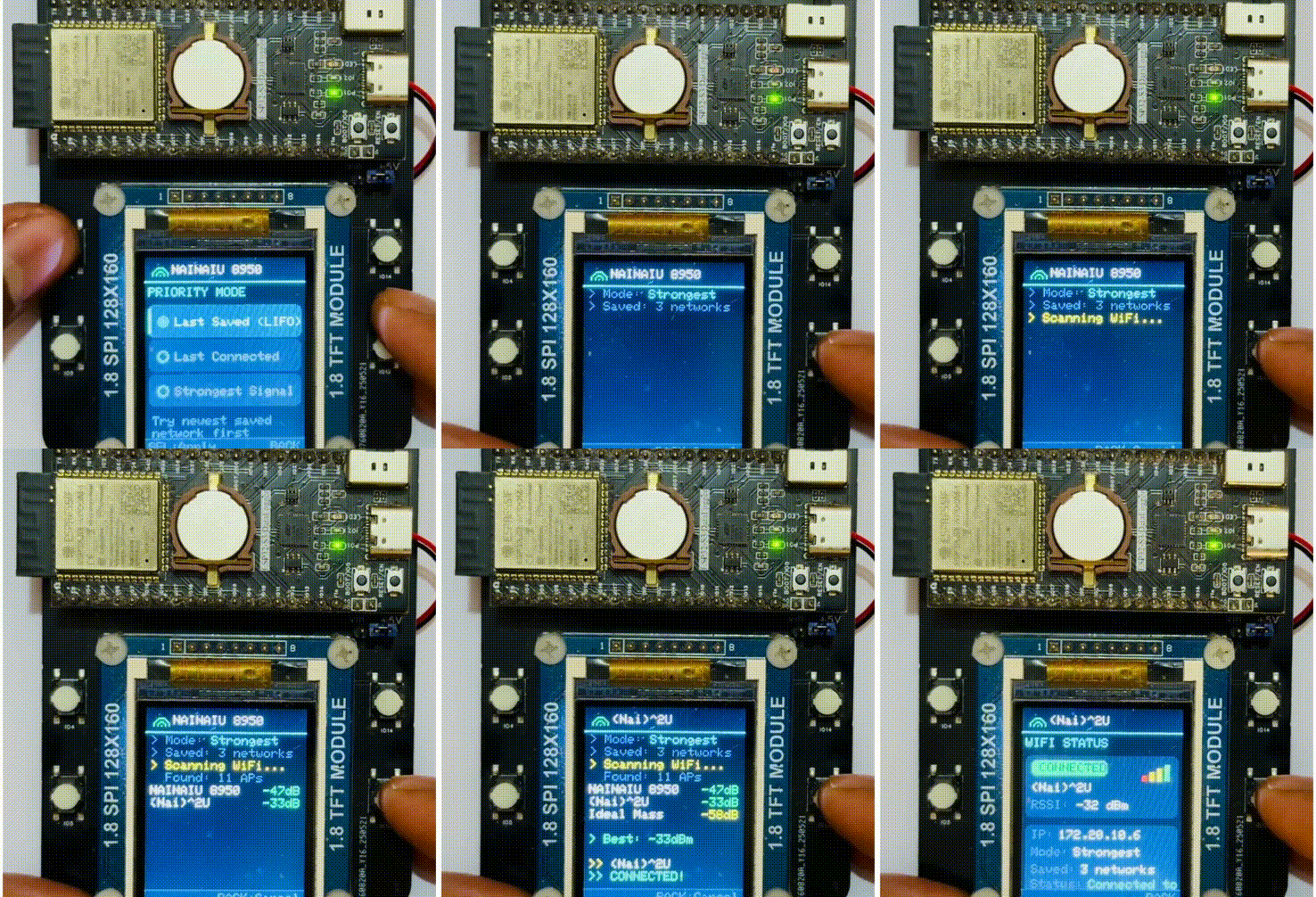
|
|
In the demonstration videos, the system is implemented using an ESP32-S3 with a TFT display.
The hardware is built on a custom PCB that was designed and manufactured through JLCPCB. The develeopment board was assembled using components from the JLCPCB parts library to simplify sourcing and assembly.
In addition, the ESP32-S3 data logger board used in the demo is also a custom design produced through JLCPCB's PCB fabrication and PCBA services. All major components used on the board are available directly from their parts library.
The classic WiFiManager was originally developed for the ESP8266 and subsequently ported to the ESP32. ESP32MultiWiFiProvision is designed from the ground up specifically for the ESP32 architecture - focusing exclusively on multi-network environments and strictly non-blocking operation.
| Feature | Classic WiFiManager | ESP32MultiWiFiProvision |
|---|---|---|
| Core Architecture | Blocking by default | ✅ 100% Non-blocking (run() loop) |
| Multi-Network Storage | ✅ Native support (Stores N credentials) | |
| Storage Engine | Mixed (EEPROM/FS/Core default) | ✅ Native ESP32 Preferences (NVS) |
| Connection Priority | ❌ No | ✅ Yes (Strongest, Last Connected, LIFO) |
| Automatic Fallback | ❌ Drops to AP immediately | ✅ Cycles through all saved networks first |
| Event System | ✅ Clean Callbacks (onConnected) |
|
| Target Platform | ESP8266 + ESP32 | ✅ 100% ESP32 Native |
Add to your platformio.ini:
lib_deps =
nainaiurk/ESP32MultiWiFiProvision- Open Arduino IDE
- Go to Sketch → Include Library → Manage Libraries…
- Search for ESP32MultiWiFiProvision
- Click Install
Or install manually:
- Download this repository as a ZIP (Code → Download ZIP).
- In Arduino IDE: Sketch → Include Library → Add .ZIP Library… → select the ZIP.
- Select your ESP32 board under Tools → Board.

📱 The Mobile Captive Portal
#include <Arduino.h>
#include <ESP32MultiWiFiProvision.h>

ESP32MultiWiFiProvision wifiConfig;
#define BUTTON_PIN 12

void setup() {
    Serial.begin(115200);
    pinMode(BUTTON_PIN, INPUT_PULLDOWN);

    wifiConfig.setAutoFallbackToAP(false);
    wifiConfig.setConnectTimeout(5000);
    wifiConfig.prioritizeStrongestSignal();

    wifiConfig.begin("Smart Device", NULL, false);
}

void loop() {
    wifiConfig.run();  // Must be called every loop

    if (digitalRead(BUTTON_PIN) == HIGH) {
        wifiConfig.startPortal();  // Opens AP at 192.168.4.1
    }

    if (wifiConfig.isConnected()) {
        // Execute connected logic here
    }
}#include <Arduino.h>
#include <ESP32MultiWiFiProvision.h>
ESP32MultiWiFiProvision wifiConfig;
void setup() {
Serial.begin(115200);
wifiConfig.begin("Smart Device", NULL, false);
wifiConfig.onConnected([](String ssid) {
Serial.println("Connected to: " + ssid);
});
if (!wifiConfig.connect()) { // Blocks for up to 40s
wifiConfig.startPortal(); // Fallback to portal
}
}
void loop() {
wifiConfig.run();
}| Method | Description |
|---|---|
begin(apSSID, apPass, autoConnect) |
Initialize the library. autoConnect=true connects immediately; false waits for manual trigger. |
run() |
Call every loop() iteration. Handles portal, DNS, state machine, and reconnection. |
connect(timeout) |
Blocking connect - tries saved networks, returns true/false. Default timeout: 40s. |
startPortal() |
Manually opens the captive portal (AP mode at 192.168.4.1). |
resetSettings() |
Erases all saved credentials from NVS. |
| Method | Default | Description |
|---|---|---|
setMaxSavedNetworks(n) |
3 | Max credentials to store |
setConnectTimeout(ms) |
10000 | Timeout per connection attempt |
setAutoFallbackToAP(bool) |
true |
Start AP automatically if all connections fail |
setAutoReconnect(bool) |
true |
Auto-retry if connection drops |
setReconnectInterval(ms) |
10000 | Delay between reconnect attempts |
setMaxRetries(n) |
3 | How many networks to try before giving up |
setRetryDelay(ms) |
100 | Delay between retry attempts |
setPortalAutoConnect(bool) |
true |
Auto-connect after saving via portal. Set false for on-demand WiFi patterns. |
Choose how the library picks which saved network to try first:
wifiConfig.prioritizeLastSaved();       // Default - LIFO order
wifiConfig.prioritizeLastConnected();   // Try last successful network first
wifiConfig.prioritizeStrongestSignal(); // Scan & pick best RSSI (~2-3s added)
setLastConnectedSSID(ssid) (v1.3.0) - Manually update the "Last Connected" state when connecting via WiFi.begin() within the application logic:
if (WiFi.status() == WL_CONNECTED) {
    wifiConfig.setLastConnectedSSID(WiFi.SSID());
}| Method | Returns | Description |
|---|---|---|
isConnected() |
bool |
true if WiFi is connected |
isPortalActive() |
bool |
true if AP/portal is running |
getConnectedSSID() |
String |
Current SSID (empty if disconnected) |
getLastConnectedSSID() |
String |
Last successfully connected SSID |
getStatus() |
ConnectionStatus |
Enum: STATUS_CONNECTED, STATUS_CONNECTING, STATUS_DISCONNECTED, STATUS_TIMEOUT, STATUS_WRONG_PASSWORD, STATUS_NO_SAVED_NETWORKS |
getStatusMessage() |
String |
Human-readable status (e.g., "Connected to HomeWiFi") |
onConnected(callback) - Event-driven notification (fires once per connection):
wifiConfig.onConnected([](String ssid) {
    Serial.println("Connected to: " + ssid);
});| Method | Description |
|---|---|
getSavedNetworkCount() |
Number of stored credentials |
getSavedSSID(index) |
SSID at index (0 to max-1) |
getSavedPassword(index) |
Password at index |
deleteCredential(index) |
Remove a specific credential |
tryConnectSaved() |
Low-level: cycle through saved networks (prefer connect()) |
- Credentials are stored in ESP32 NVS (persists across reboots).
- Portal HTML is embedded in flash - the page loads instantly.
- Network scan runs asynchronously in the background; results populate via JSON/AJAX, so the UI never blocks.
- State machine in
run()handles connection attempts, timeouts, fallbacks, and reconnection seamlessly.
- Documentation: Updated hardware sourcing links to include referral parameters, maintaining the existing professional layout.
- Fix: Switched relative image paths to absolute GitHub Raw URLs so demo animations properly render on the PlatformIO registry landing page.
- Documentation: Enhanced the README with lightweight, inline GIF animations for better cross-platform compatibility (PlatformIO Registry support).
- Documentation: Added a comprehensive visual demo section to showcase library capabilities.
- Documentation: Improved formatting and layout of the quick-start guide.
- Examples: Added four detailed usage sketches demonstrating basic provisioning, blocking mode routines, multi-network management, and advanced callback handling.
- Structure: Reorganized the repository architecture to adhere to the standard Arduino
src/directory format. - Fix: Resolved a dependency mapping issue in
library.propertiesfor smoother integration with ESP32 core libraries.
- Feature: Officially renamed library to
ESP32MultiWiFiProvision. - Feature: Added manual "Last Connected" override capability via the
setLastConnectedSSID()method. - Fix: Improved stability by resolving credential saving and preferences management issues within NVS.
- Fix: Corrected connection state timing logic to eliminate unintended 10-second connectivity delays.
- Feature: Introduced the
setPortalAutoConnect()mechanism for strictly on-demand WiFi portal invocation. - Enhancement: Enhanced captive portal user feedback loops when auto-connect behavior is disabled.
- Feature: Introduced the
onConnected()event callback for streamlined, non-polling connection handling. - Feature: Added flexible connection configuration options via
setMaxRetries()andsetRetryDelay(). - Enhancement: Implemented automatic saving of the last connected SSID upon successful background connections.
- Feature: Introduced the synchronous
connect()blocking method for simpler project architectures. - Feature: Expanded the status API with
getLastConnectedSSID(),getStatus(), andgetStatusMessage(). - Feature: Added the
ConnectionStatusenumeration for rigid state checking and debugging.
- Fix: Resolved a conflict between the captive portal interactions and the backend connection state machine.
- Fix: Addressed an issue with
getSavedNetworkCount()to properly iterate over contiguous network entries.
- Fix: Addressed an NVS storage bug (missing Preferences open/close parameters) to ensure credentials save correctly under all conditions.
- Enhancement: Updated the captive portal UI to feature an optional plain text password visibility toggle.
- Enhancement: Improved the memory replacement algorithm, guaranteeing the strict overwriting of the oldest credentials.
- Feature: Introduced advanced connection priority modes including Last Saved (LIFO), Last Connected, and Strongest Signal parsing.
- Release: Initial public release.
Nainaiu Rakhaine


MIT - see LICENSE for details.