Up-to-date docs for AI agents — local, instant, plug and play.



AI agents are trained on outdated docs. When libraries release new versions, your AI doesn't know — and confidently gives you wrong answers.
// Your AI, mass-trained on AI SDK v5 docs, will suggest:
import { Experimental_Agent as Agent, stepCountIs } from 'ai';

// But v6 changed the API entirely:
import { ToolLoopAgent } from 'ai';
The fix isn't better prompting. It's giving your AI the right docs.
Context is an MCP server backed by a community-driven package registry with 100+ popular libraries already built and ready to use. When your AI agent needs documentation, it searches the registry, downloads the right package, and queries it locally — all automatically.
Install once. Configure once. Then just ask your AI.
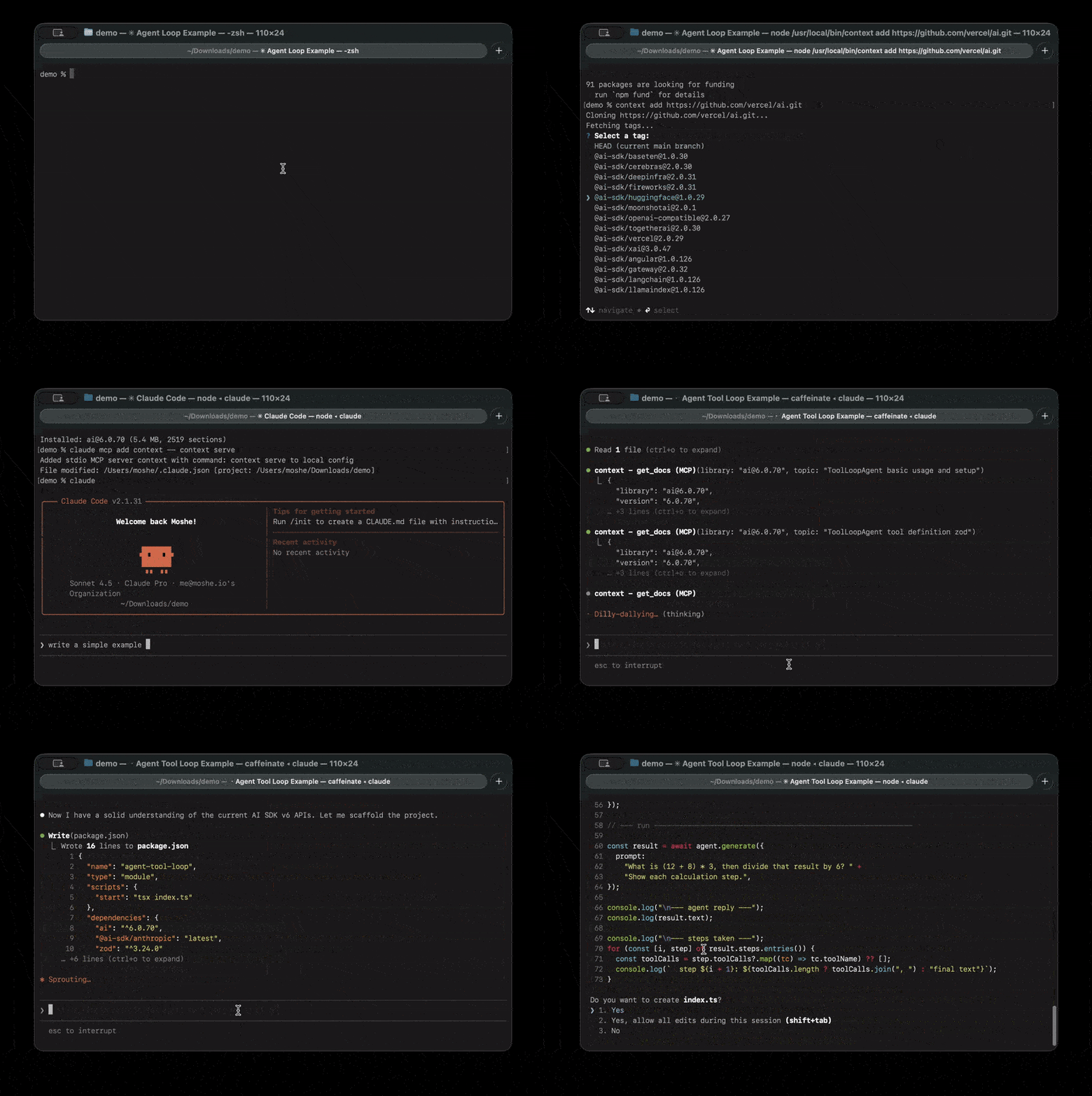
npm install -g @neuledge/contextContext works with any MCP-compatible agent. Pick yours:
Claude Code
claude mcp add context -- context serveClaude Desktop
Add to your config file:
- Linux:
~/.config/claude/claude_desktop_config.json - macOS:
~/Library/Application Support/Claude/claude_desktop_config.json - Windows:
%APPDATA%\Claude\claude_desktop_config.json
{
  "mcpServers": {
    "context": {
      "command": "context",
      "args": ["serve"]
    }
  }
}
Restart Claude Desktop to apply changes.
Cursor
Add to ~/.cursor/mcp.json (global) or .cursor/mcp.json (project-specific):
{
  "mcpServers": {
    "context": {
      "command": "context",
      "args": ["serve"]
    }
  }
}
Or use Settings > Developer > Edit Config to add the server through the UI.
OpenAI Codex
Either use the CLI
codex mcp add context -- context serveOr add to ~/.codex/config.toml (global) or .codex/config.toml (project-specific):
[mcp_servers.context]
command = "context"
args = ["serve"]
Restart OpenAI Codex to apply changes.
VS Code (GitHub Copilot)
Requires VS Code 1.102+ with GitHub Copilot
Add to .vscode/mcp.json in your workspace:
{
  "servers": {
    "context": {
      "type": "stdio",
      "command": "context",
      "args": ["serve"]
    }
  }
}
Click the Start button that appears in the file, then use Agent mode in Copilot Chat.
Windsurf
Add to ~/.codeium/windsurf/mcp_config.json:
- Windows:
%USERPROFILE%\.codeium\windsurf\mcp_config.json
{
  "mcpServers": {
    "context": {
      "command": "context",
      "args": ["serve"]
    }
  }
}
Or access via Windsurf Settings > Cascade > MCP Servers.
Zed
Add to your Zed settings (cmd+, or ctrl+,):
{
  "context_servers": {
    "context": {
      "command": {
        "path": "context",
        "args": ["serve"]
      }
    }
  }
}
Check the Agent Panel settings to verify the server shows a green indicator.
Goose
Run goose configure and select Command-line Extension, or add directly to ~/.config/goose/config.yaml:
extensions:
  context:
    type: stdio
    command: context
    args:
      - serve
timeout: 300That's it. Just ask:
"How do I create middleware in Next.js?"
Your agent searches the community registry, downloads the docs, and answers with accurate, version-specific information. Everything happens automatically — no manual context install needed for registry packages.
The registry is what makes Context plug and play. It's a growing collection of 100+ pre-built documentation packages maintained by the community. Think of it like a package manager, but for AI-ready docs.
Popular packages available today:
| Category | Libraries |
|---|---|
| Frameworks | Next.js, Nuxt, Astro, SvelteKit, Remix, Hono |
| React ecosystem | React, React Router, TanStack Query, Zustand, Redux Toolkit |
| Databases & ORMs | Prisma, Drizzle, Mongoose, TypeORM |
| Styling | Tailwind CSS, shadcn/ui, Styled Components |
| Testing | Vitest, Playwright, Jest, Testing Library |
| APIs & Auth | tRPC, GraphQL, NextAuth.js, Passport |
| AI & LLMs | LangChain, AI SDK, OpenAI, Anthropic SDK |
Anyone can contribute. If a library you use isn't listed, submit a PR to add it — your contribution helps every Context user.
Context runs entirely on your machine. Docs are downloaded once and stored as compact SQLite databases in ~/.context/packages/. After that, everything is local.
- Fast — Local SQLite queries return in under 10ms
- Offline — Works on flights, in coffee shops, anywhere
- Private — Your queries never leave your machine
- Free — No subscriptions, no rate limits, no usage caps
- Reliable — No outages, no API changes, no service shutdowns
The registry covers popular open-source libraries, but Context also works with any documentation source. Use context add to build packages from private repos, internal libraries, or anything not yet in the registry.
# Build from a git repository
context add https://github.com/your-company/design-system

# Build from a local directory
context add ./my-project

# Specific version tag
context add https://github.com/vercel/next.js/tree/v16.0.0
Once built, share packages with your team — they're portable .db files that install instantly:
# Export a package
context add ./my-project --name my-lib --pkg-version 2.0 --save ./packages/

# Teammate installs it (no build step needed)
context add ./packages/my-lib@2.0.dbRun Context as a containerized HTTP server for multi-client or Kubernetes deployments:
# Run from the repository root (required for the monorepo lockfile)
docker build -t context:local -f packages/context/Dockerfile .
docker run --rm -p 8080:8080 context:local
The container starts Context with HTTP transport on port 8080, accessible at http://localhost:8080/mcp. The image uses a multi-stage build with node:22-bookworm-slim for native module compatibility.
Search for packages available on the registry server.
# Browse by registry/name
context browse npm/next

# Output:
#   npm/next@15.1.3           3.4 MB  The React Framework for the Web
#   npm/next@15.0.4           3.2 MB  The React Framework for the Web
#   ...
#
#   Found 12 versions. Install with: context install npm/next

# Browse with just a name (defaults to npm)
context browse reactDownload and install a pre-built package from the registry server.
# Install latest version
context install npm/next

# Install a specific version
context install npm/next 15.0.4

# Install from other registries
context install pip/djangoBuild and install a documentation package from source. Use this for libraries not in the registry, or for private/internal docs. The source type is auto-detected.
From git repository:
Works with GitHub, GitLab, Bitbucket, Codeberg, or any git URL:
# HTTPS URLs
context add https://github.com/vercel/next.js
context add https://gitlab.com/org/repo
context add https://bitbucket.org/org/repo

# Specific tag or branch
context add https://github.com/vercel/next.js/tree/v16.0.0

# SSH URLs
context add git@github.com:user/repo.git
context add ssh://git@github.com/user/repo.git

# Custom options
context add https://github.com/vercel/next.js --path packages/docs --name nextjs
From local directory:
Build a package from documentation in a local folder:
# Auto-detects docs folder (docs/, documentation/, doc/)
context add ./my-project

# Specify docs path explicitly
context add /path/to/repo --path docs

# Custom package name and version
context add ./my-lib --name my-library --pkg-version 1.0.0| Option | Description |
|---|---|
--pkg-version <version> |
Custom version label |
--path <path> |
Path to docs folder in repo/directory |
--name <name> |
Custom package name |
--save <path> |
Save a copy of the package to the specified path |
Saving packages for sharing:
# Save to a directory (auto-names as name@version.db)
context add https://github.com/vercel/next.js --save ./packages/

# Save to a specific file
context add ./my-docs --save ./my-package.db
From URL:
context add https://cdn.example.com/react@18.dbFrom local file:
context add ./nextjs@15.0.dbFinding the right documentation repository:
Many popular projects keep their documentation in a separate repository from their main codebase. If you see a warning about few sections found, the docs likely live elsewhere:
# Example: React's docs are in a separate repo
context add https://github.com/facebook/react
# ⚠️  Warning: Only 45 sections found...
# The warning includes a Google search link to help find the docs repo

# The actual React docs repository:
context add https://github.com/reactjs/react.dev
Common patterns for documentation repositories:
project-docs(e.g.,prisma/docs)project.devorproject.io(e.g.,reactjs/react.dev)project-website(e.g.,expressjs/expressjs.com)
When the CLI detects few documentation sections, it will show a Google search link to help you find the correct repository.
Show installed packages.
$ context list

Installed packages:

  nextjs@16.0              4.2 MB    847 sections
  react@18                 2.1 MB    423 sections

Total: 2 packages (6.3 MB)Remove a package.
context remove nextjsStart the MCP server (used by AI agents).
# Stdio transport (default, for single-client MCP integrations)
context serve

# HTTP transport (for multi-client access over the network)
context serve --http
context serve --http 3000
context serve --http 3000 --host 0.0.0.0| Option | Description |
|---|---|
--http [port] |
Start as HTTP server instead of stdio (default port: 8080) |
--host <host> |
Host to bind to (default: 127.0.0.1) |
The HTTP transport uses the MCP Streamable HTTP protocol, enabling multiple clients on the local network to connect to a single server instance. The endpoint is available at http://<host>:<port>/mcp.
Query documentation directly from the command line. Useful for testing and debugging.
# Query a package (use name@version format from 'context list')
context query 'nextjs@16.0' 'middleware authentication'

# Returns the same JSON format as the MCP get_docs tool┌─────────────────────────────────────────────────────────┐
│ Your Machine │
│ │
│ ┌──────────┐ ┌──────────────────┐ ┌────────────┐ │
│ │ AI │ │ Context MCP │ │ ~/.context │ │
│ │ Agent │───▶│ Server │───▶│ /packages │ │
│ │ │ │ │ └────────────┘ │
│ └──────────┘ └────────┬─────────┘ │ │
│ │ ┌──────────┐ │
│ │ │ SQLite │ │
│ │ │ FTS5 │ │
│ │ └──────────┘ │
└───────────────────────────┼─────────────────────────────┘
│ (first use only)
▼
┌────────────────┐
│ Community │
│ Registry │
└────────────────┘
First time you ask about a library:
- The MCP server searches the community registry
- Downloads the pre-built documentation package (a SQLite
.dbfile) - Stores it locally in
~/.context/packages/
Every time after:
- FTS5 full-text search finds relevant sections locally
- Smart filtering keeps results within token budget
- Your AI gets focused, accurate documentation in under 10ms
Yes! Context is language-agnostic. It natively supports Markdown (.md, .mdx), AsciiDoc (.adoc), reStructuredText (.rst), and HTML — no conversion needed.
# Python - FastAPI (Markdown)
context add https://github.com/fastapi/fastapi --path docs/en/docs

# Python - Django (reStructuredText)
context add https://github.com/django/django --path docs

# Java - Spring Boot (AsciiDoc)
context add https://github.com/spring-projects/spring-boot --path spring-boot-project/spring-boot-docs/src/docs

# Rust - The Rust Book
context add https://github.com/rust-lang/book --path src
Point Context at the docs folder with --path and it handles the rest.
Yes! The registry/ directory has YAML definitions organized by package manager:
registry/npm/— JavaScript/TypeScript (Next.js, React, Tailwind, etc.)registry/pip/— Python (FastAPI, Flask, Django, Pydantic)registry/maven/— Java (Spring Boot, JUnit, Micrometer)
To add a package, create a YAML file. Two source types are supported:
Git source — clone a repo at a version tag:
# registry/pip/my-library.yaml
name: my-library
description: "Short description of the library"
repository: https://github.com/org/my-library

versions:
  - min_version: "2.0.0"
    source:
      type: git
      url: https://github.com/org/my-library
      docs_path: docs
    tag_pattern: "v{version}"
ZIP source — download HTML docs from a URL (supports {version} placeholder):
# registry/python/python.yaml
name: python
description: "Python programming language official documentation"

versions:
  - versions: ["3.14", "3.13", "3.12"]
    source:
      type: zip
      url: "https://docs.python.org/3/archives/python-{version}-docs-html.zip"
      docs_path: "python-{version}-docs-html"
      exclude_paths:
        - "whatsnew/**"
        - "changelog.html"
Version discovery is supported for npm, PyPI, and Maven Central. See existing definitions for examples.
# Install dependencies
pnpm install

# Build
pnpm build

# Test
pnpm test

# Lint
pnpm lint