
Generate videos, images, and music with Google's AI models using simple text prompts


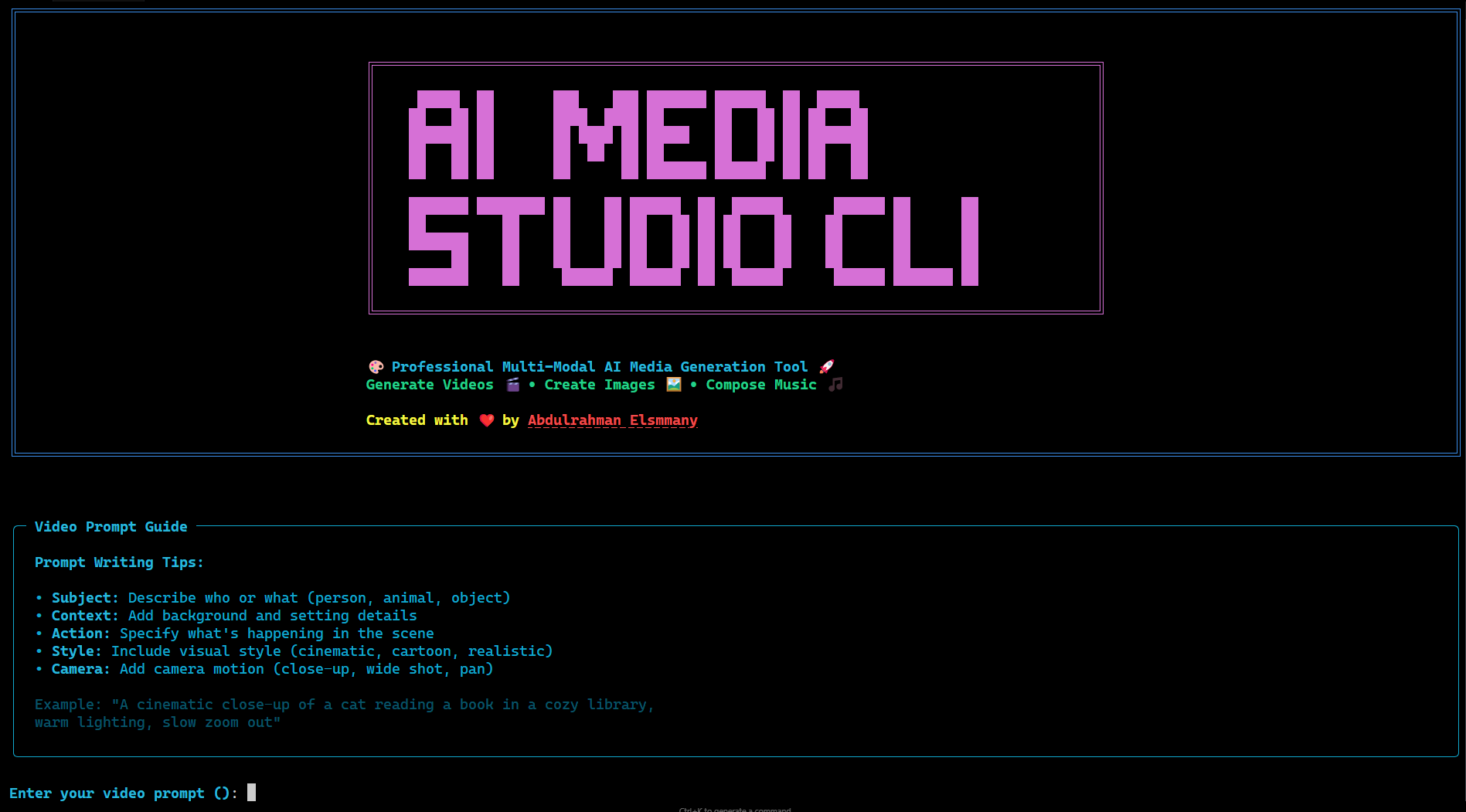
🎬 Professional Multi-Modal AI Media Generation Tool with an intuitive terminal interface
# Start the beautiful interactive experience
ai-studio interactive
Interactive Features:
- 🎨 Smart Media Selection - Choose between Video, Image, or Music generation
- 🤖 AI Model Showcase - Compare capabilities of different models
- 📐 Visual Parameter Config - Real-time validation and previews
- 💡 Prompt Writing Guide - Built-in tips for each media type
- 📊 Generation Preview - See what you're about to create
- 🎯 Intelligent Recommendations - AI-powered suggestions
- 📁 Automatic Organization - Smart file management by media type
- 🎬 Video Generation with Google's latest Veo models
- 🖼️ Image Creation with Imagen (coming soon)
- 🎵 Music Composition with MusicLM (planned)
- 🎭 Beautiful Interactive Mode for easy media generation
- 📁 Smart Organization - Auto-sorts all your generated media
- ⚡ Fast Generation - Optimized for quick results
- 🎨 Professional Quality - Using Google's best AI models
- 💻 Developer Friendly - Clean CLI with intuitive commands
- 🔄 Extensible - Easy to add new models and features
# Clone the repository
git clone https://github.com/Abdulrahman-Elsmmany/ai-media-studio-cli.git
cd ai-media-studio-cli

# Install dependencies with UV (recommended)
uv sync

# Alternative: Install with pip
pip install -e .Create your .env file with Google AI credentials:
# 🔑 Google AI API Configuration
GOOGLE_CLOUD_PROJECT=your-project-id
GOOGLE_CLOUD_LOCATION=us-central1
GOOGLE_GENAI_USE_VERTEXAI=True
GOOGLE_API_KEY=your-google-api-key

# 🪣 Google Cloud Storage Configuration
GOOGLE_CLOUD_STORAGE_BUCKET=your-bucket-name
GOOGLE_CLOUD_STORAGE_PATH=videos# 🎬 Generate your first video
ai-studio generate video -p "a cinematic sunset over mountains"
# 🎭 Or use interactive mode (recommended)
ai-studio interactive
|
|
|
|
# Simple video generation
ai-studio generate video -p "a majestic eagle soaring over mountains"

# With specific model and settings
ai-studio generate video \
  --prompt "cinematic drone shot of ocean waves at sunset" \
  --model veo3-001 \
--aspect-ratio 16:9# All generated media is auto-organized:
downloaded_media/
├── videos/ # .mp4, .avi, .mov files
├── images/ # .jpg, .png, .gif files
├── audios/ # .mp3, .wav, .flac files
└── unknown/ # Other file types# 🌅 Cinematic landscape video
ai-studio generate video \
--prompt "golden hour cinematic shot of a serene lake with mountains reflected in still water" \
--model veo3-001 \
--aspect-ratio 16:9 \
--resolution 1080 \
--videos 2 \
--duration 8
# 📱 Social media vertical video
ai-studio generate video \
--prompt "trendy coffee shop aesthetic with latte art being created" \
--model veo2-001 \
--aspect-ratio 9:16 \
--resolution 720 \
--duration 6# 🔗 Extend video from Google Cloud Storage
ai-studio generate video \
--prompt "the butterfly gracefully lands on a blooming flower petal" \
--model veo2-001 \
--extend-video "gs://your-bucket/nature-scene.mp4"
# 📁 Extend local video file
ai-studio generate video \
--prompt "the sunset transforms into a starry night sky" \
--model veo2-001 \
--extend-video "./videos/sunset-base.mp4"# 🎨 High-resolution artwork
ai-studio generate image \
--prompt "abstract digital art with vibrant colors and geometric patterns" \
--model imagen-3-ultra \
--resolution 2048x2048 \
--style artistic
# 🏢 Professional photography
ai-studio generate image \
--prompt "modern office interior with natural lighting" \
--model imagen-3-001 \
--resolution 1920x1080 \
--style photorealistic| Model | 🎯 Best For | Videos | Duration | 🚀 Special Features |
|---|---|---|---|---|
| veo2-001 | 🎨 Creative & Flexible | 4 | 5-8s | ➕ Video Extension, 🖼️ Image-to-Video |
| veo3-001 | 🎬 Professional & Stable | 4 | 8s | ✨ AI Prompt Enhancement |
| veo3-preview | 🔬 Latest Features | 4 | 8s | 🖼️ Image-to-Video, 🆕 Beta Features |
| Model | 🎯 Best For | Images | Resolution | 🚀 Special Features |
|---|---|---|---|---|
| imagen-3-ultra | 🎨 Ultra High Quality | 12 | Up to 4K | 🎨 Style Control, ⚡ Fast Generation |
| imagen-3-001 | 📸 Photorealistic | 8 | Up to 2K | 📷 Photo-realistic, 🎭 Face Generation |
| Model | 🎯 Best For | Length | Quality | 🚀 Special Features |
|---|---|---|---|---|
| musiclm-v2 | 🎼 Composition | 30-120s | Hi-Fi | 🎹 Instrument Control, 🎵 Genre Specific |
[STYLE] + [SUBJECT] + [ACTION] + [SETTING] + [TECHNICAL] + [MOOD]
# Cinematic
"Cinematic wide shot of a lone figure walking through misty forest path, golden morning light filtering through ancient trees, slow dolly forward, mysterious atmosphere"

# Documentary
"Documentary-style close-up of artisan hands crafting pottery on spinning wheel, natural lighting, steady camera, focused concentration"# Artistic
"Abstract expressionist painting with bold brushstrokes, vibrant blues and oranges, dynamic composition, oil on canvas texture"
# Photographic
"Professional headshot of businesswoman in modern office, soft natural lighting, shallow depth of field, confident expression"# Instrumental
"Uplifting piano melody with string accompaniment, major key, 120 BPM, inspiring and motivational mood"
# Ambient
"Ethereal ambient soundscape with nature sounds, gentle synthesizer pads, relaxing meditation music"❌ "make video" # Too vague, no media type specified
❌ "cool image of stuff" # Lacks specific details
❌ "amazing epic best music" # Over-hyped without substanceai-media-studio-cli/
├── 🎬 ai_media_studio_cli/
│ ├── main.py # Unified CLI application
│ ├── ui_components.py # Beautiful UI components
│ ├── models_config.py # Multi-modal AI configurations
│ ├── model_manager.py # Dynamic model handling
│ ├── download.py # Smart media download & organization
│ ├── animations.py # Progress & loading animations
│ ├── generators/
│ │ ├── video.py # Video generation logic
│ │ ├── image.py # Image generation (coming soon)
│ │ └── music.py # Music generation (planned)
├── 📚 docs/
│ ├── ADDING_NEW_MODELS.md # Developer guide
│ ├── VIDEO_GENERATION.md # Video-specific docs
│ └── ROADMAP.md # Future feature roadmap
├── 🧪 tests/ # Comprehensive test suite
│ ├── test_download.py # Download functionality tests
│ └── test_models.py # Model integration tests
├── ⚙️ pyproject.toml # Modern Python packaging
└── 📖 README.md # This documentation
- Modular architecture for easy extension to new AI models
- Async processing for all media types and downloads
- Smart caching to reduce API costs
- Batch processing for efficient generation workflows
- Memory optimization for large media files
- Plugin system for third-party model integration
- Concurrent downloads with progress tracking
- Automatic file organization by media type
- GCS cleanup to minimize storage costs
- ✅ Google Veo 2.0 & 3.0 integration
- ✅ Video extension capabilities
- ✅ Professional CLI interface
- ✅ Smart media download & organization
- ✅ Automatic folder structure (videos/, images/, audios/)
- ✅ Concurrent downloads with progress tracking
- 🔄 Google Imagen integration
- 🔄 Multiple resolution support
- 🔄 Style control and customization
- 🔄 Batch image processing
- 📋 Google MusicLM integration
- 📋 Genre and style control
- 📋 Custom length generation
- 📋 Audio format optimization
- 📋 Multi-modal workflows (video + music)
- 📋 Template system for common use cases
- 📋 Cloud storage integration (AWS, Azure)
- 📋 API rate limiting and optimization
- 📋 Advanced prompt engineering tools
# 🔑 Required - Google AI Configuration
GOOGLE_CLOUD_PROJECT=your-project-id
GOOGLE_CLOUD_LOCATION=us-central1
GOOGLE_GENAI_USE_VERTEXAI=True
GOOGLE_API_KEY=your-google-api-key

# 🪣 Required - Google Cloud Storage
GOOGLE_CLOUD_STORAGE_BUCKET=your-bucket-name
GOOGLE_CLOUD_STORAGE_PATH=videos-
Get your Google AI API Key:
- Visit Google AI Studio
- Create a new API key for your project
- Add it to your
.envfile asGOOGLE_API_KEY
-
Configure Google Cloud Project:
GOOGLE_CLOUD_PROJECT: Your Google Cloud project IDGOOGLE_CLOUD_LOCATION: Recommended:us-central1GOOGLE_GENAI_USE_VERTEXAI: Set toTruefor production use
The tool requires a GCS bucket for temporary video storage during generation:
- Create a GCS bucket in your Google Cloud project
- Set environment variables:
GOOGLE_CLOUD_STORAGE_BUCKET: Your bucket name (e.g.,my-ai-videos)GOOGLE_CLOUD_STORAGE_PATH: Path within bucket (optional, defaults tovideos)
- Ensure permissions: Your service account needs
Storage Object Adminrole
Generated content is automatically:
- 📁 Organized by media type (videos/, images/, audios/)
- 🏷️ Tagged with generation metadata
- 🧹 Cleaned up from cloud storage (optional)
- 📈 Tracked with detailed analytics
- 🔄 Versioned for iterative workflows
- ⚡ Downloaded concurrently with progress tracking
- 🎯 Sorted by file extension into appropriate folders
- 📦 Supports 20+ media formats (MP4, JPG, MP3, etc.)
The CLI features an intelligent download system that automatically organizes your generated content:
# Downloads are automatically organized by media type
downloaded_media/
├── videos/     # .mp4, .avi, .mov, .mkv, .wmv, .flv, .webm, .m4v, .3gp
├── images/     # .jpg, .jpeg, .png, .gif, .bmp, .tiff, .svg, .webp, .ico
├── audios/     # .mp3, .wav, .flac, .aac, .ogg, .wma, .m4a, .opus
└── unknown/ # Unrecognized file types- Concurrent Downloads: Multiple files downloaded simultaneously
- Progress Tracking: Real-time progress bars with ETA
- Resume Support: Automatic retry on network interruptions
- GCS Cleanup: Optional cloud storage cleanup after download
- Memory Efficient: Streaming downloads for large files
# Disable automatic organization
ai-studio generate video --no-organize

# Custom download directory
ai-studio generate video --output-dir "my-custom-folder"

# Keep files in cloud storage (no cleanup)
ai-studio generate video --keep-cloud-filesWe welcome contributions that push the boundaries of AI media generation:
- 🎬 Video Generation: New models, effects, transitions
- 🖼️ Image Creation: Style transfer, artistic filters
- 🎵 Music Composition: Instrument separation, rhythm generation
- 🖥️ User Experience: Interface improvements, workflow optimization
- 🔧 Technical: Performance, architecture, new integrations
- Type hints for all functions across all modules
- Comprehensive docstrings with examples
- Unit tests with >95% coverage for new features
- Integration tests for AI model endpoints
- Performance benchmarks for generation workflows


This project is licensed under the MIT License - see the LICENSE file for complete details.
Third-party acknowledgments:
- 🤖 Google AI for Veo, Imagen, and MusicLM model access
- 🎨 Rich for beautiful terminal UI
- ⚡ Typer for modern CLI framework
- 🔧 UV for fast Python package management
The future of AI media generation in your terminal
Created with ❤️ by Abdulrahman Elsmmany


⭐ Star this repository if it helped you create amazing AI content!
Let's build the future of AI media generation together 🚀