2. Magventure Class
The magventure.m class is used for communicating with the MagVenture stimulator. Different built-in methods in this class will empower you to have master control over your device.
Not all versions of MagPro G3 device support all the commands implemented in this toolbox. This class includes all available commands for the most recent firmware version of the device up to this date.
Before starting to use the toolbox, we recommend that you first check the firmware number for your MagVenture device. You can know the software version by checking GUI SW Version number on your device's screen like the image below.
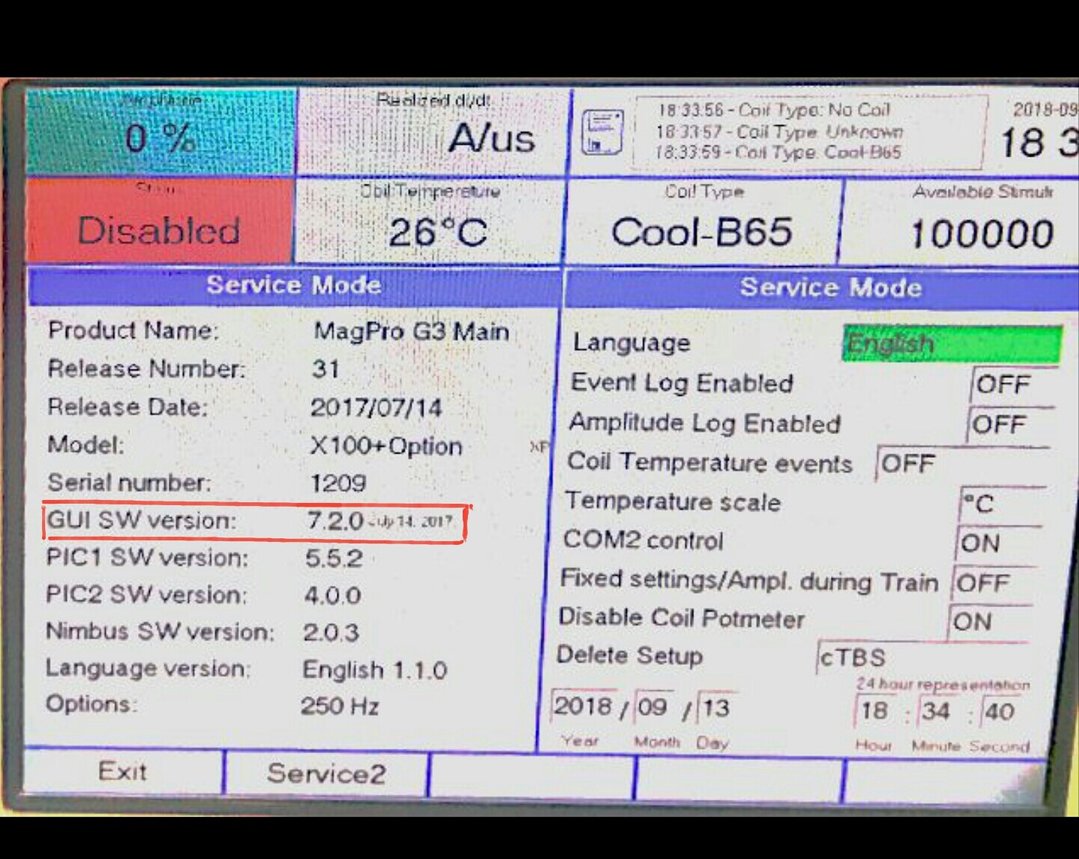
For software versions newer than 5.2.0, you can get use of commands listed below:
- Setting Amplitude
- Enabling and Disabling
- Sending Single Trigger
- Starting Train
The following commands are available for software versions newer than 7.0.1
- Getting Status
- Setting Amplitude
- Enabling and Disabling
- Sending Single Trigger
- Starting Train
- Setting Train Parameters
- Setting Page
- Setting Trig and Charge Delay Parameters
Getting/Settng Mode, Waveform, Current Direction, Burst Pulses. IPI, B/A Ratio parameters
Eventually all the following commands are available for software versions newer than 7.1.0
- Getting Status
- Setting Amplitude
- Enabling and Disabling
- Sending Single Trigger
- Starting Train
- Setting Train Parameters
- Setting Page
- Setting Trig and Charge Delay Parameters
- Getting/Settng Mode, Waveform, Current Direction, Burst Pulses. IPI, B/A Ratio parameters
Notice that if you try running a command that is not supported on your device software version, it will cause the crashing of the code and for any further applications of your MagVenture device, you will need to disconnect and ther re-connect the device once more.
To start working with the Magventure class, you need to first create an object of the class. This object will then be passed to each method as the primary input. The object will be constructed by defining the serial port using which you are intending to connect to your device.
magventureObject = magventure('PortID');
This line of code will check your computer to find the intended port and hold it as the main object of the class. Next, to start working with the toolbox, you need to connect to the desired port already defined in your magventureObject.
Using the next line of script, you will be connecting to the serial port and maintaining your connection unless an error occurs or until you manually disconnect it yourself.
magventure.connect(magventureObject); or simply magventureObject.connect();
As previously mentioned, you can easily disconnect the device from your computer using the following command line:
magventure.disconnect(magventureObject); or simply magventureObject.disconnect();
In all the following commands, you can retrieve two outputs, one indicating the success or failure of the process (errorOrSuccess) and the other would be the device response (deviceResponse) which is a cell struct giving you details on the current parameters of the stimulator.
You can choose to retrieve the device response by setting the getresponse variable, which is the last input in all functions, to 1. The default value for this input is set to 0 in all the functions.
After establishing your communication with the stimulator, you can now easily utilize all the available commands depending on the version and model of your device. In the following, you will find separate introductions for each of the commands.
To start your control over your MagVenture device, you can arm and therefore also disarm the stimulator.
magventureObject.arm();
magventureObject.disarm();
To get the stimulator's current status and parameters, there are two built-in methods in this class. Each will provide specific information about the device based on the released MagPro data transmisson.
magventureObject.getStatus();
magventureObject.getStatus2();
To set the desired amplitude for coil A and/or coil B (in dual or twin mode) you can use the following function by defining your desired amplitudes in percentage. In dual or twin mode, the variable desiredAmplitudes would be a vector of length two.
magventureObject.setAmplitude(desiredAmplitudes);
To send a single trigger to the stimulator, you can call:
magventureObject.fire();
By calling the following function, you will evoke the stimulator by sending a train of pulses:
magventureObject.sendTrain()
To set your desired parameters for the pulse train, you can input these values to the following function:
magventureObject.setTrain(repRate,pulses,numberOfTrains,iti);
- repRate {int}: represents the number of pulses per second
- pulses {int}: represents the number of pulses in each train
- numberOfTrains{int}: represents the total amount of trains arriving in one sequence
- iti {int}: represents the time interval between two trains in seconds, described as the time period between the last pulse in the first train to the first pulse in the next train.
You can call this function to set the page which is shown on the MagVenture device.
magventureObject.setPage('page');
- page {char}: defines the page. Valid inputs in Magventure: 'Main','Train','Trig','Config','Protocol'.
This function allows you to determine a number of parameters on your device.
magventureObject.setTrig_ChargeDelay(trigInDelay,trigOutDelay,chargeDelay);
- trigInDelay {int}: allows setting a delay in milliseconds from the time of arrival of an external trigger input to the time for the magnetic stimulation to be provided.
- trigOutDelay {signed int}: allows setting a delay in milliseconds from the time of the magnetic stimulation to the time of the external trigger to be provided.
- chargeDelay {int}: defines the time in milliseconds to make the device wait, before recharging.
- Under DevelopementTo set the desired working mode, waveform, current direction, burst pulses, IPI, B/A ratio parameters or get the current parameters from the device, you can call these commands.
- Set Commands:
magventureObject.setMode('mode','currentDirection', burstPulses, ipiValue, BARatioValue, varargin);
- mode {char}: defines the desired working mode. Valid inputs in MagVenture: 'Standard','Power','Twin','Dual'.
- currentDirection {char}: defines the current direction of the device in the current status. Valid inputs in magventure:'Normal','Reverse'
- burstPulses {int}: Biphasic Burst index in the current status of the device which can be 2,3,4, or 5 pulses in each stimulation.
- ipiValue {int}: represents Inter Pulse Interval of the current status of the device which defines the duration between the beginning of the first pulse to the beginning of the second pulse.
- BARatioValue {int}: when working in Twin Mode, the amplitude of the two pulses A and B are controlled in an adjustable ratio between 0.2-5.0. "Pulse B" is now adjusted to a selected percent ratio proportional to "Pulse A".
- varargin {bool}: refers to getResponse that can be True (1) or False (0) indicating whether a response from device is required or not. The default value is set to false.
magventureObject.setWaveform('waveform','currentDirection',burstPulses, ipiValue, BARatioValue,varargin);
- waveform {char}: defines the desired waveform. Valid inputs in MagVenture: 'Monophasic','Biphasic','HalfSine','BiphasicBurst'.
- currentDirection {char}: defines the current direction of the device in the current status. Valid inputs in magventure:'Normal','Reverse'
- burstPulses {int}: Biphasic Burst index in the current status of the device which can be 2,3,4, or 5 pulses in each stimulation.
- ipiValue {int}: represents Inter Pulse Interval of the current status of the device which defines the duration between the beginning of the first pulse to the beginning of the second pulse.
- BARatioValue {int}: when working in Twin Mode, the amplitude of the two pulses A and B are controlled in an adjustable ratio between 0.2-5.0. "Pulse B" is now adjusted to a selected percent ratio proportional to "Pulse A".
- varargin {bool}: refers to getResponse that can be True (1) or False (0) indicating whether a response from device is required or not. The default value is set to false.
magventureObject.setCurrentDir('currentDir', burstPulses, ipiValue, BARatioValue,varargin);
- currentDir {char}: defines the desired current direction. Valid inputs in MagVenture: 'Normal','Reverse'.
- burstPulses {int}: Biphasic Burst index in the current status of the device which can be 2,3,4, or 5 pulses in each stimulation.
- ipiValue {int}: represents Inter Pulse Interval of the current status of the device which defines the duration between the beginning of the first pulse to the beginning of the second pulse.
- BARatioValue {int}: when working in Twin Mode, the amplitude of the two pulses A and B are controlled in an adjustable ratio between 0.2-5.0. "Pulse B" is now adjusted to a selected percent ratio proportional to "Pulse A".
- varargin {bool}: refers to getResponse that can be True (1) or False (0) indicating whether a response from device is required or not. The default value is set to false.
magventureObject.setBurst(burstPulses, 'currentDirection', ipiValue, BARatioValue, varargin);
- burstPulseIndex {int}: Biphasic Burst can be selected with 2,3,4, or 5 pulses in each stimulation. Valid inputs in magventure: 2,3,4,5.
- currentDirection {char}: defines the current direction of the device in the current status. Valid inputs in magventure:'Normal','Reverse'
- ipiValue {int}: represents Inter Pulse Interval of the current status of the device which defines the duration between the beginning of the first pulse to the beginning of the second pulse.
- BARatioValue {int}: when working in Twin Mode, the amplitude of the two pulses A and B are controlled in an adjustable ratio between 0.2-5.0. "Pulse B" is now adjusted to a selected percent ratio proportional to "Pulse A".
- varargin {bool}: refers to getResponse that can be True (1) or False (0) indicating whether a response from device is required or not. The default value is set to false.
magventureObject.setIPI(ipi, 'currentDirection', burstPulses, BARatioValue,varargin);
- ipi {int}: represents Inter Pulse Interval which defines the duration between the beginning of the first pulse to the beginning of the second pulse.
- currentDirection {char}: defines the current direction of the device in the current status. Valid inputs in magventure:'Normal','Reverse'
- burstPulses {int}: Biphasic Burst index in the current status of the device which can be 2,3,4, or 5 pulses in each stimulation.
- BARatioValue {int}: when working in Twin Mode, the amplitude of the two pulses A and B are controlled in an adjustable ratio between 0.2-5.0. "Pulse B" is now adjusted to a selected percent ratio proportional to "Pulse A".
- varargin {bool}: refers to getResponse that can be True (1) or False (0) indicating whether a response from device is required or not. The default value is set to false.
magventureObject.setBARatio(BARatio, 'currentDirection', burstPulses, ipiValue, varargin);
- BARatio {int}: when working in Twin Mode, the amplitude of the two pulses A and B are controlled in an adjustable ratio between 0.2-5.0. Pulse B is being adjusted to a selected percent ratio proportional to Pulse A.
- currentDirection {char}: defines the current direction of the device in the current status. Valid inputs in magventure:'Normal','Reverse'
- burstPulses {int}: Biphasic Burst index in the current status of the device which can be 2,3,4, or 5 pulses in each stimulation.
- ipiValue {int}: represents Inter Pulse Interval of the current status of the device which defines the duration between the beginning of the first pulse to the beginning of the second pulse.
- varargin {bool}: refers to getResponse that can be True (1) or False (0) indicating whether a response from device is required or not. The default value is set to false.
- Get Commands:
magventureObject.getWaveform();
magventureObject.getMode();
magventureObject.getCurrentDir();
magventureObject.getBurst();
magventureObject.getIPI();
magventureObject.getBARatio();