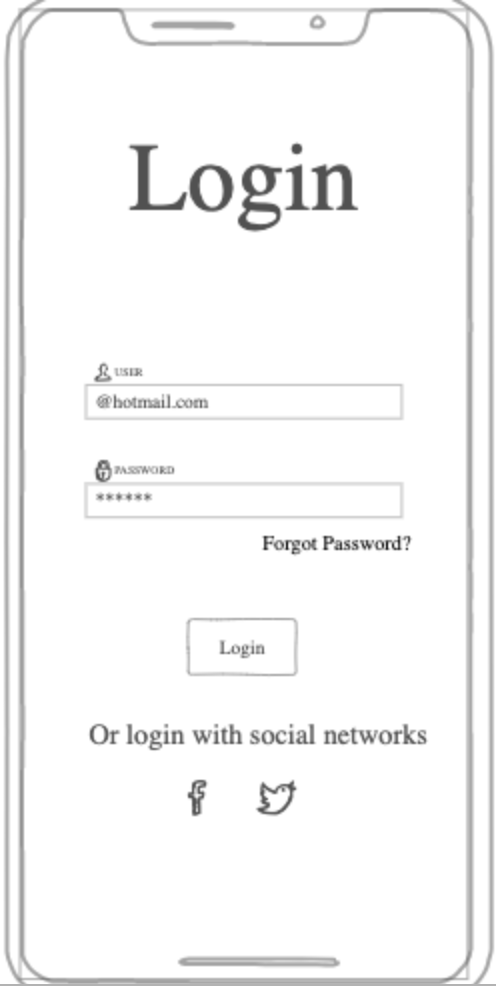
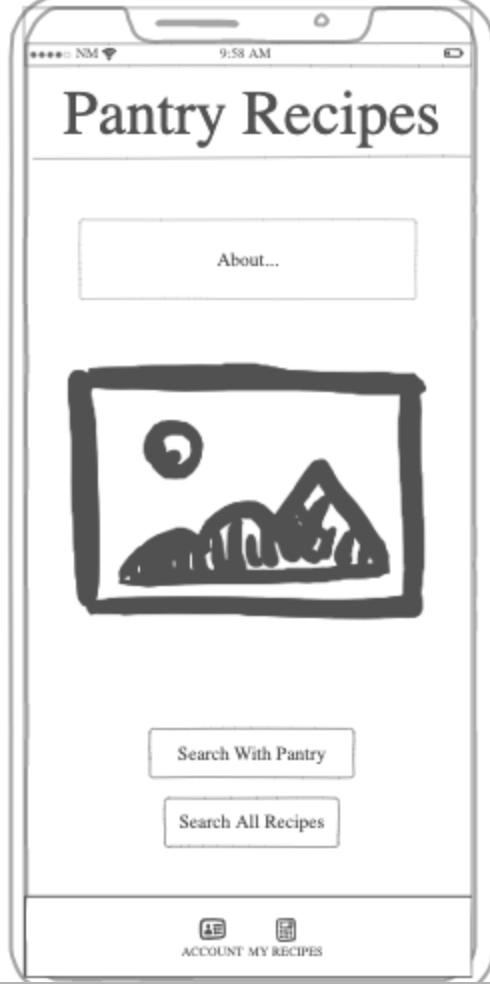
Are you ever in the mood to cook a home-made meal and you can only seem to find recipes for which you're missing a couple key ingredients? Pantry Recipes is a personalized recipe finder. The database is dependent on users' contributions. The user can add new recipes, search all recipes in the database, or do a custom search based on the ingredients they have in their pantry. With opportunity in advertisements and potential pro-memberships, the possibilities of growth are endless.
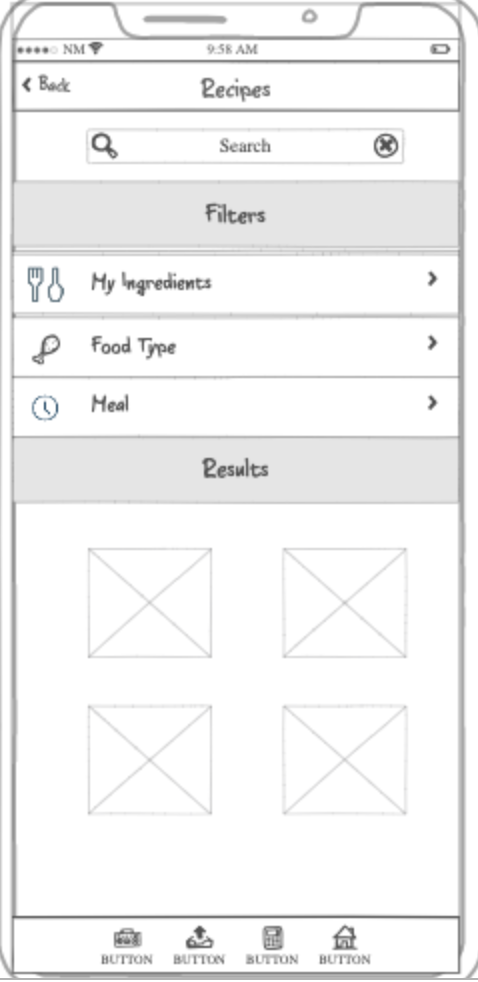
The app begins in a login/register page which then takes you to the home page where you can select to search, look at your account settings, or your recipes. Within the search page, you can filter by your ingredients, what type of food, and what meal of the day you are looking for (breakfast, lunch, dinner). You can also add new recipes in the "my recipes" section.
Key Features: -Secure login -Ability to add recipes to database -Ability to search database with filters

IP Address: 3.22.162.199
ssh -i /Users/nkroberts/Downloads/production.pem ubuntu@3.22.162.199
Make a console script exectuable: chmod +x deploy.sh
A-name records is a direct mapping of domain name to IP address, C-name Records map a domain name to another domain name and then to an IP address.
Caddy acts as a gateway to different web services, hosts web application files, and can enable HTTPS. ~/Caddyfile
Navigation through webpages is built entirely around hyperlinks. Subdomains can be added when deploying with the -s attribute along with the name for the subdomain.
"div" creates a division element
Use "cname" DNS record type to point to another DNS record. Used as an alias for an IP address
Import fonts from google using CSS "@import url('https://fonts...');"
CSS and HTML work together using selectors. Naming your HTML components and classes is important so that you can style them with CSS. Each type of object has specific attributes that you can edit to create whatever visual you please.
Use the "link" in your html headers to connect it with CSS.
Bootstrap allows for more styling within HTML. Specific class names correspond to pre-made bootstrap classes with style attributes. Include the following link to allow for bootstrap usage.
Content ] Padding ] Border ] Margin
Reduce takes an array and brings it down to one value
Map takes an array and creates an array of equal size maps each value to a new value
"margin: 0 auto;" can be used to center an element.
JSON Format: {"name": "Nate", "Year": "Sophomore", "Age": 22} JavaScript Object: {name: "Nate", year: "Sophomore", Age:22 }
You can create HTML elements in Javascript with the createElement('type') function. This is helpful for adding table rows when you have new information or under any specific conditions.
Insert text into elements with element.textContext = '...' or element.innerHTML = '...'
Reference CSS/HTML elements using the document.querySelector('#selector') function. Use querySelectorAll to get all elements
Function Declarations: function f(x) {} const f = function(x) {} const f = (x) => {}
Javascript string function modifiers: i-case insensitive, g-global, m-multi line
DOM textContent property sets the child text for an element
Fetch takes a URL and returns a promise. The following block gets and displays a random inspirational quote from a website:
fetch('https://api.quotable.io/random')
  .then((response) => response.json())
  .then((jsonResponse) => {
    console.log(jsonResponse);
  });
Node allows javascript to be deployed outside of a browser (in a server for example). NPM lets you use pre-made packages (https://www.npmjs.com/) with the command 'npm install ...'. This downloads the modules into a directory called "node_modules". Use the package by referencing the package name as a parameter to the 'require' function.
npm install give-me-a-joke
const giveMeAJoke = require('give-me-a-joke');
giveMeAJoke.getRandomDadJoke((joke) => {
  console.log(joke);
});
Express package is useful for creating a server.
const http = require('http');
const server = http.createServer(function (req, res) {
  res.writeHead(200, { 'Content-Type': 'text/html' });
  res.write('<h1>Hello Node.js!</h1>');
  res.end();
});

server.listen(8080, () => {
  console.log(`Web service listening on port 8080`);
});
Create a cluster on mongo atlas, add username, password, and port (get port from connect tab). Create a new database file with the following. Proccess.env variables are updated in the ~/.zprofile file.
const userName = process.env.MONGOUSER;
const password = process.env.MONGOPASSWORD;
const hostname = process.env.MONGOHOSTNAME;

const { MongoClient } = require('mongodb');
const url = `mongodb+srv://${userName}:${password}@${hostname}`;
const client = new MongoClient(url);
client.connect(err => {
  const collection = client.db("test").collection("devices");

  // ... perform actions on the DB collection

  client.close();
});
HTTP Responses- 100s: Informational, 200s: Successful, 300s: Redirection, 400s: Client Error, 500s: Server Error
HTTP Headers examples: Host, Content-Type, Cookie
Functions defined in the database file are called from the endpoints in the index.js file.
Authentication services require 3 key endpoints- create, login, and getme. Uses bcrypt, cooker-parser, express, mongodb, uuid. Cookies allow a server to store data on the client
const { MongoClient } = require('mongodb');
const uuid = require('uuid');
const bcrypt = require('bcrypt');
const cookieParser = require('cookie-parser');
const express = require('express');
const app = express();

const userName = process.env.MONGOUSER;
const password = process.env.MONGOPASSWORD;
const hostname = process.env.MONGOHOSTNAME;

const url = `mongodb+srv://${userName}:${password}@${hostname}`;
const client = new MongoClient(url);
const collection = client.db('authTest').collection('user');

app.use(cookieParser());
app.use(express.json());

// createAuthorization from the given credentials
app.post('/auth/create', async (req, res) => {
  if (await getUser(req.body.email)) {
    res.status(409).send({ msg: 'Existing user' });
  } else {
    const user = await createUser(req.body.email, req.body.password);
    setAuthCookie(res, user.token);
    res.send({
      id: user._id,
    });
  }
});

// loginAuthorization from the given credentials
app.post('/auth/login', async (req, res) => {
  const user = await getUser(req.body.email);
  if (user) {
    if (await bcrypt.compare(req.body.password, user.password)) {
      setAuthCookie(res, user.token);
      res.send({ id: user._id });
      return;
    }
  }
  res.status(401).send({ msg: 'Unauthorized' });
});

// getMe for the currently authenticated user
app.get('/user/me', async (req, res) => {
  authToken = req.cookies['token'];
  const user = await collection.findOne({ token: authToken });
  if (user) {
    res.send({ email: user.email });
    return;
  }
  res.status(401).send({ msg: 'Unauthorized' });
});

function getUser(email) {
  return collection.findOne({ email: email });
}

async function createUser(email, password) {
  const passwordHash = await bcrypt.hash(password, 10);
  const user = {
    email: email,
    password: passwordHash,
    token: uuid.v4(),
  };
  await collection.insertOne(user);

  return user;
}

function setAuthCookie(res, authToken) {
  res.cookie('token', authToken, {
    secure: true,
    httpOnly: true,
    sameSite: 'strict',
  });
}

const port = 8080;
app.listen(port, function () {
  console.log(`Listening on port ${port}`);
});
Websocket uses an initial HTTP connection from a client which upgrades to a websocket connection in which 2 parties can send data to another. Create a websocket object with the port number you wish to communicate on then send messages using on onmessage function.
const socket = new WebSocket('ws://localhost:9900');

socket.onmessage = (event) => {
  console.log('received: ', event.data);
};

socket.send('I am listening');
Connect websocket to HTML so that the user has text area to submit their message. Call your sendMessage() function when they press the 'enter' key. Download the ws package and create a cwebsocket server in the same directory as your index.js using the same port.
function sendMessage() {
  const msgEl = document.querySelector('#new-msg');
  const msg = msgEl.value;
  if (!!msg) {
    appendMsg('me', 'me', msg);
    const name = document.querySelector('#my-name').value;
    socket.send(`{"name":"${name}", "msg":"${msg}"}`);
    msgEl.value = '';
  }
}
JSX: Used to inject HTML into javascript, componentize your HTML, and allow for composability of your HTML
Linux Daemon- A service process that runs in the background and supervises the system or provides functionality to other processes. It executes independent of a user and starts when a computer is rebooted. (example: pm2)
Steps to convert Javascript project to React
-
Create service directory and add JS service files, package.json, package-lock.json. Delete the node_modules directory. Run 'npm install' in the service directory. Make src directory with all of the React code. Run node 'index.js' and use curl to test endpoints on the local host.
-
Commit to github.
-
Run 'npx create-react-app template-react'
-
Clean up the template code- uninstall NPM packages (test), delete unnecessary files, rename js files to have jsx extension, update manifest.json to represent your app, clean up index.html
-
Copy over generated files from the template-react to your app repo directory. Delete the template-react directory, run 'npm install' in the app directory.
-
Convert react bootstrap- run 'npm install bootstrap react-bootstrap' and add "import 'bootstrap/dist/css/bootstrap.min.css';" to components to use bootstrap styling.