Single-executable fan controller. Should work with every pwmchip-capable board.
- Requires only
python3-peripheryfrom package manager - Adjusts speed based on both CPU and NVME temperatures
- Smooth curves - gradual speed adjustments
- Hysteresis - wont switch back and forth degrading the fan
- Works with multiple fans (as separate instance/service)
- Falls back at full speed in case of termination/failure
- Multi-layered security
sudo apt install python3-periphery                                              # install systemd module for python
git clone https://github.com/nobody43/sbc-fan-control.git
cd sbc-fan-control
sudo install -m 644 -o root -g root apparmor.d/sbc-fan-control /etc/apparmor.d/ # install AppArmor profile for executable
sudo apparmor_parser --add /etc/apparmor.d/sbc-fan-control                      # confine profile for executable
sudo install -m 755 -o root -g root sbc-fan-control.py /usr/local/bin/          # install the executable
sudo install -m 644 -o root -g root systemd/system/sbc-fan-control@.service /etc/systemd/system/ # install service unit- Choose, connect the fan, and enable PWM
- Determine available PWM chips/fans:
sudo sbc-fan-control.py --list - Test without service:
sudo sbc-fan-control.py --device febf0020.pwm - Enable the service:
sudo systemctl enable sbc-fan-control@febf0020.pwm.service - Display operational data in log with signal:
sudo kill -USR1 $(pgrep -af "python3 /usr/local/bin/sbc_fan_control.py" | awk 'NR==1{print $1}')
sudo apt purge python3-periphery
sudo systemctl stop sbc-fan-control@febf0020.pwm.service
sudo systemctl disable sbc-fan-control@febf0020.pwm.service
sudo rm /etc/systemd/system/sbc-fan-control@.service
sudo rm /usr/local/bin/sbc-fan-control.py
sudo apparmor_parser --remove /etc/apparmor.d/sbc-fan-control
sudo rm /etc/apparmor.d/sbc-fan-controlYou need to load PWM overlay in your boot config. Differs on every board - refer to documentation.
A PWM-capable fan (4 pins) like NF-A4x10 5V PWM or NF-A4x20 5V PWM is required. Most boards won't have corresponding 4-pin connector - additional breadboard short jumper cables are needed (male-female). Following wire colors are for Noctua.
Load overlay inside your boot config /boot/armbianEnv.txt and reboot:
overlays=pwm14-m2
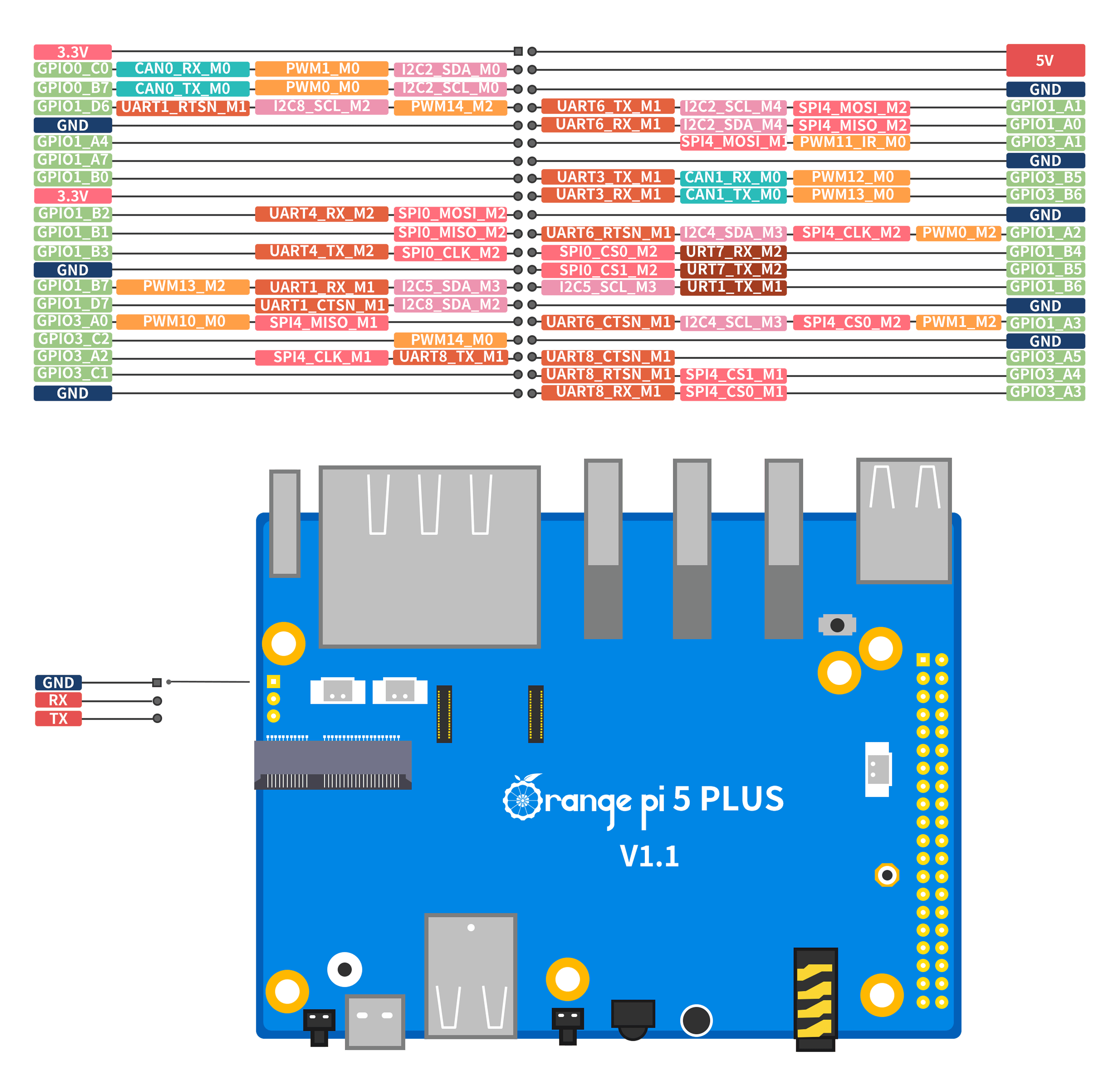
Pin layout, sequential numbers
- Connect yellow wire to
5V(PIN 4) - Connect black wire to
GND(PIN 6) - Skip the green wire
- Connect blue wire to
PWM14_M2(PIN 7)
PWM14_M2 holds febf0020.pwm address: sudo systemctl enable sbc-fan-control@febf0020.pwm.service