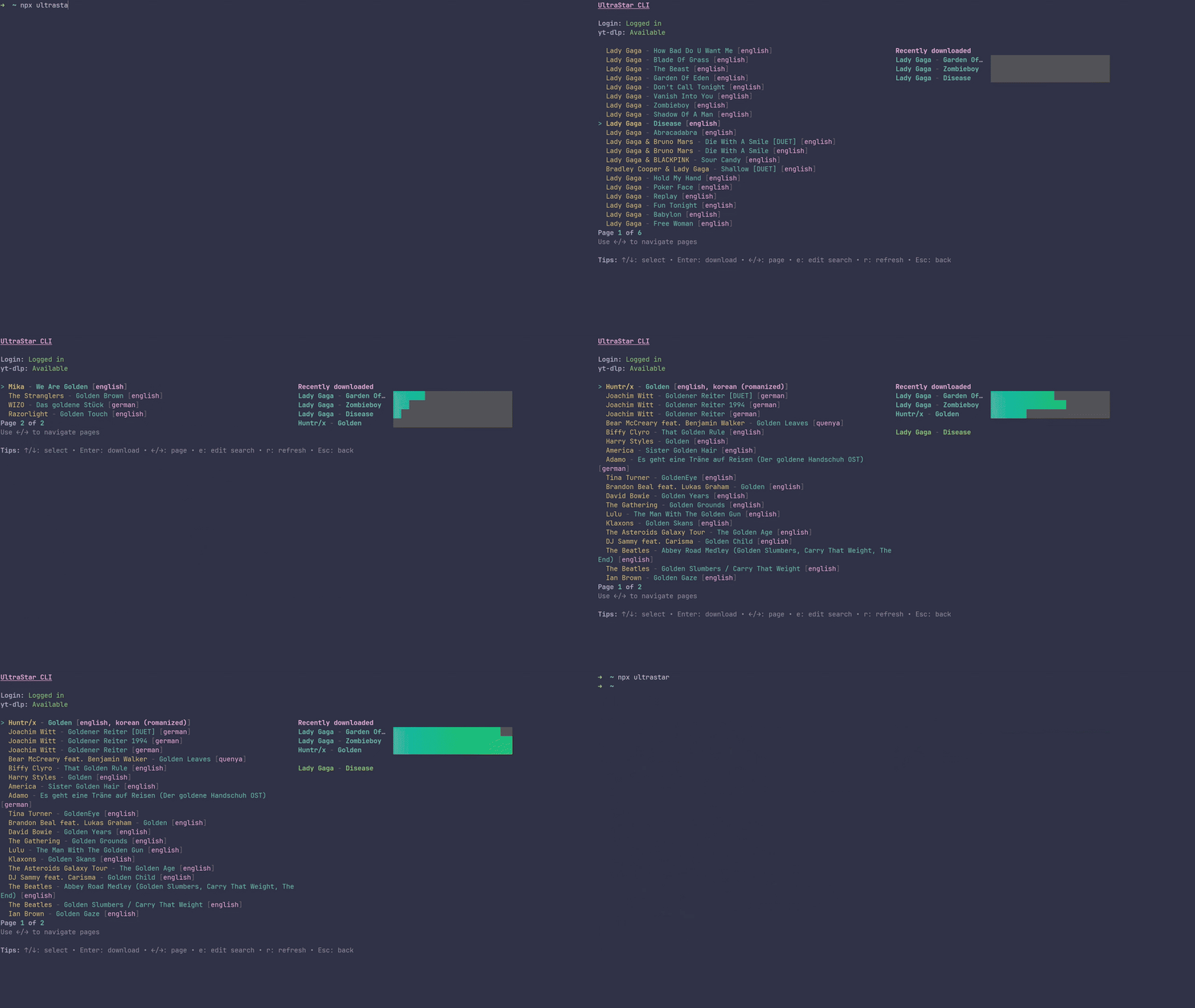
UltraStar CLI is the fastest and most powerful tool to build, manage, and scale your local UltraStar karaoke song library. Search the biggest UltraStar database, preview results, and download complete, ready-to-sing folders in one go — lyrics, cover, and video included. No manual stitching. No messy files. Just search, queue, and sing.
- Blazing Fast TUI: Powered by Ink (React for terminals), offering a modern, responsive, and intuitive command-line interface.
- Smart Sourcing: Pulls accurate metadata and lyrics from the largest UltraStar DB and automatically resolves/fetches matching high-quality video formats via YouTube.
- Robust Bulk Downloading: Queue thousands of songs at once. Process entire artist discographies or massive playlists in parallel without manual intervention.
- Crash-Resilient Architecture: Downloads are managed by a persistent queue. If you close the app or your PC crashes, your queue is saved and will resume exactly where it left off.
- Automated Repair Mode: Accidentally deleted videos? Encountered a YouTube bot-block? The built-in repair tool scans your local library and surgically re-downloads only the missing or broken files without touching your intact metadata.
- Strict Duplicate Prevention: The system remembers your download history. It prevents double-downloads across sessions, saving your bandwidth and storage.
- Cross‑platform: Works seamlessly on Linux, macOS, and Windows.
yt-dlp(required for downloading video and audio streams securely)ffmpeg(required by yt-dlp to merge video and audio streams)- Node.js (via
npm) or Bun (Highly Recommended for maximum performance)
- macOS:
brew install yt-dlporpipx install yt-dlp - Windows:
winget install yt-dlp.yt-dlporchoco install yt-dlp - Linux: Use your package manager (e.g.,
apt install yt-dlp,pacman -S yt-dlp)
- Node.js: We recommend installing via nvm
- Bun (Recommended):
curl -fsSL https://bun.sh/install | bash(Windows users can install via PowerShell:powershell -c "irm bun.sh/install.ps1 | iex")
You can run this exact version of the CLI directly from GitHub using Bun. The first run will automatically check your environment (yt-dlp, ffmpeg) and initialize a secure session.
bunx --bun github:normannormalmann/UltraStar-CLIBy default, your songs will be saved under ./songs/Artist - Title/ relative to where you run the command. You can change this path within the app's Setup menu.
To prevent accidental inputs while typing in the search bar, all core commands are mapped securely using the Ctrl modifier.
| Shortcut | Action |
|---|---|
Tab |
Switch focus between Artist and Title fields |
Enter |
Submit search |
Ctrl+S |
Open Setup (configure download directory and browser cookies) |
Ctrl+V |
Open Repair Mode (scan library for broken/missing videos) |
Esc |
Quit application |
| Shortcut | Action |
|---|---|
↑ / ↓ |
Select a song from the list |
← / → |
Navigate between pages |
Enter |
Download immediately (bypasses the queue) |
Ctrl+E |
Edit current search |
Ctrl+R |
Refresh results |
Esc |
Back to search form |
The CLI features a powerful, memory-safe queue system. You can queue up thousands of songs, and the CLI will process them in parallel in the background.
| Shortcut | Action |
|---|---|
Ctrl+Q |
Add the currently selected song to the queue |
Ctrl+A |
Add all songs on the current page to the queue |
Ctrl+P |
Fetch and add every page of the search result to the queue (Great for downloading an artist's entire discography) |
Ctrl+D |
Start processing the queue |
- Search: The app securely authenticates with USDB and queries their database.
- Resolve: If a song lacks a direct YouTube ID on USDB, the app utilizes
yt-dlpto perform a targeted, heuristic search on YouTube to find the best matching karaoke/audio track. - Download: The video and audio are pulled in high quality via
yt-dlpand merged viaffmpeg. - Assemble: The app fetches the cover art and lyrics, then formats a perfect, standard-compliant
song.txtfile compatible with UltraStar Deluxe, Vocaluxe, and UltraStar Play. - Track: Successful and failed downloads are recorded locally (
downloaded.jsonandfailed-downloads.xlsx) to prevent duplicates and make retries easy.
This project uses Bun natively. You can still run the built CLI with Node, but development is optimized for Bun.
git clone https://github.com/martiinii/UltraScrap-cli.git
cd UltraScrap-cli
bun installbun run startbun run build
# Artifacts are written to ./build/distbun run lint
bun run format- YouTube Bot Protection Blocks (Sign in to confirm you're not a bot): YouTube frequently blocks automated downloads. Press
Ctrl+Sto open the setup menu and provide the name of your primary browser (e.g.,edge,chrome). The app will extract your active YouTube session cookies. Make sure to close the browser before downloading so the cookie database isn't locked. - yt-dlp / ffmpeg not found: Ensure both tools are installed and added to your system's
PATHenvironment variable. - Segmentation Faults / OOM Crashes: Ensure you are using the latest version of the CLI. Older versions had memory leaks during massive bulk downloads, which have been fixed via debounced batch-writing and yielded queue processing.
- Repairing Broken Songs: If a download failed halfway, press
Ctrl+Vin the main menu. The app will locate the broken folders and securely patch them up.
- USDB (UltraStar Database) - The largest database of UltraStar lyrics.
- UltraStar España - Alternative database including full media packages.