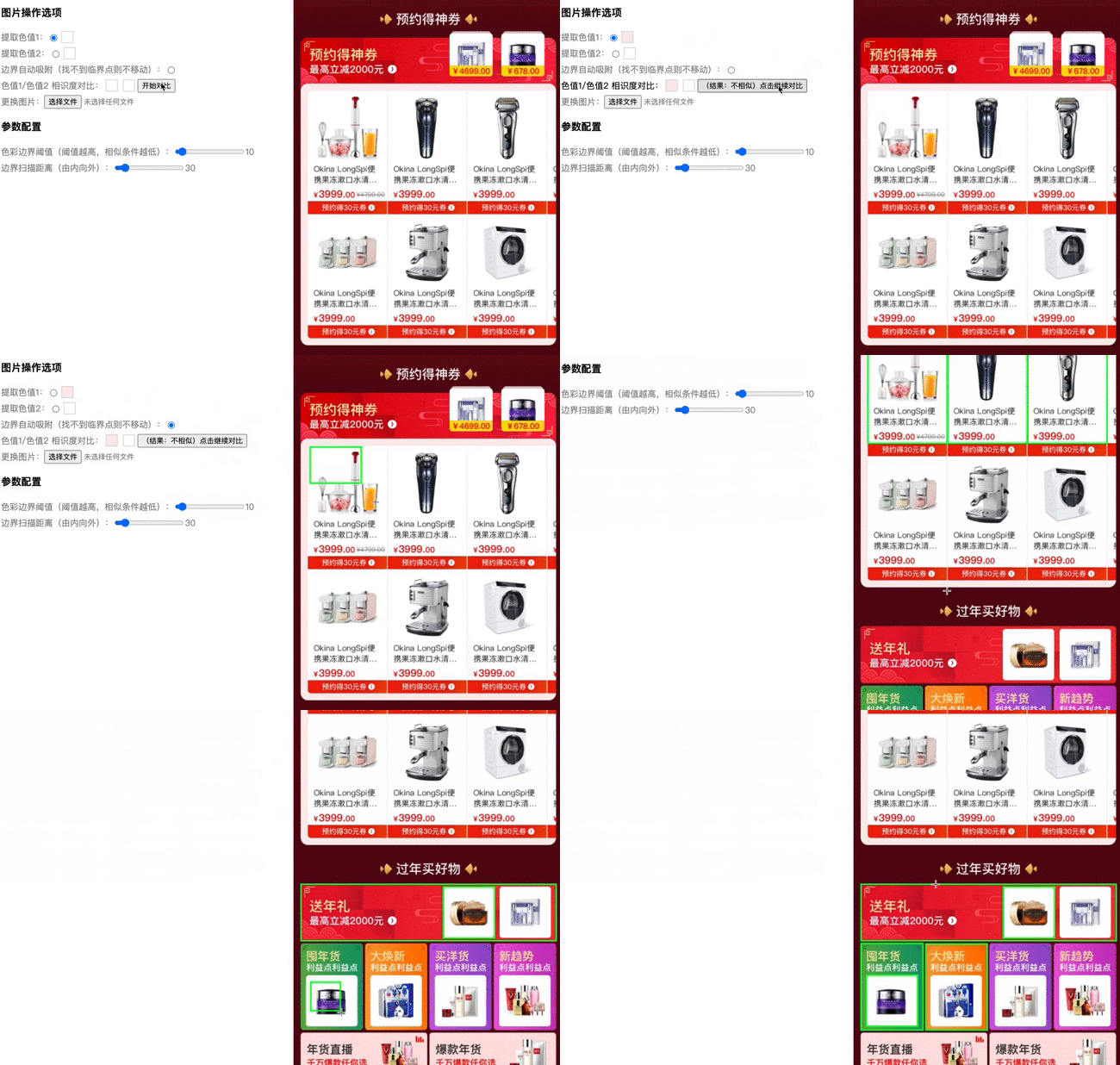
基于欧式距离公式及图片色值量化算法提供取色、色值相似度对比、色彩边界检测等能力。

npm install image-color-utils --save
import { ImageColorUtils } from 'image-color-utils'const { ImageColorUtils } = require('image-color-utils')import { ImageColorUtils } from 'image-color-utils'
const params = {
origin: img,
width: canvas.width,
height: canvas.height,
boundaryValue,
mockMovePx,
onload,
}
const imageColorUtils = new ImageColorUtils(params)
| Name |
Desc |
Type |
Default |
required |
| origin |
数据源(可以是 http链接 / ImageBitmap / HTMLImageElement ) |
string / HTMLImageElement / ImageBitmap / |
- |
true |
| width |
画板宽度 |
number |
- |
false (不传参将根据图片宽高自适应,origin 为 ImageBitmap / HTMLImageElemen,必填) |
| height |
画板高度 |
number |
- |
false (不传参将根据图片宽高自适应,origin 为 ImageBitmap / HTMLImageElemen,必填) |
| mockMovePx |
边界扫描距离(最大边界扫描距离, 扫描方向由内向外) |
number |
30 |
false |
| boundaryValue |
色彩边界阈值(作用于色值相似度对比, 阈值越高,相似条件越高) |
number |
10 |
false |
| onload |
加载完成 |
()=>void |
- |
false |
| Desc |
Type |
| ImageColorUtils实例 |
Object |
import { ImageColorUtils } from 'image-color-utils'


const imageColorUtils = new ImageColorUtils({
  origin: img,
  width: canvas.width,
  height: canvas.height
})
const res = imageColorUtils.pickColor(x, y)
| Name |
Desc |
Type |
Default |
required |
| x |
目标点距离画布左上角x坐标 |
number |
- |
true |
| y |
目标点距离画布左上角y坐标 |
number |
- |
true |
| Desc |
Type |
| 目标点 rgb 色值 |
number[] |
import { ImageColorUtils } from 'image-color-utils'


const imageColorUtils = new ImageColorUtils({
  origin: img,
  width: canvas.width,
  height: canvas.height
})
const res = imageColorUtils.pickColors()
| Desc |
Type |
| 图片色值 |
{rgb: string[], hex: string[] } |
import { ImageColorUtils } from 'image-color-utils'

const imageColorUtils = new ImageColorUtils({
  origin: img,
  width: canvas.width,
  height: canvas.height,
  boundaryValue,
  mockMovePx
})
imageColorUtils.adjust(leftTopPosition, rightBottomPosition)
| Name |
Desc |
Type |
Default |
required |
| leftTopPosition |
图片所选区域初始左上角坐标 |
number[] |
[] |
false |
| rightBottomPosition |
图片所选区域初始右下角坐标 |
number[] |
[] |
false |
| Desc |
Type |
| 边界计算后左上角坐标(x,y)及区域宽高(width,height) |
Object:{x: number, y: number, width: number, height: number} |
import { ImageColorUtils } from 'image-color-utils'

const res = ImageColorUtils.compare(color1, color2, boundaryValue, type)
| Name |
Desc |
Type |
Default |
required |
| color1 |
rgb 色值1 |
number[] |
- |
true |
| color2 |
rgb 色值2 |
number[] |
- |
true |
| boundaryValue |
色彩边界阈值(作用于色值相似度对比, 阈值越高,相似条件越高) |
number |
10 |
false |
| type |
颜色模型 |
'rgb' or 'lab' |
'rgb' |
true |
import { hex2rgb } from 'image-color-utils'

const rgb = hex2rgb(hex)
| Name |
Desc |
Type |
Default |
required |
| hex |
HEX色值 |
String |
- |
true |
import { rgb2hex } from 'image-color-utils'

const hex = rgb2hex(rgb)
| Name |
Desc |
Type |
Default |
required |
| rgb |
RGB色值 |
number[] |
- |
true |
import { ImageColorUtils } from 'image-color-utils'

const imageColorUtils = new ImageColorUtils({
  origin: img,
  width: canvas.width,
  height: canvas.height,
  boundaryValue,
  mockMovePx
})

console.log(imageColorUtils.canvas)
console.log(imageColorUtils.ctx)
console.log(imageColorUtils.imageData)
| Name |
Type |
| canvas |
OffscreenCanvas |
| ctx |
OffscreenCanvasRenderingContext2D |
| imageData |
ImageData |
