[FOR-EACH-10]: Learning content for for-each #1066
Closed
Conversation
This file contains hidden or bidirectional Unicode text that may be interpreted or compiled differently than what appears below. To review, open the file in an editor that reveals hidden Unicode characters.
Learn more about bidirectional Unicode characters


This was referenced Jun 19, 2025


Contributor
Author
This stack of pull requests is managed by Graphite. Learn more about stacking. |

 kevinkim-ogp
changed the title
kevinkim-ogp
changed the title

Datadog ReportBranch report: ✅ 0 Failed, 993 Passed, 0 Skipped, 2m 34.68s Total Time |
2 tasks
kevinkim-ogp
force-pushed
the
chore/for-each/template
branch
from
1b41b7b to
ca52dd1
Compare
kevinkim-ogp
force-pushed
the
feat/learn-more-infobox
branch
from
a66ac22 to
a10a381
Compare
kevinkim-ogp
force-pushed
the
chore/for-each/template
branch
from
ca52dd1 to
6ba3c01
Compare
kevinkim-ogp
force-pushed
the
feat/learn-more-infobox
branch
2 times, most recently
from
b755452 to
8b614e1
Compare
kevinkim-ogp
force-pushed
the
chore/for-each/template
branch
from
6ba3c01 to
6cbb9a2
Compare
14 tasks

### TL;DR

Added a new "Find Multiple Rows" action to the Tiles app that allows users to retrieve multiple rows from a tile based on specified filters.

This is a prerequisite for for-each.

### What changed?

- Created a new `findMultipleRows` action that retrieves multiple rows from a tile based on filter conditions
- Implemented permission checks to ensure only owners and editors can access the data
- Added support for sorting results in ascending or descending order
- Implemented scan limit functionality to control the number of rows returned
- Created comprehensive tests to verify the action's functionality
- Added appropriate error handling for invalid filters and deleted tiles
- Integrated the new action with the existing Tiles app

### How to test?

1. Create a new action and select the "Find multiple rows" event from the Tiles app
2. Select a tile and configure filter conditions to match the rows you want to retrieve
3. Choose the order of results (ascending or descending)
4. Test the step and verify that the correct rows are returned


### Note to reviewers
This is meant to be the backend implementation of the findMultipleRows action, the data-out metadata will be updated again.

Feature flag has been added on LaunchDarkly to allow for progressive rollout.
### TL;DR * Added a new "Get Multiple Rows" action to the M365 Excel app that allows users to retrieve multiple rows from a excel table based on the specified lookup column and value. * Cell values for each column will be combined into a single variable under that column This is a prerequisite for for-each. #### Note to reviewers * This is meant to be the backend implementation of getting rows, the data-out metadata will be updated again. * Feature flag has been added on LaunchDarkly to allow for progressive rollout. * There will be a PR created below this to display the find multiple row results in a table ### What changed? * Created a new getTableRows action that retrieves multiple rows from a M365 Excel table based on a specified lookup column and value * Only the first 500 rows that meet the condition will be returned ### How to test? 1. Create a new step with M365 Excel app and select the 'Get table rows' event. 2. Select an excel file, table, and set the lookup column and value 3. Test the step and verify that the correct rows are returned ### Screenshots 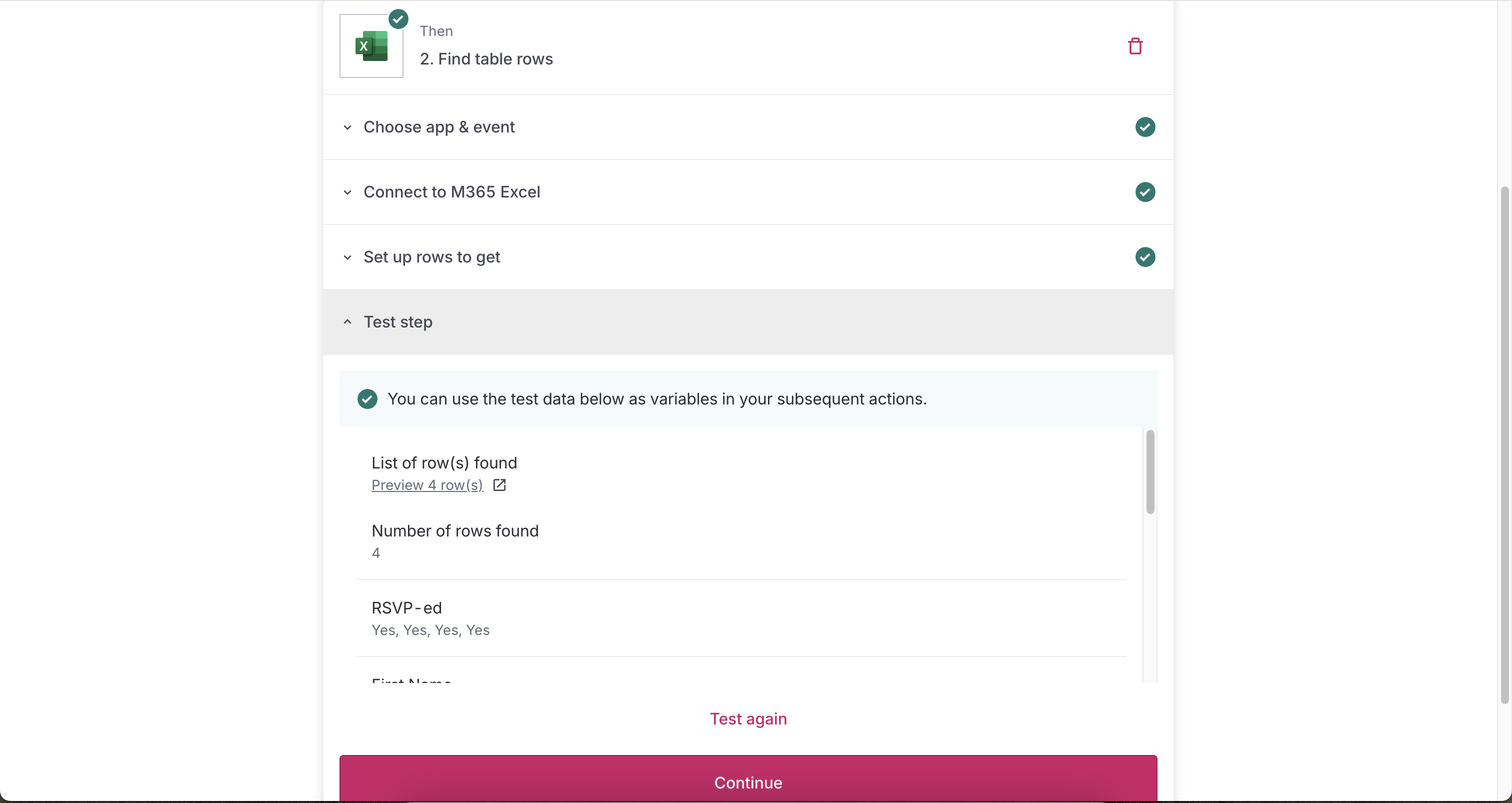 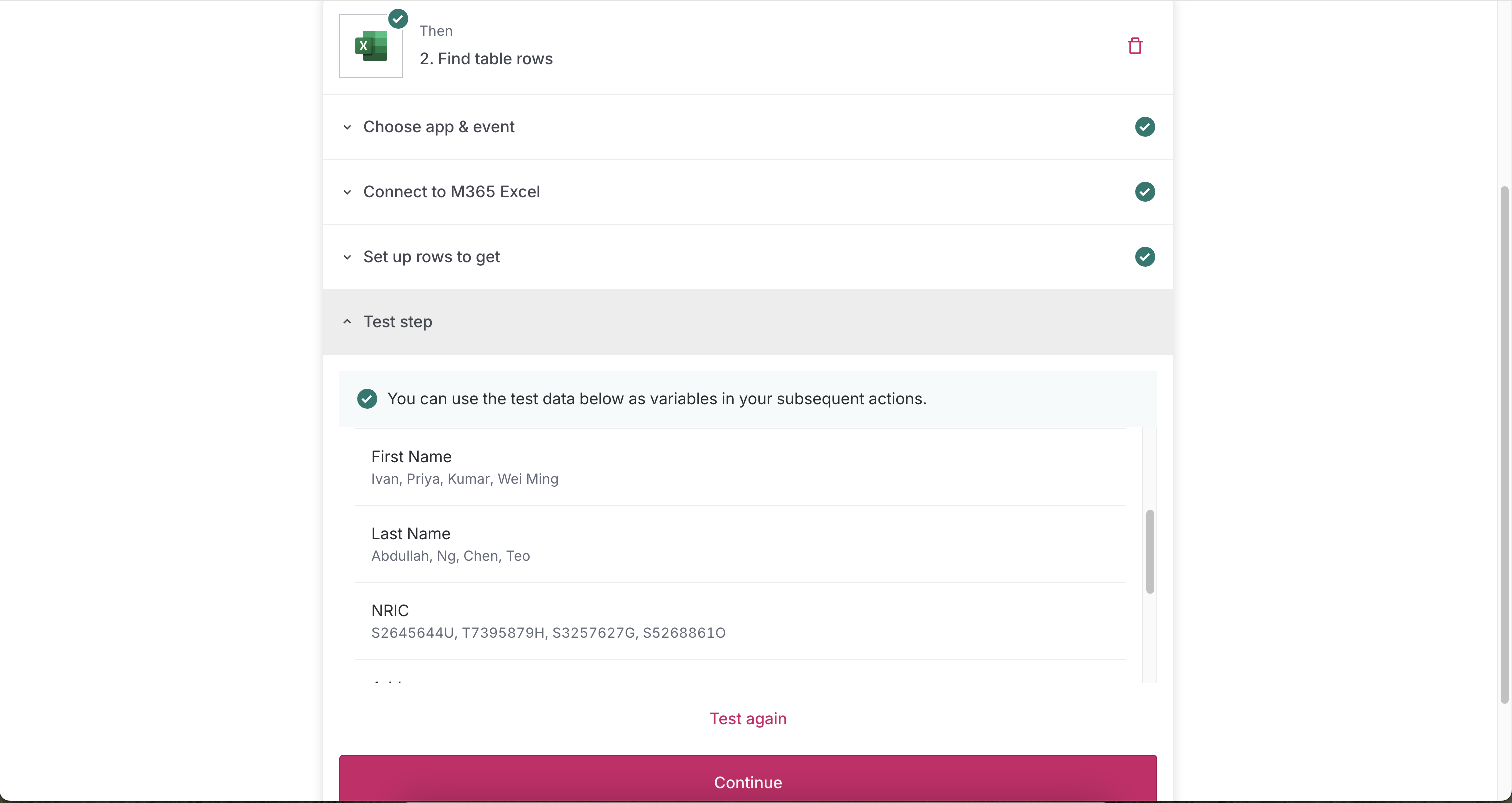
Adds a table view for displaying multiple rows in test steps for both Tiles and M365 Excel apps.

The find multiple row action is hidden by a LaunchDarkly flag. It will be made available together with the for-each release.

- Added a modal with a table view for displaying multiple rows in test steps
- Test step displays "Number of rows found" and "List of row(s) found"
- Preserved column order from when displaying results
- Improved styling to match the Tiles table design

NA

[Screen Recording 2025-04-15 at 2.53.00 PM.mov <span class="graphite__hidden">(uploaded via Graphite)</span> <img class="graphite__hidden" src="https://app.graphite.dev/api/v1/graphite/video/thumbnail/Wrwhm8Mmhv1Z2GwlSb7V/31e259a1-9416-4664-808a-74103865e704.mov" />](https://app.graphite.dev/media/video/Wrwhm8Mmhv1Z2GwlSb7V/31e259a1-9416-4664-808a-74103865e704.mov)

[Screen Recording 2025-04-15 at 2.53.33 PM.mov <span class="graphite__hidden">(uploaded via Graphite)</span> <img class="graphite__hidden" src="https://app.graphite.dev/api/v1/graphite/video/thumbnail/Wrwhm8Mmhv1Z2GwlSb7V/bd0edfa3-2a95-4679-875e-17c47b66f787.mov" />](https://app.graphite.dev/media/video/Wrwhm8Mmhv1Z2GwlSb7V/bd0edfa3-2a95-4679-875e-17c47b66f787.mov)
…1023) ## TL;DR Refactored to dynamically obtain column values for the `findMultipleRow` action instead of storing them in the execution step’s `dataOut`, to avoid duplicate data — since the values are already stored in the row data. **Note to reviewers** The modal that displays the list of rows in table format will be updated in a subsequent PR. As of now, the test result can still be verified in the output after testing the step. ## What changed? * Restructured the output format from `rows.rowData` to `data.rows` for better semantic clarity * Removed unnecessary consolidated column metadata as it is already available within the `data` * Added explicit value paths (`data.rows.*.data.<columnId>`) to column definitions for dynamic data access * Changed the type in metadata from 'array' to 'multiple-row-object' to better represent the data structure ## How to test? Set up the find multiple row action and test the following: - [ ] Number of rows returned is correct - [ ] Test result shows the correct number of columns with: - `id`: Tile column id (uuid) - `name`: Tile column name - `value`: step variable-like string in this format `data.rows.*.data.<columnId>` ## Screenshots 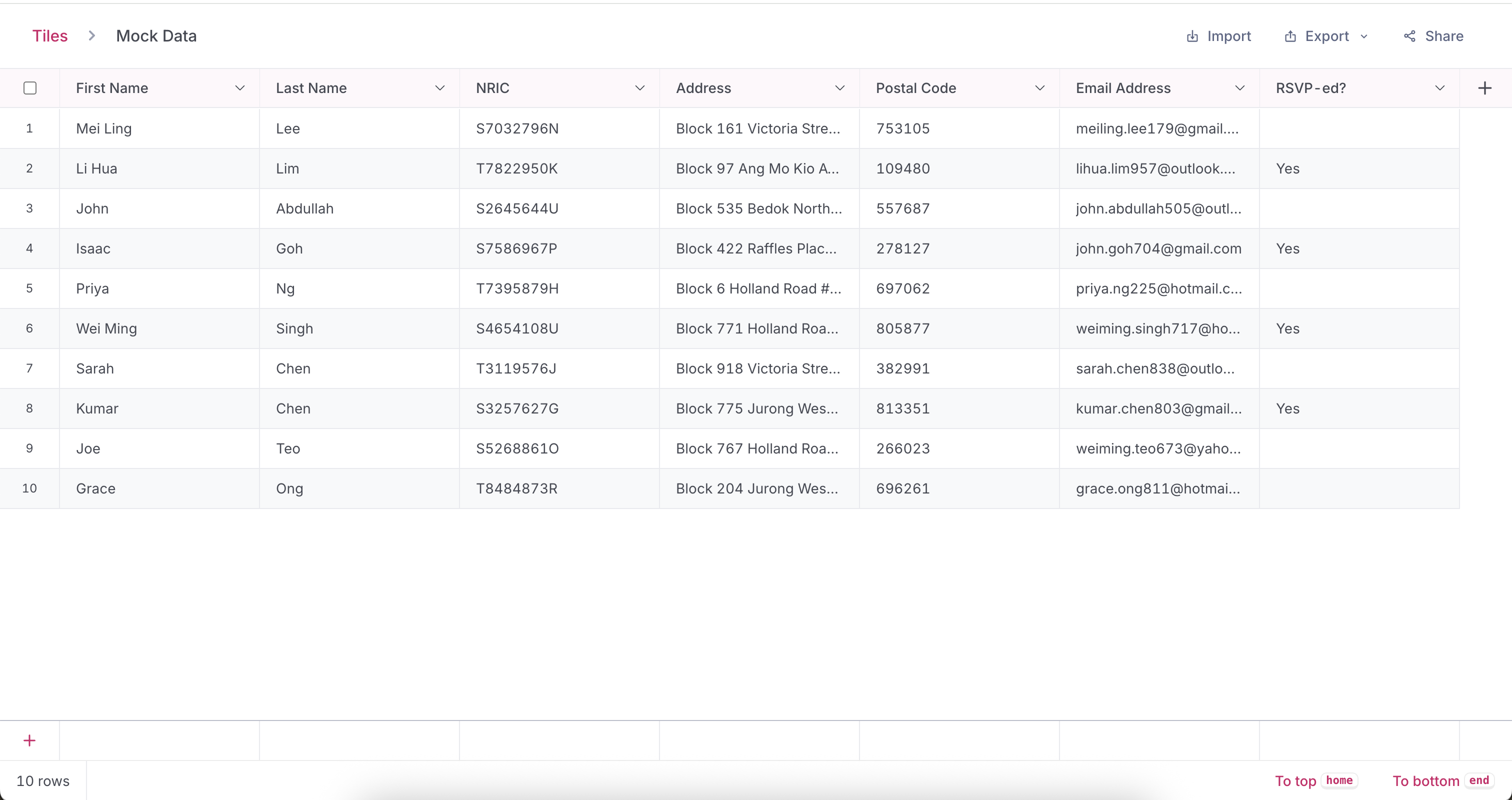 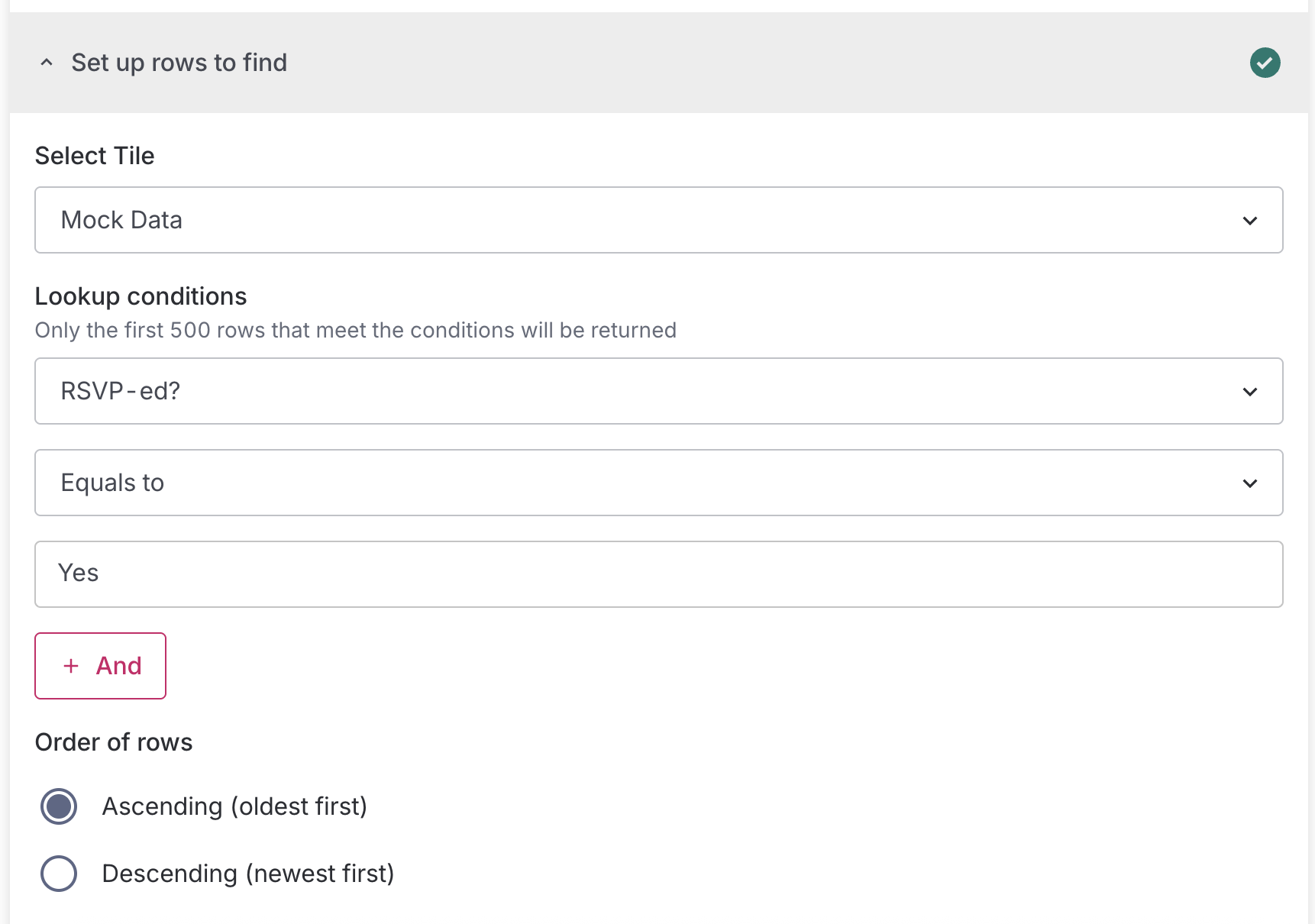 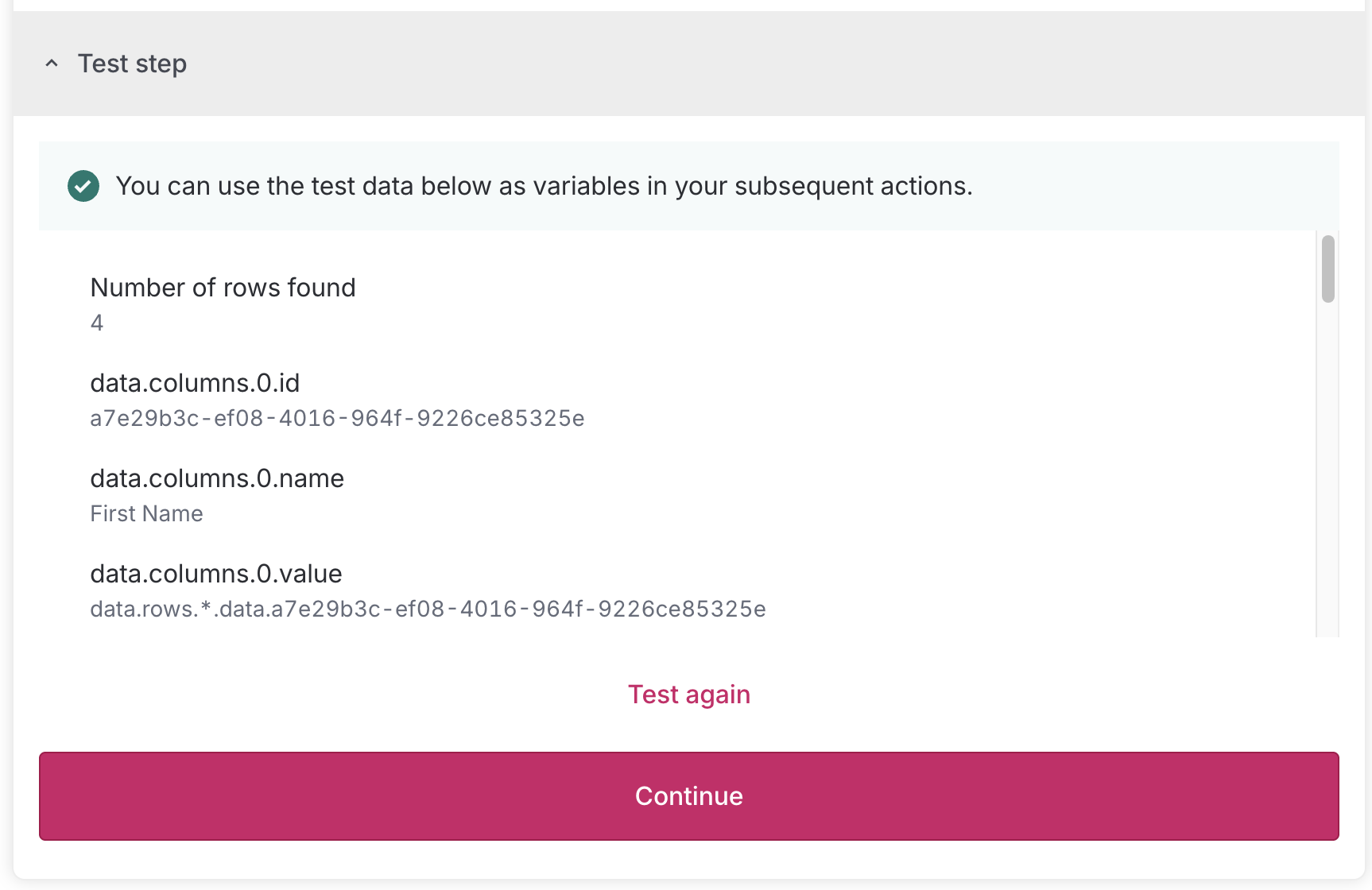
…1025) ## TL;DR Refactored to dynamically obtain column values for the `getTableRows` action instead of storing them in the execution step’s `dataOut`, to avoid duplicate data — since the values are already stored in the row data. **Note to reviewers** The modal that displays the list of rows in table format will be updated in a subsequent PR. As of now, the test result can still be verified in the output after testing the step. ## What changed? * Restructured output to align with Tiles multiple row output: * `rows.rowData` to `data.rows` for better semantic clarity\ * Removed unnecessary consolidated column metadata as it is already available within the `data` * Removed unnecessary `tableRowIndex` and `sheetRowNumber` * Added explicit value paths (`data.rows.*.data.<hex-encoded-column-name>`) to column definitions for dynamic data access * Changed the type in metadata from 'array' to 'multiple-row-object' to better represent the data structure ## How to test? Set up the find table rows action and test the following: - [ ] Number of rows returned is correct - [ ] Test result shows the correct number of columns with: - `id`: Tile column id (uuid) - `name`: Tile column name - `value`: step variable-like string in this format `data.rows.*.data.<hex-encoded-column-name>` ## Screenshots 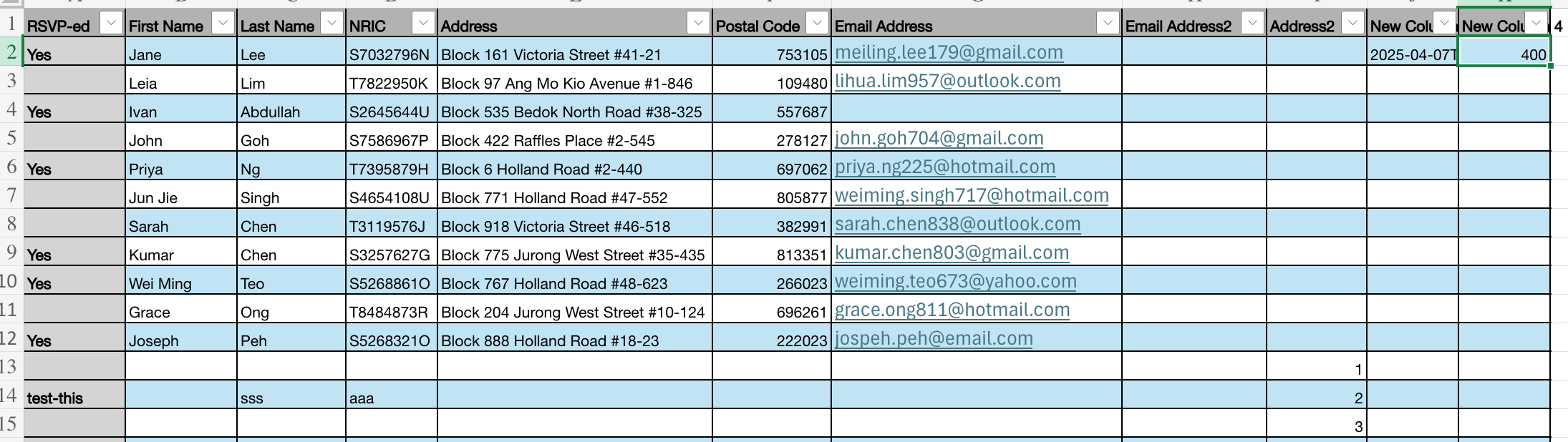  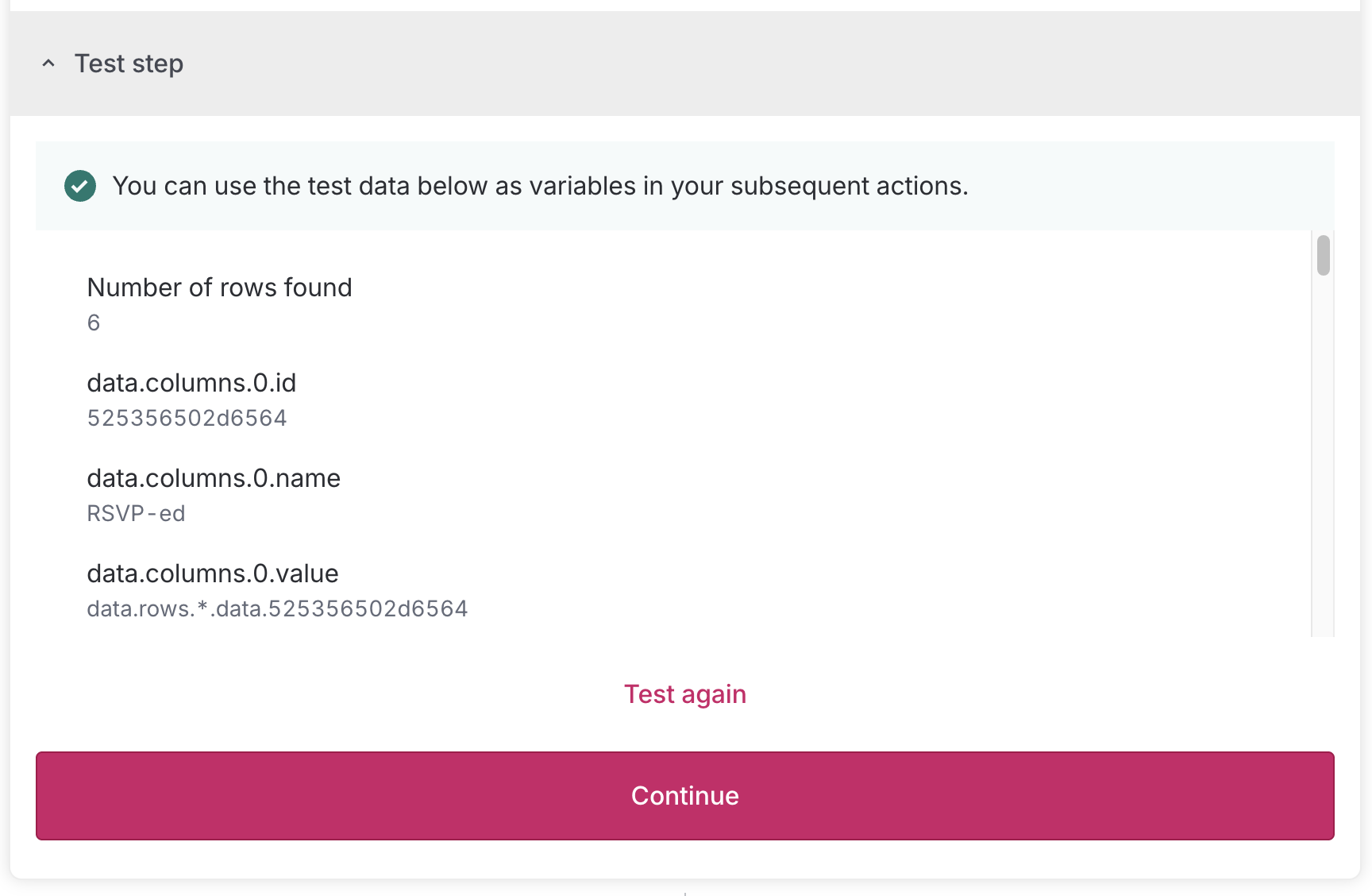
kevinkim-ogp
force-pushed
the
fix/for-each/handle-zero-values
branch
from
f3f0cd5 to
e854fc7
Compare
kevinkim-ogp
force-pushed
the
feat/learn-more-infobox
branch
from
22b6d78 to
e023cd5
Compare
### TL;DR This PR adds a "New" badge to actions marked with `isNew: true` and ensures they appear at the top of their respective app sections in the UI. ### What changed? - Added `isNew` property to the GraphQL schema for both Action and Trigger types - Created a reusable `NewBadge` component to display the "New" badge consistently - Modified the app sorting logic to prioritise actions with `isNew: true` within each app - Added the `isNew: true` flag to several actions: - "Find table rows" in Excel - "Find multiple rows" in Tiles - "For each" in Toolbox - Updated the UI components to display the "New" badge next to actions and triggers when applicable ### Screenshots - For each action 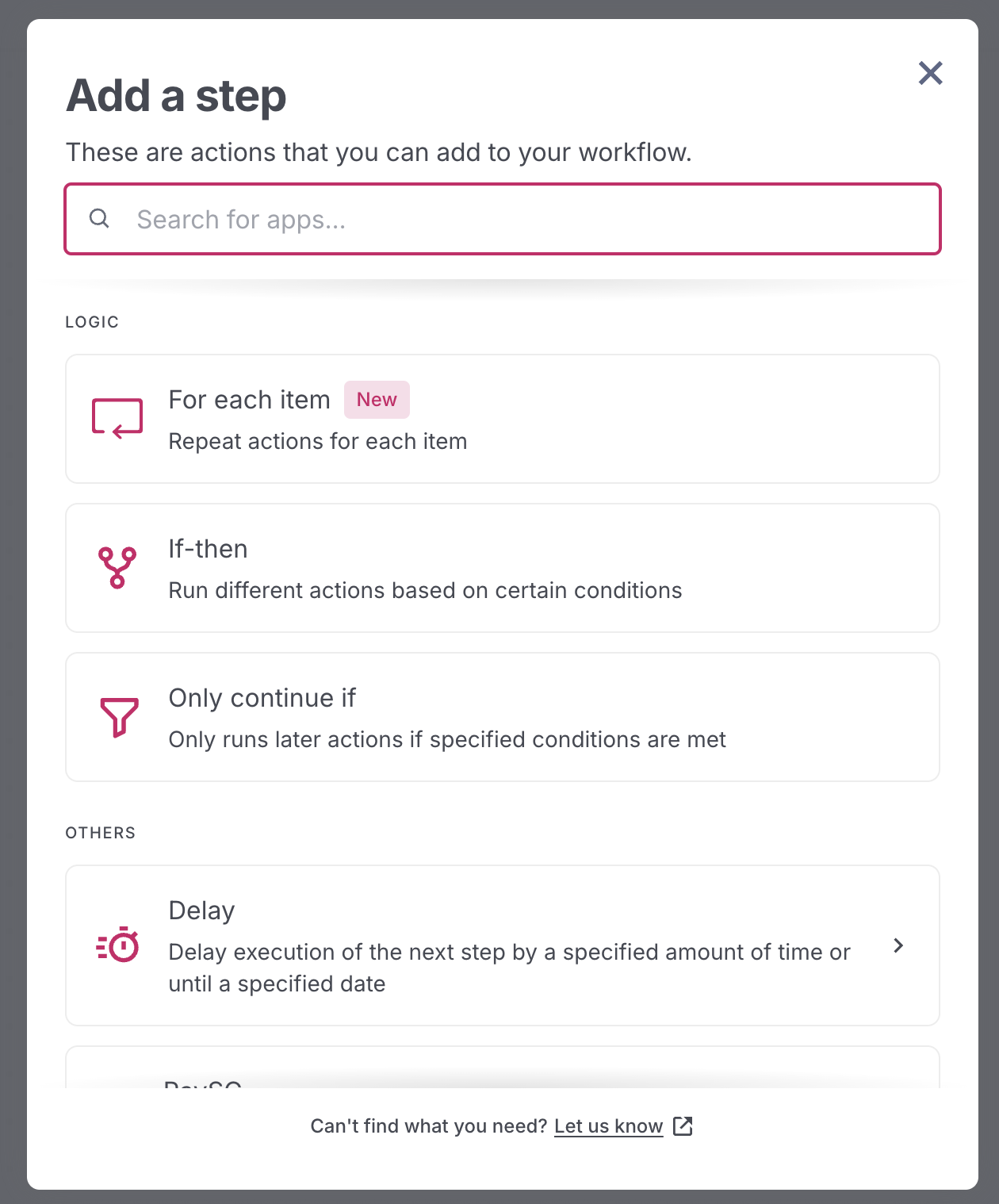 - Find multiple rows action  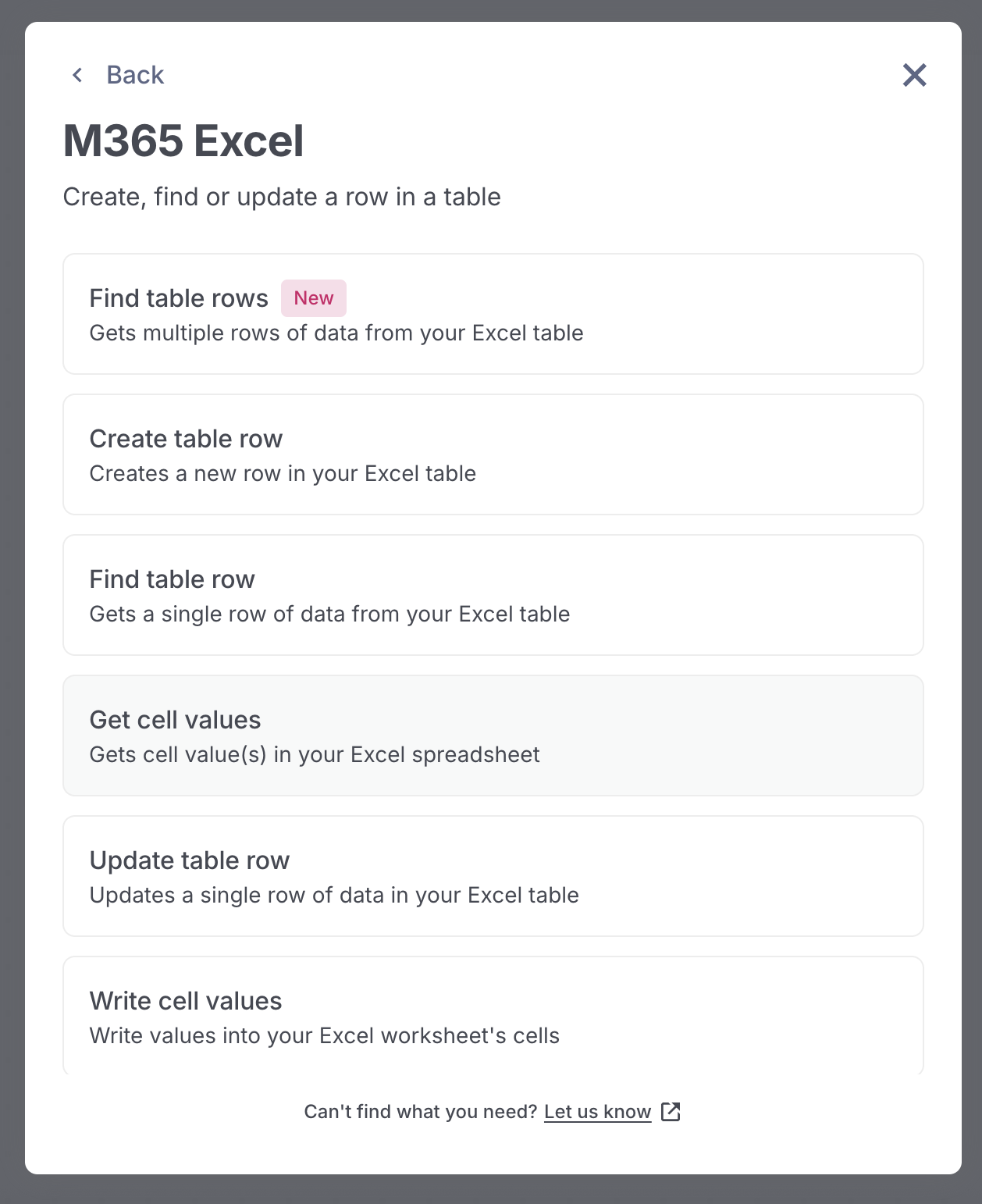
kevinkim-ogp
force-pushed
the
fix/for-each/handle-zero-values
branch
from
e854fc7 to
5eba251
Compare
kevinkim-ogp
force-pushed
the
feat/learn-more-infobox
branch
from
e023cd5 to
358b7b4
Compare
### TL;DR
Added a new 'partial-success' status for For Each iterations to better represent scenarios where steps complete with non-critical errors. This also makes it easier for users to filter iterations for retry on the Executions page.
_Partial successes are most likely to occur in Email by Postman actions where recipient emails are blacklisted._

### What changed?

- Added a new 'partial-success' status type to the execution step model
- Updated the frontend to display and filter partial success states
- Added a partial success icon and updated the GroupStatusFilter component to include the new status
- Modified the iteration status detection logic to identify partial success when a step has errorDetails but still completes

### How to test?
1. Create a Pipe with a ForEach step that includes an action that might result in partial success (e.g., email sending with some blacklisted recipients - `[email protected]`)
2. Execute the workflow and observe the partial success status in the execution page

- [ ] Execution should still be a success
- [ ] For each step should show as partial success
- [ ] Iteration selector should show the correct iteration with the partial success state
- [ ] Status filters should filter the different status correctly


### Screenshots

[Screen Recording 2025-07-09 at 11.14.01 PM.mov <span class="graphite__hidden">(uploaded via Graphite)</span> <img class="graphite__hidden" src="https://app.graphite.dev/api/v1/graphite/video/thumbnail/Wrwhm8Mmhv1Z2GwlSb7V/35adf176-1bb6-45eb-892b-a798b93f4780.mov" />](https://app.graphite.dev/media/video/Wrwhm8Mmhv1Z2GwlSb7V/35adf176-1bb6-45eb-892b-a798b93f4780.mov)
kevinkim-ogp
force-pushed
the
fix/for-each/handle-zero-values
branch
from
5eba251 to
b7afc52
Compare
kevinkim-ogp
force-pushed
the
feat/learn-more-infobox
branch
from
358b7b4 to
4aead77
Compare
### TL;DR
Allows users to replace variables in single-select mode by clicking on a variable in the input and selecting a new one from the suggestions popover.


### How to test?
- [ ] Single select inputs (For-each item)
  - [ ] Can select variable in empty input
  - [ ] Can delete variable and select a new variable
  - [ ] Can select variable and replace with another variable from the suggestions popover

- [ ] All other inputs
  - [ ] Can still select multiple variables and type freely in them
  - [ ] Can select variable and replace with another variable from the suggestions popover

### Screenshots

[Screen Recording 2025-07-09 at 10.59.31 PM.mov <span class="graphite__hidden">(uploaded via Graphite)</span> <img class="graphite__hidden" src="https://app.graphite.dev/api/v1/graphite/video/thumbnail/Wrwhm8Mmhv1Z2GwlSb7V/14695cf9-0766-49d4-b236-c275dc4856a3.mov" />](https://app.graphite.dev/media/video/Wrwhm8Mmhv1Z2GwlSb7V/14695cf9-0766-49d4-b236-c275dc4856a3.mov)

### Why make this change?
Previously, users could replace variables by clicking on them and selecting a new one from the suggestions popover. This change prevents a regression and restores that expected behaviour.
kevinkim-ogp
force-pushed
the
fix/for-each/handle-zero-values
branch
2 times, most recently
from
1327fb0 to
41cd5a8
Compare
kevinkim-ogp
force-pushed
the
feat/learn-more-infobox
branch
from
4aead77 to
4f13744
Compare
kevinkim-ogp
changed the base branch from
fix/for-each/handle-zero-values
to
graphite-base/1066
### TL;DR Fixed inconsistent handling of empty values in For Each action, which caused issues when cell values were `0` by standardising how empty values and string conversions are managed. ### What changed? - Modified `getDataOutMetadata.ts` to consistently convert displayed values to strings using `String()` instead of relying on implicit conversion - Changed empty value representation from space character (`' '`) to empty string (`''`) in tests and implementation so that checking against step parameters against test executions yielded accurate results of whether that was the latest test - Fixed the fallback logic in `computeForEachParameters.ts` to use nullish coalescing (`??`) instead of logical OR (`||`) to properly handle falsy values like `0` or `false` - Simplified the variable value selection in `RichTextEditor` component using nullish coalescing ### How to test? 1. Create a Pipe with a For Each action 2. Test with various data types including empty values, zeros, and boolean values - [ ] Variable pills should show `0` - [ ] Variable should show `false` - [ ] Variable with empty displayedValue should be an empty variable pill with dotted outline ### Screenshots #### Before 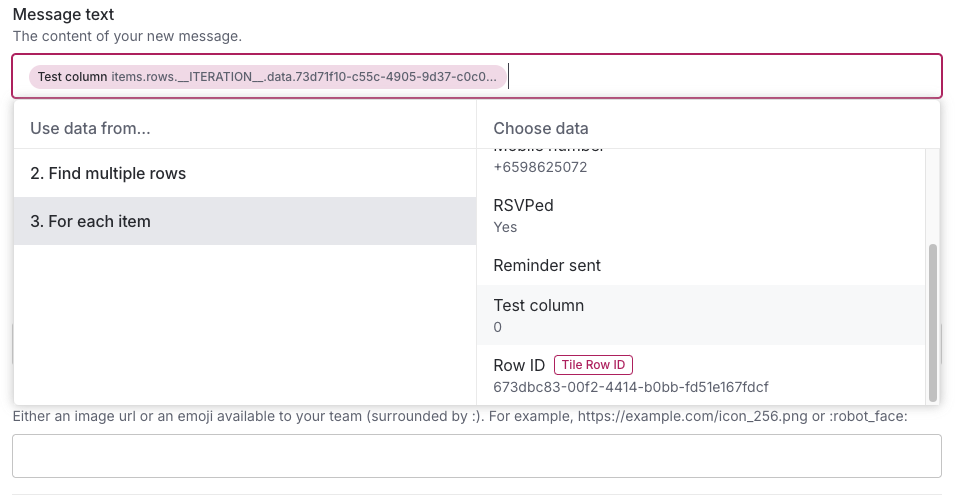 #### After 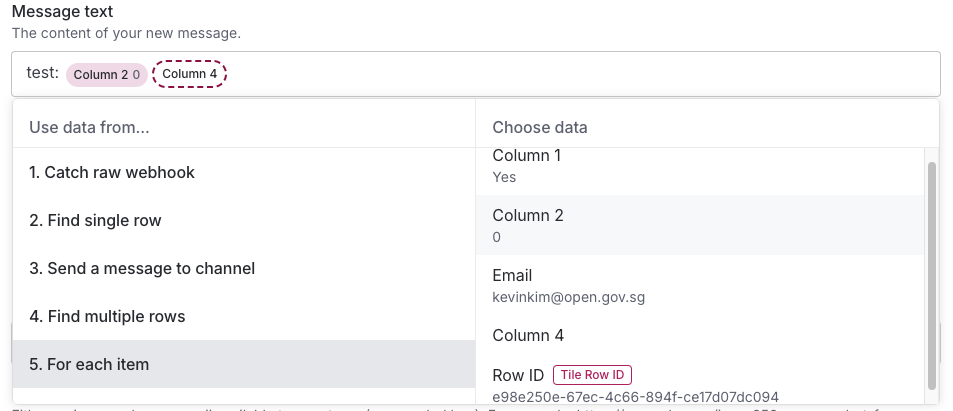 ### Why make this change? This change ensures consistent handling of empty and falsy values throughout the For Each action. The previous implementation had inconsistencies where empty values were sometimes represented as spaces and numeric values weren't properly converted to strings. Using nullish coalescing instead of logical OR prevents valid falsy values (like 0 or false) from being incorrectly replaced with empty strings.
kevinkim-ogp
force-pushed
the
feat/learn-more-infobox
branch
from
4f13744 to
a3b41b4
Compare
kevinkim-ogp
force-pushed
the
graphite-base/1066
branch
from
41cd5a8 to
1fd3fcc
Compare
 graphite-app
bot
changed the base branch from
graphite-base/1066
to
trunk/for-each
kevinkim-ogp
force-pushed
the
feat/learn-more-infobox
branch
from
graphite-app
bot
changed the base branch from
graphite-base/1066
to
trunk/for-each
kevinkim-ogp
force-pushed
the
feat/learn-more-infobox
branch
from
a3b41b4 to
98fd1ae
Compare
kevinkim-ogp
force-pushed
the
trunk/for-each
branch
from
1fd3fcc to
0a3c062
Compare
 pregnantboy
force-pushed
the
develop-v2
branch
from
pregnantboy
force-pushed
the
develop-v2
branch
from
308c1b0 to
f4f6fee
Compare
Contributor
Author
|
no longer required, a separate PR has been raised to open a link to the guide instead of showing the learning content directly in the editor |
Sign up for free
to join this conversation on GitHub.
Already have an account?
Sign in to comment















Add this suggestion to a batch that can be applied as a single commit.
This suggestion is invalid because no changes were made to the code.
Suggestions cannot be applied while the pull request is closed.
Suggestions cannot be applied while viewing a subset of changes.
Only one suggestion per line can be applied in a batch.
Add this suggestion to a batch that can be applied as a single commit.
Applying suggestions on deleted lines is not supported.
You must change the existing code in this line in order to create a valid suggestion.
Outdated suggestions cannot be applied.
This suggestion has been applied or marked resolved.
Suggestions cannot be applied from pending reviews.
Suggestions cannot be applied on multi-line comments.
Suggestions cannot be applied while the pull request is queued to merge.
Suggestion cannot be applied right now. Please check back later.
TL;DR
This PR adds a "Learn how to use this action" infobox to the editor right drawer that appears when an action has learning content available. The infobox shows a clickable link that opens the announcement modal with content specific to that action.
Note to reviewer: content in the modal may change, this is the first-cut of the for-each learning content.
What changed?
How to test?
announcement-modal-last-openedkey from local storageScreenshots
Learn for-each
Screen Recording 2025-06-19 at 11.09.45 AM.mov (uploaded via Graphite)