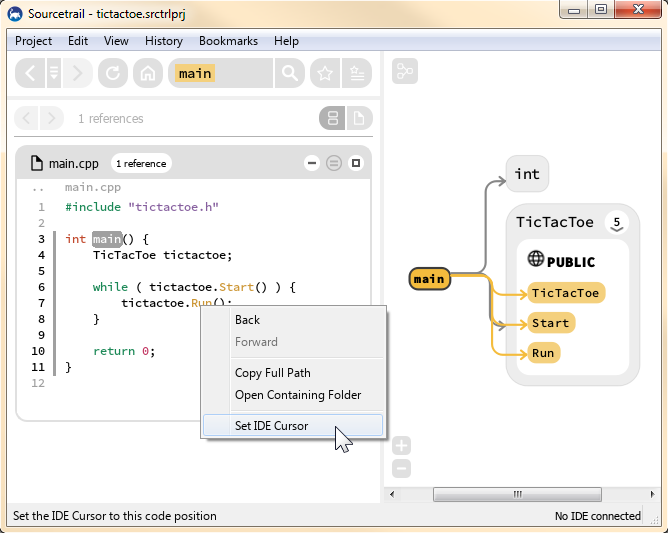
This extension allows you to set your Visual Studio text cursor to the source code location currently viewed in Sourcetrail. If the viewed file is not open in Visual Studio 2026, the extension will open and display it automatically.
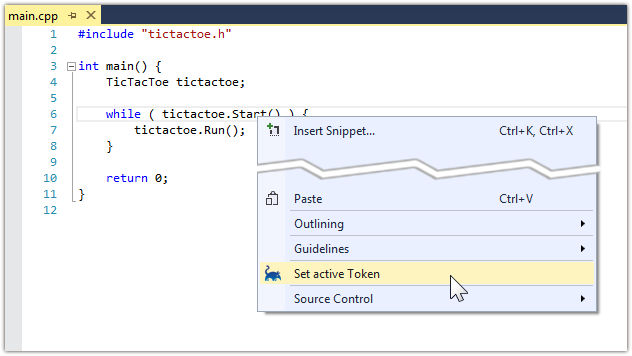
Whenever you read some source code inside Visual Studio that you actually want to explore in Sourcetrail you can use this extension to activate the right-clicked symbol in Sourcetrail.
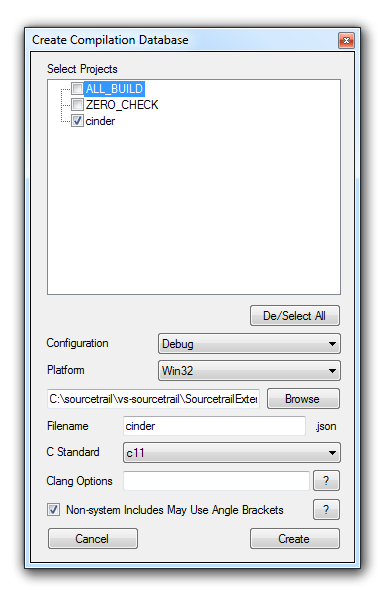
As a Clang based tool Sourcetrail supports the JSON Compilation Database format for simplified project setup. This extension enables you to generate a JSON Compilation Database from your Visual Studio projects and solutions.
The great news is: This format is independent from the Sourcetrail tool, so you can also use the generated Compilation Database to run other Clang based tools.
Use Visual Studio to open the SourcetrailExtension.sln and build the project called SourcetrailExtension.
The SourcetrailExtensionTests project contains both, unit tests and integration tests. When running an integration test it will automatically fire up a new instance of Visual Studio (called Experimental Instance) and simulate calls to the extension inside this instance. To make this work you need to point Visual Studio the the appropriate .testsettings file:
- From the menu bar choose
Test->Test Settings->Select Test Settings Fileand pick theIntegrationTests.testsettingsfile located at the root of this repository.
The first step to troubleshooting is to enable logging for the extension. This can be found in the settings for Sourcetrail in Tools -> Options -> Sourcetrail
Check that the loaded solution contains at least one C/C++ project in it. If logging is enabled for Sourcetrail, there may be messages in the output window resembling this one:
Error: Exception: The solution's source code database may not have been opened. Please make sure the solution is not open in another copy of Visual Studio, and that its database file is not read only.
This indicates that Intellisense or the browse database is disabled. Sourcetrail requires the browse database. It can be enabled in Tools -> Options -> Text Editor -> C/C++ -> Advanced.