Home Assistant Lovelace custom card to use with the PVPC Next integration (ESIOS API).
WARNING! This is a fork/mod that is intended to work only with PVPC Next
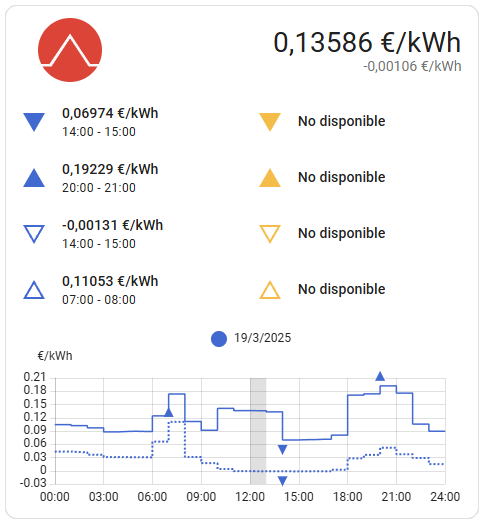
This card works with a previously configured PVPC Next integration in Home Assistant. Entity IDs follow the integration name, so with the default
esiosname you will see sensors likesensor.esios_current_price,sensor.esios_current_period, orsensor.esios_next_period.
- Prefills optional
entity_period/entity_injectionwhen the current price entity is detected. - Hardened entity auto-detection with REE attribution fallback.
- Updated docs/examples for ESIOS sensor naming.
- Compatible with all rates.
- Actual price close-up.
- Graph with the prices of the current day.
- Graph with the prices of the next day when you are available.
- Graph with the injection prices.
- Lowest and Highest of the current and next day.
- Icon indicating the current pricing period (uses the optional period entity if provided).
You could use HACS or follow this guide.
resources:
  url: /local/pvpc-hourly-pricing-card.js?v=2.1.0
type: module| Name | Type | Default | Requirement | Description |
|---|---|---|---|---|
| type | string | null |
Required | custom:pvpc-hourly-pricing-card |
| entity | string | null |
Required | ESIOS "Current Price" entity (e.g. sensor.esios_current_price) |
| entity_period | string | null |
Optional | ESIOS "Current Period" entity (e.g. sensor.esios_current_period) |
| entity_injection | string | null |
Optional | ESIOS "Injection Price" entity (e.g. sensor.esios_injection_price) |
| title | string | null |
Optional | Title of the card |
| show_current | boolean | true |
Optional | Show the current price and pricing period |
| show_details | boolean | true |
Optional | Show the lowest and highest prices and hours for the current and next day |
| show_graph | boolean | true |
Optional | Show the graph with the prices for the current and next day |
| show_only_today | boolean | false |
Optional | Show only today's data |
| graph_baseline_zero | boolean | false |
Optional | Show graph with desired minimum line base zero. |
From your Lovelace Dashboard: Configure UI ➡ Add New Card ➡ PVPC Hourly Pricing Card. Configure the card:
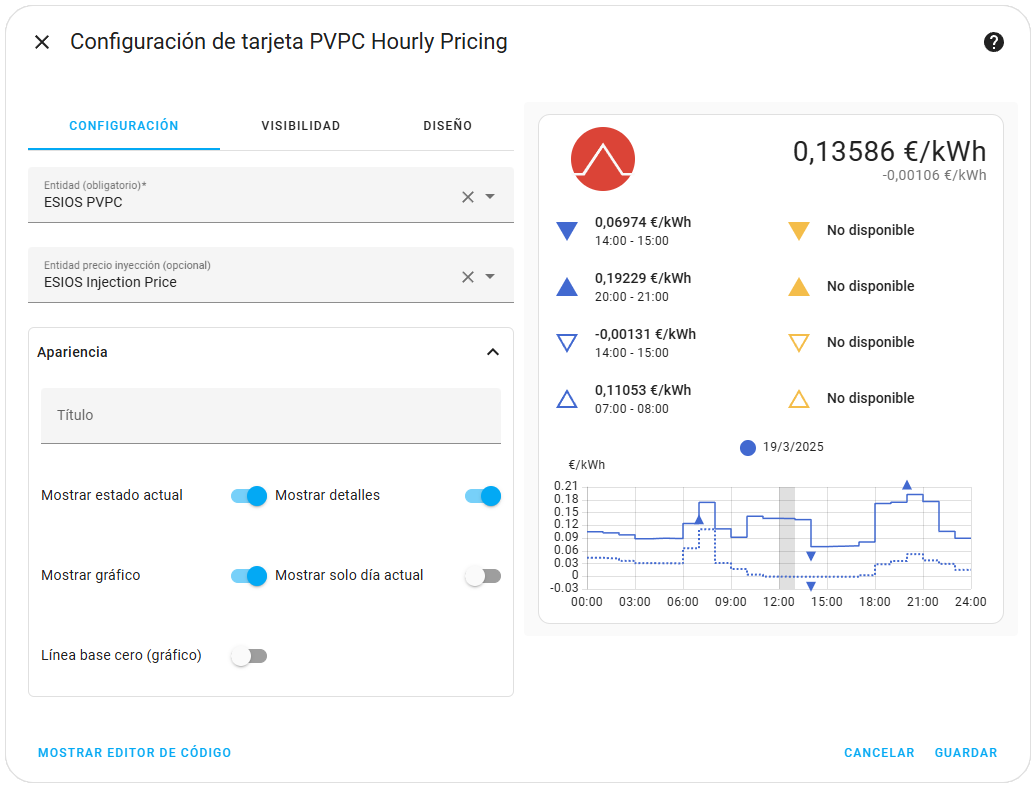
If this doesn't work, another option is to add it manually from your Lovelace Dashboard: Configure UI ➡ Add New Card ➡ Manual Card and then this code:
type: custom:pvpc-hourly-pricing-card
title: "PVPC Prices"
entity: sensor.esios_current_price
entity_period: sensor.esios_current_periodAdd this lines of code to your Lovelace Dashboard YAML file:
...
cards:
  ...
  - type: custom:pvpc-hourly-pricing-card
    title: "PVPC Prices"
    entity: sensor.esios_current_price
    entity_period: sensor.esios_current_period
  ...