Table of contents:
- Introduction
- Overview
- Architectural Rationale
- Models
- Services
- APIs & Schemas
- Urls
- Settings
- Errors & Exception Handling
- Testing
- TaskIQ
- Cookbook
- DX (Developer Experience)
This Django Styleguide establishes coding standards and architectural patterns for Django applications. Originally based on HackSoft's Django Styleguide, it has been refined through production experience.
For practical examples, refer to the
Django-Styleguide-Example
repository.
This styleguide enforces a clear separation of concerns in Django applications:
Business logic placement:
✅ Must reside in:
- Services - Functions that handle data writes and orchestrate business operations
- Selectors - Functions that handle data retrieval and queries
- Model properties - For simple, non-relational derived values
- Model
cleanmethods - For multi-field validation within a single model
❌ Must not reside in:
- APIs and Views - These are interfaces, not business logic containers
- Serializers and Forms - These handle data transformation, not business rules
- Form tags - These are presentation layer components
- Model
savemethods - These should remain simple persistence operations - Custom managers or querysets - These provide query interfaces, not business logic
- Signals - Reserved for decoupled event handling and cache invalidation
Decision criteria for properties vs selectors:
Use selectors when:
- The property spans multiple relations
- The property risks causing N+1 query problems
- Complex calculations are involved
Use properties when:
- Deriving simple values from non-relational fields
- No additional database queries are required
Placing business logic in these layers creates two critical problems:
- Fragmentation - Business logic becomes scattered across multiple locations, making the data flow impossible to trace.
- Hidden complexity - Generic abstractions obscure implementation details, requiring deep framework knowledge for simple changes.
While generic APIs and views work well for basic CRUD operations, real-world applications rarely stay within these boundaries. Once you deviate from the simple path, the code becomes unmaintainable.
Solution: This styleguide provides clear architectural boundaries that:
- Establish explicit locations for different types of logic
- Enable teams to develop their own patterns within these boundaries
- Maintain separation between core business logic and interface layers
The fundamental principle: Business logic (the "core") must remain independent from its interfaces (APIs, CLI, admin).
Custom managers and querysets should provide better query interfaces for your models. However, they're inappropriate for business logic because:
- Domain mismatch - Business logic operates on concepts that don't map directly to database models
- Cross-model operations - Business operations typically span multiple models, creating ambiguity about placement
- External dependencies - Third-party integrations don't belong in database query interfaces
Solution: Use a service layer that:
- Keeps domain logic separate from data models and APIs
- Can be implemented as functions, classes, or modules based on your needs
- Leverages custom managers/querysets for their intended purpose: better query interfaces
Signals are the most dangerous location for business logic:
Appropriate signal uses:
- Connecting decoupled components that shouldn't know about each other
- Cache invalidation outside the business layer
- System-wide event notifications
Why signals fail for business logic:
- Implicit connections make data flow impossible to trace
- Hidden dependencies create debugging nightmares
- Tight coupling disguised as loose coupling
Verdict: Reserve signals for specific infrastructure concerns, never for domain/business logic.
Models strictly handle data persistence and basic validation. Business logic must reside in the service layer.
Consider using established abstract models from django-model-utils package for common
functionality:
- TimeStampedModel: Adds
createdandmodifiedfields - TimeFramedModel: Adds
startandendfields for time-bound records - SoftDeletableModel: Adds
is_removedfield for soft deletion
Implementation:
from model_utils.models import TimeStampedModel, SoftDeletableModel


class Product(TimeStampedModel):
  # Automatically includes created and modified fields
  name = models.CharField(max_length=255)


class ArchivableProduct(TimeStampedModel, SoftDeletableModel):
  # Includes created, modified, and is_removed fields
name = models.CharField(max_length=255)Essential for international projects:
-
Field Definition Pattern:
 from django.utils.translation import gettext_lazy as _

 class Product(TimeStampedModel):

 # Always use verbose_name with the lowercase

 name = models.CharField(_("product name"), max_length=None)
 price = models.DecimalField(_("price"), decimal_places=2)
 is_available = models.BooleanField(_("is available"), default=True)

     # Help text should be clear and translatable
     logo = models.ImageField(
         _("logo"),
         help_text=_("Square logo (1:1 ratio). Requirements: 500x500 pixels, max 5MB")
     )
-
Model Meta Configuration:
class Meta:
    verbose_name = _("product")  # Lowercase singular
    verbose_name_plural = _("products")  # Lowercase plural
-
Validation Error Messages:
def clean(self):
    # Use concise, action-oriented messages
    if self.start_date >= self.end_date:
        raise ValidationError(_("End date must be after start date"))

    # For conditional requirements, be specific but brief
    if self.requires_approval and not self.approver:
        raise ValidationError(_("Approver required when approval is enabled"))
Guidelines:
- Lowercase for all field verbose names ("customer email," not "Customer Email")
- Lowercase for model verbose names in Meta
- Concise errors that explain what's wrong and how to fix it
- Import gettext_lazy as _ for all translatable strings
- Avoid first-person language in help texts
Preferred Approach: Service-layer validation with Pydantic schemas
Pydantic schemas should be your single source of truth for all business logic
validation. Model clean() methods are acceptable only for simple, self-contained field
validation.
Service-first validation pattern:
from pydantic import BaseModel, field_validator
from datetime import date


class CourseSchemaIn(BaseModel):
    name: str
    start_date: date
    end_date: date

    @field_validator('end_date')
    @classmethod
    def validate_date_range(cls, v: date, info) -> date:
        """Business logic validation happens in the schema."""
        if 'start_date' in info.data and v <= info.data['start_date']:
            raise ValueError("End date must be after start date")
        return v


def course_create(*, schema: CourseSchemaIn) -> Course:
    """Service uses validated schema - no duplication."""
    obj = Course(
        name=schema.name,
        start_date=schema.start_date,
        end_date=schema.end_date
    )

    obj.full_clean()  # Triggers database constraints only
    obj.save()

    return obj
When to use model clean() - rare cases only:
from django.db import models
from django.core.exceptions import ValidationError
from django.db.models import Q, F
from django.utils.translation import gettext_lazy as _


class Course(models.Model):
    CATEGORY_CHOICES = [
        ('programming', _('Programming')),
        ('design', _('Design')),
        ('business', _('Business')),
    ]

    name = models.CharField(unique=True, max_length=255)
    start_date = models.DateField()
    end_date = models.DateField()
    category = models.CharField(max_length=50, choices=CATEGORY_CHOICES)
    programming_languages = models.JSONField(default=list, blank=True)

    def clean(self):
        """Business logic validation - conditional requirements."""
        if self.category == 'programming' and not self.programming_languages:
            raise ValidationError(
                _("Programming courses must specify at least one programming language")
            )

    class Meta:
        constraints = [
            # Structural validation - dates must be valid
            models.CheckConstraint(
                condition=Q(start_date__lt=F("end_date")),
                name="valid_course_date_range",
                violation_error_message=_("End date must be after start date"),
            ),
        ]
Rules for choosing validation location:
✅ Use Pydantic schemas (PREFERRED):
- All business logic validation
- Multi-field validation
- Conditional validation based on other fields
- Type coercion and transformation
- Complex business rules
✅ Use database constraints:
- Structural data integrity (immutable rules)
- Examples: foreign keys, unique constraints, check constraints for data format
- See "Validation - Constraints" section below
❌ Use model clean() sparingly:
- Only when Pydantic schema isn't practical
- Simple, self-contained field validation
- Django admin compatibility requirements
Key principle: Avoid duplicating validation logic across layers. Choose one location and stick to it.
Database constraints enforce structural data integrity - use them for immutable rules only.
Django's constraints provide database-level validation that works regardless of how data is inserted.
When to Use Database Constraints:
Database constraints are for structural correctness - rules about data format that will never change:
✅ Use constraints for:
- Temporal correctness (start < end dates)
- Structural completeness (composite fields must be complete or null)
- Referential integrity (foreign keys)
- Uniqueness requirements
- Data format validation that's immutable
❌ Don't use constraints for:
- Business logic that may evolve
- Conditional validation based on user input
- Rules that depend on external state
- Complex multi-model validations
Example: Temporal Constraints
from django.db import models
from django.db.models import Q, F


class Promotion(models.Model):
    effective_start_time = models.DateTimeField(null=True, blank=True)
    effective_end_time = models.DateTimeField(null=True, blank=True)

    class Meta:
        constraints = [
            # Both null OR both set with start < end
            models.CheckConstraint(
                condition=(
                        Q(effective_start_time__isnull=True,
                          effective_end_time__isnull=True)
                        | Q(
                    effective_start_time__isnull=False,
                    effective_end_time__isnull=False,
                    effective_start_time__lt=F("effective_end_time"),
                )
                ),
                name="valid_effective_time_period",
                violation_error_message="Effective end time must be after start time",
            ),
        ]
Example: Structural Completeness Constraints
From your PriceField implementation - both amount and currency must be set together:
from django.db.models import CheckConstraint, Q


class PriceConstraint(CheckConstraint):
    """Ensures price amount and currency are both set or both null."""

    def __init__(self, *, field_name: str, **kwargs) -> None:
        condition = Q(
            **{
                f"{field_name}_amount_micros__isnull": True,
                f"{field_name}_currency_code__isnull": True,
            },
        ) | Q(
            **{
                f"{field_name}_amount_micros__isnull": False,
                f"{field_name}_currency_code__isnull": False,
            },
        )

        super().__init__(
            condition=condition,
            name=f"{field_name}_complete_or_null",
            violation_error_message="Amount and currency must be both set or null",
        )


# Usage in model:
class Product(models.Model):
    price = PriceField(null=True, blank=True)

    class Meta:
        constraints = [
            PriceConstraint(field_name='price'),
        ]
Constraint vs Pydantic Validation Decision Matrix:
| Rule Type | Example | Use |
|---|---|---|
| Structural correctness | Price has both amount + currency | DB Constraint |
| Temporal validity | Start date < End date | DB Constraint |
| Uniqueness | One promotion per merchant ID | DB Constraint |
| Business conditional | Coupon type determines required fields | Pydantic Schema |
| External validation | Valid country code from API | Pydantic Schema |
| Context-dependent | Admin can skip required fields | Pydantic Schema |
Key Principle: Database constraints protect data structure; Pydantic schemas enforce business policy.
Database constraints raise ValidationError on both model.save() and
Model.objects.create(...).
Reference: https://docs.djangoproject.com/en/dev/ref/models/instances/#validating-objects
django-pgtrigger provides PostgreSQL triggers for enforcing data integrity at the database level. Use triggers for rules that must be enforced regardless of how data is modified.
Three core patterns:
For critical models where all modifications must go through the service layer, use
pgtrigger.Protect to block direct ORM access:
import pgtrigger

class DataSource(TimeStampedModel):
    display_name = models.CharField(max_length=50)
    merchant = models.ForeignKey(Merchant, on_delete=CASCADE)

    class Meta:
        triggers = [
            pgtrigger.Protect(
                name="protect_inserts",
                operation=pgtrigger.Insert,
            ),
            pgtrigger.Protect(
                name="protect_updates",
                operation=pgtrigger.Update,
            ),
            pgtrigger.Protect(
                name="protect_deletes",
                operation=pgtrigger.Delete,
            ),
        ]
What this prevents:
# All of these FAIL with pgtrigger.Error
data_source.save()  # PostgreSQL trigger RAISES EXCEPTION
data_source.delete()  # PostgreSQL trigger RAISES EXCEPTION
DataSource.objects.create()  # PostgreSQL trigger RAISES EXCEPTION
Service layer bypass with pgtrigger_ignore:
from project.core.pgtrigger import pgtrigger_ignore

class DataSourceService:
    @transaction.atomic
    @pgtrigger_ignore(
        "data_sources.DataSource:protect_inserts",
        "data_sources.FileInput:protect_inserts",
    )
    def create(self, *, schema: DataSourceSchemaIn) -> DataSource:
        data_source = DataSource(
            display_name=schema.display_name,
            merchant=self.merchant,
        )
        data_source.full_clean()
        data_source.save()  # Allowed - trigger bypassed
        return data_source
When to use Official Interface:
- Models with complex business logic in service layer
- Models with strict validation requirements
- Models where direct manipulation could break invariants
- Audit-critical models requiring service-layer logging
Prevent modification of fields that must never change after creation:
class DataSource(TimeStampedModel):
    merchant = models.ForeignKey(Merchant, on_delete=CASCADE)
    input = EnumField(Input)
    source_type = EnumField(SourceType)

    class Meta:
        triggers = [
            pgtrigger.ReadOnly(
                name="immutable_fields",
                fields=["merchant", "input", "source_type"],
            ),
            # ... Protect triggers
        ]
What this prevents:
# This FAILS - merchant is immutable
data_source.merchant = another_merchant
data_source.save()  # PostgreSQL trigger blocks

# This SUCCEEDS - display_name is mutable
data_source.display_name = "New Name"
data_source.save()  # Allowed
Alternative: exclude specific fields:
pgtrigger.ReadOnly(
    name="immutable_fields",
    exclude=["countries"],  # Only countries can be updated
)Enforce valid state transitions at the database level:
class Brand(TimeStampedModel):
    status = EnumField(BrandStatus)

    class Meta:
        triggers = [
            pgtrigger.FSM(
                name="status_fsm",
                field="status",
                transitions=[
                    # Initial approval flow
                    (BrandStatus.PENDING, BrandStatus.APPROVED),
                    (BrandStatus.PENDING, BrandStatus.REJECTED),
                    (BrandStatus.PENDING, BrandStatus.MISSPELLED),
                    # Discover misspellings after approval
                    (BrandStatus.APPROVED, BrandStatus.MISSPELLED),
                    (BrandStatus.APPROVED, BrandStatus.REJECTED),
                    # Reconsideration paths
                    (BrandStatus.REJECTED, BrandStatus.PENDING),
                    (BrandStatus.REJECTED, BrandStatus.APPROVED),
                    # Fix incorrect misspelling classification
                    (BrandStatus.MISSPELLED, BrandStatus.APPROVED),
                    (BrandStatus.MISSPELLED, BrandStatus.REJECTED),
                ],
            ),
        ]
What this enforces:
# SUCCEEDS - valid transition
fetch.status = FetchStatus.IN_PROGRESS
fetch.status = FetchStatus.COMPLETED
fetch.save()  # PostgreSQL validates transition

# FAILS - invalid transition
fetch.status = FetchStatus.COMPLETED
fetch.status = FetchStatus.IN_PROGRESS  # Going backwards
fetch.save() # PostgreSQL trigger raises exceptionThe standard pgtrigger.ignore() uses thread-local storage, which doesn't work with
async
code. Use the custom pgtrigger_ignore wrapper from core/pgtrigger.py:
from project.core.pgtrigger import pgtrigger_ignore

# As async context manager
async with pgtrigger_ignore("app.Model:protect_inserts"):
    await instance.asave()

# As sync context manager
with pgtrigger_ignore("app.Model:protect_inserts"):
    instance.save()

# As decorator on sync function (with @transaction.atomic)
@sync_to_async
@transaction.atomic
@pgtrigger_ignore("app.Model:protect_inserts")
def create(self, *, schema: SchemaIn) -> Model:
    instance.save()

# As decorator on async function (native async)
@pgtrigger_ignore("app.Model:protect_updates")
async def update(self, *, instance: Model) -> Model:
    await instance.asave()
Transaction safety notes:
pgtrigger flushes a temporary Postgres variable when exiting the context manager. If a database error occurs inside the ignore block while in a transaction, the transaction enters an errored state and the flush fails.
# ❌ WRONG - transaction in error state when ignore context exits
with transaction.atomic():
    with pgtrigger.ignore("app.Model:protect_inserts"):
        try:
            Model.objects.create(unique_key="duplicate")
        except IntegrityError:
            pass  # Flush will fail!

# ✅ CORRECT - session flush happens outside the transaction
with pgtrigger.ignore.session("app.Model:protect_inserts"):
    with transaction.atomic():
        try:
            Model.objects.create(unique_key="duplicate")
        except IntegrityError:
pass # Transaction rolled back, session flush succeedsModels often combine multiple trigger types:
class Brand(TimeStampedModel):
    name = models.CharField(unique=True, max_length=70)
    slug = models.SlugField(unique=True)
    status = EnumField(BrandStatus)

    class Meta:
        triggers = [
            # FSM for status transitions
            pgtrigger.FSM(
                name="status_fsm",
                field="status",
                transitions=[...],
            ),
            # Immutable identifiers
            pgtrigger.ReadOnly(
                name="immutable_identifiers",
                fields=["name", "slug"],
            ),
            # Official Interface - all operations through service
            pgtrigger.Protect(name="protect_inserts", operation=pgtrigger.Insert),
            pgtrigger.Protect(name="protect_updates", operation=pgtrigger.Update),
            pgtrigger.Protect(name="protect_deletes", operation=pgtrigger.Delete),
        ]
Benefits of this approach:
- Database-level enforcement - Rules enforced regardless of how data is modified
- Race condition prevention - State transitions validated atomically
- Service layer guarantee - All business logic executes through designated paths
- Audit trail - Modifications only happen through controlled service methods
Model properties provide efficient access to derived values.
Example implementation:
from django.db import models
from django.db.models import Q, F
from django.utils import timezone
from django.core.exceptions import ValidationError
from django.utils.translation import gettext_lazy as _


class Course(models.Model):
    CATEGORY_CHOICES = [
        ('programming', _('Programming')),
        ('design', _('Design')),
        ('business', _('Business')),
    ]

    name = models.CharField(unique=True, max_length=255)
    start_date = models.DateField()
    end_date = models.DateField()
    category = models.CharField(max_length=50, choices=CATEGORY_CHOICES)
    programming_languages = models.JSONField(default=list, blank=True)

    def clean(self):
        """Business logic validation - conditional requirements."""
        if self.category == 'programming' and not self.programming_languages:
            raise ValidationError(
                _("Programming courses must specify at least one programming language")
            )

    @property
    def has_started(self) -> bool:
        now = timezone.now()
        return self.start_date <= now.date()

    @property
    def has_finished(self) -> bool:
        now = timezone.now()
        return self.end_date <= now.date()

    class Meta:
        constraints = [
            models.CheckConstraint(
                condition=Q(start_date__lt=F("end_date")),
                name="valid_course_date_range",
                violation_error_message=_("End date must be after start date"),
            ),
        ]
Properties enable direct access in serializers and templates.
Rules for model properties:
✅ Use properties when:
- Deriving values from non-relational fields only
- Calculations are simple and performant
❌ Use services/selectors when:
- Spanning multiple relations or fetching additional data
- Complex calculations that impact performance
Decision criteria: Consider query performance and N+1 implications.
Model methods extend property functionality with parameterized logic.
Example with parameters:
from django.db import models
from django.db.models import Q, F
from django.core.exceptions import ValidationError
from django.utils import timezone
from django.utils.translation import gettext_lazy as _
from datetime import date


class Course(models.Model):
    CATEGORY_CHOICES = [
        ('programming', _('Programming')),
        ('design', _('Design')),
        ('business', _('Business')),
    ]

    name = models.CharField(unique=True, max_length=255)
    start_date = models.DateField()
    end_date = models.DateField()
    category = models.CharField(max_length=50, choices=CATEGORY_CHOICES)
    programming_languages = models.JSONField(default=list, blank=True)

    def clean(self):
        """Business logic validation - conditional requirements."""
        if self.category == 'programming' and not self.programming_languages:
            raise ValidationError(
                _("Programming courses must specify at least one programming language")
            )

    @property
    def has_started(self) -> bool:
        now = timezone.now()
        return self.start_date <= now.date()

    @property
    def has_finished(self) -> bool:
        now = timezone.now()
        return self.end_date <= now.date()

    def is_within(self, x: date) -> bool:
        return self.start_date <= x <= self.end_date

    class Meta:
        constraints = [
            models.CheckConstraint(
                condition=Q(start_date__lt=F("end_date")),
                name="valid_course_date_range",
                violation_error_message=_("End date must be after start date"),
            ),
        ]
Methods requiring arguments cannot be properties.
Attribute synchronization pattern:
Use methods when setting one attribute requires updating related attributes:
from django.utils.crypto import get_random_string
from django.conf import settings
from django.utils import timezone


class Token(models.Model):
    secret = models.CharField(max_length=255, unique=True)
    expiry = models.DateTimeField(blank=True, null=True)

    def set_new_secret(self):
        now = timezone.now()

        self.secret = get_random_string(255)
        self.expiry = now + settings.TOKEN_EXPIRY_TIMEDELTA

        return self
The set_new_secret method ensures both secret and expiry are updated atomically.
Rules for model methods:
✅ Use methods when:
- Simple derived values require arguments
- Operating on non-relational fields only
- Synchronizing multiple attribute updates
❌ Move to services/selectors when:
- Spanning multiple relations or fetching additional data
- Complex business logic is involved
Test models only when they contain custom logic: validation, properties, or methods.
Implementation:
from datetime import timedelta

import pytest
from django.core.exceptions import ValidationError
from django.utils import timezone

from project.some_app.models import Course

pytestmark = pytest.mark.django_db(transaction=True)


class TestCourseValidation:
    """Tests for Course model validation."""

    def test_course_end_date_cannot_be_before_start_date(self) -> None:
        start_date = timezone.now()
        end_date = timezone.now() - timedelta(days=1)

        course = Course(start_date=start_date, end_date=end_date)

        with pytest.raises(ValidationError):
            course.full_clean()
Key principles:
- Assert validation errors through
full_clean - Use
pytest.raises()for exception testing - Avoid database hits when testing pure validation logic
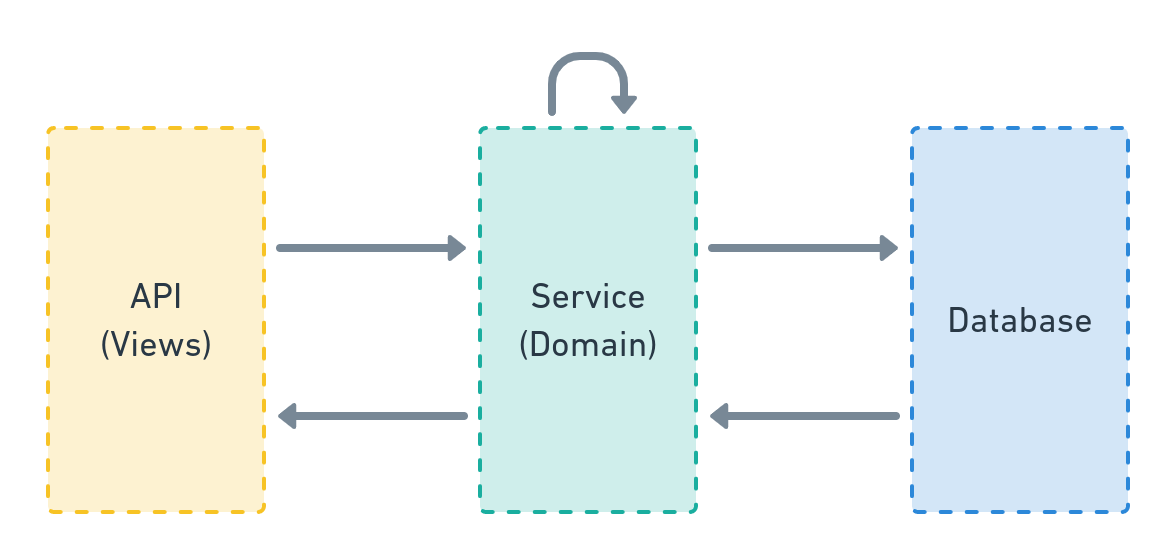
Services contain all business logic.
The service layer implements domain-specific operations, manages database transactions, and orchestrates system interactions.
Architecture position:
Service implementation forms:
- Simple functions (most common)
- Classes (for stateful operations)
- Modules (for complex domains)
Service function requirements:
- Location:
<your_app>/services.py - Arguments: Keyword-only (except for single or no arguments)
- Type annotations: Required for all parameters and returns
- Scope: Database operations, external services, business logic
Service with Pydantic schema (preferred approach):
from pydantic import BaseModel


class UserSchemaIn(BaseModel):
    """Input schema for creating a User."""
    email: str
    name: str


def user_create(
        *,
        schema: UserSchemaIn
) -> User:
    user = User(email=schema.email)
    user.full_clean()
    user.save()

    profile_create(user=user, name=schema.name)
    confirmation_email_send(user=user)

    return user
This service orchestrates the complete user creation flow, calling related services in sequence.
Pydantic schemas are the preferred default for validating service input:
from pydantic import BaseModel, HttpUrl, Field
from pydantic_extra_types.country import CountryAlpha2
from pydantic_extra_types.currency_code import Currency
from decimal import Decimal


class ReturnPolicySchemaIn(BaseModel):
    """Input schema for creating a OnlineReturnPolicy."""

    country_codes: list[CountryAlpha2] = Field(min_length=1)
    policy_url: HttpUrl
    currency: Currency
    return_methods: list[ReturnMethod] = Field(min_length=1, max_length=3)

    # Optional fields with defaults
    return_eligibility: ReturnEligibility | None = None
    accepts_exchanges: bool | None = None
    return_label_cost_amount: Decimal | None = Field(default=None, ge=0)
    # ... other fields


def return_policy_create(
        *,
        merchant: Merchant,
        schema: ReturnPolicySchemaIn,  # Schema as parameter
) -> OnlineReturnPolicy:
    """
    Service accepts schema for input validation.
    This approach keeps signatures clean and provides type safety.
    """
    # Extract and transform data from schema
    policy_data = schema.model_dump(exclude={"country_codes"}, exclude_none=True)
    policy_data["policy_url"] = str(policy_data["policy_url"])

    # Business logic implementation
    policy = OnlineReturnPolicy(merchant=merchant, **policy_data)
    policy.full_clean()
    policy.save()

    return policy
Benefits of schema-first approach:
- Type safety - Leverage Pydantic's rich type system (HttpUrl, Currency, CountryAlpha2, etc.)
- Validation - Centralized input validation with clear error messages
- API reusability - Same schema works directly with django-ninja endpoints:
@api.post("/return-policies")
def create_return_policy_api(request, data: ReturnPolicySchemaIn):
    merchant = get_object_or_404(Merchant, id=request.user.merchant_id)
    policy = return_policy_create(merchant=merchant, schema=data)
    return {"id": policy.id}
- Documentation - Schema serves as clear documentation of expected input
- Consistency - Uniform validation approach across services
Exception: Simple services can skip schemas:
# Simple lookups with basic types
def user_get(*, user_id: int) -> User:
    return get_object_or_404(User, id=user_id)


# Few parameters of basic types (str, int, bool)
def user_deactivate(*, user: User, reason: str) -> User:
    user.is_active = False
    user.deactivation_reason = reason
    user.full_clean()
    user.save()
    return user
When to skip Pydantic schemas:
- Simple services with very few parameters (1-3) of basic input types
- Internal utilities never exposed via API
- When all parameters are already validated domain objects
Class-based services encapsulate related operations under a namespace.
Example from Django Styleguide Example:
# https://github.com/HackSoftware/Django-Styleguide-Example/blob/master/styleguide_example/files/services.py


class FileStandardUploadService:
    """
    This also serves as an example of a service class,
    which encapsulates 2 different behaviors (create & update) under a namespace.

    Meaning, we use the class here for:

    1. The namespace
    2. The ability to reuse `_infer_file_name_and_type` (which can also be an util)
    """

    def __init__(self, user: BaseUser, file_obj):
        self.user = user
        self.file_obj = file_obj

    def _infer_file_name_and_type(self, file_name: str = "", file_type: str = "") ->

        Tuple[str, str]:

    file_name = file_name or self.file_obj.name

    if not file_type:
        guessed_file_type, encoding = mimetypes.guess_type(file_name)
        file_type = guessed_file_type or ""

    return file_name, file_type


def create(self, file_name: str = "", file_type: str = "") -> File:
    _validate_file_size(self.file_obj)

    file_name, file_type = self._infer_file_name_and_type(file_name, file_type)

    obj = File(
        file=self.file_obj,
        original_file_name=file_name,
        file_name=file_generate_name(file_name),
        file_type=file_type,
        uploaded_by=self.user,
        upload_finished_at=timezone.now()
    )

    obj.full_clean()
    obj.save()

    return obj


def update(self, file: File, file_name: str = "", file_type: str = "") -> File:
    _validate_file_size(self.file_obj)

    file_name, file_type = self._infer_file_name_and_type(file_name, file_type)

    file.file = self.file_obj
    file.original_file_name = file_name
    file.file_name = file_generate_name(file_name)
    file.file_type = file_type
    file.uploaded_by = self.user
    file.upload_finished_at = timezone.now()

    file.full_clean()
    file.save()

    return file
Benefits of class-based services:
- Namespace - Groups related operations (create/update)
- Code reuse - Shared logic via private methods
Usage pattern:
# https://github.com/HackSoftware/Django-Styleguide-Example/blob/master/styleguide_example/files/apis.py

class FileDirectUploadApi(ApiAuthMixin, APIView):
    def post(self, request):
        service = FileDirectUploadService(
            user=request.user,
            file_obj=request.FILES["file"]
        )
        file = service.create()

        return Response(data={"id": file.id}, status=status.HTTP_201_CREATED)
And
@admin.register(File)
class FileAdmin(admin.ModelAdmin):
    # ... other code here ...
    # https://github.com/HackSoftware/Django-Styleguide-Example/blob/master/styleguide_example/files/admin.py

    def save_model(self, request, obj, form, change):
        try:
            cleaned_data = form.cleaned_data

            service = FileDirectUploadService(
                file_obj=cleaned_data["file"],
                user=cleaned_data["uploaded_by"]
            )

            if change:
                service.update(file=obj)
            else:
                service.create()
        except ValidationError as exc:
            self.message_user(request, str(exc), messages.ERROR)
Use class-based services for multi-step workflows.
Example of a direct file upload flow:
# https://github.com/HackSoftware/Django-Styleguide-Example/blob/master/styleguide_example/files/services.py


class FileDirectUploadService:
    """
    This also serves as an example of a service class,
    which encapsulates a flow (start & finish) + one-off action (upload_local) into a namespace.

    Meaning, we use the class here for:

    1. The namespace
    """

    def __init__(self, user: BaseUser):
        self.user = user

    @transaction.atomic
    def start(self, *, file_name: str, file_type: str) -> Dict[str, Any]:
        file = File(
            original_file_name=file_name,
            file_name=file_generate_name(file_name),
            file_type=file_type,
            uploaded_by=self.user,
            file=None
        )
        file.full_clean()
        file.save()

        upload_path = file_generate_upload_path(file, file.file_name)

        """
        We are doing this in order to have an associated file for the field.
        """
        file.file = file.file.field.attr_class(file, file.file.field, upload_path)
        file.save()

        presigned_data: Dict[str, Any] = {}

        if settings.FILE_UPLOAD_STORAGE == FileUploadStorage.S3:
            presigned_data = s3_generate_presigned_post(
                file_path=upload_path, file_type=file.file_type
            )

        else:
            presigned_data = {
                "url": file_generate_local_upload_url(file_id=str(file.id)),
            }

        return {"id": file.id, **presigned_data}

    def finish(self, *, file: File) -> File:
        # Potentially, check against user
        file.upload_finished_at = timezone.now()
        file.full_clean()
        file.save()

return fileRequired pattern: <entity>_<action>
Example: user_create, user_update, user_deactivate
Benefits:
- Namespacing - All user operations start with
user_ - Searchability - Easy to find all operations for an entity
- Consistency - Predictable naming across the codebase
Start with a single services.py file.
When complexity grows, split into domain-specific modules.
Example structure for an authentication app:
services
├── __init__.py
├── jwt.py
└── oauth.py
Organization options:
- Export from
services/__init__.pyfor clean imports - Use folder-modules like
jwt/__init__.pyfor complex domains - Refactor when the current structure becomes unwieldy
Separation of concerns:
- Services - Write operations (push data)
- Selectors - Read operations (pull data)
Selectors are a specialized sub-layer for data fetching.
Rules: Selectors follow the same conventions as services.
Implementation in <your_app>/selectors.py:
def user_list(*, fetched_by: User) -> Iterable[User]:
    user_ids = user_get_visible_for(user=fetched_by)

    query = Q(id__in=user_ids)

    return User.objects.filter(query)
Note: user_get_visible_for is another selector being composed.
Return types: QuerySets, lists, or any appropriate data structure.
Selectors must provide value beyond simple QuerySet wrappers:
Selectors should encapsulate business logic (visibility rules, access control, complex
filtering) or query optimizations (select_related, prefetch_related). Don't create
selector methods that simply wrap Django ORM calls without adding logic - consumers can
call Django directly for trivial queries like Model.objects.filter(id=x).exists().
Services must be thoroughly tested as they contain business logic.
Testing requirements:
- Exhaustive coverage - Test all business logic paths
- Database interaction - Create and read real database records
- External mocking - Mock async tasks and external services
Test data creation methods:
faker- For generating fake data- Services - Use existing services to create test state
factory_boy- For model factories- Direct
Model.objects.create()- When factories aren't available
Example service under test:
from django.contrib.auth.models import User
from django.core.exceptions import ValidationError
from django.db import transaction

from project.payments.selectors import items_get_for_user
from project.payments.models import Item, Payment
from project.payments.tasks import payment_charge


@transaction.atomic
def item_buy(
        *,
        item: Item,
        user: User,
) -> Payment:
    if item in items_get_for_user(user=user):
        raise ValidationError(f'Item {item} already in {user} items.')

    payment = Payment(
        item=item,
        user=user,
        successful=False
    )
    payment.full_clean()
    payment.save()

    # Run the task once the transaction has commited,
    # guaranteeing the object has been created.
    transaction.on_commit(
        lambda: payment_charge.delay(payment_id=payment.id)
    )

    return payment
Service operations:
- Selector validation
- Object creation
- Task scheduling
Test implementation:
import pytest
from unittest.mock import patch, Mock

from django.contrib.auth.models import User
from django.core.exceptions import ValidationError

from django_styleguide.payments.services import item_buy
from django_styleguide.payments.models import Payment, Item

pytestmark = pytest.mark.django_db(transaction=True)


class TestItemBuy:
    """Tests for item_buy service."""

    @patch('project.payments.services.items_get_for_user')
    async def test_buying_item_that_is_already_bought_fails(
            self, items_get_for_user_mock: Mock
    ) -> None:
        """
        Since we already have tests for `items_get_for_user`,
        we can safely mock it here and give it a proper return value.
        """
        user = User(username='Test User')
        item = Item(
            name='Test Item',
            description='Test Item description',
            price=10.15
        )

        items_get_for_user_mock.return_value = [item]

        with pytest.raises(ValidationError):
            await item_buy(user=user, item=item)

    @patch('project.payments.services.payment_charge.kiq')
    async def test_buying_item_creates_a_payment_and_calls_charge_task(
            self,
            payment_charge_mock: Mock
    ) -> None:
        # How we prepare our tests is a topic for a different discussion
        user = await given_a_user(username="Test user")
        item = await given_a_item(
            name='Test Item',
            description='Test Item description',
            price=10.15
        )

        assert await Payment.objects.acount() == 0

        payment = await item_buy(user=user, item=item)

        assert await Payment.objects.acount() == 1
        assert payment == await Payment.objects.afirst()

        assert not payment.successful

payment_charge_mock.assert_called_once()Framework: django-ninja - Fast, type-safe, and aligned with our service layer.
Extensions for class-based APIs:
Structure:
- One endpoint per operation (4 endpoints for CRUD)
- No business logic in endpoints
- Endpoints are thin interfaces to services
Permitted in endpoints:
- Object fetching
- Data transformation
- Service delegation
Mandatory separation:
- Input schemas - Validate incoming data (Pydantic models)
- Output schemas - Define response structure (Pydantic models)
Schema conventions:
- Define schemas near endpoints
- Name as
InputSchemaorOutputSchema - Minimize schema reuse to avoid coupling
- Use inline definitions for nested structures
To avoid namespace collisions with Django models, Pydantic schemas use descriptive suffixes:
Three suffix types:
-
SchemaIn- For API write operations (create, update requests)class DataSourceSchemaIn(BaseModel): """Input schema for creating/updating a DataSource.""" display_name: str input_type: Input file_input: FileInputSchema | None = None
-
SchemaOut- For API read operations (responses)class DataSourceSchemaOut(BaseModel): """Output schema for DataSource responses.""" id: int display_name: str input_type: Input created: datetime file_input: FileInputSchema | None = None
-
Schema- For intermediate/compositional schemasclass FetchSettingsSchema(BaseModel): """Shared schema for fetch settings validation.""" enabled: bool = True frequency: Frequency time_of_day: TimeOfDay | None = None class DestinationSchema(BaseModel): """Compositional schema used in multiple contexts.""" destination: DestinationEnum state: State
Django models keep clean, natural names:
# models.py - Django models without suffixes
class DataSource(models.Model):
    display_name = models.CharField(max_length=50)
    input = EnumField(Input)
    # ...

class FetchSettings(models.Model):
    enabled = models.BooleanField(default=True)
    frequency = EnumField(Frequency)
    # ...

# schemas.py - Pydantic schemas with suffixes
class DataSourceSchemaIn(BaseModel):
    display_name: str
    input: Input
    # ...

class FetchSettingsSchema(BaseModel):
    enabled: bool = True
    frequency: Frequency
    # ...
When to use each suffix:
-
Use
SchemaIn/SchemaOutwhen:- Schemas differ for read vs write operations
- You need different fields or validation for input vs output
- Working with top-level API request/response schemas
- Example:
UserSchemaInhas password field,UserSchemaOutdoesn't
-
Use
Schemawhen:- Schema is identical for both read and write
- Schema is used for composition (nested in other schemas)
- Schema is purely for validation, not directly exposed via API
- Example:
PriceSchema,AddressSchemaused in multiple parent schemas
Benefits of this convention:
-
No namespace collisions - Import both model and schema without conflicts:
from project.data_sources.models import DataSource
from project.data_sources.schemas import DataSourceSchemaIn, DataSourceSchemaOut
# No ambiguity about which is which
-
Clear intent - Suffix immediately signals the purpose:
Schema= validation/serialization layer- No suffix = Django ORM model
-
Consistency with django-ninja - Aligns with common patterns in the ecosystem
-
Avoids duplication - Use plain
Schemafor shared validation logic instead of creating duplicateSchemaIn/SchemaOutpairs
Anti-pattern to avoid:
# DON'T create duplicate In/Out for everything
class PriceSchemaIn(BaseModel):  # ❌ Unnecessary duplication
    amount: Decimal
    currency: str

class PriceSchemaOut(BaseModel):  # ❌ Identical to In
    amount: Decimal
    currency: str

# DO use single Schema for shared validation
class PriceSchema(BaseModel):  # ✅ One schema, multiple uses
    amount: Decimal
currency: strRequired pattern: <entity>_<action>_api
Examples:
user_create_apiuser_send_reset_password_apiuser_deactivate_api
This pattern mirrors service naming for consistency.
Basic list endpoint:
from ninja import NinjaAPI, Schema
from pydantic import BaseModel
from typing import List

from styleguide_example.users.selectors import user_list

api = NinjaAPI()


class UserOutputSchema(Schema):
    id: str
    email: str


@api.get("/users", response=List[UserOutputSchema])
def list_users(request):
    users = user_list()
    return users
Note: Authentication must be explicitly configured.
Implementation with query parameters:
from ninja import NinjaAPI, Query, Schema
from pydantic import BaseModel, Field
from typing import List, Optional

from ninja.pagination import paginate, PageNumberPagination

from styleguide_example.users.selectors import user_list

api = NinjaAPI()


class UserFiltersSchema(Schema):
    id: Optional[int] = None
    is_admin: Optional[bool] = None
    email: Optional[str] = None


class UserOutputSchema(Schema):
    id: str
    email: str
    is_admin: bool


@api.get("/users", response=List[UserOutputSchema])
@paginate(PageNumberPagination)
def list_users(
        request,
        filters: UserFiltersSchema = Query(...)
):
    users = user_list(filters=filters.get_filter_expression())
    return users
The selector remains the same:
from styleguide_example.users.models import BaseUser


def user_list(*, filters=None):
    filters = filters or {}

    qs = BaseUser.objects.all()

    return qs.filter(filters)
Separation of concerns:
- Django-ninja: Parameter validation
- Selector: Filter application
Implementation:
from ninja import NinjaAPI, Schema
from datetime import date

from styleguide_example.courses.selectors import course_get

api = NinjaAPI()


class CourseOutputSchema(Schema):
    id: str
    name: str
    start_date: date
    end_date: date


@api.get("/courses/{course_id}", response=CourseOutputSchema)
def get_course(request, course_id: int):
    course = course_get(id=course_id)
return courseImplementation:
from ninja import NinjaAPI, Schema
from datetime import date

from styleguide_example.courses.services import course_create

api = NinjaAPI()


class CourseInputSchema(Schema):
    name: str
    start_date: date
    end_date: date


@api.post("/courses")
def create_course(request, data: CourseInputSchema):
    course = course_create(**data.model_dump())
return {"id": course.id}Implementation:
from ninja import NinjaAPI, Schema
from typing import Optional
from datetime import date

from styleguide_example.courses.services import course_update

api = NinjaAPI()


class CourseUpdateSchema(Schema):
    name: Optional[str] = None
    start_date: Optional[date] = None
    end_date: Optional[date] = None


@api.patch("/courses/{course_id}")
def update_course(request, course_id: int, data: CourseUpdateSchema):
    course = course_update(course_id=course_id, **data.model_dump(exclude_none=True))
return {"success": True}Object fetching must occur at the API layer.
Standard approach: Use Django's get_object_or_404 in endpoints:
from django.shortcuts import get_object_or_404
from ninja import NinjaAPI

api = NinjaAPI()


@api.get("/courses/{course_id}")
def get_course(request, course_id: int):
    course = get_object_or_404(Course, id=course_id)
    # Use the course object...
Django-ninja automatically handles 404 responses.
Define nested structures as separate Pydantic models:
from ninja import Schema
from typing import List
from datetime import date


# Define the nested schema
class WeekSchema(Schema):
    id: int
    number: int
    topic: str


# Use it in the parent schema
class CourseDetailSchema(Schema):
    id: int
    name: str
    start_date: date
    end_date: date
    weeks: List[WeekSchema]  # Nested schema


# Or define inline for simple cases
class CourseWithInlineWeeksSchema(Schema):
    id: int
    name: str

    class WeekInfo(Schema):
        number: int
        topic: str

weeks: List[WeekInfo] # Inline nested schemaComplex responses require dedicated serialization services:
from ninja import NinjaAPI
from typing import List, Any

api = NinjaAPI()


@api.get("/feed")
def get_feed(request):
    feed = some_feed_get(user=request.user)
    data = some_feed_serialize(feed)
    return data
Serialization service implementation:
from ninja import Schema
from pydantic import ConfigDict
from typing import List
from your_app.models import FeedItem  # Add the missing import


class FeedItemSchema(Schema):
    id: int
    title: str
    content: str
    calculated_field: int = 0  # Provide default for computed field

    # Pydantic v2 syntax
    model_config = ConfigDict(from_attributes=True)


def some_feed_serialize(feed_items: List[FeedItem]) -> List[dict]:
    feed_ids = [feed_item.id for feed_item in feed_items]

    # Refetch items with optimizations
    objects = FeedItem.objects.select_related(
        # ... as complex as you want ...
    ).prefetch_related(
        # ... as complex as you want ...
    ).filter(
        id__in=feed_ids
    ).order_by(
        "-some_timestamp"
    )

    some_cache = get_some_cache(feed_ids)

    result = []
    for feed_item in objects:
        # Convert to dict first, then add computed fields
        item_data = FeedItemSchema.model_validate(feed_item).model_dump()
        item_data['calculated_field'] = some_cache.get(feed_item.id, 0)
        result.append(item_data)

    return result
Serialization strategy:
- Refetch with optimized queries (joins/prefetches)
- Build in-memory caches for computed values
- Return API-ready data structures
Location: serializers.py module in the Django app.
**django-ninja handles routing via decorators, but domain organization remains critical. **
Define API instances per domain:
# project/education/apis.py
from ninja import NinjaAPI

api = NinjaAPI(urls_namespace='education')


@api.get("/courses")
def list_courses(request):
    # Implementation
    pass


@api.get("/courses/{course_id}")
def get_course(request, course_id: int):
    # Implementation
    pass
Main URL configuration:
# project/urls.py
from django.urls import path

from project.education.apis import api as education_api
from project.users.apis import api as users_api

urlpatterns = [
    path('api/education/', education_api.urls),
    path('api/users/', users_api.urls),
]Organize non-API views by domain using standard Django patterns:
# project/education/urls.py
from django.urls import path, include

from project.education import views

app_name = 'education'

# Nested URL structure for logical grouping
urlpatterns = [
    path('courses/', include([
        path('', views.course_list, name='list'),
        path('<int:course_id>/', views.course_detail, name='detail'),
        path('<int:course_id>/enroll/', views.course_enroll, name='enroll'),
        path('<int:course_id>/materials/', include([
            path('', views.materials_list, name='materials-list'),
            path('<int:material_id>/', views.material_detail, name='material-detail'),
        ])),
    ])),
]Domain-based URL organization is mandatory.
Benefits:
- Namespace separation - Each domain owns its URL namespace
- Atomic refactoring - Move entire domains as units
- Parallel development - Teams work independently
- Intuitive discovery - URLs mirror domain structure
Recommended structure for large projects:
project/
├── urls.py                    # Main URL configuration
├── api/
│   ├── v1/
│   │   └── __init__.py       # Combines all v1 API routers
│   └── v2/
│       └── __init__.py       # Combines all v2 API routers
├── education/
│   ├── apis.py               # Education API endpoints (NinjaAPI)
│   └── urls.py               # Education regular views
├── users/
│   ├── apis.py               # User API endpoints (NinjaAPI)
│   └── urls.py               # User regular views
└── payments/
    ├── apis.py               # Payment API endpoints (NinjaAPI)
    └── urls.py               # Payment regular views
This structure maintains locality of behavior by keeping URL configuration adjacent to implementation.
Requirements:
- Typed settings using pydantic
BaseSettings - YAML configuration files for values
- Full type annotations
- Startup validation
Directory structure:
config/
├── settings/
│   ├── base.py      # All settings classes and composition
│   ├── local.py     # Local environment composition
│   ├── production.py # Production environment composition
│   └── test.py      # Test environment composition
├── urls.py
├── wsgi.py
└── asgi.py

.envs/
├── .local.yaml      # Local environment values
├── .production.yaml # Production environment values
├── .test.yaml       # Test environment values
└── .override.yaml   # Local overrides (gitignored)
Define domain-specific settings classes in config/settings/base.py:
from pydantic import SecretStr, HttpUrl
from pydantic_settings import BaseSettings, YamlConfigSettingsSource


class GeneralSettings(BaseSettings):
    DEBUG: bool = False
    SECRET_KEY: SecretStr
    ALLOWED_HOSTS: list[str]


class DatabasesSettings(BaseSettings):
    DATABASES: dict[str, PostgreSQLSettings]


class NatsSettings(BaseSettings):
    NATS_URL: NatsDsn

# ... more settings classes for each domainCompose settings per environment in config/settings/{env}.py:
from pydantic_settings import SettingsConfigDict


class DjangoSettings(
    GeneralSettings,
    DatabasesSettings,
    NatsSettings,
    # ... all other settings classes
    BaseDjangoSettings,  # Must be last for proper MRO
):
    model_config = SettingsConfigDict(
        yaml_file=[
            BASE_DIR / ".envs/.local.yaml",
            BASE_DIR / ".envs/.override.yaml",  # Local overrides
        ],
        extra="ignore",
        validate_default=True,
    )


# Create instance and inject into Django
django_settings = DjangoSettings()
to_django(django_settings) # Converts pydantic settings to Django globalsStore configuration values in YAML for maintainability:
# .envs/.local.yaml
DEBUG: true
SECRET_KEY: your-secret-key-here
ALLOWED_HOSTS:
  - localhost
  - 127.0.0.1

DATABASES:
  default:
    ENGINE: django.db.backends.postgresql
    NAME: project
    HOST: localhost
PORT: 5432✅ Type safety - Validated at startup
✅ IDE support - Full autocomplete with pyright
✅ Clear structure - Domain-based organization
✅ Local overrides - Via .override.yaml
✅ Environment parity - Consistent structure
✅ Early validation - Before Django initialization
Pattern for optional integrations:
class SentrySettings(BaseSettings):
    SENTRY_DSN: str = ""  # Empty string disables Sentry
    SENTRY_ENVIRONMENT: str = "development"
    SENTRY_TRACES_SAMPLE_RATE: float = 0.1

    def configure(self) -> None:
        """Configure Sentry if DSN is provided."""
        if self.SENTRY_DSN:
            import sentry_sdk
            from sentry_sdk.integrations.django import DjangoIntegration

            sentry_sdk.init(
                dsn=self.SENTRY_DSN,
                environment=self.SENTRY_ENVIRONMENT,
                integrations=[DjangoIntegration()],
                traces_sample_rate=self.SENTRY_TRACES_SAMPLE_RATE,
            )
Integration benefits:
- Grouped, typed configuration
- Explicit enable/disable via empty values
- Startup validation
- Full IDE support
Use .envs/.override.yaml for local development settings:
# .envs/.override.yaml
DEBUG: true
DATABASES:
  default:
    HOST: my-local-postgres
    PASSWORD: my-local-password
Override rules:
- Loaded last with highest precedence
- Never commit (contains credentials)
- Provide example files for team onboarding
Core principles:
- Use Django's built-in exceptions
- Leverage Pydantic's automatic 422 validation errors
- Maintain consistent error formats
- Never silence unexpected errors (let them surface as 500s)
Standard: Follow RFC7807 (https://datatracker.ietf.org/doc/html/rfc7807) for error responses.
Direct error raising pattern:
from ninja import NinjaAPI
from ninja.errors import HttpError

api = NinjaAPI()


@api.get("/items/{item_id}")
def get_item(request, item_id: int):
    # Raise HTTP errors directly
    if not request.user.is_authenticated:
        raise HttpError(401, "Authentication required")

    item = get_item_by_id(item_id)
    if not item:
        raise HttpError(404, "Item not found")

return itemAutomatic 422 validation errors:
from pydantic import BaseModel, ConfigDict, Field, field_validator
from pydantic_extra_types.country import CountryAlpha2
from typing import Optional


class UserCreateSchema(BaseModel):
    model_config = ConfigDict(str_strip_whitespace=True)

    email: str = Field(min_length=3, max_length=255)
    age: int = Field(gt=0, le=120)
    country: CountryAlpha2
    name: str

    @field_validator('email', mode='after')
    @classmethod
    def validate_email(cls, v: str) -> str:
        if '@' not in v:
            raise ValueError('Invalid email format')
        return v.lower()


@api.post("/users")
def create_user(request, data: UserCreateSchema):
    # Validation happens automatically before this point
    # If validation fails, returns 422 with:
    # {
    #   "detail": [
    #     {"type": "value_error", "loc": ["body", "email"],
    #      "msg": "Invalid email format"}
    #   ]
    # }
return user_service_create(**data.model_dump())Register handlers for service layer exceptions:
from django.core.exceptions import (
    ValidationError as DjangoValidationError,
    PermissionDenied,
    ObjectDoesNotExist
)
from ninja import NinjaAPI

api = NinjaAPI()


# Handle Django's ValidationError from model.full_clean()
@api.exception_handler(DjangoValidationError)
def handle_django_validation_error(request, exc):
    # Extract error messages
    if hasattr(exc, 'message_dict'):
        errors = exc.message_dict
    elif hasattr(exc, 'messages'):
        errors = {'non_field_errors': exc.messages}
    else:
        errors = {'non_field_errors': [str(exc)]}

    return api.create_response(
        request,
        {"message": "Validation failed", "errors": errors},
        status=400
    )


# Handle Django's PermissionDenied
@api.exception_handler(PermissionDenied)
def handle_permission_denied(request, exc):
    return api.create_response(
        request,
        {"message": str(exc) or "Permission denied"},
        status=403
    )


# Handle Django's ObjectDoesNotExist
@api.exception_handler(ObjectDoesNotExist)
def handle_not_found(request, exc):
    return api.create_response(
        request,
        {"message": "Object not found"},
        status=404
)Domain exception hierarchy:
# project/core/exceptions.py
class ApplicationError(Exception):
    """Base for all service layer exceptions."""
    pass


# project/users/services.py
from project.core.exceptions import ApplicationError


class UserAlreadyExistsError(ApplicationError):
    pass


def user_create(*, email: str, password: str) -> User:
    """Create a new user."""
    if User.objects.filter(email=email).exists():
        raise UserAlreadyExistsError(f"User with email {email} already exists")

    user = User(email=email)
    user.set_password(password)
    user.full_clean()  # Still use Django's validation
    user.save()
    return user
Unified application error handler:
# project/api/v1/__init__.py
@api.exception_handler(ApplicationError)
def handle_application_error(request, exc):
    # Map domain exceptions to HTTP status codes
    if isinstance(exc, UserAlreadyExistsError):
        status = 409  # Conflict
    else:
        status = 400  # Bad Request

    return api.create_response(
        request,
        {"message": str(exc)},
        status=status
)Framework: Use pytest with pytest-django and pytest-asyncio for all tests.
**Reference: ** Quality Assurance in Django - Testing what matters - DjangoCon Europe 2022
Test organization by layer:
- Models
- Services
- Selectors
- APIs/Views
Required directory structure:
project_name
├── app_name
│   ├── __init__.py
│   └── tests
│       ├── __init__.py
│       ├── conftest.py              # Fixtures
│       ├── factories.py             # factory_boy factories
│       ├── test_services.py         # Service tests
│       ├── test_selectors.py        # Selector tests
│       └── test_models.py           # Model tests (if needed)
└── __init__.py
Every test file must include:
import pytest

pytestmark = pytest.mark.django_db(transaction=True)Required patterns:
- File:
test_<name_of_tested_component>.py - Class:
Test<NameOfTestedComponent><Method>(e.g.,TestBrandSelectorList) - Method:
test_<behavior_description>withasync deffor async code
Example mapping:
def a_very_neat_service(*args, **kwargs):
    pass
File name:
project_name/app_name/tests/services/test_a_very_neat_service.py
Test class:
class TestAVeryNeatService:
    """Tests for a_very_neat_service."""

    async def test_does_something(self) -> None:
        pass
Utility function tests mirror module structure:
- Module:
project_name/common/utils.py - Test:
project_name/common/tests/test_utils.py
Submodule example:
- Module:
project_name/common/utils/files.py - Test:
project_name/common/tests/utils/test_files.py
Principle: Test structure must match code structure.
Define fixtures in conftest.py:
import pytest
from project.brands.tests.factories import BrandFactory, ApprovedBrandFactory

@pytest.fixture
async def brand() -> Brand:
    return await BrandFactory.acreate()

@pytest.fixture
async def approved_brand() -> Brand:
return await ApprovedBrandFactory.acreate()Use factories for test data generation.
Resources:
- Improve your Django tests with fakes and factories
- Advanced factory usage
- factory_boy: testing like a pro - DjangoCon 2022
# Async iteration over QuerySet
brands = [b async for b in selector.list()]

# Async count
assert await queryset.acount() == 2

# Async first
brand = await queryset.afirst()
TaskIQ is required for:
- Third-party service communication (emails, notifications)
- Heavy computation outside HTTP cycles
- Periodic task scheduling
- Async event processing
Key advantage: Async-first architecture with superior performance.
Core principle: TaskIQ is an interface layer - business logic stays in services.
Important: TaskIQ is async-only, aligning with Django's async capabilities.
Email service example:
from django.db import transaction
from django.core.mail import EmailMultiAlternatives

from styleguide_example.core.exceptions import ApplicationError
from styleguide_example.common.services import model_update
from styleguide_example.emails.models import Email


async def email_send(email: Email) -> Email:
    if email.status != Email.Status.SENDING:
        raise ApplicationError(
            f"Cannot send non-ready emails. Current status is {email.status}")

    subject = email.subject
    from_email = "styleguide-example@hacksoft.io"
    to = email.to

    html = email.html
    plain_text = email.plain_text

    msg = EmailMultiAlternatives(subject, plain_text, from_email, [to])
    msg.attach_alternative(html, "text/html")

    # Use async email sending if available, or sync_to_async wrapper
    await sync_to_async(msg.send)()

    email, _ = await model_update(
        instance=email,
        fields=["status", "sent_at"],
        data={
            "status": Email.Status.SENT,
            "sent_at": timezone.now()
        }
    )
    return email
Task wrapper for the service:
from taskiq import TaskiqDepends
from config.taskiq_app import broker

from styleguide_example.emails.models import Email


@broker.task()
async def email_send(email_id: int) -> None:
    email = await Email.objects.aget(id=email_id)

    from styleguide_example.emails.services import email_send
    await email_send(email)
Task pattern:
- Fetch required data
- Delegate to service
Service triggering the task:
from django.db import transaction
from asgiref.sync import sync_to_async

# ... more imports here ...

from styleguide_example.emails.tasks import email_send as email_send_task


@sync_to_async
@transaction.atomic
def user_complete_onboarding(user: User) -> User:
    # ... some code here

    email = email_get_onboarding_template(user=user)

    # TaskIQ uses .kiq() instead of .delay()
    transaction.on_commit(
        lambda: async_to_sync(email_send_task.kiq)(email.id),
    )

    return user
Key conventions:
- Import tasks with
_tasksuffix to distinguish from services - Use
.kiq()method for task execution
TaskIQ workflow:
- Tasks call services
- Import service inside task function body
- Import task at module level with
_tasksuffix - Execute tasks on transaction commit
Benefit: This pattern prevents circular imports.
Use TaskIQ retry middlewares with tenacity for complex retry logic.
Implementation with error handling:
import logging
from taskiq import TaskiqDepends
from taskiq_aiohttp import TaskiqMiddleware
from tenacity import retry, stop_after_attempt, wait_exponential

from config.taskiq_app import broker
from styleguide_example.emails.models import Email

logger = logging.getLogger(__name__)


@broker.task(
    # Use TaskIQ's SimpleRetryMiddleware or SmartRetryMiddleware
    retry_on_error=True,
    max_retries=3,
)
@retry(
    stop=stop_after_attempt(3),
    wait=wait_exponential(multiplier=1, min=4, max=10)
)
async def email_send(email_id: int) -> None:
    email = await Email.objects.aget(id=email_id)

    from styleguide_example.emails.services import email_send

    try:
        await email_send(email)
    except Exception as exc:
        logger.warning(f"Exception occurred while sending email: {exc}")

        # Check if this is the last retry attempt
        if email_send.retry.statistics.get("attempt_number", 0) >= 3:
            # Handle final failure
            from styleguide_example.emails.services import email_failed
            await email_failed(email)

        raise  # Re-raise to trigger retry
Failed retry strategies:
- Use tenacity's
retry_error_callback - Implement wrapper functions for final exceptions
- Track failures with TaskIQ's result backend
Required location: config/taskiq_app.py
from taskiq import InMemoryBroker
from taskiq_nats import NatsBroker
from taskiq.schedule_sources import LabelScheduleSource
from taskiq.middlewares import SimpleRetryMiddleware

from django.conf import settings

# Use NATS as the recommended backend for production
if settings.ENVIRONMENT == "production":
    broker = NatsBroker(
        servers=[settings.NATS_URL],
        queue="taskiq",
    )
else:
    broker = InMemoryBroker()

# Add retry middleware
broker.add_middlewares(
    SimpleRetryMiddleware(
        default_retry_count=3,
        exponential_backoff=True,
    )
)

# Configure scheduler for periodic tasks
scheduler = broker.scheduler(
    schedule_source=LabelScheduleSource(broker),
)
TaskIQ auto-discovers tasks from tasks.py files via import paths.
Task location: tasks.py modules per app
Auto-import via CLI:
# Start worker with auto-discovery
taskiq worker config.taskiq_app:broker -fsd -tp "project/**/tasks.py"
Scaling pattern:
- Start with single
tasks.py - Split by domain when complexity grows:
tasks/domain_a.py,tasks/domain_b.py - Ensure proper imports
Use TaskIQ scheduler with decorator-based configuration:
from taskiq import TaskiqScheduler
from taskiq.schedule_sources import LabelScheduleSource
from config.taskiq_app import broker

from styleguide_example.reports.services import generate_daily_report


@broker.task(
    schedule=[
        {
            "cron": "0 2 * * *",  # Daily at 2 AM
            # https://crontab.guru/#0_2_*_*_*
            "args": [],
            "kwargs": {},
        }
    ]
)
async def generate_daily_report_task():
    """Generate daily reports at 2 AM."""
    await generate_daily_report()


@broker.task(
    schedule=[
        {
            "cron": "*/15 * * * *",  # Every 15 minutes
            # https://crontab.guru/#*/15_*_*_*_*
            "args": [],
            "kwargs": {},
        }
    ]
)
async def health_check_task():
    """Run health checks every 15 minutes."""
    from styleguide_example.monitoring.services import run_health_checks
    await run_health_checks()
Scheduler command:
taskiq scheduler config.taskiq_app:scheduler -fsd -tp "project/**/tasks.py"Advantages over Celery Beat:
- Decorator-based schedules
- No database models required
- Simplified deployment
- Requirement: Include crontab.guru links for all cron expressions
Advanced patterns:
- Dependency injection - FastAPI-style dependencies
- NATS streaming - JetStream for event streaming
- FastStream integration - Complex event-driven architectures
from taskiq import TaskiqDepends, Context


@broker.task()
async def complex_workflow(
        data: dict,
        context: Context = TaskiqDepends(),
) -> None:
    """Example of a task with dependencies."""
    task_id = context.message.task_id

    # Your complex workflow logic here
    # Can spawn sub-tasks, handle streams, etc.
Core principles remain:
- Business logic in services
- Tasks as thin interfaces
- Clear separation of concerns
Critical: TaskIQ is async-only. Use sync_to_async and async_to_sync from
asgiref.sync for Django integration.
Use model_update / amodel_update by default for all single-instance updates.
def user_update(*, user: User, data) -> User:
    non_side_effect_fields = ['first_name', 'last_name']

    user, has_updated = model_update(
        instance=user,
        fields=non_side_effect_fields,
        data=data
    )

    # Side-effect fields update here (e.g. username is generated based on first & last name)

    # ... some additional tasks with the user ...

    return user
Benefits over manual save():
- Auto-calls
full_clean()before save - Auto-includes
modifiedinupdate_fields - Dirty checking: only saves if values actually changed
- Returns
has_updatedflag for conditional logic - Optimized UPDATE query with only changed fields
Reference implementations:
Important: Include tests when adopting this pattern.
Use direct modification only when:
- Read-modify-write pattern (new value depends on old value)
- Bulk update preparation with
prepare_instance_for_bulk_update - Explicitly skipping validation (rare, document why)
| Scenario | Approach | Example |
|---|---|---|
| Single-instance update | model_update helper |
Any update where you set fields to known values |
| Read-modify-write | Direct modification | counter += 1, balance -= amount where new depends on old |
Default: use helper
def pause(self, *, data_source: DataSource) -> tuple[FetchSettings, bool]:
    """Use helper - handles full_clean, modified, update_fields automatically."""
    return model_update(
        instance=data_source.file_input.fetch_settings,
        fields=["enabled"],
        data={"enabled": False},
    )
Direct modification: only for read-modify-write
def increment_counter(self, *, instance: Model) -> Model:
    """Direct modification - new value depends on old value."""
    instance.counter += 1
    instance.full_clean()
    instance.save(update_fields=["counter", "modified"])
return instanceRequired: pyright for static type checking
Standard: Full type annotations for all code
Validation command:
basedpyrightRun pyright before committing to ensure type safety. All parameters and return types must be annotated.
Required tools:
ruff- Fast Python linter and formatter ( replaces flake8, black, isort)uv- Modern package manager (10-100x faster than pip)
Validation workflow:
# Format code first
ruff format .

# Then lint and auto-fix
ruff check . --fix

# Type check
pyright
Important: Always run ruff format before ruff check - formatting may affect
linting results.
Pre-commit checklist:
ruff format .- Ensure consistent formattingruff check . --fix- Fix linting issuespyright- Verify type safetypytest- Run tests