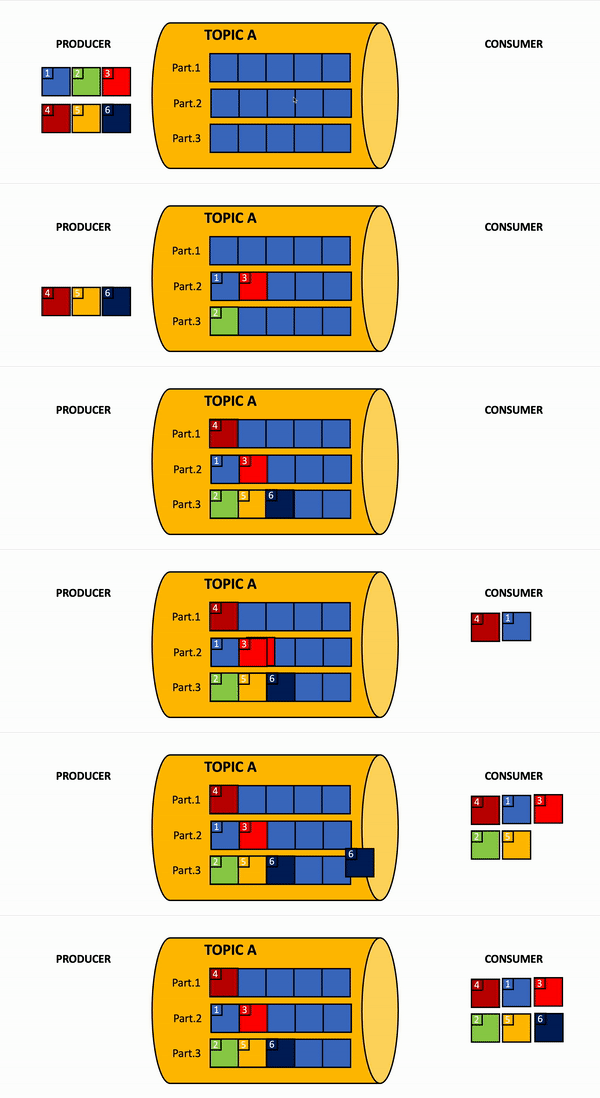
This project sets up a Kafka environment using Docker and Docker Compose, along with a Node.js Express application (kafka-express-app) to test Kafka by producing and consuming messages.
- Docker and Docker Compose installed on your system.
- Node.js and npm installed for running the Express.js application.
kafka-docker/
├── docker-compose.yml       # Docker Compose file for Kafka setup
├── kafka-express-app/       # Node.js Express application
│   ├── src/
│   │   ├── kafka/
│   │   │   ├── producer.ts  # Kafka producer logic
│   │   │   └── consumer.ts  # Kafka consumer logic
│   │   ├── routes/
│   │   │   └── index.ts     # Express routes
│   │   └── app.ts           # Express app entry point
│   ├── package.json         # Node.js dependencies and scripts
│   ├── tsconfig.json        # TypeScript configuration
│   └── .env                 # Environment variables
└── README.md                # Project documentation
- Zookeeper: Manages Kafka brokers.
- Kafka Broker: The Kafka server.
- Schema Registry: Manages Avro schemas for Kafka topics.
- Kafka Connect: For connecting Kafka to external systems.
- Control Center: Web UI for managing Kafka.
- kafka-express-app: Node.js application for testing Kafka.
-
Start Docker Services: Run the following command to start all services:
docker-compose up -d
-
Verify Services: Check if all services are running:
docker ps
-
Access Control Center: Open the Confluent Control Center in your browser:
http://localhost:9021
Create a .env file in the kafka-express-app directory with the following content:
KAFKA_CLIENT_ID=my-app
KAFKA_BROKERS=localhost:9092
KAFKA_GROUP_ID=test-group
KAFKA_TOPIC=test-topic
KAFKA_AUTH_ENABLED=false
If you connect to a secured Kafka cluster, set KAFKA_AUTH_ENABLED=true and provide KAFKA_USERNAME, KAFKA_PASSWORD, and optionally KAFKA_SSL=true.
Navigate to the kafka-express-app directory and install the required dependencies:
cd kafka-express-app
npm installCompile the TypeScript code to JavaScript:
npm run buildStart the application in development mode:
npm run devOr start the compiled application:
npm startUse a tool like curl or Postman to send a POST request to the /api/publish endpoint:
curl -X POST http://localhost:3000/api/publish \
-H "Content-Type: application/json" \
-d '{"topic": "test-topic", "message": "Hello Kafka!"}'Send a GET request to the /api/subscribe endpoint to start consuming messages:
curl http://localhost:3000/api/subscribeYou should see the consumed messages logged in the console.
To stop all Docker services, run:
docker-compose down-
Kafka Broker Connection Issues: Ensure the
KAFKA_BROKERSin.envmatches the broker address indocker-compose.yml(for local Docker Compose, uselocalhost:9092from your app host orbroker:29092from another container). LeaveKAFKA_AUTH_ENABLED=falseunless the broker actually requires SASL authentication. -
Port Conflicts: Ensure the ports defined in
docker-compose.yml(e.g.,9092,29092,9021) are not in use by other applications.
This project is licensed under the MIT License.