








HBB2OBB converts horizontal (axis-aligned) bounding boxes (HBBs) into oriented (rotated) bounding boxes (OBBs) by using your existing HBB annotations as prompts for segmentation models from the SAM (Segment Anything Model) family. It targets object detection tasks where objects appear at arbitrary orientations, such as aerial imagery, satellite data, or traffic monitoring, producing OBBs that tightly encapsulate non-upright objects. Beyond conversion, it ships evaluation, hyperparameter optimization, and annotation format-conversion tools, with both a command-line interface and a Python API.

- 🎯 Accurate OBBs from HBBs: prompts SAM-family segmentation models with your existing horizontal boxes to fit tight oriented boxes around non-upright objects, with no re-annotation required.
- 🧩 Model ensemble: combines masks from multiple SAM variants through majority voting for more robust, accurate results (see Usage).
- 🛡️ Spatially constrained & safe: region-specific masking and contour refinement keep segmentation inside the object, and a fallback keeps the original HBB when no valid mask is found.
- 🔎 Confidence-scored output: every OBB gets a quality score in
[0, 1]that flags silent fallbacks and low-confidence conversions, so you know which boxes to trust (see Confidence scores). - 📐 Flexible scaling: positive or negative scale factors (optionally different for the short and long sides) recover cropped object parts or tighten overly conservative annotations.
- 📊 Evaluate & optimize: built-in IoU evaluation against ground truth plus a hyperparameter optimizer over SAM inference resolution × scale factors.
- 🔄 Format conversions: utilities to move between YOLO TXT and COCO / Pascal VOC / LabelMe JSON annotations.
- ⚙️ CLI + Python API:
hbb2obbandhbb2obb-evalcommands plus an importable API, with transparent visualizations of every step.
📋 Full Feature Overview
- HBB to OBB conversion: converts YOLO-format horizontal bounding boxes to oriented bounding boxes.
- Segmentation-based: uses state-of-the-art SAM models for accurate object boundary detection.
- Multiple model support: SAM, SAM2, SAM2.1, SAM3, Mobile SAM, and FastSAM families (details).
- Model ensemble: combine multiple models via majority voting for enhanced accuracy.
- Confidence scoring: a per-OBB quality score flags fallbacks and low-confidence conversions for triage (details).
- Evaluation tools: assess OBB accuracy against ground truth using IoU metrics.
- Hyperparameter optimization: search SAM inference resolutions and HBB scale factors for the best settings on your data.
- Visualization tools: render HBBs, segmentation masks, derived contours, and resulting OBBs.
- Format conversion utilities: convert between LabelMe / COCO / Pascal VOC annotations and YOLO TXT.
🚀 Planned Enhancements
- Improved morphological operations: more advanced operations for better mask refinement.
- Integration with other libraries: integrate with popular object detection libraries to alleviate the need for HBB annotations.
- Support for other segmentation models: extend compatibility beyond the SAM/FastSAM families.
🔗 Related Projects
HBB2OBB integrates with and complements several specialized tools:
-
Geo-trax 🛰️: georeferenced vehicle trajectory extraction pipeline for high-altitude drone imagery, built on YOLO detection and multi-object tracking. Its vehicle detector produces the horizontal bounding box annotations HBB2OBB consumes, so it can supply the HBB inputs for vehicle use cases (car, bus, truck, motorcycle).
-
Stabilo 🌀: Python library for video and trajectory stabilization using robust homography transformations. Supports various feature detectors, RANSAC algorithms, and user-defined masks.
-
Stabilo-Optimize 🎯: benchmarking and hyperparameter optimization framework for Stabilo. Evaluates stabilization performance through ground truth-free assessment using random perturbations.
Create and activate a Python virtual environment (Python 3.9–3.13), then install from PyPI:
python3.11 -m venv .venv
source .venv/bin/activate  # On Windows: .venv\Scripts\activate
pip install hbb2obb
Also works with uv (uv pip install hbb2obb) and conda.
Note
SAM model weights are downloaded automatically by Ultralytics on first use into a models/ directory relative to your current working directory: run commands from a consistent location so weights are reused. The one exception is SAM 3, which must be downloaded manually (see below).
Alternatives: conda or uv
conda create -n hbb2obb python=3.11 -y
conda activate hbb2obb
uv (fastest; then uv pip install hbb2obb):
uv venv --python 3.11
source .venv/bin/activate  # On Windows: .venv\Scripts\activate
Install from source (development / editable)
git clone https://github.com/rfonod/hbb2obb.git
cd hbb2obb && pip install -e '.[dev]'
The -e flag makes your local changes take effect without reinstalling; the [dev] extra adds pytest and ruff. For a plain install, use pip install . instead.
SAM 3 model weights (manual download required)
Unlike other SAM models, SAM 3 weights (sam3.pt) are not auto-downloaded by Ultralytics. To use SAM 3:
- Request access on the SAM 3 model page on Hugging Face.
- Once approved, download
sam3.pt. - Place
sam3.ptin themodels/directory (relative to where you run the conversion).
See the Ultralytics SAM 3 documentation for more.
A small sample dataset ships in data/. From the repository root:
# Convert the sample HBBs to OBBs (default single model) and save visualizations
hbb2obb data/images --save_img

# Higher accuracy with a model ensemble
hbb2obb data/images --sam_models sam_b sam_l sam2_b sam2.1_b

# Evaluate the converted OBBs against ground truth
hbb2obb-eval data/labels_obb_gt data/labels_obb -mp data/classes.yaml
Converted OBB annotations are written to data/labels_obb/. Run hbb2obb --help or hbb2obb-eval --help for all options.
# Default single model (sam_b), HBBs read from <img_source>/../labels_hbb
hbb2obb /path/to/images --hbb_dir /path/to/hbb/annotations

# Model ensemble (majority voting across models)
hbb2obb /path/to/images --sam_models sam_b sam_l sam2_b sam2.1_b

# Scale HBBs: expand to recover cropped parts, or shrink conservative boxes
hbb2obb /path/to/images --scale_factors 0.1      # expand uniformly
hbb2obb /path/to/images --scale_factors -0.02    # shrink uniformly
hbb2obb /path/to/images --scale_factors 0.1 0.05 # short side / long side

# Save visualization images of the conversion
hbb2obb /path/to/images --save_imghbb2obb-eval /path/to/ground_truth /path/to/predictionsMore CLI arguments
Run hbb2obb --help / hbb2obb-eval --help for the full list. Key conversion arguments:
--hbb_dir/-hd: directory of HBB annotations in YOLO TXT format (default:<img_source>/../labels_hbb).--obb_dir/-od: directory to save OBB annotations (default:<img_source>/../labels_obb).--sam_models/-sm: SAM model(s) to use (e.g.sam_b,sam_l,sam2_b,sam2.1_b,sam3,mobile_sam,FastSAM-s).--imgsz: SAM inference resolution (default: 1280).--scale_factors/-sf: factor(s) to scale HBBs (single value, or two values for short/long sides).--opening_kernel_percentage/-okp: morphological opening kernel size as a percentage of the mask's smaller dimension.--save_confidence: append a per-OBB confidence score as a 10th column in the output TXT files.--save_img,--viz_dir,--show_confidence, and--hide_hbb/--hide_obb/--hide_masks/--hide_segments/--hide_class_labels: visualization controls.--model_kwargs/-k: extra Ultralytics inference kwargs askey1=value1,key2=value2.
Key evaluation arguments:
--excluded_classes/-e: class IDs to exclude from evaluation.--iou_threshold/-t: IoU threshold for a match (default: 0.1).--class_agnostic/-ca: ignore class-label matching (useful for re-classified GT).--exclude_edge_cases/-exc,--edge_tolerance/-et,--img_width/-iw,--img_height/-ih: edge-case handling.--map_path/-mp: path to a label map YAML mapping class IDs to names.
Python API
Converting HBB to OBB: hbb2obb() processes a single image and returns the OBB annotations as a NumPy array:
from pathlib import Path
from hbb2obb.converter import hbb2obb, save_obb_annotations

img_path = Path("/path/to/images/img1.jpg")

# Single SAM model
obb_annotations = hbb2obb(
    img_path=img_path,
    hbb_dir="/path/to/hbb/annotations",
    sam_models="sam_b",
    imgsz=1280,
    scale_factors=0.05,
    opening_kernel_percentage=0.15,
    save_img=True,
    viz_dir="/path/to/save/visualizations",
)

# Model ensemble with per-side scale factors
obb_annotations = hbb2obb(
    img_path=img_path,
    hbb_dir="/path/to/hbb/annotations",
    sam_models=["sam_b", "sam_l", "sam2_b", "sam2.1_b"],
    scale_factors=[0.1, 0.05],  # short side / long side
)

# Writes <obb_dir>/img1.txt, deriving the filename from img_path
save_obb_annotations(obb_annotations, "/path/to/save/obb/annotations", img_path)

# Also return per-OBB confidence scores, and write them as a 10th column
obb_annotations, confidences = hbb2obb(img_path=img_path, sam_models="sam_b", return_confidence=True)
save_obb_annotations(obb_annotations, "/path/to/save/obb/annotations", img_path, confidences=confidences)
Evaluating OBB predictions:
from pathlib import Path
from hbb2obb.evaluator import evaluate_obb, print_results

results = evaluate_obb(
    gt_dir=Path("/path/to/ground_truth_annotations"),
    pred_dir=Path("/path/to/predictions"),
    iou_threshold=0.1,
    class_agnostic=True,      # optional: match regardless of class label
    exclude_edge_cases=True,  # optional: drop boxes at the image edge
    img_width=3840,
    img_height=2160,
)

print_results(results, "/path/to/label_map.yaml")
End-to-end workflow with LabelMe JSON annotations
Starting from LabelMe JSON annotations for HBB and OBB ground truth:
# 1. Convert HBB and OBB ground-truth JSON to YOLO TXT
python scripts/json2yolo.py project/json_hbb -td project/labels_hbb
python scripts/json2yolo.py project/json_obb_gt -td project/labels_obb_gt

# 2. Optimize hyperparameters to find the best settings
python scripts/optimize_hbb2obb.py project/images project/labels_obb_gt -sm sam_b sam_l sam2_b -n multi_sam

# 3. Inspect the best parameters, then convert with them
cat project/benchmark_results/multi_sam/summary.txt
hbb2obb project/images --hbb_dir project/labels_hbb --obb_dir project/labels_obb \
  --sam_models sam_b sam_l --imgsz 1280 --scale_factors 0.05 \
  --opening_kernel_percentage 0.15 --save_img --viz_dir project/visualizations

# 4. Evaluate against ground truth
hbb2obb-eval project/labels_obb_gt project/labels_obb -mp project/label_map.yaml

# 5. Convert OBBs back to JSON for review in LabelMe
python scripts/yolo2json.py project/labels_obb project/label_map.yaml -jd project/json_obb
labelme project/images --output project/json_obb --nodata# LabelMe JSON -> YOLO TXT (HBB and OBB); -mp label map optional
python scripts/json2yolo.py /path/to/json_dir -mp /path/to/label_map.yaml
# Official COCO instance JSON -> YOLO TXT (HBB only)
python scripts/json2yolo.py /path/to/instances.json --input_format coco -td /path/to/labels_yolo
# Pascal VOC XML -> YOLO TXT (HBB)
python scripts/voc2yolo.py /path/to/voc_xml_dir -td /path/to/labels_yolo
# YOLO TXT -> LabelMe-compatible JSON (HBB and OBB); label map required
python scripts/yolo2json.py /path/to/yolo /path/to/label_map.yamljson2yolo.py defaults to LabelMe input (each JSON has imageHeight, imageWidth, shapes); use --input_format coco for official COCO instance files (images, annotations, categories, HBB only).
# Search inference resolutions x scale factors for one or more SAM models
python scripts/optimize_hbb2obb.py /path/to/images /path/to/ground_truth -sm sam_b sam_l sam2_b sam2.1_b -n multi_sam

# Visualize the results
python scripts/plot_optimization_results.py /path/to/optimization_resultsHBB annotations (input): YOLO TXT, one file per image; coordinates relative (0–1) or absolute px:
class_id x_center y_center width height
You bring your own HBB annotations. If you don't have any and your objects are vehicles (car, bus, truck, motorcycle), you can generate them from drone imagery with Geo-trax and feed its detections straight into HBB2OBB.
OBB annotations (output): YOLO TXT, one file per image; four corners in absolute px:
class_id x1 y1 x2 y2 x3 y3 x4 y4
With --save_confidence, a 10th column holds the per-OBB confidence score:
class_id x1 y1 x2 y2 x3 y3 x4 y4 confidence
hbb2obb-eval ignores the trailing confidence column, so evaluation works on either variant.
Label map (optional): YAML mapping class IDs to names:
0: Car
1: Bus
2: TruckHBB2OBB fits each OBB by prompting SAM with your HBBs, refining the resulting mask, and wrapping it in a minimum-area rotated box.
Conversion pipeline
- Load HBB annotations from YOLO TXT.
- Scale bounding boxes: positive factors expand HBBs (recover cropped parts), negative factors shrink them (tighten conservative boxes); short and long sides can be scaled differently.
- Segmentation: run SAM model(s) with the HBBs as prompts.
- Mask aggregation: with an ensemble, combine masks by majority voting; clip to the scaled HBB region; apply morphological opening.
- Contour extraction: extract the largest refined mask contour per object.
- OBB computation: fit a minimum-area oriented bounding box.
- Fallback: if no valid mask is found inside an HBB, keep the original HBB as the OBB (confidence
0.0). - Confidence: score each OBB in
[0, 1](see Confidence Scores). - Visualization (optional): overlay HBBs, masks, contours, and OBBs (colored by confidence).
Key characteristics:
- Label preservation: OBBs inherit the class label of their source HBB (no re-classification).
- Corrective effects: the transformation can recover cropped parts (positive scaling) and produce tighter boxes through precise segmentation.
Each OBB carries a heuristic quality score in [0, 1] that helps triage a converted dataset: high scores are trustworthy SAM fits, low scores warrant a look, and 0.0 marks a fallback where the original HBB was kept. It is a heuristic, not a calibrated probability. The detail crop below shows the score that --show_confidence prints next to each converted box.
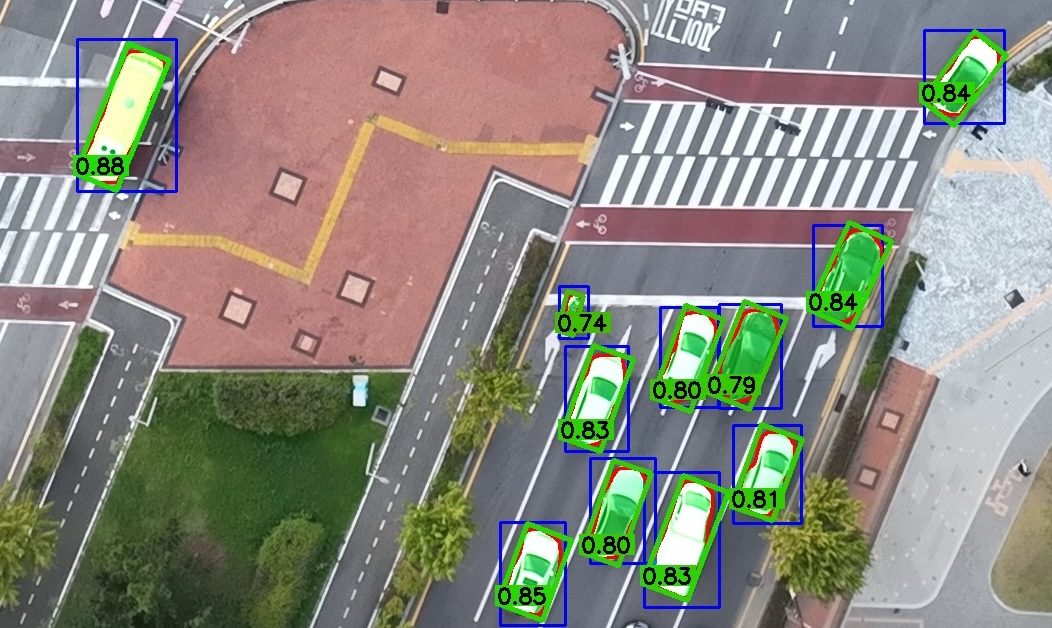
The score is the product of two factors:
- Rectangularity: the fitted contour area divided by the area of its minimum-area rotated rectangle, i.e. how tightly the OBB wraps the segmented shape (
1.0for a perfectly rectangular object). - Ensemble consensus: the fraction of the per-model mask union that survived the majority vote, i.e. how strongly the SAM models agree. This is
1.0for a single model and equals the mask IoU for two models.
Enable it with --save_confidence (writes a 10th column to each output file). In the visualization, OBBs are always tinted on a green→red gradient by score, and --show_confidence prints the numeric value next to each box. When using the Python API, pass return_confidence=True to hbb2obb() to get the scores back alongside the OBBs.
- For optimal results, combine multiple SAM models, e.g.
--sam_models sam_b sam_l sam2_b sam2.1_b sam3. - Experiment with scale factors and inference resolutions based on your dataset.
- Run the hyperparameter optimizer to find the best settings for your data.
- Use class-agnostic evaluation when comparing against manually annotated ground truth with different class labels.
- Visualize the conversion to understand how the model interprets your HBBs.
- Results depend on the quality of the input HBBs and the SAM models used; poor annotations or weak segmentation lead to inaccurate OBBs.
- Highly occluded or complex objects, where the HBB gives insufficient context, may not convert well.
If you use HBB2OBB in your research or software, please cite the archived release:
@software{fonod2026hbb2obb,
  author  = {Fonod, Robert},
  title   = {HBB2OBB: Horizontal to Oriented Bounding Box Conversion and Evaluation Tool},
  year    = {2026},
  license = {MIT},
  doi     = {10.5281/zenodo.15151143},
  url     = {https://github.com/rfonod/hbb2obb}
}
Each GitHub release is automatically archived to Zenodo via the Zenodo–GitHub integration; see CITATION.cff for the latest version and DOI.
Contributions are welcome! If you encounter issues or have suggestions, please open a GitHub Issue or submit a pull request.
This project is distributed under the MIT License. See the LICENSE file for details.