Application for the game GTFO that reports terminal log progress for the D-Lock Block Decipherer achievement.
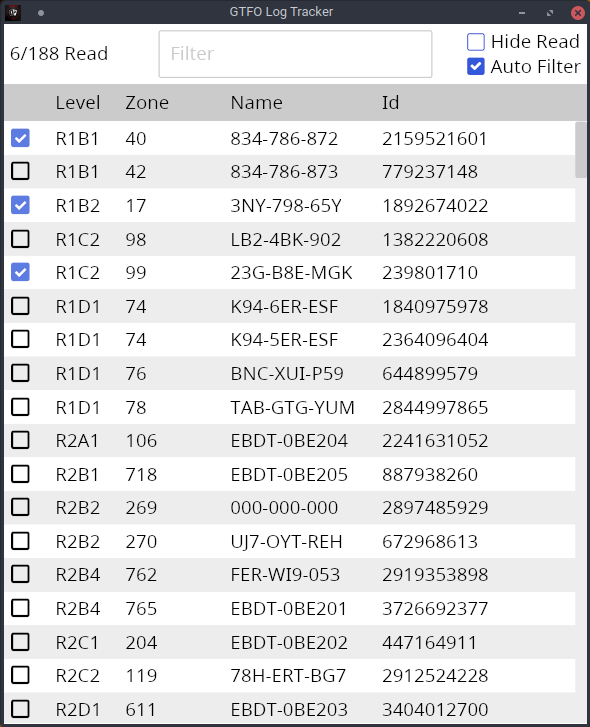
This application doesn't require any installation. It's a standalone executable.
- Download the latest release for your operating system
- Extract
- Windows - right click file and select extract
- Linux - use your systems archive manager or
tar
- Run the executable named gtfo-log-tracker
-
Automatic Tracking
The app can both fetch data from PlayFab (GTFO's official storage location for achievement data) and parse your log files to get your progress.
Using PlayFab will provide the most correct results, but you won't be able to run the tracker at the same time as you play the game due to Steam limitations. You can use the
--playfabargument to fetch data from PlayFab.Parsing from your log files can be less accurate. The game only fetches achievement progress when the game starts. Since logs are counted as read for the whole team if one person in your team reads them and the game only writes to your log file when you read them, the app won't see an update if a teammate reads a log until you start the game again.
Parsing from log files can also provide false positives since some log names are shared between different log files. For example, 2MD-N3H-SYH is the name of the log in R7D1 205 and R8C1 249 even though they are different logs.
The default is to read from your log files so the app can be run while you are playing.
-
Auto-filter
The app can be set to automatically show only the logs in the level you're currently playing for easier tracking.
The application will load the latest log file in your game's data directory. It will also watch that directory for changes so you can leave the app open as you play and it will automatically update.
You may use the filter text box to narrow down the terminal logs that are shown. For example, typing R1 into the textbox will only show logs with R1 in any of the columns.
| Argument | Effect |
|---|---|
| --playfab | Get achievement progress from Play Fab |
| --data-path | Manually specify your GTFO data path if it can't automatically be found (C:\Users\user\AppData\LocalLow\10 Chambers Collective\GTFO) |
-
You can apply arguments via your terminal emulator of choice (gnome-terminal, alacritty, CMD, Windows Terminal, etc...)
/path/to/gtfo-log-tracker --playfab -
On Windows, you can create a shortcut and append the argument in the Target textbox
-
Right-click
gtfo-log-tracker.exe -
Select Create Shortcut
-
Right-click newly created shortcut
-
Select Properties
-
Select Shortcut tab
-
Add your argument(s) to the Target textbox
-

Debug logging is placed in the standard log location for your operating system:
- Windows -
%LOCALAPPDATA%\gtfo-log-tracker\log.txt - Linux -
$XDG_STATE_HOME/gtfo-log-tracker/log.txt(~/.local/stateif$XDG_STATE_HOMEisn't set)
- Install Rust
- Compile and run the binary:
$ git clone https://github.com/rfvgyhn/gtfo-log-tracker
$ cd gtfo-log-tracker
$ cargo build --release
$ cp target/release/build/steamworks-sys-*/out/*steam_api* target/release
$ ./target/release/gtfo-log-tracker