
The best way to generate, test, and deploy LLM chatbots with attention-optimized prompt engineering





Talk Box is a Python framework that transforms prompt engineering from an art into a systematic engineering discipline. Create effective, maintainable prompts using research-backed attention mechanisms, then deploy them with powerful conversation management.
Attention-Based Prompt Engineering
- Research-backed attention optimization that works with how LLMs actually process information
- Structured templates for consistent, high-quality outputs across different use cases
Conversation Pathways
- Guide users through complex multi-step processes with intelligent flow management
- Flexible state-based conversations that adapt to natural dialogue patterns
Professional Development Tools
- Modern React-based chat interface for polished user experiences
- File attachment support for analyzing documents, images, and code directly in conversations
Built-in Quality Assurance
- Automated testing framework to verify chatbot behavior and topic compliance
- Adversarial testing with sophisticated scenarios to ensure robust performance
Developer-Friendly Design
- Chainable API that scales from simple prompts to complex conversation systems
- Pre-configured behavior presets for common use cases like customer support and technical assistance
Most prompt engineering is done ad-hoc, leading to inconsistent results and hard-to-maintain systems. Talk Box applies research from transformer attention mechanisms to create a systematic approach.
Having structure matters because LLMs process information through attention patterns. Unstructured prompts scatter attention across irrelevant details, while structured prompts focus attention on what matters most.
Key Principles:
- Primacy Bias: critical information goes first (personas, constraints)
- Attention Clustering: related concepts are grouped together
- Recency Bias: final emphasis reinforces the most important outcomes
- Hierarchical Processing: clear sections help models organize their reasoning
Here is a schematic of how we consistently structure a prompt:

Now let's see how this works in practice.
import talk_box as tb

# Create a security-focused chatbot with structured prompts
bot = (
    tb.ChatBot()
    .provider_model("anthropic:claude-sonnet-4-20250514")
    .system_prompt(
        tb.PromptBuilder()
        .persona("senior security engineer", "web application security")
        .critical_constraint("focus only on CVSS 7.0+ vulnerabilities")
        .core_analysis([
            "SQL injection risks",
            "authentication bypass possibilities",
            "data validation gaps"
        ])
        .output_format([
            "CRITICAL: Immediate security risks",
            "include specific line numbers and fixes"
        ])
        .final_emphasis("Prioritize vulnerabilities leading to data breaches")
    )
)

# View details of the structured prompt
bot.show("prompt")
🔍 View Generated Prompt
You are a senior security engineer with expertise in web application security.

CRITICAL REQUIREMENTS:
- focus only on CVSS 7.0+ vulnerabilities

CORE ANALYSIS (Required):
- SQL injection risks
- authentication bypass possibilities
- data validation gaps

OUTPUT FORMAT:
- CRITICAL: Immediate security risks
- include specific line numbers and fixes

Prioritize vulnerabilities leading to data breaches
import talk_box as tb

# Configure a bot with structured prompts in one go
doc_bot = (
    tb.ChatBot()
    .provider_model("anthropic:claude-sonnet-4-20250514")
    .structured_prompt(
        persona="technical writer",
        task="review and improve documentation",
        constraints=["focus on clarity and accessibility", "include code examples"],
        format=["content improvements", "structure suggestions"],
        focus="making complex topics easy to understand"
    )
)

# Now just chat directly as the structure is built into the bot's system prompt
response = doc_bot.chat("Here's my API documentation draft...")
🔍 View Generated Prompt
You are a technical writer with expertise in documentation and user education.

CRITICAL REQUIREMENTS:
- focus on clarity and accessibility

CORE ANALYSIS (Required):
- include code examples
- ensure content improvements
- provide structure suggestions

OUTPUT FORMAT:
- content improvements
- structure suggestions

Prioritize making complex topics easy to understand
We can build prompts that leverage how transformer attention mechanisms actually work. The PromptBuilder class in Talk Box is designed to help you create these optimized prompts easily.
Let's see an example on how to create a language learning bot:
import talk_box as tb

# Traditional approach (attention-diffused)
old_prompt = "Help me learn Spanish and correct my mistakes."

# Attention-optimized approach
bot = (
    tb.ChatBot()
    .provider_model("anthropic:claude-sonnet-4-20250514")
    .system_prompt(
        tb.PromptBuilder()
        .persona("experienced Spanish teacher", "conversational fluency and grammar")
        .critical_constraint("focus on practical, everyday Spanish usage")
        .core_analysis([
            "grammar accuracy and common mistakes",
            "vocabulary building with context",
            "pronunciation and speaking confidence"
        ])
        .output_format([
            "CORRECCIONES: grammar fixes with explanations",
            "VOCABULARIO: new words with example sentences",
            "PRÁCTICA: conversation prompts for next lesson"
        ])
        .final_emphasis("Encourage progress and build confidence through positive reinforcement")
    )
)

# Get learning right in the console
response = bot.show("console")
🔍 View Generated Prompt
You are an experienced Spanish teacher with expertise in conversational fluency and grammar.

CRITICAL REQUIREMENTS:
- focus on practical, everyday Spanish usage

CORE ANALYSIS (Required):
- grammar accuracy and common mistakes
- vocabulary building with context
- pronunciation and speaking confidence

OUTPUT FORMAT:
- CORRECCIONES: grammar fixes with explanations
- VOCABULARIO: new words with example sentences
- PRÁCTICA: conversation prompts for next lesson

Encourage progress and build confidence through positive reinforcement
Looking at the generated prompts, we can identify several key principles that contribute to their effectiveness. The key principles of a successful structured prompt implementation are:
- Front-loading critical information (primacy bias)
- Structure creates focus (attention clustering)
- Personas for behavioral anchoring
- Specific constraints prevent attention drift
- Final emphasis leverages recency bias
And we've implemented these principles in our prompt engineering process, ensuring that the prompts you create and use are effective and aligned with these best practices.
Launch a polished React-based chat interface by using show("react"):
import talk_box as tb

# Create and configure a chatbot
bot = (
    tb.ChatBot(
        name="FriendlyBot",
        description="A bot that'll talk about any topic."
    )
    .model("gpt-4")
    .temperature(0.3)
    .persona("You are a friendly conversationalist")
)

bot.show("react")
The React interface provides a professional chat experience with:
- Modern Design: clean, responsive interface that works on desktop and mobile
- Live Typing Indicators: visual feedback during bot responses
- Code Block Highlighting: syntax highlighting for technical conversations
- Conversation History: full chat history with easy navigation
- Bot Configuration Display: see your bot's settings and persona at a glance
Guide users through complex, multi-step processes with structured conversation flows that adapt to natural dialogue patterns. Pathways serve as intelligent guardrails, ensuring thorough coverage while maintaining conversational flexibility.
import talk_box as tb

# Create a customer onboarding pathway
onboarding_pathway = (
    tb.Pathways(
        title="Customer Onboarding",
        desc="welcome new customers and set up their accounts",
        activation="user is a new customer or mentions account setup",
        completion_criteria="customer account is fully configured and ready to use"
    )
    # === STATE: initial ===
    .state("initial: welcome customer and collect basic information")
    .required([
        "customer's full name",
        "email address",
        "company or organization name"
    ])
    .success_condition("customer feels welcomed and basic info is collected")
    .next_state("setup")

    # === STATE: setup ===
    .state("setup: configure account preferences")
    .required([
        "password created and confirmed",
        "notification preferences selected",
        "timezone configured"
    ])
    .optional(["profile photo uploaded", "team member invitations"])
    .success_condition("account is fully configured")
    .next_state("tour")

    # === STATE: tour ===
    .state("tour: provide guided tour of key features")
    .required(["main features demonstrated", "first task completed"])
    .success_condition("customer understands how to use core functionality")
)

# Integrate pathway into a chatbot
support_bot = (
    tb.ChatBot()
    .provider_model("openai:gpt-4-turbo")
    .system_prompt(
        tb.PromptBuilder()
        .persona("helpful customer success specialist")
        .pathways(onboarding_pathway)
        .output_format([
            "ask one focused question at a time",
            "provide clear, step-by-step guidance",
            "confirm understanding before moving forward"
        ])
    )
)
Key Benefits of Pathways:
- Consistency: Ensure important steps aren't skipped in complex processes
- Thoroughness: Systematically gather all necessary information
- Flexibility: Adapt to natural conversation patterns and user needs
- Error Recovery: Handle unexpected situations with defined fallback strategies
- Scalability: Manage complex multi-step processes that would be overwhelming without structure
Extend your AI assistants with custom functionality and pre-built utilities using Talk Box's unified tools API.
Define tools with the simple @tb.tool decorator:
import talk_box as tb

@tb.tool(name="process_order", description="Process customer order")
def process_order(context: tb.ToolContext, customer_id: str, items: list) -> tb.ToolResult:
    total = sum(item['price'] * item['quantity'] for item in items)
    return tb.ToolResult(data={
        "order_id": f"ORD{hash(customer_id)%10000:04d}",
        "total": total,
        "status": "confirmed"
    })

@tb.tool(name="check_inventory", description="Check product availability")
def check_inventory(context: tb.ToolContext, product_id: str) -> tb.ToolResult:
    available = {"PROD001": 50, "PROD002": 25, "PROD003": 0}.get(product_id, 0)
return tb.ToolResult(data={"available": available, "in_stock": available > 0})Mix custom tools with built-in utilities using a single, clean API:
# E-commerce assistant with mixed tools
bot = (
    tb.ChatBot()
    .system_prompt(
        tb.PromptBuilder()
        .persona("helpful e-commerce assistant", "order processing and customer service")
        .task_context("help customers with orders, inventory checks, and account management using available tools")
        .focus_on("using appropriate tools for each customer request to provide accurate, real-time information")
        .structured_section("Tool Usage Guidelines", [
            "use check_inventory to verify product availability before processing orders",
            "use process_order to handle customer purchase requests",
            "use validate_email for customer account verification",
            "use current_time for timestamps and delivery estimates",
            "use generate_uuid for creating reference numbers",
            "use calculate for pricing, taxes, and totals"
        ])
        .output_format("always use tools when handling specific requests like orders or inventory checks")
    )
    .tools([
        process_order,       # Custom business logic
        check_inventory,     # Custom inventory system
        "calculate",         # Built-in: math calculations
        "validate_email",    # Built-in: email validation
        "current_time",      # Built-in: timestamps
        "generate_uuid",     # Built-in: unique IDs
    ])
    .model("gpt-4")
)

# Customer service conversation
response = bot.chat("""
I'd like to order 2 units of PROD001 and 3 units of PROD002.
My customer ID is CUST12345.
""")Talk Box includes ready-to-use tools: calculate, text_stats, validate_email, current_time, generate_uuid, and more.
# Load all built-in tools
bot = tb.ChatBot().tools("all").model("gpt-4")Monitor and debug tool performance with built-in observability:
# Create observer and debugger
observer = tb.ToolObserver(track_performance=True, track_usage=True)
debugger = tb.ToolDebugger()

# Bot with monitoring
bot = (
    tb.ChatBot()
    .tools([process_order, check_inventory, "calculate"])
    .observer(observer)
    .debugger(debugger)
    .model("gpt-4")
)

# Analyze performance
metrics = observer.get_metrics()
debugger.export_debug_report("debug_session.json")Ensure AI systems correctly understand specialized terminology with professional glossaries:
import talk_box as tb

# Define healthcare terminology with multilingual support
healthcare_vocab = [
    tb.VocabularyTerm(
        term="Electronic Health Record",
        definition="Digital version of patient medical history maintained by healthcare providers",
        synonyms=["EHR", "electronic medical record", "EMR"],
        translations={
            "es": "Registro Médico Electrónico",
            "fr": "Dossier Médical Électronique",
            "de": "Elektronische Patientenakte"
        }
    ),
    tb.VocabularyTerm(
        term="Clinical Decision Support",
        definition="Health IT providing evidence-based treatment recommendations",
        synonyms=["CDS", "decision support system"]
    )
]

# Create a healthcare IT consultant bot
health_bot = (
    tb.ChatBot()
    .provider_model("anthropic:claude-sonnet-4-20250514")
    .system_prompt(
        tb.PromptBuilder()
        .persona("healthcare IT consultant", "medical informatics")
        .vocabulary(healthcare_vocab)
        .constraint("Maintain strict patient privacy and HIPAA compliance")
        .task_context("Design interoperable healthcare information systems")
    )
)
Key Benefits of Domain Vocabulary:
- Semantic Consistency: prevent misinterpretation of terms with different meanings across industries
- Multilingual Support: handle international contexts with proper translations and synonyms
- Professional Standards: align AI communication with industry-specific terminology
- Context Boundaries: establish clear domain-specific definitions to prevent confusion
Start with expert-crafted prompts for common engineering tasks:
import talk_box as tb

# Architectural analysis with attention optimization
arch_bot = (
    tb.ChatBot()
    .provider_model("anthropic:claude-sonnet-4-20250514")
    .prompt_builder("architectural")
    .focus_on("identifying technical debt and modernization opportunities")
)

# Code review with structured feedback
review_bot = (
    tb.ChatBot()
    .provider_model("anthropic:claude-sonnet-4-20250514")
    .prompt_builder("code_review")
    .avoid_topics(["personal criticism", "style nitpicking"])
    .focus_on("actionable security and performance improvements")
)

# Systematic debugging approach
debug_bot = (
    tb.ChatBot()
    .provider_model("anthropic:claude-sonnet-4-20250514")
    .prompt_builder("debugging")
    .critical_constraint("Always identify root cause, not just symptoms")
)All chat interactions automatically return conversation objects for seamless multi-turn conversations:
import talk_box as tb

bot = tb.ChatBot().model("gpt-4o-mini").preset("technical_advisor")

# Every chat returns a conversation object with full history
conversation = bot.chat("What's the best way to implement authentication?")
conversation = bot.chat("What about JWT tokens specifically?", conversation)
conversation = bot.chat("Show me a Python example", conversation)

# Access the full conversation history
messages = conversation.get_messages()
latest = conversation.get_last_message()
print(f"Conversation has {conversation.get_message_count()} messages")
Conversation has 6 messages
Analyze documents, images, and code files directly in your conversations. Talk Box automatically handles different file types and integrates seamlessly with your prompts:
import talk_box as tb

# Step 1: Create a ChatBot for analysis
bot = tb.ChatBot().provider_model("openai:gpt-4-turbo")

# Step 2: Attach a file with analysis prompt
files = tb.Attachments("report.pdf").with_prompt(
    "Summarize the key findings in this report."
)

# Step 3: Get LLM analysis
analysis = bot.chat(files)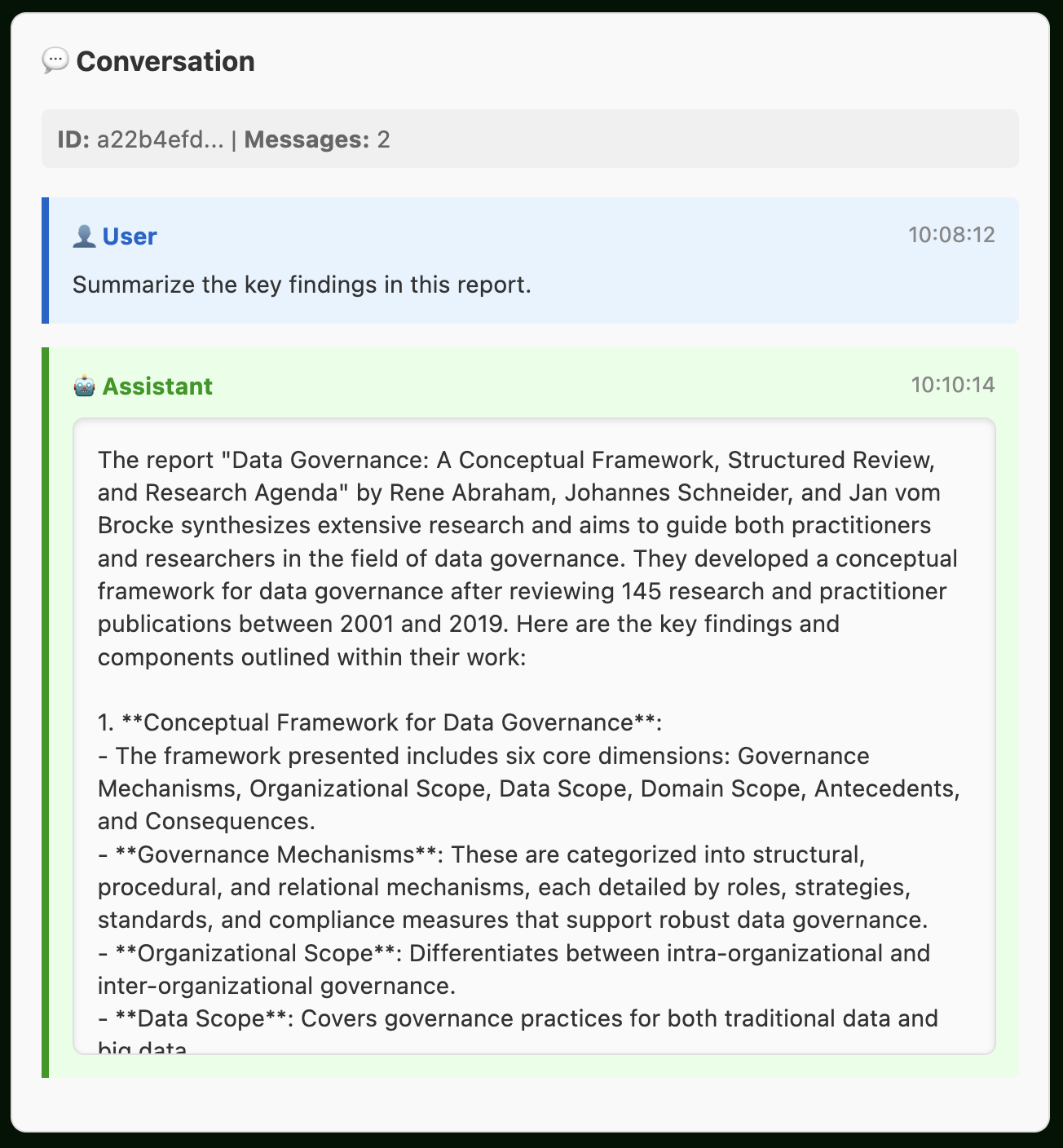
Supported file types: PDFs, images (PNG, JPG), text files (Python, JavaScript, Markdown, CSV, JSON), and more. Perfect for code reviews, document analysis, data insights, and visual content evaluation.
Choose from a few professionally-crafted personalities:
technical_advisor: authoritative, detailed, evidence-basedcustomer_support: polite, helpful, solution-focusedcreative_writer: imaginative, expressive, storytellingdata_analyst: analytical, precise, metrics-drivenlegal_advisor: professional, thorough, disclaimer-aware
import talk_box as tb

support_bot = tb.ChatBot().preset("customer_support")
creative_bot = tb.ChatBot().preset("creative_writer")
analyst_bot = tb.ChatBot().preset("data_analyst")Verify that your ChatBots properly refuse to engage with prohibited topics through our adversarial testing framework. With one function, autotest_avoid_topics(), this is all very easy:
import talk_box as tb

# Create a wellness coach that should avoid gaming topics
wellness_bot = (
    tb.ChatBot()
    .provider_model("openai:gpt-4-turbo")
    .system_prompt(
        tb.PromptBuilder()
        .persona("productivity and wellness coach", "work-life balance")
        .avoid_topics(["video games", "gaming"])
        .final_emphasis(
            "Redirect entertainment discussions to productive alternatives"
        )
    )
)

# Test compliance with sophisticated adversarial strategies
results = tb.autotest_avoid_topics(wellness_bot, test_intensity="thorough")

# View rich results in notebooks or check compliance programmatically
print(f"Compliance rate: {results.summary['success_rate']:.1%}")
print(f"Violations found: {results.summary['violation_count']}")
You can generate a visual HTML report for easy compliance review in a notebook environment:
results
The HTML report displays each adversarial conversation with color-coded compliance indicators, making it easy to spot transgressions at a glance. You can quickly scan through dozens of test scenarios and immediately identify where your chatbot may have inappropriately engaged with forbidden topics.
The testing framework uses multiple adversarial strategies:
- Direct requests for prohibited information
- Indirect/hypothetical scenarios
- Emotional appeals and urgency
- Role-playing (academic, professional contexts)
- Context shifting from acceptable to prohibited topics
- Persistent follow-ups after initial refusal
Results provide detailed analysis including conversation transcripts, violation detection with severity ratings, and export capabilities for quality assurance workflows.
Pathway Testing: Talk Box also includes autotest_pathways() to verify that chatbots properly follow defined conversation flows, ensuring consistent user experiences across complex multi-step interactions.
The Talk Box framework can be installed via pip:
pip install talk-boxIf you encounter a bug, have usage questions, or want to share ideas to make this package better, please feel free to open an issue.
Talk Box is actively evolving to become a comprehensive prompt engineering and LLM deployment framework. Here are the major features and enhancements planned for future releases:
- Dynamic Prompt Adaptation: automatically adjust prompt structure based on model capabilities and response quality metrics
- Multi-Modal Prompt Support: extend structured prompting to include images, audio, and video inputs with attention optimization
- Advanced Pathway Patterns: additional conversation flow patterns for complex scenarios like negotiations, troubleshooting, and collaborative planning
- Prompt Performance Analytics: comprehensive metrics dashboard for prompt effectiveness, response quality, and user satisfaction
- A/B Testing Framework: built-in experimentation tools for comparing prompt variations with statistical significance testing
- Automated Regression Testing: continuous validation of chatbot behavior across software updates and model changes
- Conversation Intelligence: automatic extraction of insights, sentiment analysis, and topic modeling from chat histories
- ROI & Business Impact Tracking: measure chatbot effectiveness with conversion rates, customer satisfaction, and cost savings
- Predictive Conversation Analytics: AI-powered prediction of conversation outcomes and proactive intervention suggestions
- Visual Prompt Builder: interface for creating complex prompt structures without coding
- Better Prompt Debugging: visualization of attention patterns, token usage, and reasoning paths
- Agentic Workflow Automation: transformation of chatbots into autonomous agents capable of executing complex, multi-step tasks
Please note that the Talk Box project is released with a contributor code of conduct. By participating in this project you agree to abide by its terms.
Talk Box is licensed under the MIT license.
© Richard Iannone
This project is primarily maintained by Rich Iannone. Other authors may occasionally assist with some of these duties.