Snap behavior in UIScrollView in Swift
Needed this to answer a StackOverflow question:
UIAnimator's UISnapBehavior possible with UIScrollview?
What I am Trying to Achieve
UIScrollView to 'snap' to certain point while the user is dragging the scroll view. However, the scrolling has to resume from snapped position without the user having to lift the touch.
Apple seems to achieve this in Photo Editing in their iOS Photos App. (See screenshot below)
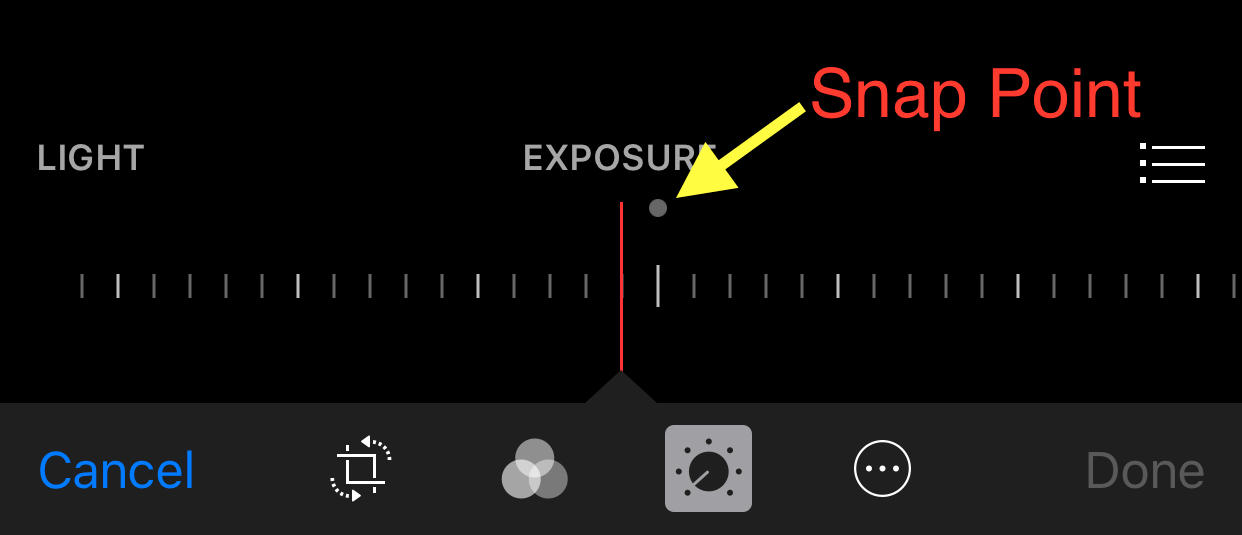
I've tried to mimic iOS Photos app. Here is my logic:
// CALCULATE A CONTENT OFFSET FOR SNAPPING POINT
let snapPoint = CGPoint(x: 367, y: 0)

// CHANGE THESE VALUES TO TEST
let minDistanceToSnap = 7.0
let minVelocityToSnap = 25.0
let minDragDistanceToReleaseSnap = 7.0
let snapDuringDecelerating = false
This kind of scrolling needs 3 stages
enum SnapState {
case willSnap
case didSnap
case willRelease
}
willSnap:Default state. Decide when to snap. ComparecontentOffset distance from SnapPoint with minDistanceToSnapandscrollview velocity with minVelocityToSnap. Change todidSnapstate.didSnap:ManuallysetContentOffsetto a providedcontextOffset(snapPoint). CalculatedragDistanceonscrollView. If user drag more than a certain distance (minDragDistanceToReleaseSnap) change towillReleasestate.willRelease:Change towillSnapstate again ifdistance scroll from snapPointis more thanminDistanceToSnap.
extension ViewController: UIScrollViewDelegate {
    func scrollViewDidScroll(scrollView: UIScrollView) {
        switch(snapState) {
            case .willSnap:
                let distanceFromSnapPoint = distance(between: scrollView.contentOffset, and: snapPoint)
                let velocity = scrollView.panGestureRecognizer.velocityInView(view)
                let velocityDistance = distance(between: velocity, and: CGPointZero)
                if distanceFromSnapPoint <= minDistanceToSnap && velocityDistance <= minVelocityToSnap && (snapDuringDecelerating || velocityDistance > 0.0) {
                    startSnapLocaion = scrollView.panGestureRecognizer.locationInView(scrollView)
                    snapState = .didSnap
                }
            case .didSnap:
                scrollView.setContentOffset(snapPoint, animated: false)
                var dragDistance = 0.0
                let location = scrollView.panGestureRecognizer.locationInView(scrollView)
                dragDistance = distance(between: location, and: startSnapLocaion)
                if dragDistance > minDragDistanceToReleaseSnap  {
                    startSnapLocaion = CGPointZero
                    snapState = .willRelease
                }
            case .willRelease:
                let distanceFromSnapPoint = distance(between: scrollView.contentOffset, and: snapPoint)
                if distanceFromSnapPoint > minDistanceToSnap {
                    snapState = .willSnap
                }
        }
    }
}
Helper function
func distance(between point1: CGPoint, and point2: CGPoint) -> Double {
    return Double(hypotf(Float(point1.x - point2.x), Float(point1.y - point2.y)))
}