A security tool that detects malicious packages from external vulnerability feeds and searches for them in your package registries or artifact repositories.
- 🛡️ Features
- 📦 Ecosystem Support
- 🚫 Package Blocking & Security
- 🚀 Quick Start
- 📋 Usage
- 🧪 Testing
- 🔧 Configuration
- ⚡ Redis Cache
- Wildcard Compression
- 📢 Notifications
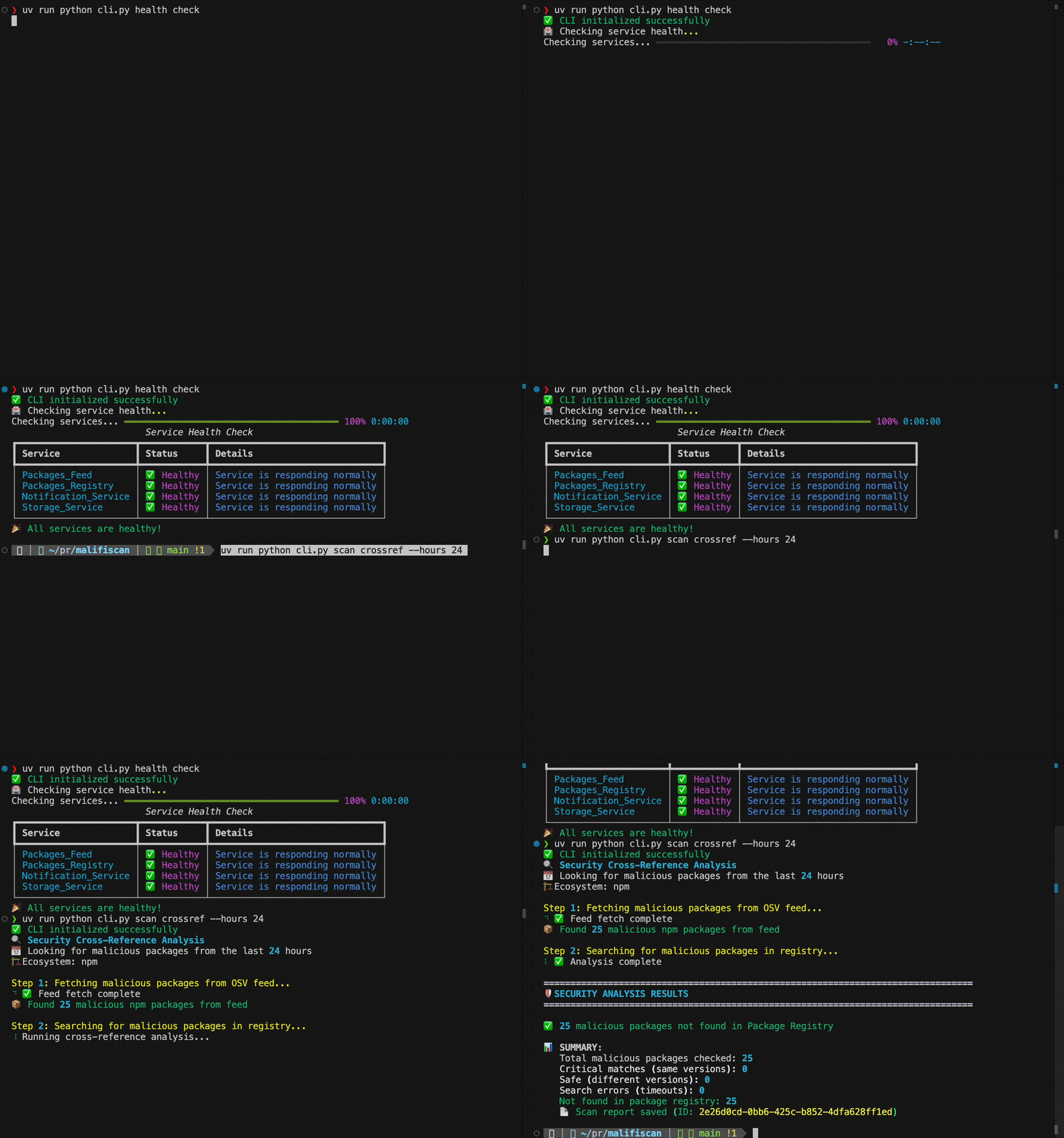
- 📊 Sample Output
- ⚡ Performance Considerations
- 🔒 Security Notes
- 📚 Documentation
- 🆘 Troubleshooting
- 📄 License
- Multi-Ecosystem Support: Supports scanning and blocking across 10 major package ecosystems
- OSV Feed Integration: Fetches malicious package data from Google Cloud Storage OSV vulnerability database
- JFrog Artifactory Search: Searches for packages in your Artifactory repositories using AQL (Artifactory Query Language)
- Security Cross-Reference: Compares OSV malicious packages against your JFrog repositories to identify potential threats
- Package Blocking: Block malicious packages using JFrog Artifactory exclusion patterns to prevent downloads
- Package Management: View, block, and unblock packages with enterprise-grade safety features
- Notifications & Alerts: Configurable notifications via webhook, or Microsoft Teams when malicious packages are detected
- Time-Based Filtering: Configurable time window for fetching recent malicious packages (default: 48 hours)
- Rich CLI Interface: Interactive command-line interface with progress bars and formatted output
- Comprehensive Health Checks: Validates connectivity to OSV and JFrog services
Malifiscan supports 10 major package ecosystems with varying levels of OSV scanning, JFrog searching, and blocking capabilities:
| Ecosystem | OSV Scanning | JFrog Scanning | JFrog Blocking | Notes |
|---|---|---|---|---|
| npm | ✅ Full | ✅ Full | ✅ Full | Complete support with scoped packages |
| PyPI | ✅ Full | ✅ Full | ✅ Full | Complete support with normalized names |
| Maven | ✅ Full | ✅ Full | ✅ Full | Complete GAV (GroupId:ArtifactId:Version) support |
| Go | ✅ Full | ✅ Full | ✅ Full | Complete module path and version support |
| NuGet | ✅ Full | ✅ Full | ✅ Full | Complete package ID and version support |
| RubyGems | ✅ Full | ✅ Full | ✅ Basic | Standard gem file patterns |
| crates.io | ✅ Full | ✅ Full | ✅ Basic | Standard crate file patterns |
| Packagist | ✅ Full | ✅ Full | ✅ Basic | Composer vendor/package patterns |
| Pub | ✅ Full | ✅ Full | Generic patterns only (Dart/Flutter) | |
| Hex | ✅ Full | ✅ Full | Generic patterns only (Elixir) |
Legend:
- OSV Scanning: Fetches malicious package data from OSV vulnerability database
- JFrog Scanning: Searches for packages in JFrog Artifactory repositories using AQL
- JFrog Blocking: Creates exclusion patterns to block package downloads
- ✅ Full: Complete blocking support with ecosystem-specific patterns
- ✅ Basic: Good support with standard file patterns
⚠️ Limited: Basic patterns with limited blocking effectiveness
Different ecosystem support levels create different types of exclusion patterns when blocking packages:
✅ Full Support (Precise Patterns)
- npm:
axios/-/axios-1.12.2.tgz(targets exact tarball file) - PyPI:
simple/requests/requests-2.28.1*(follows PyPI simple API structure) - Maven:
com/example/evil-lib/1.0.0/**(follows GAV structure: GroupId/ArtifactId/Version) - Go:
github.com/user/module/@v/v1.2.3*(follows Go module proxy structure) - NuGet:
packagename/1.0.0/**(follows NuGet repository layout)
✅ Basic Support (Standard Patterns)
- RubyGems:
gems/package-name-1.0.0.gem(standard gem file format) - crates.io:
crates/package-name/package-name-1.0.0.crate(standard crate format) - Packagist:
vendor/package/1.0.0/**(Composer vendor/package structure)
- Pub/Hex:
**/package-name-1.0.0*or**/package-name/**(broad wildcards)
The blocking effectiveness decreases from Full (surgical precision) to Limited (broad patterns that might block more than intended or miss some variations).
# Scan all available ecosystems (default behavior)
uv run python cli.py scan crossref

# Scan specific ecosystem only
uv run python cli.py scan crossref --ecosystem npm
uv run python cli.py scan crossref --ecosystem PyPIMalifiscan can automatically block malicious packages in your JFrog Artifactory repositories using exclusion patterns. This prevents developers from downloading compromised packages while preserving existing patterns.
When you block a package, Malifiscan:
- Generates specific patterns for the malicious package (e.g.,
axios/-/axios-1.12.2.tgz) - Updates repository configuration by adding patterns to the
excludesPatternfield - Preserves existing patterns using safe union-based merging
# Block a specific package version
uv run python cli.py registry block axios npm 1.12.2

# Block all versions of a package
uv run python cli.py registry block malicious-pkg npm "*"

# View currently blocked packages
uv run python cli.py registry list-blocked npm

# Unblock a package
uv run python cli.py registry unblock axios npm 1.12.2- Pattern Preservation: Existing exclusion patterns are never overwritten
- Granular Control: Block specific versions or entire packages
- Audit Trail: All blocking operations are logged and traceable
- Python 3.9+
- JFrog Artifactory instance with API access
- Internet connectivity for OSV database access
UV is a fast Python package manager that provides better dependency resolution and faster installs.
-
Install UV (if not already installed)
-
Clone and setup the project
git clone <repository-url>
cd malifiscan

# Initialize UV project and install dependencies
uv init --no-readme --no-pin-python
uv sync --dev
-
Initialize configuration
# Generate local configuration files from templates
uv run python cli.py config init

# Edit the generated files with your settings:
# - .env: Add your JFrog credentials
# - config.local.yaml: Customize any settings
-
Verify setup
uv run python cli.py config validate
uv run python cli.py health check
-
Clone and setup
git clone <repository-url>
cd malifiscan

# Create and activate virtual environment
python -m venv venv
source venv/bin/activate  # On Windows: venv\Scripts\activate

# Install dependencies from pyproject.toml
pip install --upgrade pip
pip install -e .
-
Initialize configuration
# Generate local configuration files from templates
python cli.py config init

# Edit the generated files with your settings:
# - .env: Add your JFrog credentials
# - config.local.yaml: Customize any settings
-
Verify setup
python cli.py config validate
python cli.py health check
Quick Start: docker run --env-file .env rotemreiss/malifiscan python cli.py health check. All data is ephemeral unless you mount a volume: docker run --env-file .env -v $(pwd)/data:/app/data rotemreiss/malifiscan python cli.py scan crossref.
The tool provides two entry points with support for both UV and traditional Python environments:
python -m src.main- Core CLI with basic scan and status operationscli.py- Comprehensive testing and administration tool
# Basic security scan
uv run python -m src.main --scan
uv run python -m src.main  # Default: runs scan

# Health check
uv run python -m src.main --statussource venv/bin/activate # Activate virtual environment first
# Basic security scan
python -m src.main --scan
python -m src.main # Default: runs scan
# Health check
python -m src.main --status# Health check
uv run python cli.py health check
# Search for packages
uv run python cli.py registry search <package-name>
uv run python cli.py registry search axios npm
# Package blocking and management
uv run python cli.py registry block <package-name> <ecosystem> <version>
uv run python cli.py registry block axios npm 1.12.2
uv run python cli.py registry unblock axios npm 1.12.2
uv run python cli.py registry list-blocked npm
# Security cross-reference scan
uv run python cli.py scan crossref
uv run python cli.py scan crossref --hours 24
# Interactive mode
uv run python cli.py interactiveHealth Check
python cli.py health checkValidates connection to your JFrog Artifactory instance and other services.
Search for Packages
python cli.py registry search <package-name>
python cli.py registry search axios npm
Search for specific packages in your JFrog repositories.
Package Blocking and Management
# Block malicious packages
python cli.py registry block <package-name> <ecosystem> <version>
python cli.py registry block axios npm 1.12.2

# View blocked packages
python cli.py registry list-blocked npm

# Unblock packages
python cli.py registry unblock axios npm 1.12.2
Block, unblock, and manage malicious packages using JFrog exclusion patterns.
Security Cross-Reference Scan
python cli.py scan crossref
python cli.py scan crossref --hours 24
python cli.py scan crossref --hours 6 --ecosystem npm --limit 100
Fetches malicious packages from OSV (last 6 hours by default) and searches for them in your JFrog repositories.
Replace python cli.py with docker run --env-file .env rotemreiss/malifiscan python cli.py for any command. Add -v $(pwd)/data:/app/data for persistent storage.
Basic Health Check
python -m src.main --statusBasic Security Scan
python -m src.main --scanpython cli.py interactiveStart an interactive session with autocomplete and command history.
For scheduled scans, use the core entry point:
# Run security scan every 6 hours
0 */6 * * * cd /path/to/malifiscan && python -m src.main --scan

# Daily health check
0 9 * * * cd /path/to/malifiscan && python -m src.main --status
Docker: Replace python with docker run --rm --env-file .env -v $(pwd)/data:/app/data rotemreiss/malifiscan python in cron commands above.
Testing guidelines, database persistence strategy, and detailed command usage have moved to CONTRIBUTING.md.
Quick commands:
uv run pytest tests/                 # All tests (UV)
pytest tests/                        # All tests (pip/venv)
For database best practices, coverage instructions, integration test markers, and adding new tests, see the Testing section in CONTRIBUTING.md.
Malifiscan uses a layered configuration approach for maximum flexibility and user-friendliness.
# Initialize configuration files (one-time setup)
python cli.py config init

# Validate your configuration
python cli.py config validate

# View current configuration
python cli.py config show
Configuration is loaded from multiple sources, with higher priority sources overriding lower ones:
- CLI arguments (highest priority)
- Environment variables (
.envfile or system environment) - Local config file (
config.local.yaml- user-specific, gitignored) - Project config file (
config.yaml- defaults, committed to Git) - Built-in defaults (lowest priority)
Contains sensitive information like credentials and API keys.
# JFrog Configuration (Required)
JFROG_BASE_URL=https://your-company.jfrog.io/artifactory
JFROG_API_KEY=your-api-key-here

# Optional: Customize scan behavior
SCANNER_INTERVAL_HOURS=1
LOG_LEVEL=INFO
Use --env to specify custom env file:
uv run python cli.py --env .env.prodreg scan crossrefYour personal configuration overrides (gitignored):
# Enable debug mode for development
debug: true
environment: development

# Override service configurations
packages_registry:
  enabled: true
  config:
    timeout_seconds: 60

# Custom storage location
storage_service:
  type: file
  config:
data_directory: "my_scan_results"Project defaults (committed to Git):
packages_feed:
  type: osv
  enabled: true

packages_registry:
  type: jfrog
  enabled: true

notification_service:
  type: null
  enabled: false

storage_service:
  type: file
enabled: trueMalifiscan supports persistent caching of malicious packages using Redis for optimal performance at scale. Redis cache significantly reduces scan times by avoiding repeated fetches from the OSV vulnerability database.
Benefits:
- Fast Scans: Cache malicious package data for instant access
- Reduced Load: Minimize calls to external OSV feed
- Automatic Fallback: Gracefully handles Redis unavailability (fetches from source)
Configuration:
Enable Redis cache in your config.local.yaml:
packages_feed:
  config:
    cache:
      redis_url: "redis://localhost:6379/0"  # null = no cache (fetch from source)
Or via environment variable in .env:
REDIS_URL=redis://localhost:6379/0Cache Behavior:
- Redis Available: Packages cached in Redis with configurable TTL
- Redis Unavailable: Automatic fallback to no-cache mode (fetches from source)
- No File Cache: Redis-only caching (no file-based fallback)
For large-scale security scans with thousands of malicious packages, Malifiscan automatically optimizes package searches using intelligent wildcard compression. Instead of searching for each package version individually (e.g., @scope/pkg-1.0.0, @scope/pkg-1.0.1, @scope/pkg-1.0.2), the system groups related packages and searches with wildcards (e.g., @scope/pkg-*), dramatically reducing query overhead while maintaining comprehensive coverage. This optimization is especially valuable for ecosystems with scoped packages (npm) or hierarchical structures (Maven), enabling efficient detection of malicious packages even when scanning thousands of entries from the OSV database.
Malifiscan supports configurable notifications to alert your team when malicious packages are detected. Test your notification configuration with built-in testing commands that support both basic connectivity checks and realistic malicious package simulations.
# Test basic notification functionality
uv run python cli.py notifications check

# Test with realistic malicious package payload
uv run python cli.py notifications check --malicious
Configure webhook, or Microsoft Teams integration through the notification service settings in your configuration files.
Security Cross-Reference Scan:
🔍 Security Cross-Reference Scan
Fetching malicious packages from OSV (last 48 hours)...
✅ Found 327 malicious packages from OSV

🔍 Searching in JFrog repositories...
Processing packages ━━━━━━━━━━━━━━━━━━━━━━━━ 100% 327/327

📊 Security Scan Results
┏━━━━━━━━━━━━━━━━━┳━━━━━━━━━┳━━━━━━━━┓
┃ Metric          ┃ Count   ┃ Status ┃
┡━━━━━━━━━━━━━━━━━╇━━━━━━━━━╇━━━━━━━━┩
│ Packages Scanned│ 327     │ ✅     │
│ Found in JFrog  │ 0       │ ✅     │
│ Processing Errors│ 3      │ ⚠️     │
└─────────────────┴─────────┴────────┘

🎉 No malicious packages found in your repositories!
Package Search:
🔍 Searching for package: axios

📊 Search Results for 'axios'
┏━━━━━━━━━━━━━━━━━━━━━━━━━━━━━━━━━━━━━━━━━━━━━━━┳━━━━━━━━━━━━━━━━━━━━━━━━━━━━━━━━━━━━━━━━━━━━━━━┓
┃ Repository                                  ┃ Version                                    ┃
┡━━━━━━━━━━━━━━━━━━━━━━━━━━━━━━━━━━━━━━━━━━━━━━━╇━━━━━━━━━━━━━━━━━━━━━━━━━━━━━━━━━━━━━━━━━━━━━━━┩
│ npm-local                                   │ 1.12.2                                     │
│ npm-virtual                                 │ 1.12.2                                     │
└─────────────────────────────────────────────┴────────────────────────────────────────────┘

✅ Found 2 results for 'axios'
When using exclusion patterns for package blocking:
- Moderate Impact: JFrog evaluates exclusion patterns for every artifact request
- Recommended Limits: Monitor performance with 100-500 patterns initially
- Pattern Optimization: Use specific patterns rather than broad wildcards
- Monitoring: Track JFrog performance metrics when implementing at scale
For high-volume repositories, consider:
- Grouping similar patterns when possible
- Keeping pattern strings under 10KB total
- Regular cleanup of obsolete patterns
- Read-Only Operations: The tool only reads from OSV and searches JFrog repositories
- Manual Blocking: Packages are only blocked when explicitly requested via CLI commands
- Pattern Safety: Existing exclusion patterns are preserved using union-based merging
- Audit Trail: All scans and blocking operations are logged for audit purposes
- Credential Security: Credentials are only used for JFrog API access and stored locally
- CONTRIBUTING.md: Development setup, architecture, and contribution guidelines
- STANDARDS.md: Coding standards and best practices
- TESTING.md: Testing procedures and coverage requirements
Common Issues:
- JFrog Connection Failed: Verify JFROG_BASE_URL and JFROG_API_KEY in .env file
- OSV Timeout: Check internet connectivity and try again
- No Results Found: Package may not be in your repositories or ecosystem filter may be incorrect
Get Help:
python cli.py --help
python cli.py <command> --helpThis project is licensed under the MIT License - see the LICENSE file for details.