[x]it! is a plain-text file format for todos and check lists (see format reference here). This is an Emacs major mode that gives highlighting and interactivity for .xit files.
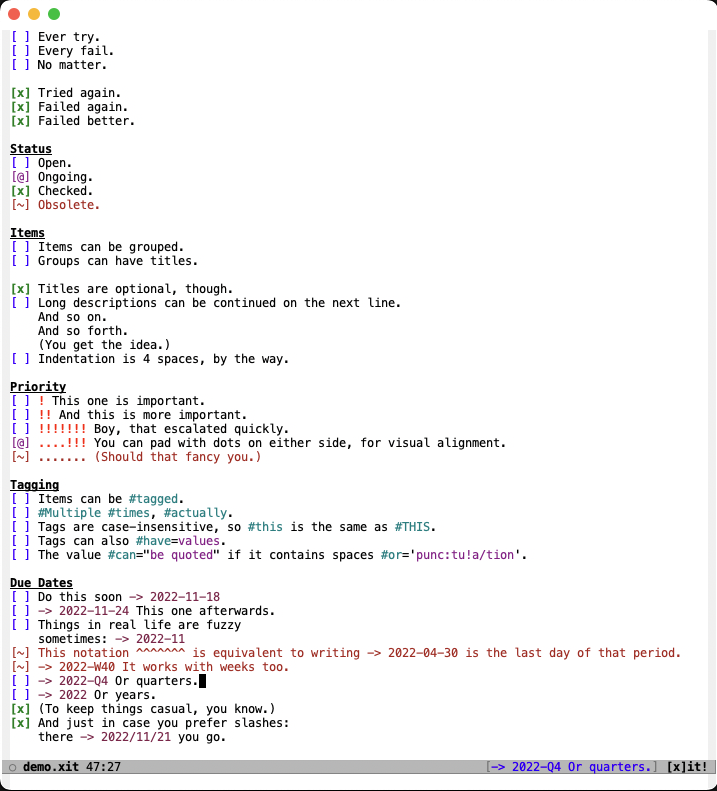
xit-mode has a recipe in the melpa repository to ease its installation.
You can use the command M-x package-install and then select the xit-mode package to install it automatically.
You can also rely on the use-package configuration helper to ease the installation and configuration from your .emacs file.
Just add the following snippet to your config file:
(use-package xit-mode :ensure t)Alternatively, you can still install the mode manually by following these steps:
cd ~/.emacs.d/
git clone https://github.com/ryanolsonx/xit-modeIn your .emacs or init.el:
(load "~/.emacs.d/xit-mode/xit-mode.el")
(require 'xit-mode)- Syntax highlighting with customizable faces
- Item state and priority management via keybindings
imenusupport- Dates support
C-c C-n(M-x xit-new-item) : Create a new open itemC-c C-o(M-x xit-open-item) : Set an item as open ([ ])C-c C-d(M-x xit-checked-item) : Set an item as checked ([x])C-c C-p(M-x xit-ongoing-item) : Set an item as ongoing ([@])C-c C-a(M-x xit-obsolete-item) : Set an item as obsolete ([!])C-c C-C(M-x xit-state-cycle-item) : Cycle through the different states (open->ongoing->checked->obsolete)C-c C-<up>(M-x xit-inc-priority-item) : Increase the priority by adding a!C-c C-<down>(M-x xit-dec-priority-item) : Decrease the priority by removing a!or a.C-c C-w(M-x xit-insert-date) : Insert a formatted date
Here is the list of the faces used in the xit-faces group:
xit-open-checkbox-facexit-open-description-facexit-checked-checkbox-facexit-checked-description-facexit-ongoing-checkbox-facexit-ongoing-description-facexit-obsolete-checkbox-facexit-obsolete-description-facexit-priority-facexit-tag-facexit-tag-value-facexit-date-face
Imenu can be customized via the variable xit-imenu-function. Its possible values are:
'xit-imenu-groupsto list only groups'xit-imenu-groups-and-itemsto list groups and items


