🤖 An AI-powered network automation assistant that uses MCP to securely call pyATS tools against Arista cEOS devices in Containerlab setup. Chat naturally to run show commands, push configs, validate status, and optionally provision a lab EC2 host with Terraform.
              ╔════════════════════════════════════╗
              ║  AI Network Assistant Flow         ║
              ╚════════════════════════════════════╝

                        ┌──────────┐
                        │   User   │
                        └─────┬────┘
                              │ chat query
                              ▼
                   ┌──────────────────────┐
                   │   agent.py (Gemini)  │ ◄─ Gemini API
                   └──────────┬───────────┘
                              │ MCP stdio
                              │ (list_devices, run_show, configure)
                              ▼
                   ┌──────────────────────┐
                   │  server.py (FastMCP) │ ◄─ pyATS
                   └──────────┬───────────┘
                              │ SSH (testbed.yaml)
                              ▼
                  ┌────────────────────────┐
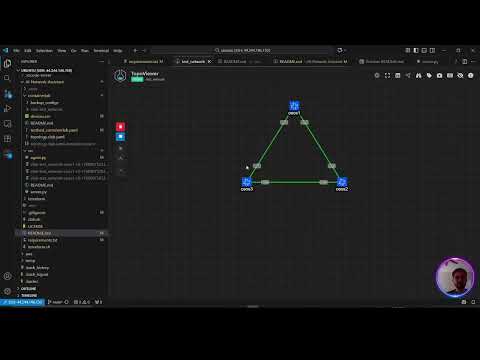
                  │  Containerlab Topology │
                  │  ┌────┐  ┌────┐ ┌────┐ │
                  │  │ceos│──│ceos│─│ceos│ │
                  │  │ 1  │  │ 2  │ │ 3  │ │
                  │  └────┘  └────┘ └────┘ │
                  └────────────────────────┘

  Optional: Terraform → EC2 → Containerlab → cEOS
- MCP-first design: The server exposes safe, explicit network automation tools (list devices, run show, push config, ping, etc.) over MCP.
- AI Agent (Gemini):
src/agent.pyuses Gemini and calls MCP tools when needed. The model never has raw device access; it only acts through MCP tools. - pyATS integration:
src/server.pyloads a pyATS testbed (PYATS_TESTBED_PATH) and executes commands on devices using robust send/expect flows. - Containerlab topology: A sample Arista cEOS lab is provided under
containerlab/with atopology.clab.yamland a ready-made pyATS testbed. - Optional cloud provisioning:
terraform/can spin up an EC2 host to run Containerlab if you prefer a cloud lab environment.
Key Features:
- Safety via tools: The AI can only do what MCP tools allow. Destructive commands are blocked by design.
- Repeatable lab: Containerlab topology + testbed YAML = fast, reproducible demos.
- Cloud optionality: Local or EC2. Use what fits your environment.
Use a venv to avoid dependency conflicts.
cd AI-Network-Assistant
python3 -m venv .venv
source .venv/bin/activate
pip install -U pip
pip install -r requirements.txtCreate a .env file in the project root (it is already in .gitignore to avoid secrets leak).
cat > .env << 'EOF'
GEMINI_API_KEY=your_gemini_api_key_here
PYATS_TESTBED_PATH=./containerlab/testbed_containerlab.yaml
EOF
Notes:
GEMINI_API_KEYis required by the agent.PYATS_TESTBED_PATHmust point to your pyATS testbed YAML. A ready-made file exists atcontainerlab/testbed_containerlab.yaml.
This repo includes a simple 3-node Arista cEOS topology.
Install Containerlab and dependencies with the helper script:
./clab.shDeploy the lab:
sudo containerlab deploy -t containerlab/topology.clab.yamlYou have:
- 3 cEOS nodes (
ceos1,ceos2,ceos3) with startup configs undercontainerlab/backup_configs/ - Links as defined in
containerlab/topology.clab.yaml - A ready pyATS testbed at
containerlab/testbed_containerlab.yamlwith SSH access and default creds (admin/adminfor the demo)
Tear down when done:
sudo containerlab destroy -t containerlab/topology.clab.yamlIf you want to run the lab in AWS instead of locally, you can provision an instance and then install Containerlab there. If you are not using cloud, you can skip this section.
Install AWS CLI and Terraform:
./terraform.shConfigure AWS credentials (once):
aws configureReview/adjust terraform/terraform.tfvars as needed, then provision:
cd terraform
terraform init
terraform plan
terraform apply -auto-approve
Useful outputs will include instance details and an SSH command. After provisioning, SSH to the instance, clone this repo, repeat steps 1–3, and deploy the Containerlab topology in the cloud VM.
Destroy when finished:
terraform destroy -auto-approveWith your venv active and .env configured:
python3 src/agent.pyWhat happens:
- The agent launches and connects to the MCP server (
src/server.py) over stdio. - The server loads the pyATS testbed from
PYATS_TESTBED_PATHand exposes tools. - You chat with the agent; when needed, it calls MCP tools to operate on the devices.
Example things to ask:
- "List devices"
- "Run show ip route on clab-test_network-ceos1"
- "Configure a description on Ethernet1 on clab-test_network-ceos2"
- "Ping 10.0.12.2 from clab-test_network-ceos1"
-
Server (
src/server.py)- Uses
fastmcpto expose tools over MCP (stdio transport). - Loads pyATS testbed via
PYATS_TESTBED_PATHand connects to devices on-demand. - Implements safe helpers to run show commands, push configuration, get logs, and run pings.
- Cleans CLI output (removes ANSI codes), blocks dangerous inputs, and disconnects cleanly.
- Uses
-
Agent (
src/agent.py)- Loads
.envand initializes Gemini (google-generativeai). - Connects to the MCP server as a stdio client and reflects the server tools to Gemini as functions.
- Sends user prompts to Gemini, handles function calls, executes MCP tools, returns results.
- Provides a simple chat loop for interactive use.
- Loads
-
Containerlab and pyATS
containerlab/topology.clab.yamldefines the cEOS nodes and links.- Startup configs live under
containerlab/backup_configs/. - The pyATS testbed at
containerlab/testbed_containerlab.yamlpoints to the lab device IPs with SSH creds.
-
Terraform (optional)
terraform/defines an EC2 instance, security group, and instance state control.terraform.shinstalls AWS CLI and Terraform on a machine before runningterraformcommands.
- Ensure
.venvis activated andpip install -r requirements.txtsucceeded. - Verify
.envexists with validGEMINI_API_KEYandPYATS_TESTBED_PATH. - Confirm Containerlab devices are reachable via SSH using the IPs in the testbed YAML.
- If running in AWS, confirm security groups allow SSH from your IP.
- The MCP server restricts operations to defined tools; dangerous commands are rejected.
- Example: erase/delete/redirect are blocked in command filters and config application. You may check @mcp.tools for implementation.
- Always review and adapt startup configs, credentials, and security groups for production usage.
Contributions are welcome! Please follow these steps:
- Fork the repository
- Create a feature branch
git checkout -b feature-branch-name- Commit your changes
git commit -m "Add new feature"- Push to your fork
git push origin feature-branch-name- Open a Pull Request
Apache 2.0