This is the course repo for CMPT 756 Project (Spring 2022)
We have decided to implement a songs_list api in addition to the s1 and s2 services. We have made a lot of cross api calls between s3 and s2. Please find the below architecture for our microservices.
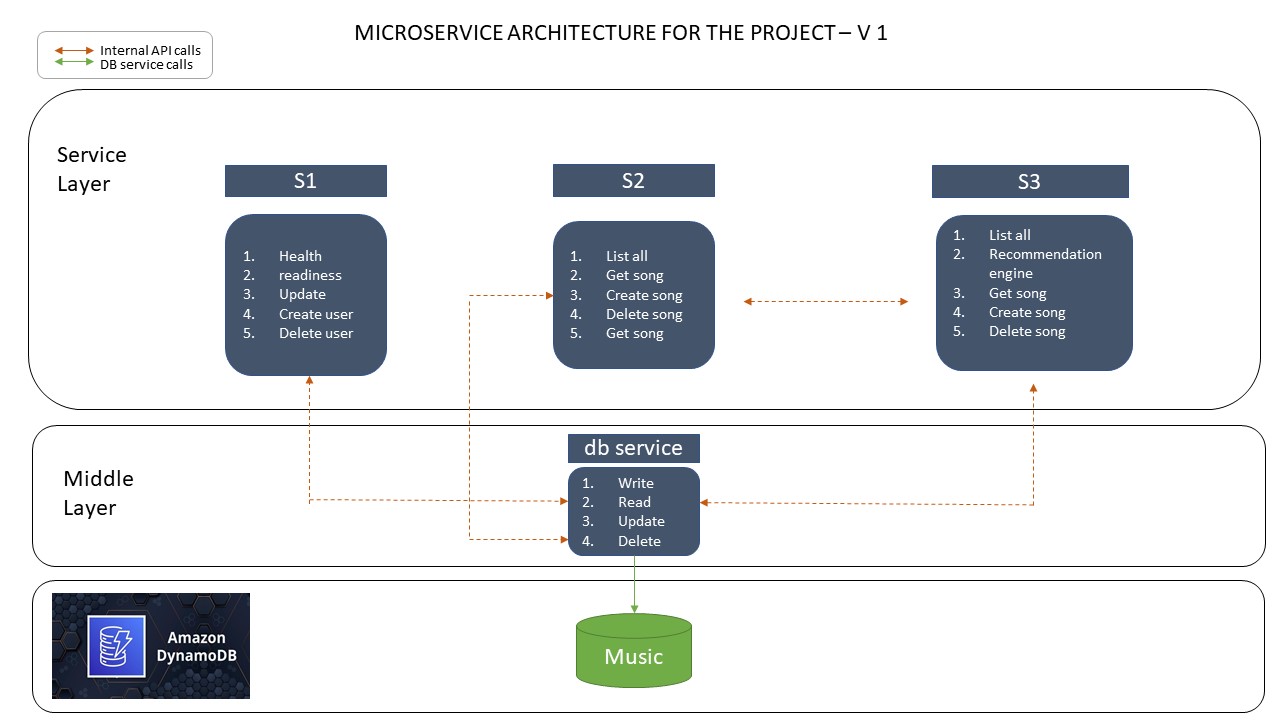
- Build and upload docker images to github.
- logs/s1.repo.log logs/s2-v1.repo.log logs/s3.repo.log logs/db.repo.log
- Start Amazon Kubernetes services.
- make -f eks.mak start
- Deploying the services on kubernetes.
- make -f k8s.mak gw db s2
- Load initial data into DyanmoDB
- make -f k8s.mak loader
- Monitoring the services.
- Start k9s to track the health and staus of services.
- Gathering metrics using Prometheus
- make -f k8s.mak prometheus-url
- Dashboard building using grafana.
- make -f k8s.mak grafana-url
- Monitoring traffic using Kiali.
- mak -f k8s.mak kiali-url
Copy the file cluster/tpl-vars-blank.txt to cluster/tpl-vars.txt
and fill in all the required values in tpl-vars.txt. These include
things like your AWS keys, your GitHub signon, and other identifying
information. See the comments in that file for details. Note that you
will need to have installed Gatling
(https://gatling.io/open-source/start-testing/) first, because you
will be entering its path in tpl-vars.txt.
Once you have filled in all the details, run
$ make -f k8s-tpl.mak templates
This will check that all the programs you will need have been installed and are in the search path. If any program is missing, install it before proceeding.
The script will then generate makefiles personalized to the data that
you entered in clusters/tpl-vars.txt.
Note: This is the only time you will call k8s-tpl.mak
directly. This creates all the non-templated files, such as
k8s.mak. You will use the non-templated makefiles in all the
remaining steps.
Regardless of where your cluster will run, it uses AWS DynamoDB for its backend database. Check that you have the necessary tables installed by running
$ aws dynamodb list-tables
This is the tree of this repo.
The CI material at ci and .github/workflows are presently designed for Assignment 7 and the course's operation. They're not useable for you and should be removed. If you are ambitious or familiar with GitHub action, the one flow that may be illustrative is ci-to-dockerhub.yaml. It is not directly useable as you team repo will not use templates.
├── ./.github
│   └── ./.github/workflows
│       ├── ./.github/workflows/ci-a1.yaml
│       ├── ./.github/workflows/ci-a2.yaml
│       ├── ./.github/workflows/ci-a3.yaml
│       ├── ./.github/workflows/ci-mk-test.yaml
│       ├── ./.github/workflows/ci-system-v1.1.yaml
│       ├── ./.github/workflows/ci-system-v1.yaml
│       └── ./.github/workflows/ci-to-dockerhub.yaml
├── ./ci
│   ├── ./ci/v1
│   └── ./ci/v1.1
Be careful to only commit files without any secrets (AWS keys).
├── ./cluster
These are templates for the course and should be removed.
├── ./allclouds-tpl.mak
├── ./api-tpl.mak
├── ./az-tpl.mak
│   ├── ./ci/create-local-tables-tpl.sh
│   │   ├── ./ci/v1/compose-tpl.yaml
│       ├── ./ci/v1.1/compose-tpl.yaml
│   ├── ./cluster/awscred-tpl.yaml
│   ├── ./cluster/cloudformationdynamodb-tpl.json
│   ├── ./cluster/db-nohealth-tpl.yaml
│   ├── ./cluster/db-tpl.yaml
│   ├── ./cluster/dynamodb-service-entry-tpl.yaml
│   ├── ./cluster/loader-tpl.yaml
│   ├── ./cluster/s1-nohealth-tpl.yaml
│   ├── ./cluster/s1-tpl.yaml
│   ├── ./cluster/s2-dpl-v1-tpl.yaml
│   ├── ./cluster/s2-dpl-v2-tpl.yaml
│   ├── ./cluster/s2-nohealth-tpl.yaml
│   ├── ./cluster/tpl-vars-blank.txt
│   ├── ./db/app-tpl.py
├── ./eks-tpl.mak
│   ├── ./gcloud/gcloud-build-tpl.sh
│   └── ./gcloud/shell-tpl.sh
├── ./gcp-tpl.mak
├── ./k8s-tpl.mak
├── ./mk-tpl.mak
│   │   ├── ./s2/standalone/README-tpl.md
│   │   └── ./s2/standalone/unique_code-tpl.py
│   │   └── ./s2/v1/unique_code-tpl.py
The core of the microservices. s2/v1.1, s2/v2, and s2/standalone are for use with Assignments. For your term project, work and/or derive from the v1 version.
├── ./db
├── ./s1
├── ./s2
│   ├── ./s2/standalone
│   │   ├── ./s2/standalone/__pycache__
│   │   └── ./s2/standalone/odd
│   ├── ./s2/test
│   ├── ./s2/v1
│   ├── ./s2/v1.1
│   └── ./s2/v2
results and target need to be created but they are ephemeral and do not need to be saved/committed.
├── ./gatling
│   ├── ./gatling/resources
│   ├── ./gatling/results
│   │   ├── ./gatling/results/readmusicsim-20220204210034251
│   │   └── ./gatling/results/readusersim-20220311171600548
│   ├── ./gatling/simulations
│   │   └── ./gatling/simulations/proj756
│   └── ./gatling/target
│       └── ./gatling/target/test-classes
│           ├── ./gatling/target/test-classes/computerdatabase
│           └── ./gatling/target/test-classes/proj756
A small job for loading DynamoDB with some fixtures.
├── ./loader
Logs files are saved here to reduce clutter.
├── ./logs
Deprecated material for operating the API via Postman.
├── ./postman
Redundant copies of the AWS macros for the tool container. You should use the copy at https://github.com/overcoil/c756-quickies instead.
├── ./profiles
Reference material for istio and Prometheus.
├── ./reference
Assorted scripts that you can pick and choose from:
└── ./tools
Three tools are used to monitor the distributed application and microservices: Grafana, Prometheus and Kiali
First, copy your GitHub Repository token to cluster/ghcr.io-token.txt.
Install istio, prometheus, kiali, and their dependencies and deploy the microservices by running
$ make -f k8s.mak provision
Get Grafana URL, run:
$ make -f k8s.mak grafana-url
Click the url and login with: User: 'admin' Password: 'prom-operator'
After signon, in Grafana home screen, navigate to the dashboard by hovering on the “Dashboards” icon on the left. Select “Browse” from the menu it displays a list of dashboards. Click on c756 transactions.
Get Prometheus URL, run:
$ make -f k8s.mak prometheus-url
Get Kiali URL, run:
$ make -f k8s.mak kiali-url
Run the following commands from your host computer. This will put an instant load of 250 users for each microservice
$ ./gatling-250-user.sh
$ ./gatling-250-music.sh
$ ./gatling-250-recommendation.sh
./tools/kill-gatling.sh
$ make -f eks.mak stop