


Important
Project Renaming Notice
This project has been renamed from Smdn.Devices.MCP2221 to Smdn.Devices.Mcp2221A.
- NuGet Package: The current stable package is still published under the old name
Smdn.Devices.MCP2221. A new packageSmdn.Devices.Mcp2221Awill be released soon. - Source Code for the Current Package: As the
mainbranch now reflects the renamed project structure, please refer to the release tags for the source code and examples for the currently released version. - Code Change Required: The next major version will include breaking changes, including the renaming of namespaces and assemblies. Users migrating to the new package will need to update their code (e.g.,
using Smdn.Devices.Mcp2221A;). - Upcoming API Changes: An API refactoring is planned for the next release to improve usability and support for MCP2221A features.


Smdn.Devices.Mcp2221A is a .NET library for the Microchip Technology MCP2221 and MCP2221A, a USB2.0 to I2C/UART Protocol Converter with GPIO. This library provides APIs that enable .NET applications to access the functions of the MCP2221/MCP2221A via the USB-HID interface.
With this library, you can interface with I2C devices and control GPIO pins from any PC that has a USB port. It can be used without intermediate microcontrollers like Raspberry Pi or Arduino and does not require any special kernel drivers, offering an alternative for hardware control and prototyping.
This library also provides the MCP2221/MCP2221A adapter interface for System.Device.Gpio. This library enables you to use the many device bindings provided by Iot.Device.Bindings.
See Smdn.Devices.Mcp2221A examples.
- GP functionalities
- GPIO
- GPIO read/write value
- GPIO get/set direction (some methods throw NotImplementedException)
- ADC inputs
- DAC outputs
- Clock output
- Interrupt detection
- Other functionalities
- Configure GP0 as SSPND
- Configure GP0 as LED_URx
- Configure GP1 as LED_UTx
- Configure GP2 as USBCFG
- Configure GP3 as LED_I2C
- Set initial value (Negating logic level)
- GPIO
- I2C functionalities
- I2C read/write (7-bit address) (Transferring larger than 60 bytes have not been tested with actual device)
- I2C read/write (10-bit address)
- configure communication speed
- Standard mode (100kbps)
- Fast mode (400kbps)
- Low speed mode (10kbps)
- Non-standard custom speed
- Flash/SRAM functionalities
- SRAM read/write
- GP settings
- Chip settings
- Flash read/write
- GP Settings
- Chip Settings
- USB Manufacturer Descriptor String (read only)
- USB Product Descriptor String (read only)
- USB Serial Number Descriptor String (read only)
- Chip Factory Serial Number (read only, always returns
01234567(issue #8)) - Hardware/Firmware revision (read only)
- Passwords and chip setting protection
- SRAM read/write
- Reset
Haven't tested with the actual MCP2221, but it is expected that works as same as MCP2221A.
- Frameworks/Platforms
- .NET Standard 2.1/.NET 5
- Windows/Linux/MacOS and any other platforms which USB-HID driver supports
Smdn.Devices.Mcp2221ARead/Writeand other command methods- Supports
Span<byte>/Memory<byte> - Supports
async,CancellationToken - Supports logging with
ILogger, Microsoft.Extensions.Logging (example)
- Supports
- Can handle multiple MCP2221/MCP2221A by finding target with
Predicate<IUsbHidDevice> - I2C bus scanning (example)
- Using HIDSharp as default USB-HID driver, LibUsbDotNet also supported.
- Provides an adapter for System.Device.Gpio
- Can handle I2C devices using with Iot.Device.Bindings
This library communicates with the MCP2221/MCP2221A device using the USB HID interface. To do this, you must add a PackageReference for one of the following USB HID backend provider packages (Smdn.IO.UsbHid.Providers.*). This design, integrated with standard .NET dependency injection, gives you the flexibility to choose a provider based on your specific requirements, such as licensing.
HidSharp (Apache License 2.0) 
PackageReference for Smdn.IO.UsbHid.Providers.HidSharp to your project file. Then, register the backend provider with the ServiceCollection using the AddHidSharpUsbHid() extension method.
var services = new ServiceCollection();

services.AddHidSharpUsbHid();
LibUsbDotNet version 3 (LGPL-3.0, alpha release) 
PackageReference for Smdn.IO.UsbHid.Providers.LibUsbDotNetV3, and then register the provider using the AddLibUsbDotNetV3UsbHid() method.
services.AddLibUsbDotNetV3UsbHid(
  configure: (builder, options) => {
    ...
  }
);
LibUsbDotNet version 2 (LGPL-3.0, stable release) 
PackageReference for Smdn.IO.UsbHid.Providers.LibUsbDotNet, and then register the provider using the AddLibUsbDotNetUsbHid() method.
If the libusb-1.0 library fails to load automatically, you can either explicitly specify its filename via the LibUsbLibraryPath option, or provide a custom library resolving callback to LibUsbDllImportResolver.
services.AddLibUsbDotNetUsbHid(
  configure: (builder, options) => {
    // Specify the filename of the libusb-1.0 library installed on your
    // system or placed in the output directory.
    options.LibUsbLibraryPath = "libusb-1.0.so.0";
    // options.LibUsbLibraryPath = "libusb-1.0.dll";
    // options.LibUsbLibraryPath = "libusb-1.0.dylib";
  }
);To use the MCP2221/MCP2221A with this library, two configuration steps may be required depending on your Linux distribution.
Device permissions (udev) §
To access the MCP2221/MCP2221A via this library, some system configuration may be required. Generally, a udev rule is necessary on most distributions to grant non-root users access to the device (see udev rule files for setup instructions).
Driver conflict (Ubuntu 24.04 / Kernel 6.8+) §
On Ubuntu 24.04 (Kernel 6.8+) and newer systems, you may also encounter a driver conflict where the native hid_mcp2221 driver claims the device, preventing the /dev/hidraw* node from being created. In this case, you must blacklist the dedicated driver to force the system to use the generic usbhid driver. Detailed steps for this process can be found in modprobe blacklist file.
Add package Smdn.Devices.Mcp2221A 
dotnet add package Smdn.Devices.Mcp2221A
Then write your codes. The simplest code, blinking the LEDs connected to the GP pins is like below.
using System.Device.Gpio;

using Microsoft.Extensions.DependencyInjection;

using Smdn.Devices.Mcp2221A;
using Smdn.IO.UsbHid.DependencyInjection;

var services = new ServiceCollection();

// Use HidSharp (Apache License 2.0)
// (Add `Smdn.IO.UsbHid.Providers.HidSharp` to PackageReference)
services.AddHidSharpUsbHid();

using var serviceProvider = services.BuildServiceProvider();

// Find and open the first MCP2221/MCP2221A device connected to the USB port.
using var device = Mcp2221A.Create(serviceProvider);

// Configure the GP pins (GP0-GP3) as GPIO output.
device.GP0.ConfigureAsGpio(PinMode.Output);
device.GP1.ConfigureAsGpio(PinMode.Output);
device.GP2.ConfigureAsGpio(PinMode.Output);
device.GP3.ConfigureAsGpio(PinMode.Output);

// Blink the configured GPIO pins.
foreach (var gp in device.GPs) {
  Console.WriteLine($"Blinking {gp.PinDesignation}");

  for (var n = 0; n < 10; n++) {
    // Set the pin output to Low (logic 0)
    gp.SetValue(false);
    Thread.Sleep(100);

    // Set the pin output to High (logic 0)
    gp.SetValue(true);
    Thread.Sleep(100);
  }
}
See the actual action in the video
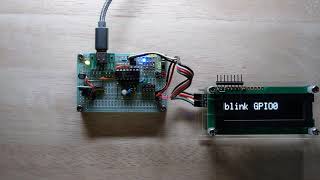
For detailed instructions, including wiring of the devices and parts, see blink example page.
More examples can be found in following examples directory.
- Smdn.Devices.Mcp2221A examples: Small examples using MCP2221/MCP2221A functionalities.
If your application cannot detect the MCP2221/MCP2221A, follow these steps to diagnose driver conflicts or permission issues.
First, check if the system has created the character device file for HIDRAW:
ls -l /dev/hidraw*If no devices are listed, or if a device corresponding to the target MCP2221/MCP2221A is not listed, the kernel driver conflict is likely the cause. If the file exists but you cannot open it due to unprivileged access, check the permissions.
Next, inspect the kernel logs. Monitor the kernel logs while reconnecting the device to identify which driver is claiming it. Use dmesg -w or journalctl -k -f.
Expected Output: You should see hid-generic or usbhid associated with the device, followed by a hidraw assignment.
kernel: usb 3-1.1: New USB device found, idVendor=04d8, idProduct=00dd, bcdDevice= 1.00
kernel: usb 3-1.1: New USB device strings: Mfr=1, Product=2, SerialNumber=0
kernel: usb 3-1.1: Product: MCP2221 USB-I2C/UART Combo
kernel: usb 3-1.1: Manufacturer: Microchip Technology Inc.
kernel: hid-generic 0003:04D8:00DD.0008: hiddev0,hidraw0: USB HID v1.11 Device [Microchip Technology Inc. MCP2221 USB-I2C/UART Combo] on usb-0000:00:14.0-1.1/input2
In this example, /dev/hidraw0 is successfully assigned.
Conflict Indicator: If you see mcp2221 mentioned instead of hid-generic, or logs indicating the I2C/GPIO features are being initialized, the dedicated mcp2221 kernel driver is active and suppressing the HIDRAW interface.
kernel: mcp2221 0003:04D8:00DD.000A: USB HID v1.11 Device [Microchip Technology Inc. MCP2221 USB-I2C/UART Combo] on usb-0000:00:14.0-1.1/input2
If this occurs, you must blacklist the mcp2221 driver.
To verify which driver is currently controlling the interface, run:
lsusb -tLook for the MCP2221/MCP2221A interface (typically Class=Human Interface Device).
If the target interface is displayed as Driver=usbhid, it can be controlled as HIDRAW. However, if it is displayed as Driver=mcp2221, it is controlled by the kernel driver, and the HIDRAW node is suppressed.
If the /dev/hidrawX file exists but remains inaccessible, verify the ACL (Access Control List) permissions using the getfacl command and check that your user is part of the plugdev group or that the uaccess tag is correctly applied:
getfacl /dev/hidrawX # Replace X with your device number# file: dev/hidrawX
# owner: root
# group: plugdev
user::rw-
user:[your-username]:rw- # This line may be added by 'uaccess'
group::rw-
mask::rw-
other::---
If you do not have sufficient permissions, check if the udev properties were applied correctly:
udevadm info -n /dev/hidrawXConfirm that E: GROUP=plugdev and/or E: TAGS=:uaccess: are present in the output. If these properties are missing, ensure your udev rules are correctly installed and reloaded.
If uaccess does not apply as expected, manually add your user to the plugdev group:
sudo usermod -aG plugdev $USER # A re-login is required for group changes to take effectWhen using LibUsbDotNet, you need to unbind the devices that are bound to the usbhid driver.
If you got the exception like below, configure the MCP2221/MCP2221A to unbind, and reconnect it again. See udev rule file for detail.
Unhandled exception. Smdn.Devices.MCP2221.DeviceUnavailableException: MCP2221/MCP2221A is not available, not privileged or disconnected.
  ---> LibUsbDotNet.LibUsb.UsbException: Resource busy
    at LibUsbDotNet.LibUsb.ErrorExtensions.ThrowOnError(Error error)
    at LibUsbDotNet.LibUsb.UsbDevice.ClaimInterface(Int32 interfaceID)
If you got the exception like below, you need to run as the root user, the command like sudo dotnet run.
LibUsbDotNet:
Unhandled exception. Smdn.Devices.MCP2221.DeviceUnavailableException: MCP2221/MCP2221A is not available, not privileged or disconnected.
 ---> LibUsbDotNet.LibUsb.UsbException: Access denied (insufficient permissions)
   at LibUsbDotNet.LibUsb.ErrorExtensions.ThrowOnError(Error error)
   at LibUsbDotNet.LibUsb.UsbDevice.Open()
HIDSharp:
Unhandled exception. Smdn.Devices.MCP2221.DeviceUnavailableException: MCP2221/MCP2221A is not available, not privileged or disconnected.
 ---> HidSharp.Exceptions.DeviceIOException: Unable to open HID class device (OK).
   at HidSharp.Platform.Linux.LinuxHidStream.DeviceHandleFromPath(String path, HidDevice hidDevice, oflag oflag)
   at HidSharp.Platform.Linux.LinuxHidDevice.TryParseReportDescriptor(ReportDescriptor& parser, Byte[]& reportDescriptor)
   at HidSharp.Platform.Linux.LinuxHidDevice.RequiresGetInfo()
   at HidSharp.Platform.Linux.LinuxHidDevice.OpenDeviceDirectly(OpenConfiguration openConfig)
   at HidSharp.Device.OpenDeviceAndRestrictAccess(OpenConfiguration openConfig)
   at HidSharp.Device.Open(OpenConfiguration openConfig)
   at HidSharp.Device.Open()
   at HidSharp.HidDevice.Open()
If you want to give access privileges to a non-root user instead, you can use udev rule file. See udev rule files.
Contributions are appreciated!
If there's a feature you would like to add or a bug you would like to fix, please read Contribution guidelines and create an Issue or Pull Request.
IssueやPull Requestを送る際は、Contribution guidelinesをご覧頂ください。 可能なら英語が望ましいですが、日本語で構いません。
This project is licensed under the terms of the MIT License.
(An English translation for the reference follows the text written in Japanese.)
本プロジェクトは、MCP2221/MCP2221Aの製造元・供給元・販売元とは無関係の、非公式なものです。
This is an unofficial project that has no affiliation with the manufacturers/vendors/suppliers of MCP2221/MCP2221A.
This project uses the following components. See ThirdPartyNotices.md for detail.