Universal AI CLI launcher with local context management. Launch any AI coding assistant from a single entry point with persistent context across sessions.




Local-First Design - All context and data stays on your machine. No cloud dependencies.
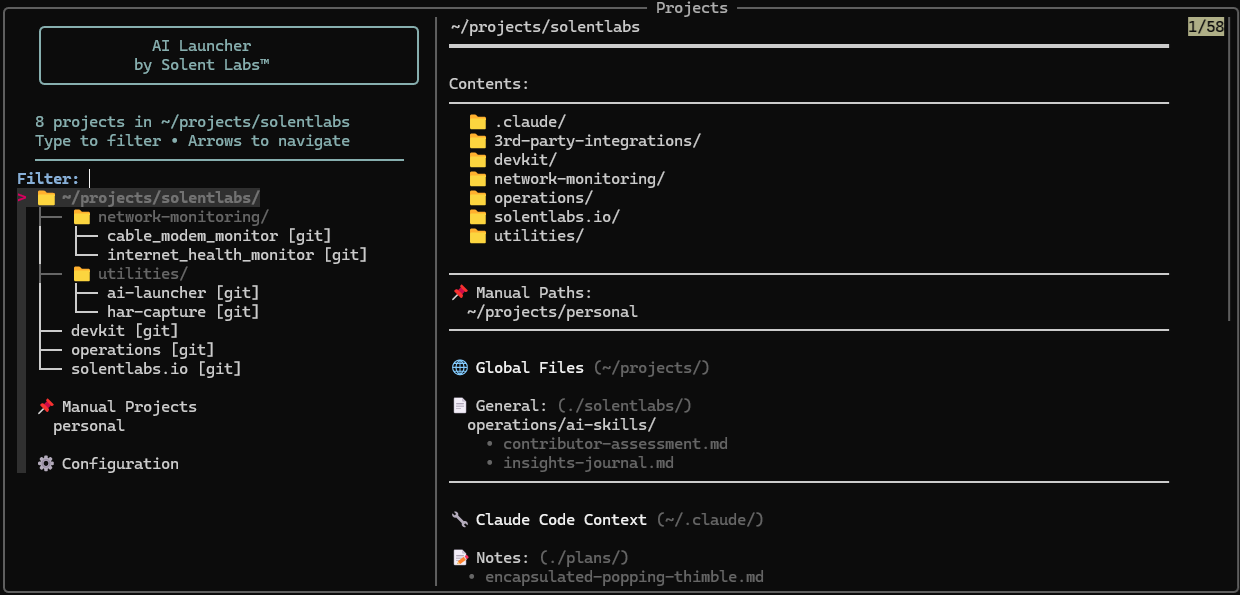
Interactive project selector with tree view and context preview
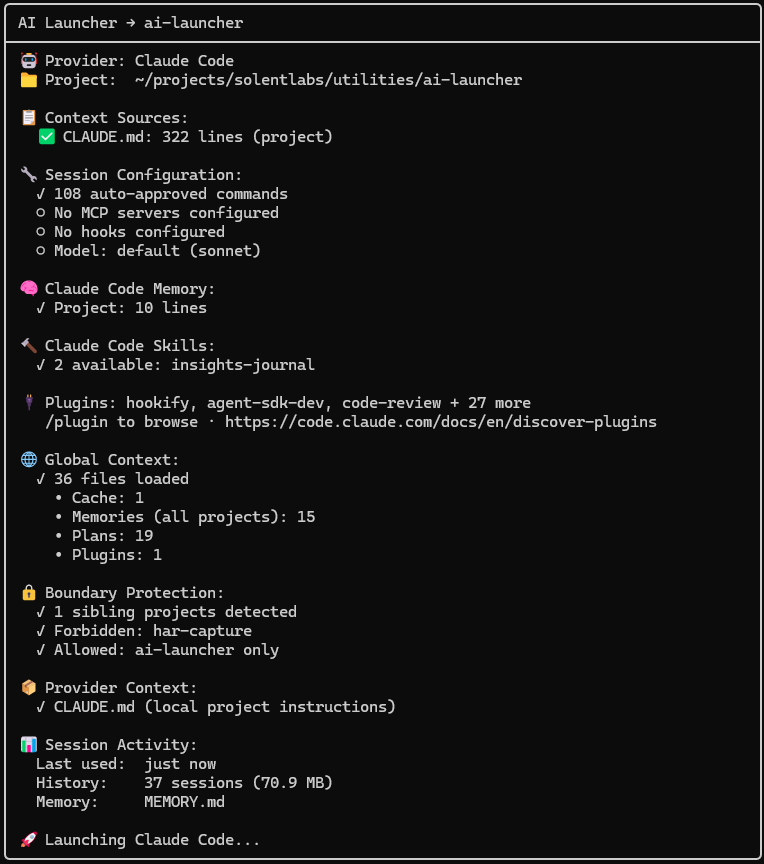
Startup transparency report showing context, plugins, and session details
A terminal-first launcher that:
- 🎯 Single Entry Point - One command to access all your AI coding tools
- 🧠 Context Management - Maintains persistent context across sessions
- 🔒 Local-Only - Everything stays on your machine
- 🔍 Project Switching - Fuzzy search across all your projects
- 🤖 Multi-Tool Support - Works with Claude Code, Gemini CLI, and more
- 👁️ Context Transparency - See exactly what files AI tools access
- 🖥️ Cross-Platform - Native support for Linux, macOS, WSL, and Windows
Linux / macOS / WSL
# Install ai-launcher (fzf auto-downloads if missing)
pipx install ai-launcher
Windows (PowerShell)
# Install ai-launcher (fzf auto-downloads if missing)
pipx install ai-launcher

# Or with pip (use py -m to avoid launcher issues)
py -m pip install ai-launcher
From source
git clone https://github.com/solentlabs/ai-launcher.git
cd ai-launcher
pip install -e .Linux / macOS / WSL
ai-launcher claude ~/projectsWindows (PowerShell)
ai-launcher claude C:\Users\you\projects

# If ai-launcher is not in PATH
py -m ai_launcher claude C:\Users\you\projects
See what's available:
ai-launcher claude --discover ~/projects
ai-launcher claude --context
Select a project, and your AI tool opens with full context.
- 🔍 Fuzzy search - Type to filter projects instantly
- 📁 Tree navigation - See your project structure at a glance
- 📋 Preview pane - Git status, context files, directory contents
- ⚡ Last opened - Cursor starts on your most recent project
- ➕ Manual projects - Add non-git directories
- 🔗 Symlink support - Works with linked directories
- 🤖 Provider abstraction - Switch between Claude Code, Gemini, and more
- 🔧 Per-project configuration - Different AI tools for different projects
- 📊 Discovery mode - See what providers are installed
- 👁️ Context visualization - View what files AI tools access
- 🧠 Context awareness - Detects CLAUDE.md, GEMINI.md, and other context files
- 📺 Auto title setting - Terminal shows "project → provider" for easy window identification
- 🎨 Customizable format - Configure your preferred title style
- 🪟 Multi-window workflow - Instantly identify which terminal has which project
- 🖥️ Broad compatibility - Works with xterm, iTerm2, GNOME Terminal, Windows Terminal, tmux, and more
- Python 3.8+
- fzf (auto-downloaded if missing)
- An AI CLI tool (Claude Code, Gemini CLI, Cursor, Aider, or GitHub Copilot CLI)
Each AI tool is a subcommand:
ai-launcher claude ~/projects     # Anthropic's Claude Code
ai-launcher gemini ~/projects     # Google's Gemini CLI
ai-launcher cursor ~/projects     # Cursor IDE
ai-launcher aider ~/projects      # Aider pair programmer
ai-launcher copilot ~/projects    # GitHub Copilot CLI
See Configuration for all CLI options.
Your code and context should stay on your machine. AI Launcher:
- Never sends data to external services
- Works offline
- Respects your privacy
- Gives you full control
MIT - see LICENSE
Made by Solent Labs™ - Building tools for developers who value privacy and local-first software.