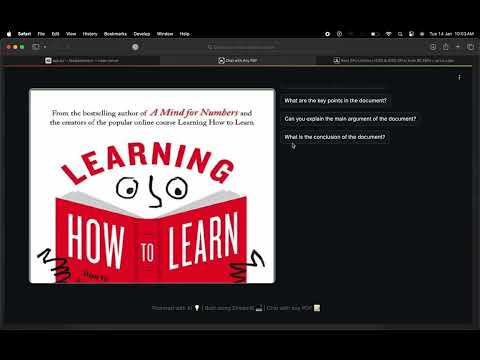
Document-Based RAG Chatbot is a state-of-the-art natural language processing (NLP) system designed for querying and retrieving relevant information from large PDF documents. Leveraging advanced models like Mistral7B, FAISS, and Langchain, the chatbot provides fast, context-aware answers to user queries. This system is built to handle documents up to 300 pages, providing seamless integration with HuggingFace Transformers for high-quality responses.
- Retrieval-Augmented Generation (RAG): Combines retrieval-based and generation-based methods to provide accurate responses by pulling context from documents and generating relevant answers.
- Natural Language Querying: Users can query large PDF documents in natural language, receiving precise and contextually relevant answers.
- Optimized Search and Query Latency: Utilizing FAISS vector database and custom BGE embeddings from HuggingFace, the system minimizes query latency while maintaining high-quality responses.
- PDF Processing: Efficient handling and processing of PDFs, with the ability to process documents up to 300 pages.
- Streamlit Frontend: A responsive web interface that allows users to interact with the chatbot in real-time, rendering PDFs and answering queries seamlessly.
- Contextual Understanding: Uses advanced models like Mistral LLM for deep understanding and context-based responses.
- Backend: FastAPI, Langchain, HuggingFace Transformers, PyPDF, FAISS
- Machine Learning: Mistral7B, BGE embeddings, Torch
- Frontend: Streamlit (for responsive web interface)
- Document Processing: PyPDF (for PDF processing)
- Cloud & Tools: GPU Cloud resources, FAISS (for optimized search)
- DevOps Tools: Docker, Git, GitHub
To set up and run the Document-Based RAG Chatbot, follow these steps:
Clone the repository to your local machine:
git clone https://github.com/sourabhligade/document-rag-chatbot.git
cd document-rag-chatbotCreate and activate a virtual environment to manage dependencies:
For Linux/MacOS:
python3 -m venv venv
source venv/bin/activate
For Windows:
python -m venv venv
venv\Scripts\activateInstall the required dependencies by running:
pip install -r requirements.txtEnsure you have all the necessary environment variables set up (if applicable), such as API keys or file paths, as described in the documentation or project configuration files.
After setting up the environment, start the backend and frontend servers:
Backend Server: Start the FastAPI server:
uvicorn app.main:app --reloadThis will run the server at http://localhost:8000.
Frontend Interface: Start the Streamlit frontend:
streamlit run app/frontend.pyThis will open the chat interface in your browser at http://localhost:8501.
Now, the Document-Based RAG Chatbot should be fully functional on your local machine.