Chrome extension to mass-unmatch Tinder matches based on configurable rules.
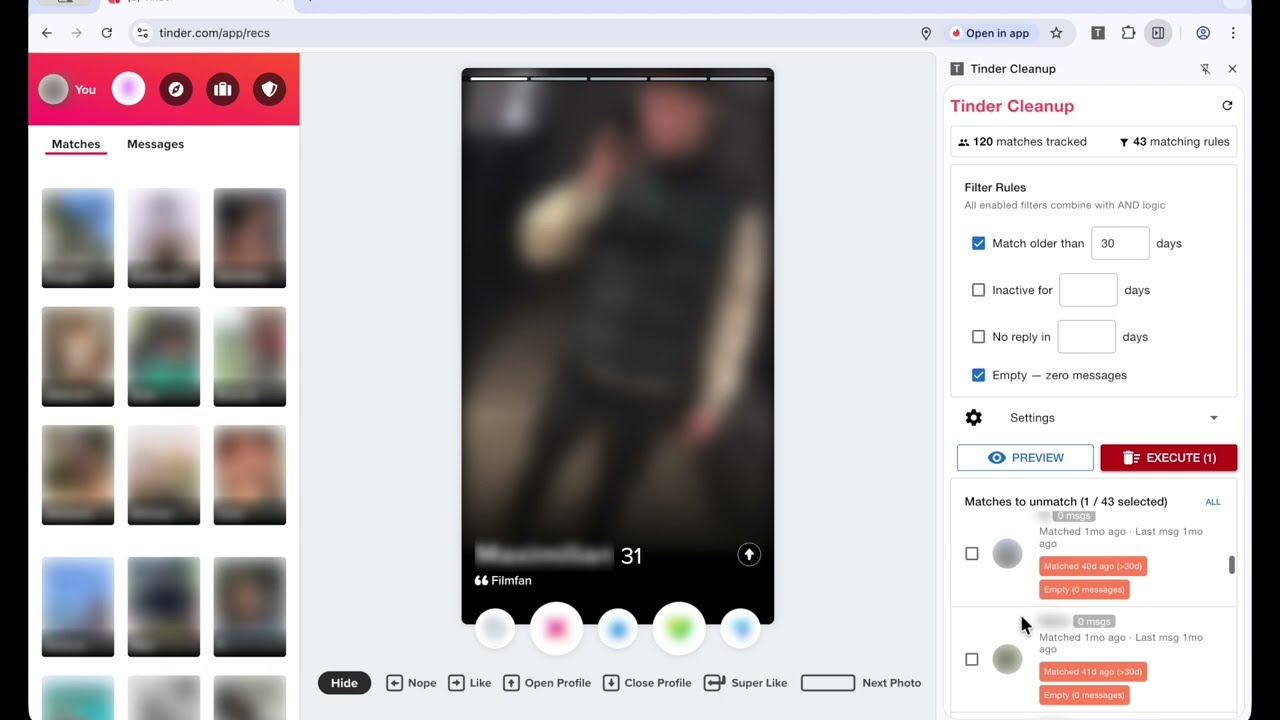
- Passive data capture — reads match data from Tinder's own API responses as you browse
- Filter rules (combine with AND logic):
- Match older than X days
- Inactive for X days
- No reply in X days (you sent the last message)
- Empty — zero messages exchanged
- Preview before deleting — see who will be unmatched with names, photos, match dates, and which rules triggered
- Selective unmatching — checkboxes to deselect anyone you want to keep
- Click profile photos to open that conversation in Tinder
- Staggered delays between unmatches to mimic natural usage (configurable)
- Session limits to prevent accidental mass-deletion (configurable)
- Page-context requests — all API calls run through Tinder's own page context with real browser headers, cookies, and session data, so they're indistinguishable from normal usage
- Side panel UI — stays open alongside Tinder for easy workflow
Use this extension at your own risk. Unmatching is permanent and cannot be undone. The extension relies on data from Tinder's API, which may be incomplete or inaccurate. Matches may be incorrectly deleted. The authors accept no responsibility for lost matches, blocked accounts, or any other consequences of using this extension.
Keep the Tinder tab in the foreground while the extension is running. The tab must be the active tab in its browser window — it's fine to work in other apps, but don't switch to a different tab in the same window and don't minimize the browser. Running in a background tab may trigger Tinder's automation detection and result in your account being temporarily blocked.
Don't lower the delay settings below the defaults (30–45 seconds). Shorter delays increase the chance that Tinder flags your account for unusual activity. The extension will warn you if you set delays below 30 seconds. The hard minimum is 10 seconds.
The extension can only see matches that Tinder has loaded in your browser. To include older matches, scroll down through your match list on tinder.com before running a preview.
git clone https://github.com/ssuess/tinder-cleanup-ext.git
cd tinder-cleanup-ext
npm install
npm run build
Then go to chrome://extensions → Enable "Developer mode" → "Load unpacked" → select the dist folder.
- Injected script — monkey-patches
window.fetchin the page context to intercept Tinder API responses, capture auth headers, and execute proxied API calls (browse + unmatch) so requests are indistinguishable from Tinder's own code - Content script — injects the page script via
<script>tag, bridges messages bidirectionally between the injected script and background service worker - Background service worker — stores matches, evaluates filter rules, orchestrates unmatch sessions with staggered delays
- Side panel (Vue 3 + Quasar) — rule builder, preview list, execution controls, session log
- TypeScript
- Vue 3 + Quasar
- Vite
- Chrome Manifest V3
All data stays local in your browser. No data is sent to any external server. See PRIVACY.md for details.