Edit remote Linux files in VS Code directly.
Note
Only support remote Linux machine. Some functionality (like file watching) may not work well on other operating system (like FreeBSD).
- Edit remote Linux files in VS Code directly without temporary file involed.
- Extremely fast & low-cost file watching to detect remote file system changes.
- Convenient uploading/downloading with progress reporting & cancellation.
All commands are grouped in SFTP category.
SFTP: Open Folderto open remote folderSFTP: Add Folderto add remote folder into workspaceSFTP: Open Fileto open remote fileSFTP: Downloadto download remote file/folder- For non-Windows users,
SFTP: Uploadto upload file/folder to remote - For Windows users,
SFTP: Upload Folderto upload folder to remote - For Windows users,
SFTP: Upload Fileto upload file to remote SFTP: Remove Configurationto remove SSH credential information stored in VS CodeSFTP: Helpto show this help document
SSH credential configuration could be required during processing, with the following json format:
{
    "host": "Host Name / IP Address",
    "port": 22,
    "username": "User Name",
    "password": "Password",
    "passphrase": "Passphrase",
    "privateKeyFile": "/path/to/privateKeyFile"
}"port": use 22 as default"privateKeyFile": please use absolute path"port","username"and one of ["password","privateKeyFile"] are necessary."passphrase"is also necessary if your"privateKeyFile"needs it.
Note
The credential configurations are stored without encryption in VS Code, including
"host","port","username","password","passphrase"and privateKey from"privateKeyFile". You can useSFTP: Remove Configurationto remove configurations.
Trigger related command by Command Palette, Explore Context Menu or Editor Context Menu.
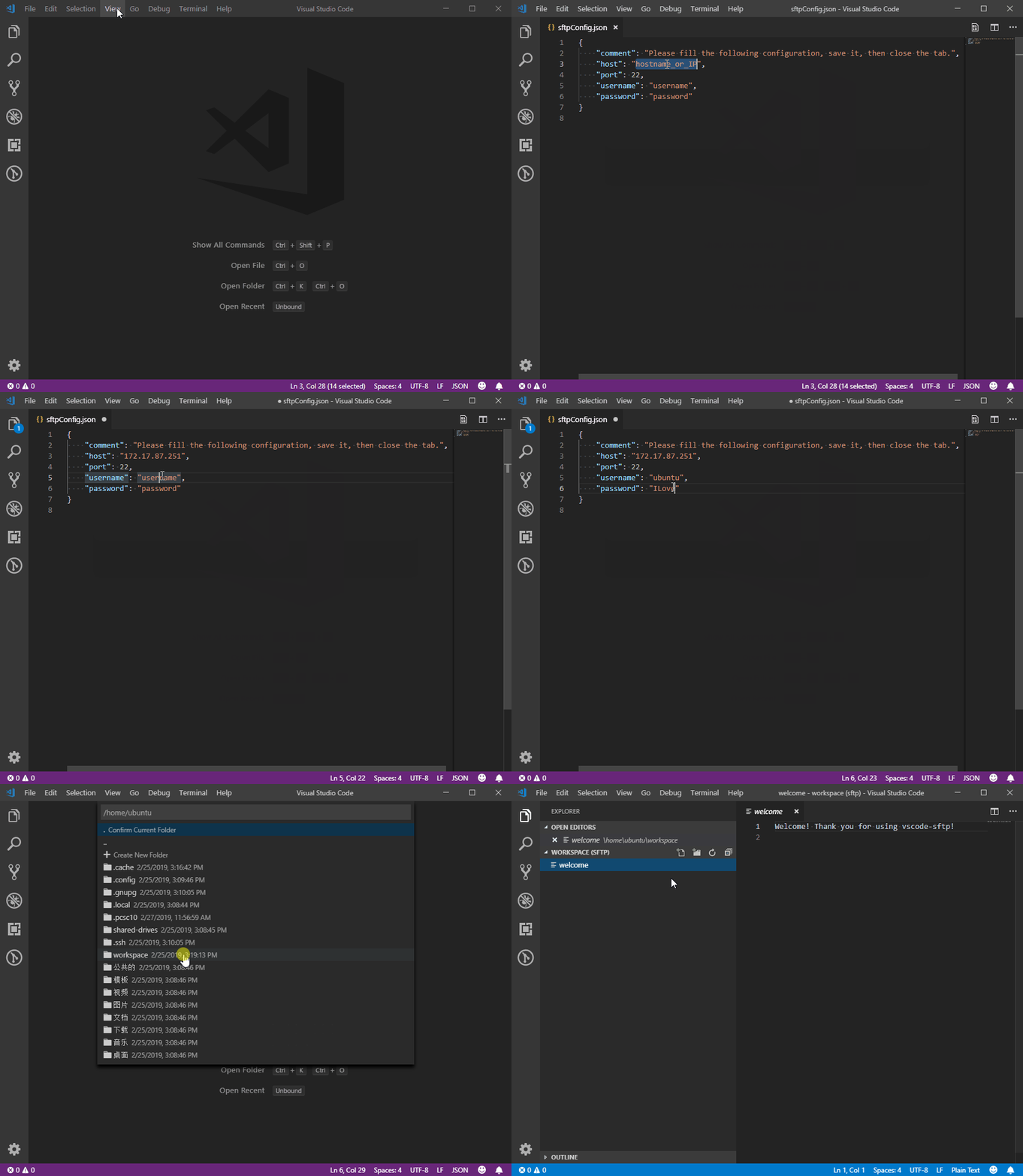
After choosing the Add New SFTP Configuration option, the credential information is required by asking user to edit a temporary json file.
Remote resource is selected by showing user a popup quick-pick widget. Only file, folder and symbolic link to a file/folder are showed in the widget.
- Pick
. (Confirm Current Folder)option to confirm selecting current folder. - Pick
Create New Folderto create a new folder. - Pick folder name to browse into the folder.
- Pick file name to select the file.
Symbolic links are ignored on Windows when in a downloading folder, since Windows need Admin permisstion to create them.
See nodejs/node-v0.x-archive#2274.
Linux file name could contain \, but it would be treated as path seperator in VS Code.
Sincerenly thanks to these people who have contributed to this extension.
gsun4
Enjoy!