
This repository provides a template for setting up E2E UI test automation with UTAM (UI Test Automation Model) in Salesforce DX projects. In addition to the basic test setup configuration, a number of sample test cases are included to help you get started with UTAM. The configuration shown here was set up based on the contents of the following two repositories:
- UTAM JavaScript Recipes | Various examples of how to test the Salesforce UI with UTAM
- Salesforce E-Bikes App | LWC sample application with UTAM UI tests
To use this template, the Node version specified in the package.json and the latest version of the Salesforce CLI should already be installed.
Follow the steps below to get the template running and manually execute the sample tests already included. The sample tests should be generic enough to run in any Salesforce Org without specific configuration, such as a Trailhead Playground.
-
First clone the repository and open it with VS Code, install all the recommended extensions and run the following command to install all required dependencies:
npm install -
Next you need to authorize an org for which you want to run the tests. In VS Code this can be done by pressing Command + Shift + P, enter "sfdx", and select SFDX: Authorize an Org. Alternatively you can also run the following command from the command line:
sf org login web -
Compile all UTAM page objects:
npm run test:ui:compile -
Prepare the Salesforce login information:
npm run test:ui:generate:login -
Finally, execute all existing UI tests:
npm run test:ui
Note: By default, the tests are executed in headless mode with the given configuration, i.e. the browser does not open visibly but runs tests in the background. This configuration is primarily intended for automatic execution in CI/CD pipelines. To deactivate the headless mode for local development and testing purposes, please comment out the following line in wdio.conf.js:
args: ['--headless']
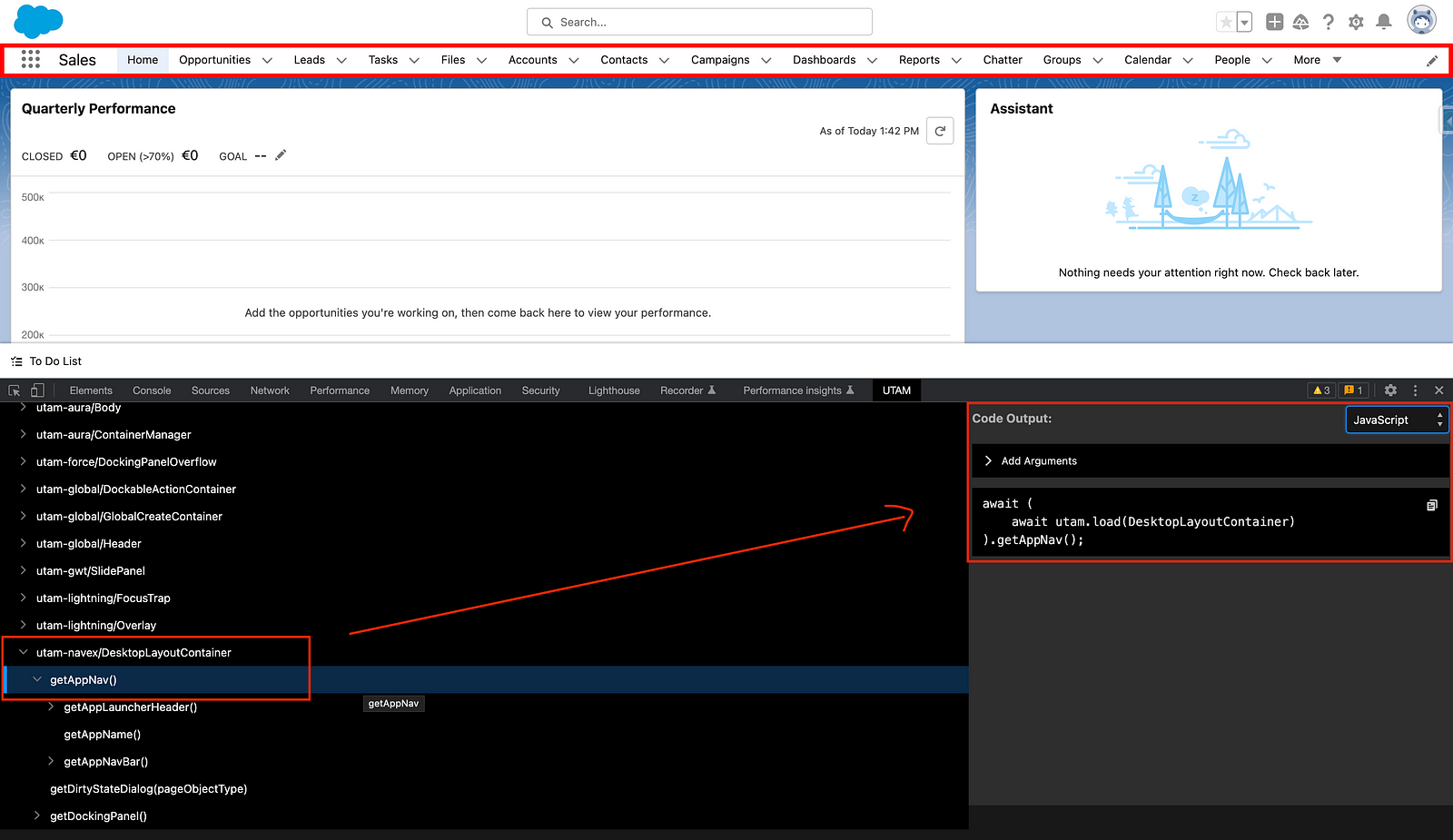
Creating UTAM tests is not trivial and the setup may involve one or two hurdles. Fortunately, there is a handy UTAM Chrome Browser Extension to help with writing the tests. This extension helps to identify the page objects of interest directly in the Salesforce org and generates the corresponding test code in the selected language:
UTAM tests can also be executed automatically in headless mode within a pipeline. The following Medium article describes how to an automated UTAM test execution in detail:
Automate Salesforce E2E Testing using UTAM & GitHub Actions
Below is an example with GitHub Actions, which is also used in this repository and can be found in the .github directory:
# least-privilege token: the workflow only reads the repository
permissions:
  contents: read

jobs:
  tests:
    name: E2E UI Tests
    runs-on: ubuntu-latest
    steps:
      - name: Checkout
        uses: actions/checkout@v7.0.1
        with:
          persist-credentials: false # the GITHUB_TOKEN is not needed after the checkout
      - name: Select Node Version
        uses: svierk/get-node-version@v1.5.1
      - name: Install Dependencies
        run: npm ci
      - name: Install SF CLI
        uses: svierk/sfdx-cli-setup@v1.1.2
      - name: Salesforce Org Login
        uses: svierk/sfdx-login@v1.4.2
        with:
          client-id: ${{ secrets.SFDX_CONSUMER_KEY }}
          jwt-secret-key: ${{ secrets.SFDX_JWT_SECRET_KEY }}
          username: ${{ vars.SFDX_USERNAME }}
      - name: Compile UTAM Page Objects
        run: npm run test:ui:compile
      - name: Prepare Login Details
        run: npm run test:ui:generate:login
      - name: UTAM E2E Tests
        run: npm run test:ui
A few conventions worth copying along with the snippet:
- Pin every action to an exact release tag (
@v7.0.1, not@mainor@v7). A floating branch or major-version tag silently changes what runs in your pipeline; an exact tag makes every update a reviewable commit. Dependabot keeps the pins current - see .github/dependabot.yml for thegithub-actionsecosystem configuration used here. - Keep the org username in a repository variable, not a secret. Only the connected app's consumer key (
SFDX_CONSUMER_KEY) and the JWT private key (SFDX_JWT_SECRET_KEY) are confidential;vars.SFDX_USERNAMEdocuments itself in the run log and keeps the secret list to what actually needs masking. - Never interpolate a secret into a
run:script. Pass it as an action input as shown above, or expose it throughenv:- inlining${{ secrets.* }}into a shell command puts it into the command line and, with the wrong quoting, into the log. - Grant the workflow only
contents: readand add further permissions per job, where they are needed. - Guard secret-dependent jobs against fork pull requests. Those runs get no secrets by design, so an org login would fail for reasons unrelated to the change. In this repository the E2E job carries
if: github.event_name != 'pull_request' || github.event.pull_request.head.repo.full_name == github.repository.
- UTAM Developer Guide | Official UTAM documentation on Salesforce Developers
- Run End-to-End Tests with the UI Test Automation Model (UTAM) | Post in Salesforce Developers' Blog
- Streamline E2E Testing with UTAM: Salesforce's UI Test Automation Model | Medium post
- Automate Salesforce E2E Testing using UTAM & GitHub Actions | Medium post
- From a Jira Ticket to a Running Salesforce UI Test Written by an AI | Medium post
- Run End-to-End Tests With UTAM | YouTube video, 15min UTAM overview
- Getting Started with UTAM | YouTube video, 1h step by step guide for writing a UTAM test
- Streamline Salesforce E2E UI Testing with UTAM | Apex Hours session, August 2025 (slides)
- Automate UI Testing with AI and UTAM | Apex Hours session, August 2026 (slides)