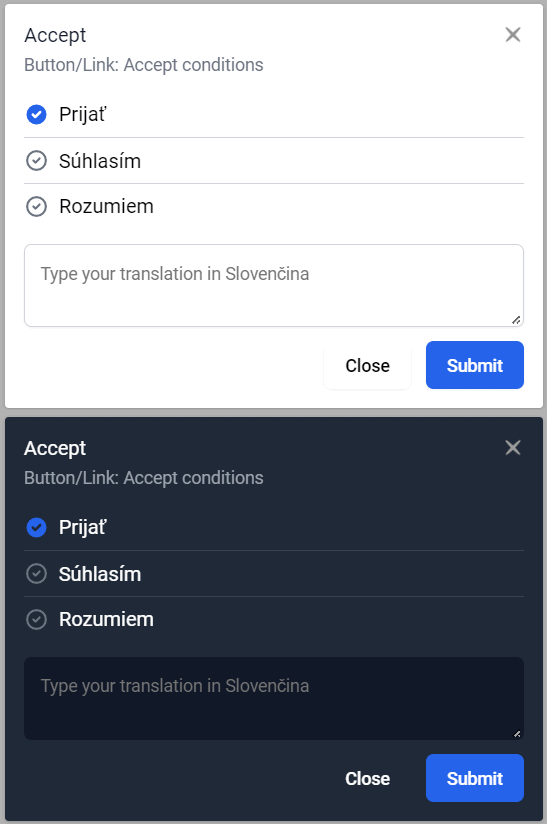
The extension serves to effectively translate your application using inline translations so that you can view strings you are translating in context. If you right-click on the underlined string, the translation dialog appears and you will be able to vote for the available translations or submit a new one.
You can make translations available to your translators, users, or the entire community and make your product multilingual.
❇️ Translations can also be approved by your trusted translator(s).
This library requires one of the following FBT frameworks:
- 📝 Inline: translating for real-time context
- 📚 Glossary: support for consistent terminology
- 👍 Voting: on translation options
- 🔄 Variations: for dynamic content
- 🌙 Dark Mode: to match your theme
Install the plugin using npm or yarn:
npm install fbt-inline-translations
# or
yarn add fbt-inline-translationsErrors in the terminal will give hints on how to add the required polyfill.
In your Webpack config:
module.exports = {
  resolve: {
    // ...
    fallback: {
      "buffer": require.resolve("buffer/"),
      "url": require.resolve("url/"),
      "path": require.resolve("path-browserify"),
      "http": require.resolve("stream-http"),
      "https": require.resolve("https-browserify"),
    },

    alias: {
      process: "process/browser",
    },

    plugins: [
      // Work around for Buffer is undefined:
      // https://github.com/webpack/changelog-v5/issues/10
      new webpack.ProvidePlugin({
        Buffer: ['buffer', 'Buffer'],
      }),
      new webpack.ProvidePlugin({
        process: 'process/browser',
      }),
    ],
  },
};
and
npm install buffer url path-browserify stream-http https-browserify --save-dev
# you may need to clear your cache after this change
rm -fr node_modules/.cache
Restart the Dev Server and the error will be gone.
Copy file fbt/InlineFbtResult.js to your project.
Register custom getFbtResult hook:
import { init } from "fbt";
import FbtResult from "fbt/lib/FbtResult";
import InlineFbtResult from "./InlineFbtResult";

let inlineMode = 'NO_INLINE';

if (true) { // enable inline translations
    inlineMode = 'TRANSLATION';
}

init({
  hooks: {
    // ...
    getFbtResult: (input) => {
      if (inlineMode && inlineMode !== 'NO_INLINE') {
        return new InlineFbtResult(
          input.contents,
          inlineMode,
          input.patternString,
          input.patternHash,
        );
      }

      return new FbtResult(input.contents, input.errorListener);
    },
  },
  // ...
});Register your FBT project on Swiftyper Translations.
| Option | Type | Description |
|---|---|---|
apiKey |
string | API key for authenticating with the translation service. |
locale |
string | Locale setting for translations (e.g., en_US, de_DE). |
contributor |
string | Contributor email for authentication. |
darkMode |
boolean | Dark mode theme. |
Include the following code snippet in your HTML page:
<div id="inline-translator"></div>

<script src="https://cdn.jsdelivr.net/npm/fbt-inline-translations/dist/bundle.js"></script>
<script>
    swiftyperInlineTranslations.default({
        token: 'YOUR_API_KEY_HERE',
        locale: 'sk_SK', // translation locale
        contributor: 'contributor@email.com', // contributor must be invited
        darkMode: false, // dark mode also depends on html class 'tw-dark'
    })
</script>In your application, wrap your App component. We recommend adding it around your root component in the index.js file.
// src/index.js

import ReactDOM from 'react-dom';
import { FbtInlineTranslationsWrapper } from 'fbt-inline-translations';

ReactDOM.render(
  <FbtInlineTranslationsWrapper
    token={'YOUR_API_KEY_HERE'}
    locale={"sk_SK"} // translation locale
    contributor={"contributor@email.com"} // contributor must be invited
    darkMode={false} // dark mode also depends on html class 'tw-dark'
  >
    <App />
  </FbtInlineTranslationsWrapper>,
  document.getElementById('root')
);npm run startWe welcome contributions! If you'd like to help improve this project, feel free to open an issue or submit a pull request.
This project is licensed under the MIT License. See the LICENSE file for details.