Auctionator is designed for casual everyday auction house users. Auctionator makes the auction house easier to use, by presenting auction house listings clearly and succinctly, and by eliminating the tedium involved in posting and managing auctions.
- Download the repository ZIP and extract the
Auctionatorfolder intoInterface/AddOns/. - Use the direct link: Download ZIP
- Fixed a bug while performing a full scan of the auction house, when the names of some items are not loaded from the server and it caused an infinity hang;
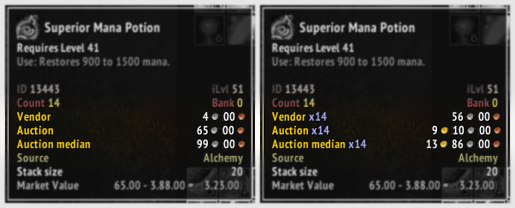
- A new mark has been added to the items tooltip - the median price. Calculated based on the last 15 full scans of the auction house and stored in
SavedVars.
- 20 seconds timeout on full scan, which would mean infinite hang anyway
- 2 seconds timeout on buy scan, which would mean infinite hang anyway
- Added modern-like "Inventory" section on the "sell" tab
- Alt-right click to list items from bag (can't do right click because of game limitation) (might not work becauxse of other addons)
- Fix performance bug when changing zones
- Fix .xml positions on the sell tab history for visual enhancement (3-4 lines of height required)
- Fix when listing stacks of items, need to re-open sell tab window
- Fix lua errors conflicts for some addons/users
- Fix alt click issue for some users
If anyone wants to do a PR, it would be appreciated although the addon is in a good state now
See the screenshot for modern inventory for ultra fast listing

- Open the auction house;
- Select first 'Browse' tab;
- Clear search filter if exist;
- Press 'Search' to load all auction items to game cache;
- Select 'Buy' or 'Sell' tab;
- Press 'Full Scan' button at top;
- Press 'Start Scanning'.
- Wait until finish.