


Simple, automated thermostat setback control without complex automation setup.
Stop wrestling with complex Home Assistant automations for your thermostat! This controller makes temperature setback management effortless - just set it up once and it handles everything automatically.
- No Complex Automation Required: Forget about writing YAML automations or dealing with complex logic
- One-Time Setup: Configure once through the UI and it works forever
- Smart & Automatic: Seamlessly switches between normal and setback temperatures based on your schedule
- Manual Control When Needed: Override anytime with simple controls
- Skip Setback Feature: Temporarily skip the next setback cycle when you need normal temperature
- External Integration: Works with any binary sensor or switch for additional control
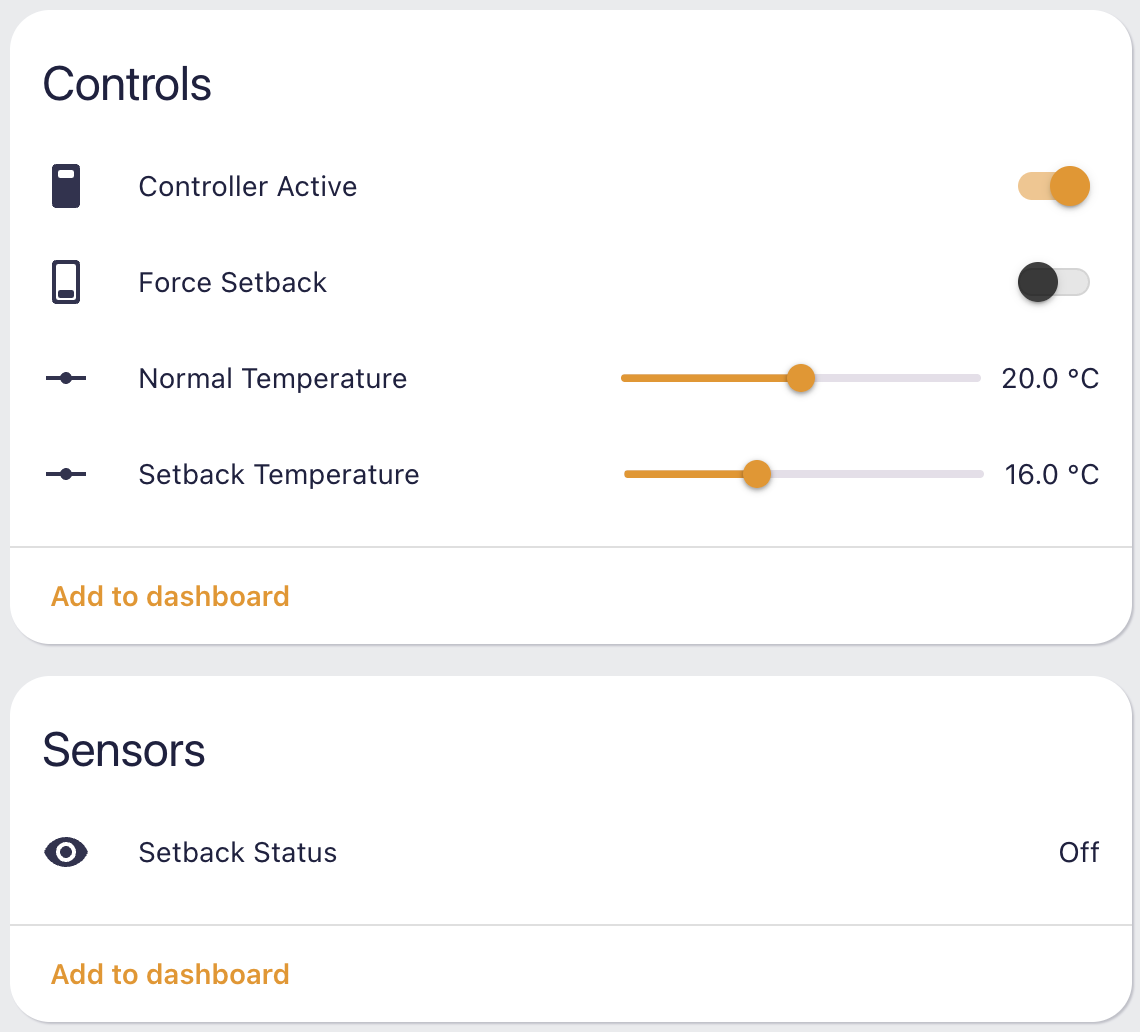
The integration creates two sensors for monitoring:
- Name: "Setback Status" (or your custom name)
- Value:
onwhen setback is active,offwhen normal temperature is active - Attributes:
climate_device: The controlled thermostat entityschedule_device: The schedule helper entitybinary_input_device: Optional binary input that monitors any binary sensor or switch to activate forced setback. For example, monitor a house mode helper and force setback when vacation mode is active.
Tracks how long it takes for temperature to reach normal after setback ends
- Name: "Recovery Time"
- Value: Time in seconds it took for the last recovery from setback to normal temperature
- Unit: Seconds (s)
- Attributes:
is_recovering:truewhen currently recovering from setback,falseotherwise
The integration creates three switches for manual control:
Manually override to force setback mode on or off, regardless of schedule or other conditions.
- Name: "Force Setback"
- State:
onwhen forced setback is active,offwhen not forced - Usage: Turn on to manually enable setback, turn off to return to automatic control
Enable or disable the entire controller.
- Name: "Controller Active"
- State:
onwhen controller is active,offwhen disabled - Usage: Turn off to completely disable temperature control, turn on to re-enable
Skip the next scheduled setback cycle.
- Name: "Skip Setback"
- State:
onwhen skip is active,offwhen not skipping - Usage:
- Turn on to skip the next setback cycle when your schedule becomes active
- If currently in setback, turning this on will immediately return to normal temperature
- The flag automatically resets after the next setback cycle is skipped
- Useful for temporarily preventing setback when you know you'll be home or need normal temperature
- Add this repository to HACS as a custom repository
- Install "Thermostat Setback Controller" from HACS
- Restart Home Assistant
- Copy the
custom_components/thermostat_setbackfolder to your Home Assistantcustom_componentsdirectory - Restart Home Assistant
- Add the integration through the UI
- Go to Settings > Devices & Services
- Click Add Integration
- Search for "Thermostat Setback Controller"
- Fill in these simple settings:
- Name: Give it a friendly name (e.g., "Living Room Setback")
- Climate Device: Pick your thermostat (e.g.,
climate.living_room_thermostat) - Schedule Device: Choose your schedule helper (defines when setback is active)
- Forced Setback Monitoring Sensor: Optional - monitors any binary sensor or switch to activate forced setback. For example, monitor a house mode helper and force setback when vacation mode is active.
The controller immediately starts working:
- ✅ Automatically switches to setback temperature when your schedule is active
- ✅ Automatically returns to normal temperature when schedule is inactive
- ✅ No YAML needed - everything is handled through the UI
- ✅ Works forever - set it and forget it!
This project uses a dev container for development. To get started:
- Open the project in VS Code
- Reopen in Dev Container when prompted
- The container will automatically install Python dependencies
custom_components/thermostat_setback/
├── __init__.py          # Main integration setup
├── climate.py           # Climate entity implementation
├── config_flow.py       # Configuration flow
├── const.py            # Constants and configuration keys
├── manifest.json       # Integration manifest
├── services.py         # Service implementations
└── services.yaml       # Service definitions
Enable debug logging by adding this to your configuration.yaml:
logger:
  logs:
custom_components.thermostat_setback: debug- Fork the repository
- Create a feature branch
- Make your changes
- Test thoroughly
- Submit a pull request
This project is licensed under the MIT License - see the LICENSE file for details.
For support, please open an issue on the GitHub repository.