Well-designed stepper component for react
npm install react-stepper-horizontal --save
Then just add import Stepper from 'react-stepper-horizontal'; into your file.
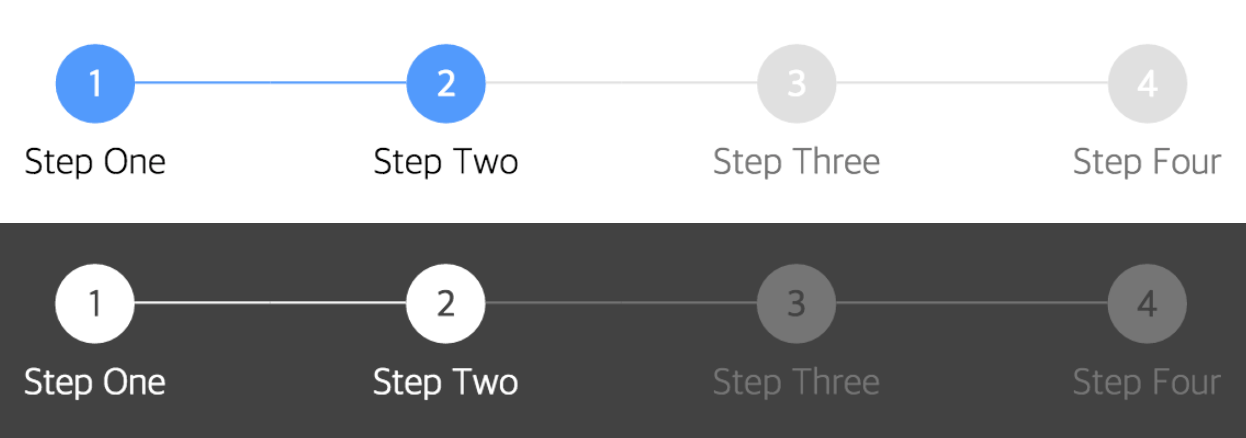
render() {
  return (
    <div>
      <Stepper steps={ ['Step One', 'Step Two', 'Step Three', 'Step Four'] } activeStep={ 1 } />
    </div>
  );
}
See full example here
| name | description | default | type |
|---|---|---|---|
| activeStep | Active step index, starts at 0 | 0 | number |
| steps | List of steps, must be string array | array | |
| activeColor | Active circle color | #5096FF | string |
| completeColor | Completed circle color | #5096FF | string |
| defaultColor | Default circle color - not active or completed | #E0E0E0 | string |
| activeTitleColor | Active title color | #000 | string |
| completeTitleColor | Completed title color | #000 | string |
| defaultTitleColor | Default title color - not active or completed | #757575 | string |
| circleFontColor | Circle text color (for index) | #FFF | string |
| size | Circle size | 32 | number |
| circleFontSize | Circle text size | 16 | number |
| titleFontSize | Title text size | 16 | number |
| circleTop | Top margin of Stepper component |
24 | number |
| titleTop | Space between circle and title | 8 | number |
InJung Chung / @mu29