

In case you know the SHAPER Origin you know what this generator does and how to use the generated files. It generates SVG files like that with the selected Radius:
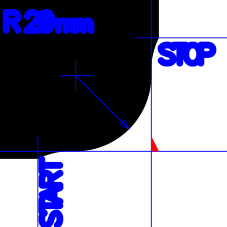
This project is inspired by "Sam's" corner rounding from ShaperHub: https://hub.shapertools.com/creators/59b9b947291ebbfa71254b56/shares/6351788e91733509027f62ba
- select unit like inch or mm
- enter the radius
- hit the download button and save the generated SVG into the download folder of your PC or Mac
- upload the generated corner to the SHAPER Origin as you do with your other Shaper SVGs (e.g. by using USB or ShaperHub)
- Mill the corner with your SHAPER Origin
Right click on ShaperCorner.html and download or safe the linked file to your computer. Safe the file as HTML (not as text !). If the file is saved automatically you need eventuall to change the extension from TXT to HTML on you computer. Nothing else is needed, just open the file ine e.g. Chrome or Safari (both tested) and run the web application locally.