
This repository contains the Socket.IO C++ client. It depends on websocket++ and is inspired by socket.io-clientpp.
By virtue of being written in C++, this client works in several different platforms. The examples folder contains an iPhone, QT and Console example chat client!
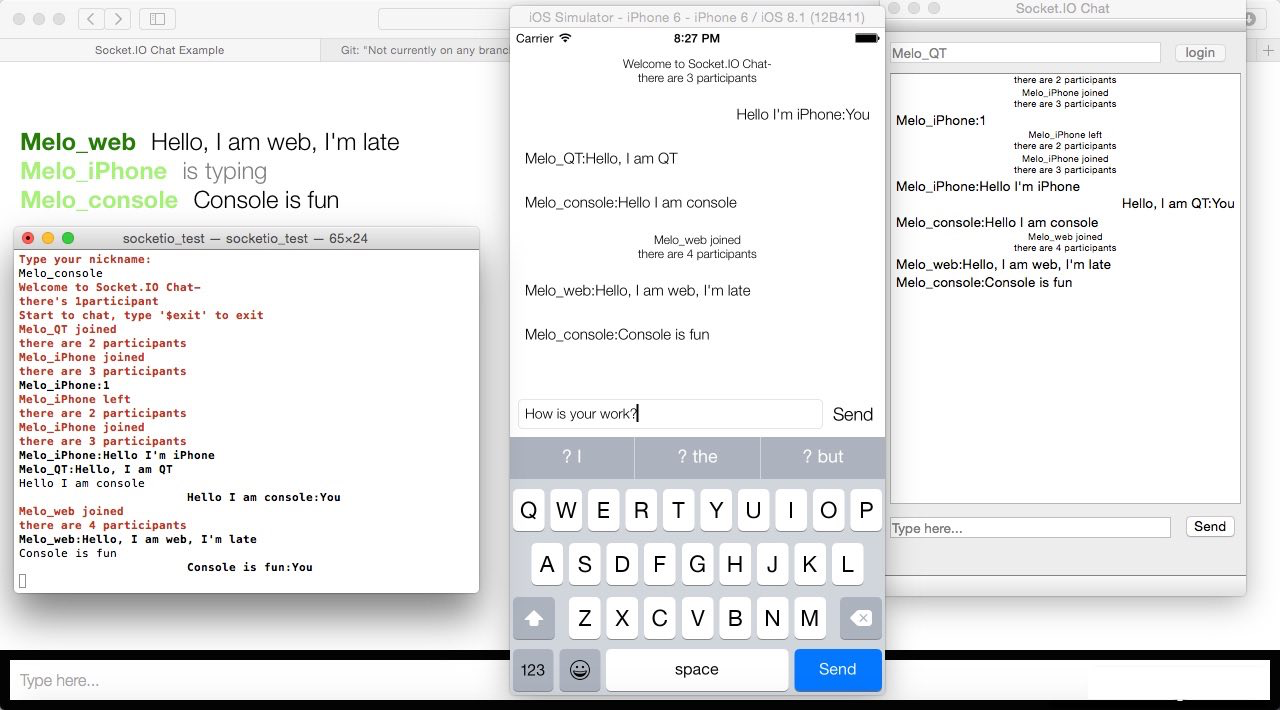
- 100% written in modern C++11
- Compatible with 1.0+ protocol
- Binary support
- Automatic JSON encoding
- Multiplex support
- Similar API to the Socket.IO JS client
- Install boost, see Boost setup section.
- Use
git clone --recurse-submodules https://github.com/socketio/socket.io-client-cpp.gitto clone your local repo. - Run
cmake -DBOOST_ROOT:STRING=<your boost install folder> -DBOOST_VER:STRING=<your boost version> ./ - Run
make install(if makefile generated) or open generated project (if project file generated) to build. - Outputs is under
./build, link with the all static libs under./build/liband include headers under./build/includein your client code where you want to use it.
- If you're using boost without install,you can specify
boost include dirandboost lib dirseparately by:
cmake
-DBOOST_INCLUDEDIR=<your boost include folder>
-DBOOST_LIBRARYDIR=<your boost lib folder>
-DBOOST_VER:STRING=<your boost version>
./- CMake didn't allow merging static libraries,but they're all copied to
./build/lib, you can DIY if you like.
- Install boost, see Boost setup section.
- Use
git clone --recurse-submodules https://github.com/socketio/socket.io-client-cpp.gitto clone your local repo. - Add
<your boost install folder>/include,./lib/websocketppand./lib/rapidjson/includeto headers search path. - Include all files under
./srcin your project, addsio_client.cpp,sio_socket.cpp,internal/sio_client_impl.cpp,internal/sio_packet.cppto source list. - Add
<your boost install folder>/libto library search path, addboost.lib(Win32) or-lboost(Other) link option. - Include
sio_client.hin your client code where you want to use it.
The APIs are similar with JS client.
Connect to a server
sio::client h;
h.connect("http://127.0.0.1:3000");
Emit a event
//emit event name only:
h.socket->emit("login");
//emit text
h.socket()->emit("add user", username);
//emit binary
char buf[100];
h.socket()->emit("add user", std::make_shared<std::string>(buf,100));
//emit message object with lambda ack handler
h.socket()->emit("add user", string_message::create(username), [&](message::list const& msg)
{
});
//emit with `message::list`
message::list li("arg1");
li.push(string_message::create("arg2"));
socket->emit("new va",li);// support io.on("new va",function(arg1,arg2){}); style in server side.- Items in
message::listwill be expanded in server side event callback function as function arguments.
Bind a event
/**************** bind with function pointer ***************/
void OnMessage(sio::event &)
{

}
h.socket()->on("new message", &OnMessage);

/********************* bind with lambda ********************/
h.socket()->on("login", [&](sio::event& ev)
{
    //handle login message
    //post to UI thread if any UI updating.
});

/**************** bind with member function *****************/
class MessageHandler
{
public:
    void OnMessage(sio::event &);
};
MessageHandler mh;
h.socket()->on("new message",std::bind( &MessageHandler::OnMessage,&mh,std::placeholders::_1));
Send to other namespace
h.socket("/chat")->emit("add user", username);There're just 3 roles in this library - socket,client and message.
client is for physical connection while socket is for "namespace"(which is like a logical channel), which means one socket paired with one namespace, and one client paired with one physical connection.
Since a physical connection can have multiple namespaces (which is called multiplex), a client object may have multiple socket objects, each is bind to a distinct namespace.
Use client to setup the connection to the server, manange the connection status, also session id for the connection.
Use socket to send messages under namespace and receives messages in the namespace, also handle special types of message.
The message is just about the content you want to send, with text,binary or structured combinations.
Sockets are all managed by client, no public constructors.
You can get it's pointer by client.socket(namespace).
void emit(std::string const& name, message::list const& msglist, std::function<void (message::ptr const&)> const& ack)
Universal event emition interface, by applying implicit conversion magic, it is backward compatible with all previous emit interfaces.
void on(std::string const& event_name,event_listener const& func)
void on(std::string const& event_name,event_listener_aux const& func)
Bind a callback to specified event name. Same as socket.on() function in JS, event_listener is for full content event object,event_listener_aux is for convinience.
void off(std::string const& event_name)
Unbind the event callback with specified name.
void off_all()
Clear all event bindings (not including the error listener).
void on_error(error_listener const& l)
Bind the error handler for socket.io error messages.
void off_error()
Unbind the error handler.
//event object:
class event
{
public:
    const std::string& get_nsp() const;

    const std::string& get_name() const;

    const message::ptr& get_message() const;

    bool need_ack() const;

    void put_ack_message(message::ptr const& ack_message);

    message::ptr const& get_ack_message() const;
   ...
};
//event listener declare:
typedef std::function<void(const std::string& name,message::ptr const& message,bool need_ack, message::ptr& ack_message)> event_listener_aux;

typedef std::function<void(event& event)> event_listener;

typedef std::function<void(message::ptr const& message)> error_listener;
connect will happen for existing sockets automatically when client have opened up the physical connection.
socket opened with connected client will connect to its namespace immediately.
void close()
Positively disconnect from namespace.
std::string const& get_namespace() const
Get current namespace name which the client is inside.
client() default constructor.
void set_open_listener(con_listener const& l)
Call when websocket is open, especially means good connectivity.
void set_fail_listener(con_listener const& l)
Call when failed in connecting.
void set_close_listener(close_listener const& l)
Call when closed or drop. See client::close_reason
//connection listener declare:
enum close_reason
{
    close_reason_normal,
    close_reason_drop
};
typedef std::function<void(void)> con_listener;

typedef std::function<void(close_reason const& reason)> close_listener;void set_socket_open_listener(socket_listener const& l)
Set listener for socket connect event, called when any sockets being ready to send message.
void set_socket_close_listener(socket_listener const& l)
Set listener for socket close event, called when any sockets being closed, afterward, corresponding socket object will be cleared from client.
    //socket_listener declare:
typedef std::function<void(std::string const& nsp)> socket_listener;void connect(const std::string& uri)
Connect to socket.io server, eg. client.connect("ws://localhost:3000");
void close()
Close the client, return immediately.
void sync_close()
Close the client, return until it is really closed.
bool opened() const
Check if client's connection is opened.
void set_reconnect_attempts(int attempts)
Set max reconnect attempts, set to 0 to disable transparent reconnecting.
void set_reconnect_delay(unsigned millis)
Set minimum delay for reconnecting, this is the delay for 1st reconnecting attempt, then the delay duration grows by attempts made.
void set_reconnect_delay_max(unsigned millis)
Set maximum delay for reconnecting.
void set_reconnecting_listener(con_listener const& l)
Set listener for reconnecting is in process.
void set_reconnect_listener(reconnect_listener const& l)
Set listener for reconnecting event, called once a delayed connecting is scheduled.
socket::ptr socket(std::string const& nsp)
Get a pointer to a socket which is paired with the specified namespace.
std::string const& get_sessionid() const
Get socket.io session id.
message Base class of all message object.
int_message message contains a 64-bit integer.
double_message message contains a double.
string_message message contains a string.
array_message message contains a vector<message::ptr>.
object_message message contains a map<string,message::ptr>.
message::ptr pointer to message object, it will be one of its derived classes, judge by message.get_flag().
All designated constructor of message objects is hidden, you need to create message and get the message::ptr by [derived]_message:create().
-
Download boost from boost.org.
-
Unpack boost to some place.
-
Run either .\bootstrap.bat (on Windows), or ./bootstrap.sh (on other operating systems) under boost folder.
Run with following script will build the necessary subset:
bjam install --prefix="<your boost install folder>" --with-system --with-date_time --with-random link=static runtime-link=shared threading=multiOptionally You can merge all output .lib files into a fat one,especially if you're not using cmake.
In output folder, run:
lib.exe /OUT:boost.lib *pod 'SocketIO-Client-CPP'
Grab the latest library built for all architectures from https://github.com/hfossli/SocketIO-Client-CPP-iOS-Builds
Use this shell to download and build boost completely automattically. It installs boost to <shell folder>/prefix.
See the iOS example project for how to integrate the rest.
##License MIT