


Playwright Timeline Reporter renders your Playwright tests as an interactive timeline. You can use it to optimize your test run performance:
- identify slow tests
- detect costly or repeated hooks and fixtures
- evaluate worker utilization
- get ready-to-use prompt for AI analysis
Plug it into any Playwright project and get a self-contained HTML report.
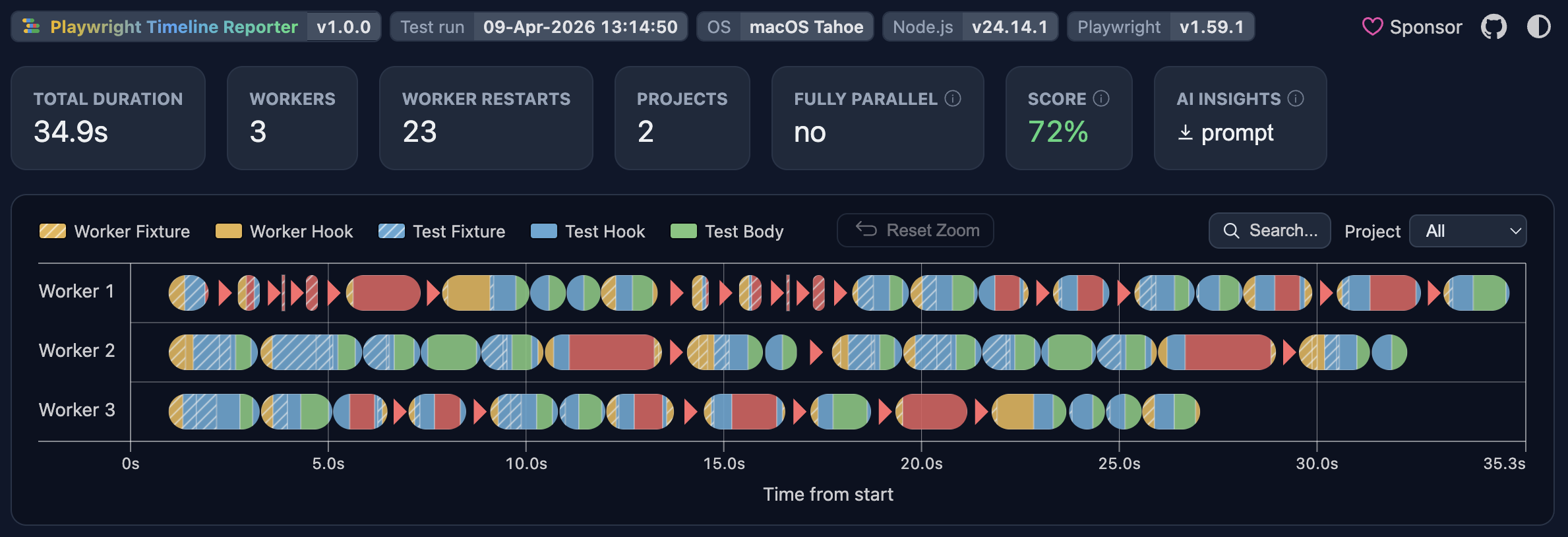
Click the screenshot to open the live report ↗
Also check out the sharded report demo.
Install with any package manager:
npm install --save-dev playwright-timeline-reporterpnpm add --save-dev playwright-timeline-reporteryarn add --dev playwright-timeline-reporterAdd the reporter to your playwright.config.ts:
import { defineConfig } from '@playwright/test';

export default defineConfig({
  reporter: [
    ['playwright-timeline-reporter']
  ],
});
Additionally, you can provide options:
import { defineConfig } from '@playwright/test';

export default defineConfig({
  reporter: [
    ['playwright-timeline-reporter', { /* reporter options */ }],
  ],
});Run your tests and open ./timeline-report/index.html in any browser.
In the report you can do the following:
- Review the timeline to spot the slowest spans.
- Hover any span to inspect its type, details, and source location.
- Click spans to isolate a specific test, hook, or fixture.
- Inspect restart markers to understand worker restart reasons.
- Switch projects to isolate project-specific bottlenecks.
- Focus on a worker or shard by clicking its label.
- Select a region to zoom in for deeper investigation.
- Search for files, tests, tags, or error messages.
- Copy the AI prompt and paste it into any AI chat for analysis.
Note
Your input is appreciated: you can help improve the reporter by upvoting these Playwright issues: #38350, #38962, #40175.
For sharded runs, configure each shard to produce a blob report, then merge them into a single timeline.
1. Run each shard with the blob reporter:
import { defineConfig } from '@playwright/test';

export default defineConfig({
  reporter: [
    ['blob']
  ],
});
npx playwright test --shard=1/3
npx playwright test --shard=2/3
npx playwright test --shard=3/32. Merge the blob reports:
npx playwright merge-reports --reporter=playwright-timeline-reporter ./blob-reportOpen ./timeline-report/index.html to see the unified timeline across all shards.
For more details on sharding see the Playwright sharding docs.
- Type:
string - Default:
./timeline-report/index.html - Env var:
PLAYWRIGHT_TIMELINE_OUTPUT_FILE
Path for the generated report file, relative to config dir.
- Type:
string - Default: —
Path to a custom LLM prompt template, must contain {data} exactly once. See the default prompt.
- Type:
boolean - Default:
false - Env var:
PLAYWRIGHT_TIMELINE_DEBUG
Enables debug logging in the reporter and extra debug details in the generated HTML report.
Example with options:
import { defineConfig } from '@playwright/test';

export default defineConfig({
  reporter: [
    [
      'playwright-timeline-reporter',
      {
        outputFile: './reports/timeline.html',
        debug: true,
      },
    ],
  ],
});You can also use this reporter to better understand and visualize different Playwright concepts. Feel free to add timelines to your posts and presentations. Deploy it to GitHub Pages and share a link with your readers so they can explore the chart themselves.
Example articles:
You can integrate a link to the timeline inside Playwright's built-in HTML report:
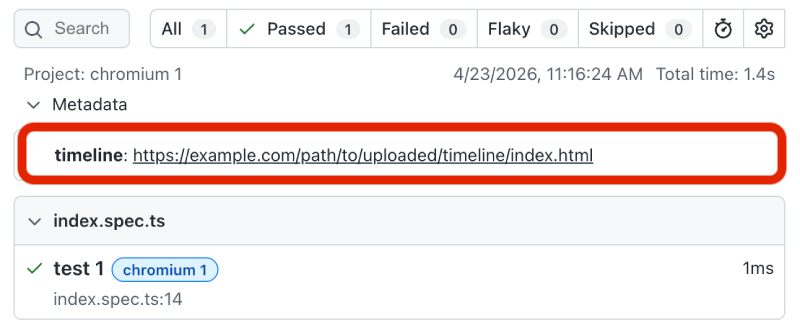
Add a timeline report link to the metadata object in the Playwright config:
export default defineConfig({
  metadata: {
    timeline: 'https://path/to/uploaded/timeline/index.html',
  }
});
Then open the HTML report with a special hash #show-metadata-other:
http://localhost:9323/#show-metadata-other
Customization of Playwright HTML report is a bit awkward, see #35614.
The reporter embeds all collected data directly into the generated HTML file. It does not send it to any third-party services. Your data remains local unless you choose to share the HTML file yourself.
Playwright's API does not provide a reliable way to reconstruct worker lanes exactly as they were executed (#40175). This reporter does its best to approximate the original worker distribution, but in some cases the lane assignment may be not 100% accurate.
If you notice a bug or have any feedback, feel free to open an issue.
- @global-cache/playwright - Cache and reuse data between Playwright workers.
- request-mocking-protocol - Mock client-side and server-side API calls in tests.
This project is licensed under the MIT License.
The generated report includes attribution links to this repository and the sponsor page. You are welcome to use and modify the tool freely — please keep those links intact in the report output.