

Wallet Service or wService for short, provides a generic basic Wallet service with a RESTful API to visualise balance and move funds according to the approrpiate accounts that was implemented in Go (using gokit.io) that employs Postgres as a db solution.
I used Gokit to help us separate concerns by employing an onion layered model, where at the very core we have our use cases or bussines domain (source code dependencies can only point inward) and then wrapping that with other functionality layers such as transport (http, JSON, gRPC), logging, metrics & monitoring...and the list can be extended to service discovery, rate limitting, circuit breaking, alerting, etc.
Here are the core functionalities that this service implements:
- Seeing all available accounts
- Sending a payment from one account to another (same currency)
- Seeing all comitted payments since the initial balance value
Assumptions and contraints:
- Only payments within the same currency are supported (no exchanges)
- There are no users in the system (no auth)
- Balance can't go below zero
- There will be no transactions withing the same account
- More than one instance of the application can be launched
Get the source code:
$ go get -u github.com/vstoianovici/wservice
Build the environment from the docker-compose.yml file in the root (gowebapp and postgresdb will be deployed):
$ docker-compose up -d
The postgresdb will already have a database called Postgres that has the Accounts and Transfers tables. The Account table will look something like this:
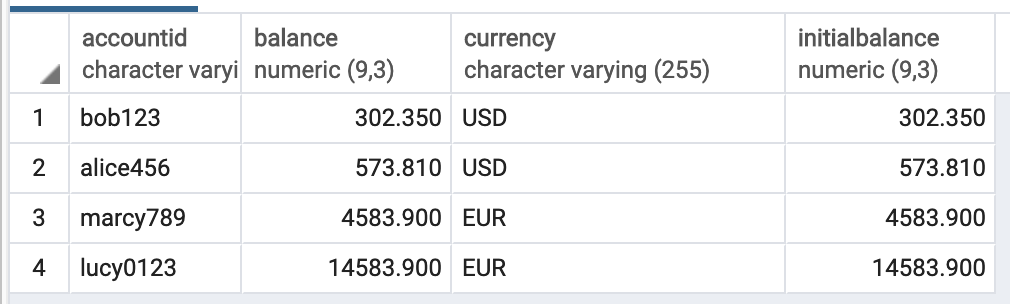
while the Transfers table will be empty:

One can visualize both tables by accessing the follwing links:
-
The
Accounttable: http://127.0.0.1:8080/accounts -
The
Transferstable: http://127.0.0.1:8080/transfers -
Additionally one can see the
Metrics & Instrumentationendpoint here: http://127.0.0.1:8080/metrics
At this point one could proceed to the Runtime section from below and focus on the sections about the curl commands that allow you to interact with the service (ignore the part where wservice is launched, as that is only for those who don't use docker to deploy the service)
Get the source code:
$ go get -u github.com/vstoianovici/wservice
Build the binary by running the following command in the root:
$ make build
If the build succeeds, the resulting binary named "wService" should be found in the /cmd directory.
To build the Postgres db as a Docker container run these 2 commands:
docker build -t postgresdb -f ./Dockerfile_postgres .
followed by
docker run --rm --name postgresdb -e POSTGRES_PASSWORD=password -d -p 5432:5432 postgresdb
In case Postgres is installed in any other way other than the ones described above the user needs to create a database named Postgres and run the SQL queries contained in the init-user-db.sh script from the /docker folder to create the tables Accounts and Transfers as portrayed in the screenshots from the section "Get strated with Docker" from above.
Addtionally there is a postgresql.cfg file contained in /cmd that is used for configuring the connection between the Go webapp and the Postgres db. The content is pretty self-explanatory:
sqlDriver : postgres,
sqlHost : 127.0.0.1,
sqlPort : 5432,
sqlUser : postgres,
sqlPassword : password,
sqlDbName : postgres,
sslmode : disable,
accountsTable : Accounts,
transfersTable : Transfers
Run the tests:
$ make test
Feel free to explore the Makefile available in the root directory.
- Otherwise, once
wServiceis built and ready for runtime it can run (/cmd/wService) without any parameters (default should be fine) but there is the option of passing in a different port or a differentpostgres.cfgfile (skip this step, if you are deploying with docker-compose, and continue to the curl commands bellow):
$ ./wService -h
time=2019-03-22T20:40:18.099917Z tag=start msg="created logger"
Usage of ./wService:
  -file string
        Path of postgresql config file to be parsed. (default "./postgresql.cfg")
  -port int
        Port on which the server will listen and serve. (default 8080)
- At runtime the easiest way to actually create fund transfers is to run a curl command against the
submittransferAPI endpoint such as the following:
curl -d'{"from":"bob123","to":"alice456","amount":"20"}' "127.0.0.1:8080/submittransfer"
- The other touchpoints of the API to visualize the accounts' balance (
/accounts,), the already submitted transactions (/transfers) and the metrics data (/metrics) are, as mentioned earlier reachable with:
curl "127.0.0.1:8080/transfers"
curl "127.0.0.1:8080/accounts"
curl "127.0.0.1:8080/metics"
Anybody can use this resource as a library to create their own implementation of a micro Wallet Service as long as they mimic what is being done in /cmd/main.go
For the future, a nice feature to implement would be a gRPC endpoint in addition to the Json over HTTP REST API so that the wallet can be a service in a microservice architecture solution.
Contributions to this project are welcome, though please file an issue before starting work on anything major. The next step in the evolution of this product would be a gRPC Transport wrapper to allow for optimum inter-process commuinication
The MIT License (MIT) - see the LICENSE file for more details