-
-
Notifications
You must be signed in to change notification settings - Fork 101
docs: add Rsdoctor 2.0 release blog #1835
New issue
Have a question about this project? Sign up for a free GitHub account to open an issue and contact its maintainers and the community.
By clicking “Sign up for GitHub”, you agree to our terms of service and privacy statement. We’ll occasionally send you account related emails.
Already on GitHub? Sign in to your account
Open
yifancong
wants to merge
19
commits into
main
Choose a base branch
from
docs/migrate-v2-package-docs
base: main
Could not load branches
Branch not found: {{ refName }}
Loading
Could not load tags
Nothing to show
Loading
Are you sure you want to change the base?
Some commits from the old base branch may be removed from the timeline,
and old review comments may become outdated.
Open
Changes from all commits
Commits
Show all changes
19 commits
Select commit
Hold shift + click to select a range
b1dc496
docs: add Rsdoctor 2.0 release blog
yifancong b6300cf
docs: update Rsdoctor 2.0 release blog
yifancong 291fe33
docs: 2.0 release blog
yifancong 4279ea7
docs: refine Rsdoctor 2.0 release note
yifancong add9e6b
docs: add Rsdoctor 2.0 benchmark results
yifancong 25641db
docs: clarify bundle analysis improvements
yifancong 0733fc0
docs: refine Rsdoctor 2.0 release notes
yifancong af1e168
docs: polish Rsdoctor 2.0 release notes
yifancong 0bf9f9a
Potential fix for pull request finding
yifancong 227de84
Potential fix for pull request finding
yifancong d7fe37b
docs: clarify compiler output paths
yifancong 13d2bad
docs: refine Rsdoctor 2.0 release notes
yifancong 8b5408d
docs: add visuals to Rsdoctor 2.0 release notes
yifancong a38ff34
fix(examples): update child compiler analysis demo
yifancong 7c2efd4
docs: polish Rsdoctor 2.0 release notes
yifancong cad612b
docs: recommend Rsdoctor v2 migration skill
yifancong ba61c2e
docs: resize contributor avatars
yifancong 96a0a2c
docs: summarize Treemap improvements
yifancong a8cca06
docs: refine Rsdoctor 2.0 release notes
yifancong File filter
Filter by extension
Conversations
Failed to load comments.
Loading
Jump to
Jump to file
Failed to load files.
Loading
Diff view
Diff view
There are no files selected for viewing
This file contains hidden or bidirectional Unicode text that may be interpreted or compiled differently than what appears below. To review, open the file in an editor that reveals hidden Unicode characters.
Learn more about bidirectional Unicode characters
This file contains hidden or bidirectional Unicode text that may be interpreted or compiled differently than what appears below. To review, open the file in an editor that reveals hidden Unicode characters.
Learn more about bidirectional Unicode characters
This file contains hidden or bidirectional Unicode text that may be interpreted or compiled differently than what appears below. To review, open the file in an editor that reveals hidden Unicode characters.
Learn more about bidirectional Unicode characters
| Original file line number | Diff line number | Diff line change |
|---|---|---|
| @@ -1,4 +1,5 @@ | ||
| [ | ||
| "release-note-2_0", | ||
| "release-note-1_2", | ||
| "release-note-1_0", | ||
| "release-note-0_4", | ||
|
|
||
213 changes: 213 additions & 0 deletions
213
packages/document/docs/en/blog/release/release-note-2_0.mdx
Large diffs are not rendered by default.
Oops, something went wrong.
This file contains hidden or bidirectional Unicode text that may be interpreted or compiled differently than what appears below. To review, open the file in an editor that reveals hidden Unicode characters.
Learn more about bidirectional Unicode characters
This file contains hidden or bidirectional Unicode text that may be interpreted or compiled differently than what appears below. To review, open the file in an editor that reveals hidden Unicode characters.
Learn more about bidirectional Unicode characters
This file contains hidden or bidirectional Unicode text that may be interpreted or compiled differently than what appears below. To review, open the file in an editor that reveals hidden Unicode characters.
Learn more about bidirectional Unicode characters
| Original file line number | Diff line number | Diff line change |
|---|---|---|
| @@ -1,4 +1,5 @@ | ||
| [ | ||
| "release-note-2_0", | ||
| "release-note-1_2", | ||
| "release-note-1_0", | ||
| "release-note-0_4", | ||
|
|
||
213 changes: 213 additions & 0 deletions
213
packages/document/docs/zh/blog/release/release-note-2_0.mdx
This file contains hidden or bidirectional Unicode text that may be interpreted or compiled differently than what appears below. To review, open the file in an editor that reveals hidden Unicode characters.
Learn more about bidirectional Unicode characters
| Original file line number | Diff line number | Diff line change |
|---|---|---|
| @@ -0,0 +1,213 @@ | ||
| --- | ||
| published_at: 2026-09 | ||
| --- | ||
|
|
||
| <img | ||
| src="https://assets.rspack.rs/rsdoctor/rsdoctor_2.png" | ||
| alt="Rsdoctor 2.0 发布横幅" | ||
| style={{ margin: 'auto' }} | ||
| /> | ||
|
|
||
| _2026 年 9 月_ | ||
|
|
||
| # Rsdoctor 2.0 发布公告 | ||
|
|
||
| 我们很高兴地宣布 **Rsdoctor 2.0**!🎉 | ||
|
|
||
| 从 2.0 开始,Rsdoctor 将全面聚焦 Rspack,webpack 项目可以继续使用 Rsdoctor 1.x。聚焦 Rspack 后,Rsdoctor 可以更深入地使用其内置能力,并持续围绕 Rspack 的构建模型和生态场景提供分析支持。 | ||
|
|
||
| 构建分析数据也不再只服务于报告页面:开发者可以通过可视化报告排查问题,coding agent 和自动化流程则可以直接查询同一份数据。2.0 同时带来了更快的分析、更完整的 compiler 支持和更轻量的安装体积。 | ||
|
|
||
| 本次更新的主要亮点包括: | ||
|
|
||
| - **更快的 Rspack 分析**:2.0 全面聚焦 Rspack,耗时较长的数据处理在 Rspack 内部完成。该能力在 1.0 中作为可选项推出时,已将整体分析时间减少 **20% 以上**;2.0 默认启用,并进一步减少 stats 转换等重复处理。 | ||
| - **面向 agent 的构建分析**:Agent CLI 与 Rsdoctor analysis skill 可以帮助 coding agent 查询构建数据,并给出可执行的优化建议。 | ||
| - **一个报告覆盖所有 compiler**:常规 Rspack 插件可以自动处理 multi-compiler、Rsbuild environments 和 child compiler,同时保持每个 compiler 的数据相互隔离。 | ||
| - **更小的安装体积**:核心能力统一收敛到 `@rsdoctor/core`,仓库 package 从 11 个减少到 5 个,完整生产安装体积减少 **48.5%**。 | ||
| - **更快的增量构建分析**:通过保留 loader 缓存、跳过非必要计算并优化报告写入,bench 中的 HMR 中位数降低约 **47%**。 | ||
|
|
||
| ## 更深入、更快的 Rspack 分析 {#rspack-native-by-default} | ||
|
|
||
| Rsdoctor 1.x 同时支持 Rspack 和 webpack,因此部分分析能力需要建立在两者都能提供的数据上。2.0 聚焦 Rspack 后,可以更充分地复用 Rspack 内部数据,并随着 Rspack 的构建模型和能力持续演进。 | ||
|
|
||
| Rspack native plugin 最初是 Rsdoctor 1.x 中的一项可选性能优化。它将耗时较长的数据处理逻辑使用 Rust 重写并集成到 Rspack,在 1.0 的大型项目测试中将整体分析时间减少了 **20% 以上**。Rsdoctor 2.0 默认启用这项能力。 | ||
|
|
||
| module graph 与 chunk graph 现在直接由 Rspack 提供,不再经过 stats 转换;resolver 分析会复用 Rspack 内部的解析数据,tree shaking 所需的副作用源码也只会在相关分析开启时采集。这些变化减少了 JavaScript 侧的数据转换和重复处理。 | ||
|
|
||
| 项目不再需要配置 [`experiments.enableNativePlugin`](/config/options/experiments#enablenativeplugin),升级到 2.0 后删除该配置即可。 | ||
|
|
||
| ## 面向 agent 的构建分析 {#build-analysis-for-agents} | ||
|
|
||
| Rsdoctor 报告包含 asset、module、package、loader 和 tree shaking 等多个维度的详细信息。在大型项目中,找到一个问题的答案仍可能需要在多个页面之间切换,再手动组合不同维度的数据。 | ||
|
|
||
| Agent CLI 与 Rsdoctor analysis skill 最早在 1.x 期间推出,并在 2.0 中成为推荐的 AI 辅助分析工作流。[`@rsdoctor/agent-cli`](/guide/start/ai#agent-cli) 可以直接读取 `rsdoctor-data.json` 并返回结构化 JSON,让 coding agent 无需启动常驻服务即可检索和过滤报告数据。 | ||
|
|
||
| ```bash | ||
| # 安装 Agent CLI | ||
| pnpm add -D @rsdoctor/agent-cli | ||
|
|
||
| # 安装 Rsdoctor analysis skill(可选) | ||
| npx skills add rstackjs/agent-skills --skill rsdoctor-analysis | ||
|
|
||
| # 构建并生成 JSON 数据 | ||
| RSDOCTOR_OUTPUT=json pnpm run build | ||
| ``` | ||
|
|
||
| 完成准备后,用户无需记忆或手动执行 Agent CLI 命令,只需直接向 coding agent 提问,例如: | ||
|
|
||
| ```text | ||
| 使用 Rsdoctor 分析当前项目,找出可以优化产物体积的方向。 | ||
| ``` | ||
|
|
||
| coding agent 会根据问题调用相应的 `rsdoctor-agent` 命令,结合项目上下文分析大 chunk、重复依赖、module 引用链、loader 热点和 tree shaking 失败原因,并在需要时继续发起更聚焦的查询。 | ||
|
|
||
| <img | ||
| src="https://assets.rspack.rs/others/assets/rsdoctor/agent-cli-2.gif" | ||
| alt="Agent CLI 演示" | ||
| style={{ margin: 'auto' }} | ||
| /> | ||
|
|
||
| Rsdoctor 2.0 已移除 `@rsdoctor/mcp-server`,统一使用按需执行、无需维护服务连接的 Agent CLI。它不兼容 MCP 协议,也不是旧 API 的直接替代品;安装和迁移方式请参考 [AI](/guide/start/ai) 与 [2.0 迁移指南](/guide/start/migration-v2#ai-工作流迁移)。 | ||
|
|
||
| ## 一个报告覆盖所有 compiler {#one-report-for-every-compiler} | ||
|
|
||
| 现代 Rspack 应用经常在同一进程中创建多个 compiler。multi-compiler 配置可能同时构建浏览器端和 Node.js 产物,Rsbuild environments 可能分别创建 web 和 server 构建,插件也可能通过 child compiler 生成自己的资源。 | ||
|
|
||
| Rsdoctor 2.0 将常规的 `RsdoctorRspackPlugin` 统一为这些场景的入口: | ||
|
|
||
| - [multi-compiler 与 Rsbuild environments](https://github.com/web-infra-dev/rsdoctor/pull/1888):自动聚合同一次启动中创建的 compiler,并使用 `web`、`node` 等 environment 名称区分结果。 | ||
| - [child compiler](https://github.com/web-infra-dev/rsdoctor/pull/1842):自动发现 child compiler,并将其分析数据与 main compiler 隔离展示。 | ||
|
|
||
| <img | ||
| src="https://assets.rspack.rs/rsdoctor/child_compiler.png" | ||
| alt="包含 main compiler 和带 Child 标签的 child-assets 的 compiler 选择器" | ||
| style={{ margin: 'auto' }} | ||
| /> | ||
|
|
||
| 自动聚合默认开启,无需引入新的插件。如果同一进程启动的是多个互不相关的 compiler,可以设置 `multiCompiler: false`;也可以通过命名分组明确关联多个插件实例: | ||
|
|
||
| ```ts | ||
| new RsdoctorRspackPlugin({ | ||
| multiCompiler: { group: 'ssr' }, | ||
| }); | ||
| ``` | ||
|
|
||
| 浏览器端、服务端、worker 和插件生成的构建可以在一个报告中切换查看,不再需要使用专门的 multi-compiler plugin。 | ||
|
|
||
| ## 更轻量的安装 {#a-smaller-package-and-dependency-graph} | ||
|
|
||
| ### 更精简的 package 结构 {#smaller-dependency-graph} | ||
|
|
||
| Rsdoctor 2.0 将 core、graph、SDK、utils 和 Rspack plugin 合并到 `@rsdoctor/core`,共享能力收敛到 `@rsdoctor/shared`,client 与 CLI 则保留独立入口: | ||
|
|
||
| | 指标 | Rsdoctor 1.x | Rsdoctor 2.0 | | ||
| | ------------------------------------------------- | -----------: | -----------: | | ||
| | 仓库顶层 package | 13 | 6 | | ||
| | 顶层 package 的 `dependencies` 直接依赖声明数之和 | 88 | 39 | | ||
|
|
||
| 这里统计的是源码中的直接依赖声明数,不是安装后的 package 数。依赖图还会包含根节点、传递依赖和 peer 依赖,因此节点数会更多。 | ||
|
|
||
| ### 更小的安装体积 {#smaller-production-install-footprint} | ||
|
|
||
| 包结构和 runtime 依赖的精简,也让 `@rsdoctor/core` 及其完整传递依赖的生产安装体积接近减半: | ||
|
|
||
| | 指标 | Rsdoctor 1.6.2 | Rsdoctor 2.0 | 减少 | 降幅 | | ||
| | --------------------------------- | -------------: | -----------: | ------: | --------: | | ||
| | `@rsdoctor/core` 完整生产安装体积 | 25.5 MB | 13.1 MB | 12.3 MB | **48.5%** | | ||
|
|
||
| Rspack 项目升级时需要使用 `@rsdoctor/core` 替换 `@rsdoctor/rspack-plugin`,具体步骤请参考 [2.0 迁移指南](/guide/start/migration-v2#更新-rspack-插件)。 | ||
|
|
||
| ## watch 模式下更快的增量构建 {#faster-rebuilds-in-watch-mode} | ||
|
|
||
| Rsdoctor 2.0 通过三项优化减少 watch 与 HMR 关键路径上的重复工作: | ||
|
|
||
| - 复用 SDK 会话和报告服务,并让报告页面仅在首次构建时打开。 | ||
| - 保留 bundler 的 loader 缓存,并避免 loader 事件在重复构建中累积。 | ||
| - 跳过 module 与 asset 的 gzip 体积计算;非 watch 构建仍保留完整分析。 | ||
|
|
||
| watch 模式会使用更快的压缩级别写入报告数据,以减少每次更新的同步写入耗时。作为取舍,主要报告分片的压缩后体积会增大约 26%。这一变化只影响 Rsdoctor 报告数据,不影响应用构建产物;非 watch 构建仍使用默认压缩级别。 | ||
|
|
||
| 在 bench 中,HMR 中位数从 6.81 s 降至 3.64 s,提升约 **47%**。另一组重复构建基准中,分析耗时从 250.9 ms 降至 14.2 ms,提升 **94.3%**。 | ||
|
|
||
| > bench 关闭了 Rsdoctor client server;重复构建基准使用 100 个 module,预热 1 次后取 5 次中位数。 | ||
| > | ||
| > 相关 PR:[#1901](https://github.com/web-infra-dev/rsdoctor/pull/1901)、[#1904](https://github.com/web-infra-dev/rsdoctor/pull/1904)、[#1905](https://github.com/web-infra-dev/rsdoctor/pull/1905)、[#1906](https://github.com/web-infra-dev/rsdoctor/pull/1906)、[#1908](https://github.com/web-infra-dev/rsdoctor/pull/1908)、[#1913](https://github.com/web-infra-dev/rsdoctor/pull/1913)。 | ||
|
|
||
| ## 更清晰的产物分析体验 {#refined-bundle-analysis} | ||
|
|
||
| 大型项目的产物往往包含数量众多、层级很深的 module。Rsdoctor 2.0 不仅优化了 Bundle Size 页面的渲染性能,也重新梳理了从选择 asset、筛选 chunk,到定位 module 和查看详情的分析路径,让复杂产物更容易浏览和理解。 | ||
|
|
||
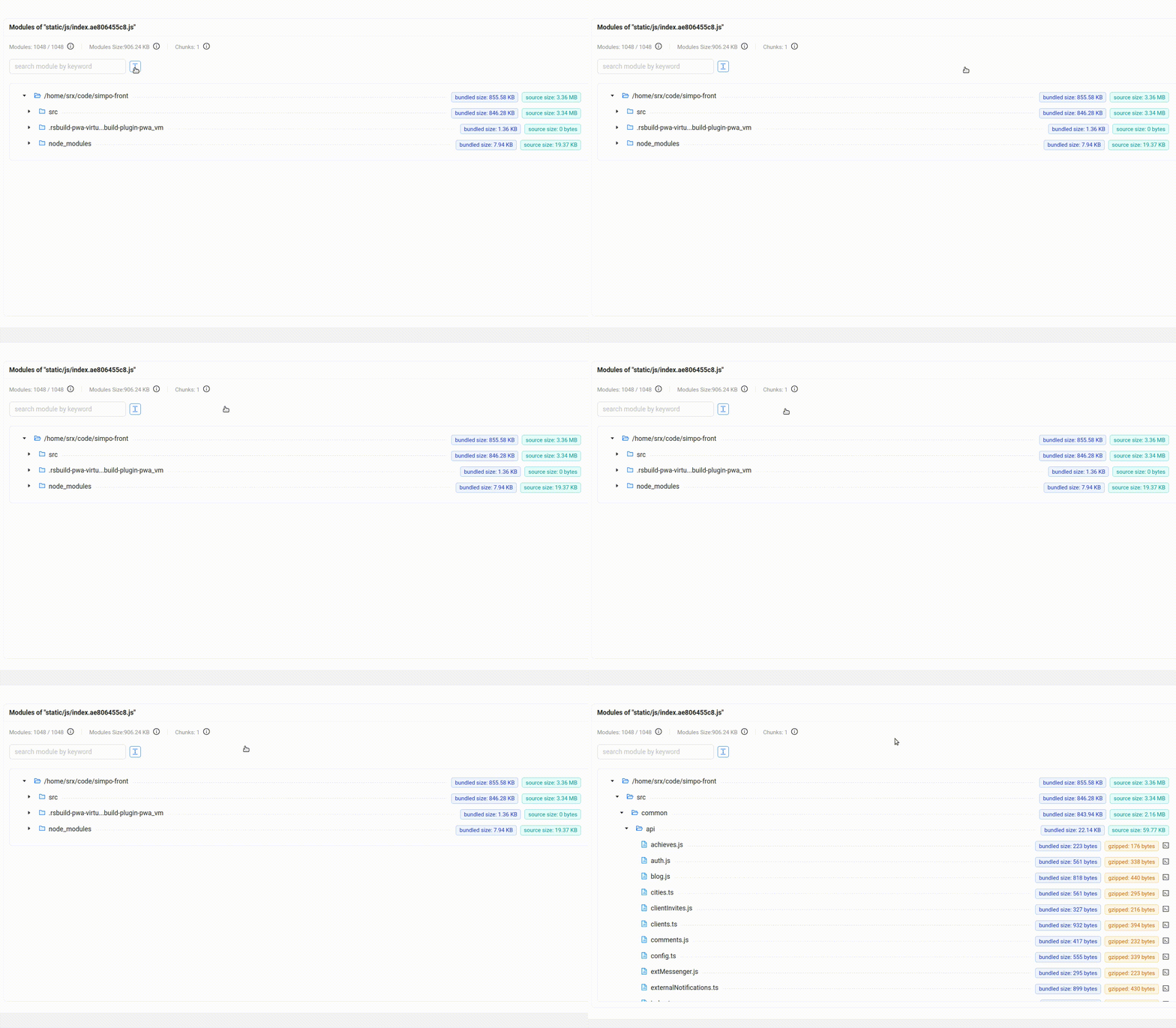
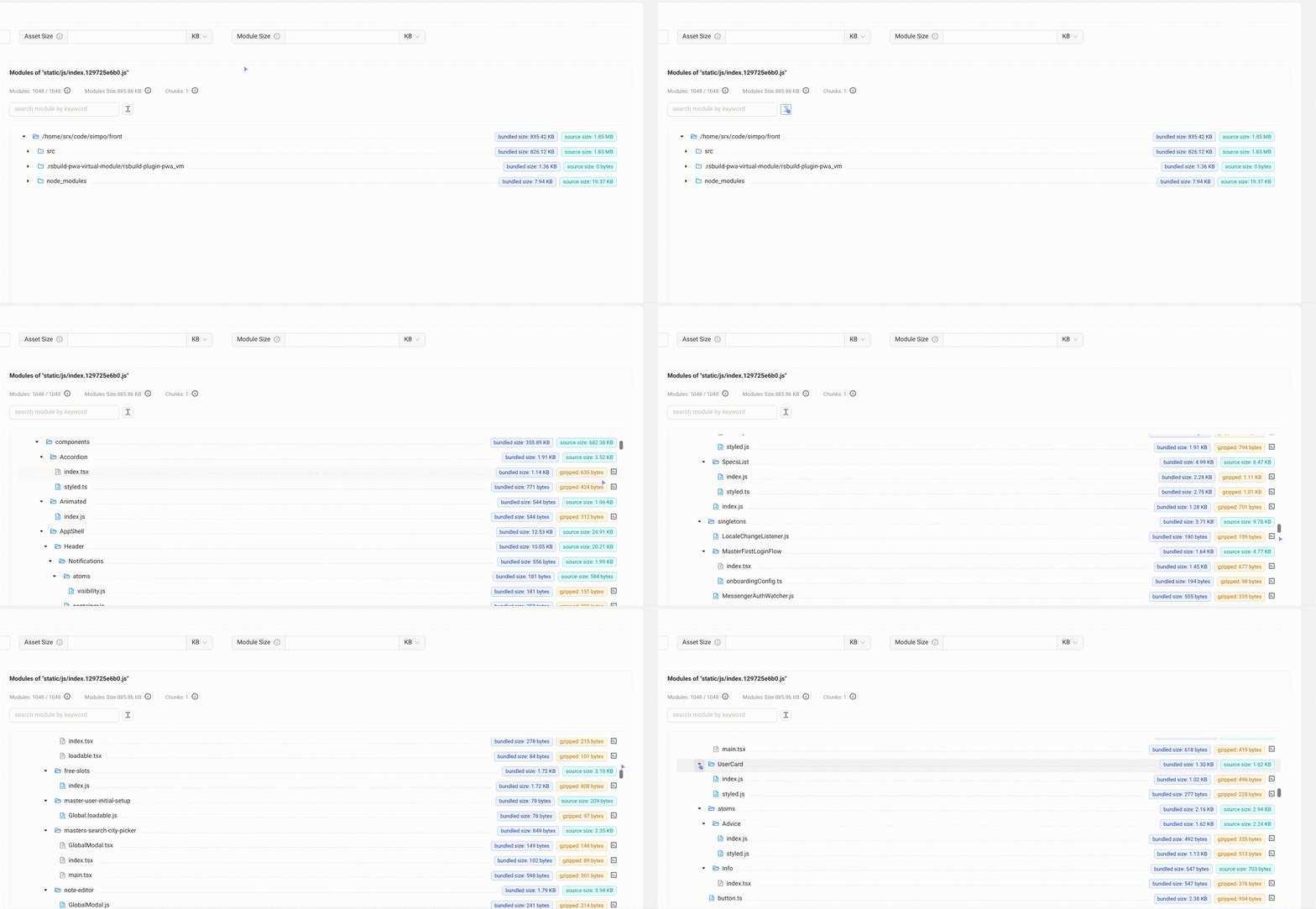
| - Tree Graph 使用虚拟滚动和渲染缓存,仅渲染当前视窗附近的节点,并降低滚动期间 tooltip、popover 等交互组件的额外开销。即使 asset 包含大量 module,展开目录和连续滚动也能保持流畅。 | ||
|
|
||
| **优化前** | ||
|
|
||
|  | ||
|
|
||
| **优化后** | ||
|
|
||
|  | ||
|
|
||
| Treemap 新增全屏模式、可收起侧边栏、面包屑导航和点击缩放,并统一 Stat、Parsed 和 Gzipped 体积口径,配合 JavaScript asset 筛选与响应式布局,让大型产物的层级浏览更清晰高效。 | ||
|
|
||
| > 相关 PR:[#1705](https://github.com/web-infra-dev/rsdoctor/pull/1705)、[#1782](https://github.com/web-infra-dev/rsdoctor/pull/1782)、[#1830](https://github.com/web-infra-dev/rsdoctor/pull/1830)、[#1839](https://github.com/web-infra-dev/rsdoctor/pull/1839)。 | ||
|
|
||
| ## 不兼容更新 {#breaking-changes} | ||
|
|
||
| Rsdoctor 2.0 主动收敛了兼容范围和包结构。升级前需要处理以下变更: | ||
|
|
||
| - **运行环境与构建工具**:要求使用 Node.js 22.18 及以上版本和 Rspack 2.0 及以上版本。Rspack 1.x 项目需要先升级 Rspack;webpack 项目应继续使用长期维护的 Rsdoctor 1.x,或先迁移到 Rspack。 | ||
| - **包与模块格式**:使用 `@rsdoctor/core` 替换 `@rsdoctor/rspack-plugin`;Rsdoctor package 仅提供 ESM 产物,需要将 CommonJS `require()` 改为 ESM `import`。 | ||
| - **AI 工作流**:`@rsdoctor/mcp-server` 已移除。请迁移到直接读取报告数据的 `@rsdoctor/agent-cli`;Agent CLI 不兼容 MCP 协议,也不是旧 API 的直接替代品。 | ||
|
|
||
| ### 配置项 {#configuration-options} | ||
|
|
||
| 下表区分了已经移除、仍处于废弃状态以及继续受支持的配置项: | ||
|
|
||
| | Rsdoctor 1.x 配置项 | 2.0 状态 | 替代方式 | | ||
| | ---------------------------------------------------------------------------------- | ---------------------- | -------------------------------------------------------------------------------------------------------------------------------- | | ||
| | [`experiments.enableNativePlugin`](/config/options/experiments#enablenativeplugin) | 已移除 | 删除该配置;Rspack native plugin 现在始终启用。 | | ||
| | `mode: 'normal'` | 已移除且会被忽略 | 使用 `output.mode: 'normal'`。 | | ||
| | `mode: 'brief'` | 已移除且会被忽略 | 使用 `output.mode: 'brief'`。 | | ||
| | `mode: 'lite'` | 已移除且会被忽略 | 使用 `output.mode: 'normal'`,并将 `output.reportCodeType` 设置为 `'noCode'` 或 `'noAssetsAndModuleSource'`。 | | ||
| | `brief` | 已废弃,仅为兼容而保留 | 使用 `output.mode: 'brief'`、`output.options.type: ['html']`,并通过 `output.options.htmlOptions` 配置 `reportHtmlName` 等选项。 | | ||
| | `brief.writeDataJson` 或 `output.options.htmlOptions.writeDataJson` | 已移除 | 使用 `output.options.type: ['html', 'json']` 同时输出两种格式。 | | ||
| | `output.compressData` | 已移除且会被忽略 | 使用 `output.mode: 'brief'` 和 `output.options.type: ['json']`。 | | ||
| | `port` | 已废弃,仅为兼容而保留 | 使用 `server.port`。 | | ||
| | `supports.generateTileGraph` | 已废弃,不再需要配置 | 删除该配置;treemap 数据默认生成。 | | ||
|
|
||
| 完整示例请参考 [配置迁移说明](/config/options/options-v2)。 | ||
|
|
||
| ## 升级到 2.0 {#upgrade-to-20} | ||
|
|
||
| 满足上述版本要求的 Rspack 项目,可以先替换 1.x 的插件包: | ||
|
|
||
| ```bash | ||
| pnpm remove @rsdoctor/rspack-plugin | ||
| pnpm add -D @rsdoctor/core | ||
| ``` | ||
|
|
||
| 推荐使用 [`rsdoctor-migrate-v2` skill](https://github.com/rstackjs/agent-skills/pull/115),让编码 agent 协助完成迁移: | ||
|
|
||
| ```bash | ||
| npx skills add rstackjs/agent-skills --skill rsdoctor-migrate-v2 | ||
| ``` | ||
|
|
||
| 使用 CLI 时,请确保 `@rsdoctor/cli` 与 `@rsdoctor/core` 的版本一致。完整步骤请参考 [Rsdoctor 2.0 迁移指南](/guide/start/migration-v2)。 | ||
|
|
||
| --- | ||
|
|
||
| 通过专注 Rspack,Rsdoctor 2.0 为可视化与自动化构建分析建立了更精简的基础。我们会继续深入 Rspack 的构建场景,完善提供给开发者和 agent 的分析数据,让构建问题更容易被发现、理解和解决。 | ||
|
|
||
| 完整更新内容请参考 [release 页面](https://github.com/web-infra-dev/rsdoctor/releases)。 | ||
|
|
||
| ## 致谢 {#acknowledgements} | ||
|
|
||
| Rsdoctor 2.0 离不开社区的共同参与。感谢所有贡献代码、测试、文档、设计与评审的开发者,也感谢提交 issue、提供可复现项目和验证预发布版本的用户。你们的反馈与协作让 Rsdoctor 2.0 更可靠,也帮助我们持续改进构建分析体验 ❤️ | ||
|
|
||
| <a href="https://github.com/web-infra-dev/rsdoctor/graphs/contributors"> | ||
| <img | ||
| src="https://contrib.rocks/image?repo=web-infra-dev/rsdoctor&columns=16" | ||
| alt="Contributors" | ||
| style={{ display: 'block', margin: '0 auto', width: '100%' }} | ||
| /> | ||
| </a> | ||
Oops, something went wrong.
Oops, something went wrong.
Add this suggestion to a batch that can be applied as a single commit.
This suggestion is invalid because no changes were made to the code.
Suggestions cannot be applied while the pull request is closed.
Suggestions cannot be applied while viewing a subset of changes.
Only one suggestion per line can be applied in a batch.
Add this suggestion to a batch that can be applied as a single commit.
Applying suggestions on deleted lines is not supported.
You must change the existing code in this line in order to create a valid suggestion.
Outdated suggestions cannot be applied.
This suggestion has been applied or marked resolved.
Suggestions cannot be applied from pending reviews.
Suggestions cannot be applied on multi-line comments.
Suggestions cannot be applied while the pull request is queued to merge.
Suggestion cannot be applied right now. Please check back later.
Uh oh!
There was an error while loading. Please reload this page.