




r3ngine v3.7.4 introduces Target Report Generation — a multi-scan, cross-scan PDF intelligence report that aggregates the full history of a target across any number of completed scans. Select 2+ scans from the Target Summary page, choose from 11 optional report sections, and generate a Cyber Pro-styled PDF with a cross-scan Vulnerability Tracking Timeline (status columns per scan: Open, Resolved, False Positive, Accepted Risk, Not Detected), embedded Severity Trend and Findings Timeline charts, and an Executive Summary with risk-by-severity boxes and remediation counts. Report branding (colours, logo, footer) is sourced from the configured Report Settings. Building off the original reNgine and further inspired by rengine-ng (Check out rengine-ng v3 if you haven't!) this release delivers a production-stabilized, enterprise-grade evolution of the platform. Key capabilities include the Attack Path Modeling Engine (179 rules, MITRE ATT&CK, 10-factor scoring), Distributed Remote Workers, Certificate Intelligence (tlsx-driven TLS reconnaissance), Identity Infrastructure Intelligence (SSO/IdP detection), Expanded Graph & API Intelligence (Organization → Application → APIEndpoint chain with a dedicated full-chain visualizer), Exposure Correlation Engine (cross-tool dedup + 18-category taxonomy), WPScan/WPTaint SAST integration, Nuclei proxy rotation, session-based LinkedIn OSINT, Tier 7 LLM auto-enrichment, offline hash cracking, intelligent Tier 5 tool gating, a full Target Editing workflow, multi-source Breach Intelligence (WhatBreach + CredSpy), a massively expanded GF Pattern Library (32+ patterns), and a UC-based Exploit Source scraper (Cloudflare bypass for Vulners NSE findings). The infrastructure remains hardened with Django 5.2.3 LTS, PostgreSQL 16, and Gunicorn + Uvicorn ASGI production serving. Building on the v3.2.0 Celery → Temporal migration — which replaced the legacy at-most-once task broker with a durable workflow engine providing crash-safe execution, full replay history, and pause/resume signaling — v3.7.x focuses on attack intelligence depth, operational security, horizontal scaling, and production reliability at scale.


R3NgineMobileSOC: Stable Release Out Now

| Dashboard | Geo-Tactical Map | Scan Details | Scan Orchestration |
|---|---|---|---|
 |
 |
 |
 |
The r3ngine Mobile SOC companion app provides a full command-and-control interface for managing scans, reviewing findings, and monitoring targets from any device. Features include a 4-step scan wizard, plugin selector, real-time task log streaming, animated activity badge, ReconX monitoring settings, and geo-tactical map visualization.
r3Ngine Plugins: Stable Release 1.5.0 Out Now

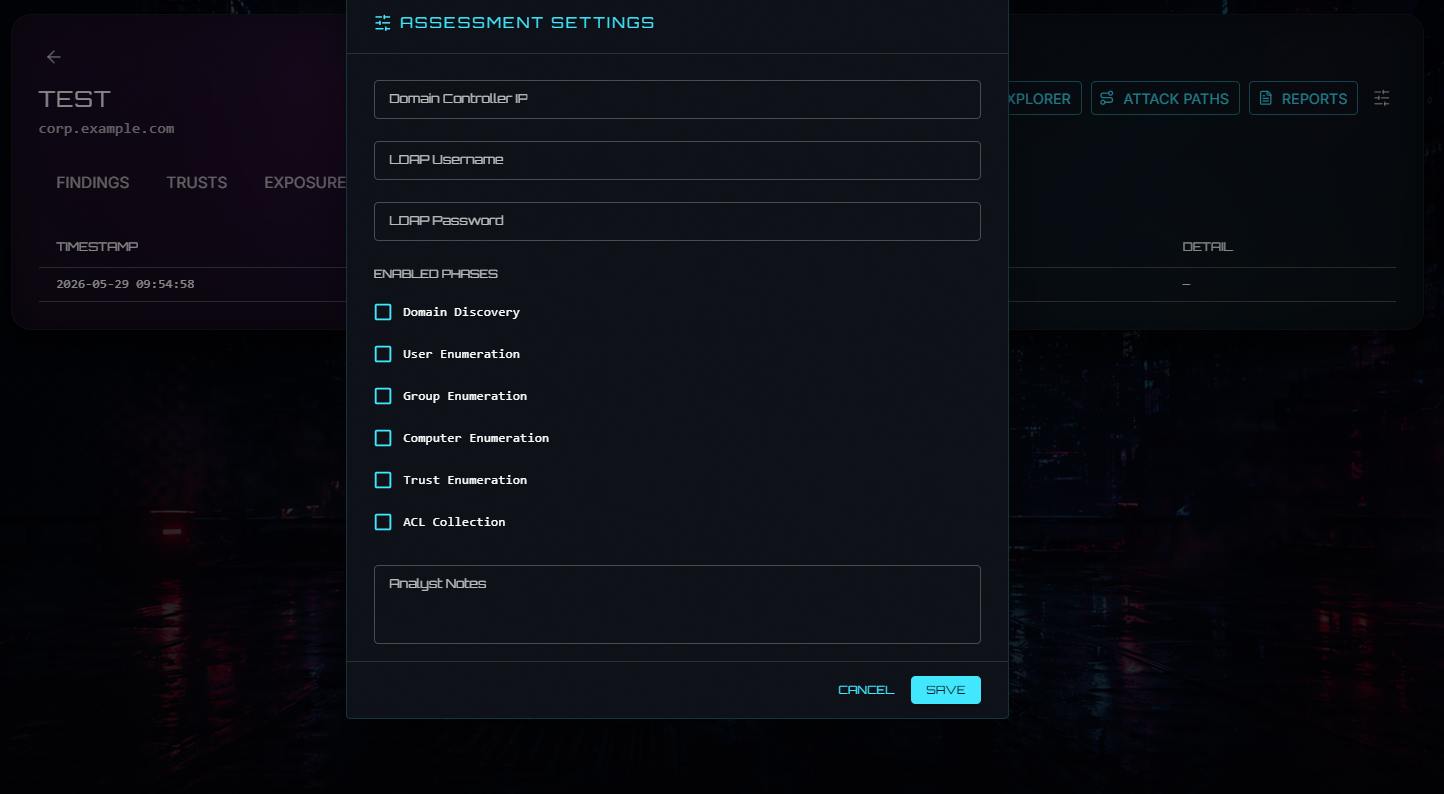
| Active Directory |
|---|
 |
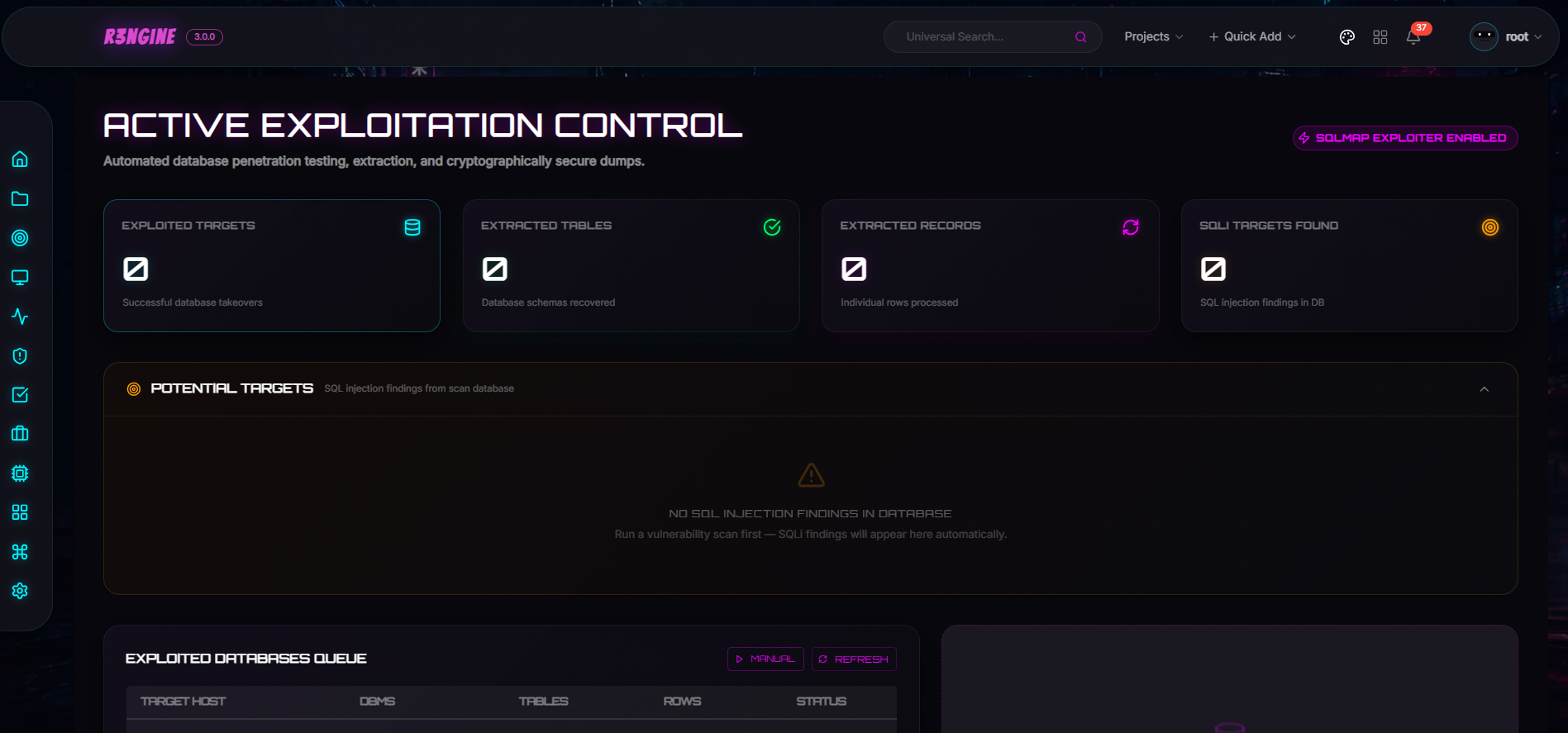
| Active Exploitation |
|---|
 |
| Exploit Readiness Layer |
|---|
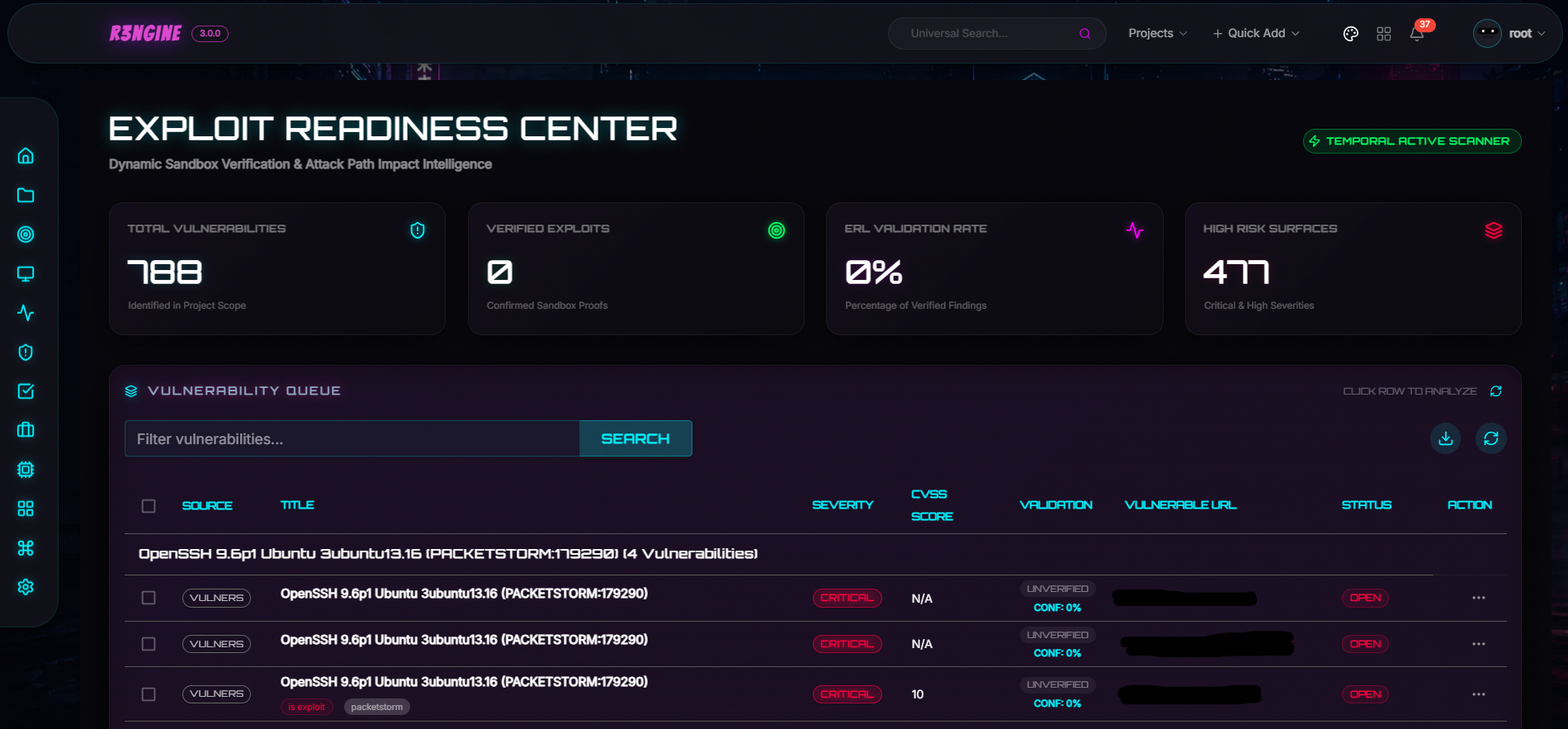 |
The plugin system supports dynamic installation, signed .r3n packages with Ed25519 verification, Temporal-wired activities, and Module Federation UI loaded directly into the host router. Available plugins include Active Directory Intelligence, Active Exploitation, Exploit Readiness Layer, Burp Suite Integration, and Email Security.
IMPORTANT — Upgrading from an existing installation
v3.4.1 upgraded the infrastructure stack: Django 3.2 → 5.2.3 LTS, PostgreSQL 12 → 16, and the production server changed from
runserverto Gunicorn + Uvicorn ASGI. v3.2.0 replaced Celery with Temporal. Both are breaking infrastructure changes that require a full upgrade run.You must run the full upgrade script before starting services:
# Linux / macOS
git pull
make fullupgrade

# Windows
git pull
make.bat fullupgrade
The script will:
- Warn you of all changes and ask for explicit confirmation before proceeding
- Stop and remove all existing containers
- Back up the PostgreSQL database and upgrade it from pg12 → pg16 (automated, idempotent)
- Rebuild all images from scratch with
--no-cache- Apply all database migrations
- Start the full updated stack and verify Gunicorn is serving
Your data is safe. All Docker volumes (
scan_results,postgres_data,nuclei_templates,wordlist, etc.) are fully preserved.Do not run
make upordocker compose updirectly on an existing install without runningfullupgradefirst — migrations will not be applied automatically.Any scans running at the time of upgrade will be interrupted. Ensure no critical scans are in progress before upgrading.
- About r3ngine
- Workflow
- Project Schema
- Features
- Quick Installation
- Administration & Recovery
- Contributing
- Reporting Security Vulnerabilities
- License
r3ngine is a production-grade web reconnaissance and vulnerability scanning platform. It combines a 7-tier scan pipeline with AI-powered intelligence gathering, graph-based attack path modeling, CVE enrichment from official threat intel feeds, and operational security controls — all orchestrated by Temporal for durable, crash-safe execution.
🦾 End-to-end reconnaissance via 30+ integrated security tools: subdomain discovery, port scanning, HTTP crawling, directory fuzzing, screenshot capture, secret scanning, vulnerability assessment (Nuclei, Semgrep, WPScan, Dalfox), and more.
🗃️ Unified data model with a custom query language. Filter reconnaissance data using natural-language operators like http_status=200&name=admin across all finding types.
🔧 Highly configurable scan engines via YAML configuration. Pre-built profiles include Full Scan, Passive Scan, Screenshot Gathering, and OSINT Scan. Every parameter — threads, timeouts, rate limits — is tunable.
💎 Subscans: respond immediately to in-progress discoveries. Launch a targeted port scan or vulnerability assessment against any subdomain without waiting for the full pipeline.
🧠 CVE Intelligence: automatic CVSS v3.1 scoring from NVD, EPSS exploitation probability from FIRST, and CISA KEV marking — enriched on every startup and queryable via the API.
🤖 Local LLM Orchestration: Manage your own localized Ollama Docker containers natively from the LLM Toolkit dashboard to power offline vulnerability risk assessments, mitigation strategy generation, and intelligent reporting without leaving your infrastructure.
📃 PDF Reports: Full Scan, Vulnerability, and OSINT report types with customizable templates, executive summaries, LLM-generated impact narratives, and remediation priorities.
🌐 Distributed Remote Workers: Horizontally scale scanning infrastructure by deploying standalone remote workers with UI management, secure token authentication, and automatic heartbeat validation.
⚙️ Role-based access control: Sys Admin, Penetration Tester, and Auditor roles with precisely defined permissions.

The full scan pipeline is orchestrated by MasterScanWorkflow on Temporal. Every tier boundary is a hard synchronisation point — no tier starts until all activities in the previous tier have completed and their results are persisted to the database.
flowchart TD
    START([▶ Scan Initiated]) --> TP

    subgraph S0["⚙️ Step 0 — Target Setup"]
        direction TB
        TP[TargetProfilingActivity] --> LC[LoadCheckpointActivity]
    end

    LC --> F1(( ))
    F1 --> SD & AI & FW & DNS & OS & SF & BD

    subgraph T1["🔍 Tier 1 — Discovery  ·  all parallel"]
        direction TB
        SD[RunSubdomainDiscoveryActivity]
        AI[RunAmassIntelDiscoveryActivity]
        FW[RunFirewallVPNScanActivity]
        DNS[RunDNSSecurityActivity]
        OS["RunGenericTaskActivity · osint"]
        SF["RunGenericTaskActivity · spiderfoot_scan
─ requires yaml spiderfoot_scan block"]
        BD["RunGenericTaskActivity · subdomain_discovery
uses_tools: [baddns]"]
    end

    SD & AI & FW & DNS & OS & SF & BD --> J1(( ))
    J1 --> PDR[ParseDiscoveryResultsActivity]
    PDR --> CP1{{"⏸ Pause Checkpoint"}}

    CP1 --> F2(( ))
    F2 --> HC & PS & VD

    subgraph T2["🌐 Tier 2 — Endpoint Discovery  ·  all parallel"]
        direction TB
        HC["RunHTTPCrawlActivity
via SeedEndpointsForCrawlActivity"] --> PHC[ParseHTTPCrawlResultsActivity]
        PS[RunPortScanActivity]
        VD["RunVigoliumDiscoveryActivity
─ requires vigolium_discovery.run_vigolium_discovery"]
    end

    PHC & PS & VD --> PT2[Dispatch tier_2 plugins]
    PT2 --> F3(( ))
    F3 --> FU & SS

    subgraph T3["🔗 Tier 3 — URL Fetching + Screenshot  ·  parallel"]
        direction TB
        FU[RunFetchURLActivity]
        SS[RunScreenshotActivity]
    end

    FU & SS --> DFF

    subgraph T4["📁 Tier 4 — Directory & File Fuzzing  ·  sequential"]
        direction TB
        DFF[RunDirFileFuzzActivity] --> PFF[ParseFuzzResultsActivity]
    end

    PFF --> PER[ParseEnumerationResultsActivity]
    PER --> CP2{{"⏸ Pause Checkpoint"}}

    CP2 --> F4(( ))
    F4 --> WAD & WD & SEC & VA

    subgraph T5["🔬 Tier 5 — Analysis  ·  all parallel"]
        direction TB
        WAD[RunWebAPIDiscoveryActivity]
        WD[RunWAFDetectionActivity]
        SEC[RunSecretScanningActivity]
        VA["RunVigoliumAnalysisActivity
─ requires vigolium_analysis.run_vigolium_analysis"]
    end

    WAD & WD & SEC & VA --> J3(( ))
    J3 --> PAR[ParseAnalysisResultsActivity]
    PAR --> CP3{{"⏸ Pause Checkpoint"}}

    CP3 --> NUC

    subgraph T6["🎯 Tier 6 — Security Assessment"]
        direction TB
        subgraph NP["NucleiPlannerWorkflow · child workflow · runs first"]
            direction TB
            NUC[RunNucleiActivity / vuln stage chain]
        end
        NUC --> G6(( ))
        G6 --> WB & VS
        WB[RunWAFBypassActivity]
        VS["RunVigoliumScanActivity
─ requires vulnerability_scan.run_vigolium"]
    end

    WB & VS --> PASM[ParseAssessmentResultsActivity]
    PASM --> CP4{{"⏸ Pause Checkpoint"}}

    CP4 --> CV

    subgraph T7["🧠 Tier 7 — Intelligence  ·  sequential"]
        direction TB
        CV[CorrelateVulnerabilitiesActivity]
        EC[EnrichScanCVEsActivity]
        CR[CalculateRiskScoresActivity]
        GI[GenerateImpactAssessmentActivity]
        SG[SyncGraphActivity]
        APME["RunGenericTaskActivity · run_apme"]
        CV --> EC --> CR --> GI --> SG --> APME
    end

    APME --> SN[SendScanNotificationActivity]
    SN --> DONE([✓ Scan Complete])
(( ))= fork/join (parallel branch split/rejoin) ·{{"⏸"}}= pause checkpoint (workflow waits forresumesignal) ·─ requires= only runs when the noted YAML flag is setFull tier reference and execution notes:
.github/workflows/temporal-scan-flow.mdProject-wide code navigation map for contributors and AI agents:
documents/PROJECT_SCHEMA.md
documents/PROJECT_SCHEMA.md is a living architecture map that explains ownership boundaries, workflow inventory, request paths, and which folders usually matter for a given change.
AI-specific onboarding entrypoints are also available in AGENTS.md, CLAUDE.md, and .cursorrules for low-token handoff into other assistants.
- Distributed Remote Workers:
ScanWorkermodel +RemoteWorkersPageSettings UI manage isolated worker pools withauth_tokenshared secrets and timing-attack-resistant heartbeat validation. Workers run headless viadocker-compose.worker.ymland emit non-blockingasyncio.to_threadheartbeats; scans only route to workers active within 5 minutes. - Certificate Intelligence:
CertificateIntelligencemodel +tlsxingest pipeline persist per-host issuer/subject/SAN/validity/signature/fingerprint/wildcard/self-signed metadata. APMECertificatenodes withPROTECTSedges andx_cert_intel.yamlrules surface expired, self-signed, and weak-signature paths./api/cert-intel/<scan_id>/REST endpoint +CertIntelTabpanel. - Identity Infrastructure Intelligence:
IdentityInfraDiscoverycatalogs Okta/ADFS/Auth0/Ping/Azure AD/Keycloak/generic SAML/OIDC endpoints via a URL → title → header precedence pipeline. APMEx_identity_infra.yamlrules map findings to credential-harvesting and authenticated-access capabilities./api/identity-infra/<scan_id>/+IdentityInfraPanel. - Expanded Graph & API Intelligence:
APIIntelligenceProfileclusters endpoints by(base_url, api_type)with REST/GraphQL/SOAP/generic classification. NewOrganization(fromDomain.project),Application(per webserver-fingerprinted subdomain), andAPIEndpointAPME nodes withDEPENDS_ON,TRUSTS_DOMAIN, andPART_OFedges anchor the new top of chain.x_api_intelligence.yamlrules cover GraphQL data exfil, unauthenticated REST → account takeover, SOAP → RCE. New/api/graph/chain/REST endpoints back aFullChainGraphTabvisualizer with stat tiles and per-type drilldown. Two-pass node + edge queries with allowlist-validated labels replace the prior cartesian truncation. - Exposure Correlation Engine & Taxonomy Expansion:
ExposureCorrelatorconsolidates duplicate exposures across Nuclei, Semgrep, Trivy, and Dalfox via fuzzy URL + signature matching. 18 new exposure categories with MITRE technique mapping and remediation priorities, backed by 18 new tests; 14 review edge-cases hardened. - APME Attack Trees UX:
RiskSummaryBar,PriorityBadge, score weight tooltips, speculative-paths section (showing why paths were gated out), and leaf-node detectability chips. Attack-tree 404s fixed by URL-encodingtargetId.ImpactExplorerfully typed and themed; MITRE helpers consolidated intoapme.utils.mitre. - Exposure UI:
ExposureListaggregate stats bar and status filter chips.ExposureCardasset summary (host + path + method).ExposureDetailsDrawerrenders evidence as key-value list with timestamps and inline linked vulnerabilities. - Feroxbuster Directory Fuzzing: New
run_feroxbusterengine config key runsferoxbusteralongsideffufwith shared wordlist/proxy settings; results merged and deduped on URL. Disabled by default in bundled engine YAMLs.
- CVE Enrichment Service: Fetches CVSS v3.1 metrics from NVD API v2.0, exploitation probability scores from FIRST EPSS (synced daily via local feed), and syncs the CISA KEV (Known Exploited Vulnerabilities) catalog. Enriched data is cached (7-day TTL for CVEs, 1-hour for KEV) and gracefully degrades when external APIs are unavailable.
- Vulnerability History Tracking:
VulnerabilityHistorymodel traces vulnerabilities across historical scans, automatically classifying findings as new, persistent, or remediated. - Multi-Criteria Correlation Scoring: Composite scores using configurable tool weights, asset criticality, CISA KEV/EPSS exploitability factors, and temporal modifiers. In-scan duplicate suppression groups findings under a
group_keybefore writing. - Neo4j ID-Based Graph Sync: CVE nodes in Neo4j are linked by precise CVE ID with CVSS base score and EPSS score ingested as node properties for attack path enrichment.
- Startup Enrichment: On every orchestrator start,
sync_cve_datafires 5 minutes after graph sync completes — enriching all unenriched CVEs and refreshing the KEV catalog automatically. - Management Command:
python manage.py sync_cve_data --allfor full manual synchronization.
- Centralized AI Management: Unified interface supporting OpenAI, Anthropic (Claude 3), Google Gemini, and local Ollama models.
- Vulnerability Impact Intelligence: Automated impact narratives, remediation strategies, and priorities via LLMs, visualized through interactive Cytoscape.js attack paths and a state-aware Impact Explorer.
- PII Gate Security: Advanced privacy layer that anonymizes sensitive data (IPs, emails, hostnames) before sending to external LLMs.
- GPT Attack Surface Generator: Automated generation of target profiles and high-value asset identification.
- Natural Language Querying: Complex database lookups using human-like operators.
- Burp Suite Professional Integration (v3.4.0 plugin): Two-phase Temporal sync (import → correlate), bidirectional scope push, filterable issues grid, and live connection health badge.
- Active Directory Intelligence Plugin: Full AD attack surface analysis — Cytoscape.js graph with 5 layout presets, real-time WebSocket streaming (150 ms batching), paginated findings API, 7-section PDF reports (
ad_modern,cyber_protemplates), and RBAC evidence logs. - Attack Path Modeling Engine (APME): Neo4j-based graph discovery of feasible attack routes (e.g., SQLi → DB Access → Pivot) with 179 attack rules across 13 YAML category files, MITRE ATT&CK attribution, 10-factor confidence scoring, Dijkstra pathfinding with semantic deduplication, constraint-gated (22 gates) feasibility filtering, and automated "Goal Injection".
- Adaptive Stress & Resilience Engine (ASRE):
k6,wrk,hping3, andLocustorchestration with real-time ECharts telemetry via Redis Streams and WebSockets, safety kill-switches, and LLM-powered bottleneck PDF reports. - Exploit Readiness Layer (ERL): Containerized, non-destructive vulnerability validation with native proxy rotation and OpSec compliance built into the adapter layer.
- Autonomous Recon Orchestration: Temporal durable workflows with crash-safe execution, 10-attempt retry cap, full history replay at
localhost:8080, and UI-based resume. - Nmap Vulners NSE Grouped Findings: Product-version grouped vulnerability display in UI and PDF reports with collapsed/expandable CVE sub-tables.
- Nuclei Sequential Severity Execution:
NucleiPlannerWorkflowruns severities sequentially to prevent OOM on large target sets, with per-severity activity status in the timeline. - Vulnerability Correlation Engine: Unifies findings from Nuclei, Semgrep, Trivy, Gitleaks, Acunetix, Retire.js, and more into a prioritized threat landscape with persistent state tracking.
- Scan Queueing: Optional concurrency limiter (
max 1 main + 1 subscan) with Temporal polling loop and settings panel toggle.
- Advanced Web API Discovery: Kiterunner, Arjun, ParamSpider, LinkFinder, and InQL pipeline.
- Deep Pursuit OSINT Engine: Email pivoting (holehe), cross-platform social profile mapping (maigret), social presence discovery (gosearch), tactical identity permutation (username-anarchy), and a Playwright-driven LinkedIn Intelligence Engine with session-state + cookie-vault authentication — MFA-compatible, no stored passwords, graceful scan continuation on session expiry.
- Multi-Source Breach Intelligence: WhatBreach (DeHashed, Pastebin, Hunter.io discovery — all modules except HIBP) runs alongside the existing HIBP scraper; each
EmailBreachrow carries asourcebadge distinguishing the two tools. Optional database download is opt-in. CredSpy runs post-crawl when Microsoft Exchange/Entra infrastructure is detected (MX records, autodiscover subdomains), enumerating account existence and auth capabilities via Azure GetCredentialType — proxy-mandatory to protect the operator's IP. All four report templates present breach findings grouped per email address with per-source badges and an inline CredSpy sub-table. - URL Deduplication: Two-pass dedup after
fetch_url— URL signature dedup (pre-save) collapses parametric variants, content-based dedup (post-save) removes duplicate HTTP responses — reducing Tier 4–6 load. - Vulnerability Scanning: Nuclei (sequential severity, auto-template updates), Semgrep (parallel downloads, 500-file cap, 5 MB per-file limit), WPScan, Dalfox (deep scan, WAF bypass, remote payloads), CRLFuzzer, S3Scanner, Gitleaks, Retire.js.
- Custom Parameter Discovery Engine (CPDE): Define custom regex and string matchers with severity levels to automatically flag undocumented or high-value parameters during crawling.
- WHOIS, WAF Detection, and IP Geolocation.
- Enhanced Proxy Orchestration: Automated fetching, validation, and per-tool rotation of proxies across all discovery modules.
- Centralized Brute-Force Orchestration: Hydra and Medusa integration with Proxychains4. Multi-service targeting: SSH, FTP, HTTP, SMB, RDP, Telnet.
- OpSec Presets: User-Agent rotation, stealth timing, custom DNS resolvers, WAF bypass headers, and TOR circuit rotation.
- Hardened Scan Termination:
abort_scan_history()/abort_subscan()cancels all child subscans and Temporal workflows before database updates, eliminating orphaned processes.
- Cyberpunk V3 UI: Glassmorphic dashboard — Hacker (Cyberpunk), Hybrid (Modern Dark), and Enterprise (Professional Slate) themes.
- Attack Surface Map v4.0: fCoSE and KLay layouts, hierarchical asset clustering (Domains > Subdomains > Endpoints), AI-driven graph search.
- Tactical GeoMap Visualization: CSS-animated markers and tooltip interactions for global asset positioning.
- Bounty Hub: HackerOne program management, asset tracking, and direct vulnerability reporting.
- Automated Startup Sync: On every orchestrator start — graph sync, CISA KEV catalog refresh, Semgrep rule sync, stuck scan recovery, and full CVE enrichment — all fire as one-shot Temporal schedules.
- Configuration Export/Import: Backup and restore API keys, wordlists, tool configs, and scan engines to/from a single
.zip. - Scan Result Recovery:
recover_scan_resultsmanagement command reconstructs the database from thescan_resultsvolume on disk — idempotent, dry-run by default. - Customizable Alerts: Notifications via Slack, Discord, Telegram, and Lark.
- Django 5.2.3 LTS (supported until April 2028) + PostgreSQL 16 (supported until November 2028).
- Gunicorn + Uvicorn ASGI: 4-worker production server with full ASGI support for HTTP and Django Channels WebSocket streams.
- Temporal Workflow Engine: Durable execution, automatic retry with configurable backoff, per-workflow cancellation.
- Automated Infrastructure Upgrade (
make fullupgrade): 8-step procedure covering DB backup, PostgreSQL major-version upgrade (idempotent), image rebuild, migration apply, and health verification. - Global Redis Caching: Unified Redis-backed caching replacing per-process local memory for shared state efficiency.
- Deterministic Resource Limits: Docker
deploy.resourceslimits for all production services.
The r3ngine frontend is built with a "Safety-First" philosophy under strict: true TypeScript throughout.
- Full Strict Mode: Eliminates hidden null pointers and undefined property access at build time.
- Contract Integrity: Frontend models mapped to the auto-generated OpenAPI schema (
src/types/api.ts) withverbatimModuleSyntaxfor tree-shaking. - Modular Architecture: Feature-based structure — each module (
targets,scans,vulnerabilities) maintains its own API hooks and types. - Production Hardening: CI/CD validates every commit against
tsc -bandvite build.
-
Clone the repository
git clone https://github.com/whiterabb17/r3ngine && cd r3ngine
-
Configure the environment
nano .env
Ensure you change the
POSTGRES_PASSWORDfor security. -
(Optional) For non-interactive install, set admin credentials in
.envDJANGO_SUPERUSER_USERNAME=yourUsername DJANGO_SUPERUSER_EMAIL=YourMail@example.com DJANGO_SUPERUSER_PASSWORD=yourStrongPassword
-
Configure Temporal worker concurrency in
.env(optional)TEMPORAL_MAX_CONCURRENT_ACTIVITIES=20 TEMPORAL_MAX_CONCURRENT_WORKFLOWS=10
Recommended values by available RAM:
- 4 GB:
TEMPORAL_MAX_CONCURRENT_ACTIVITIES=10 - 8 GB:
TEMPORAL_MAX_CONCURRENT_ACTIVITIES=20 - 16 GB+:
TEMPORAL_MAX_CONCURRENT_ACTIVITIES=40
The Temporal UI is available at
http://localhost:8080for workflow inspection, history replay, and manual intervention. - 4 GB:
-
Run the installation script:
sudo ./install.sh
For non-interactive install:
sudo ./install.sh -nNote: If needed, run
chmod +x install.shfirst.
r3ngine is accessible at https://127.0.0.1 (or your VPS IP). Do not expose via direct port access in production.
For Mac, Windows, or other systems, refer to the installation notes in docker/ or open an issue for platform-specific guidance.
cd r3ngine && sudo ./update.shFor major version upgrades (including infrastructure changes), always use make fullupgrade instead of a plain docker compose up.
If the database is lost or corrupted but the scan_results Docker volume is intact, the recover_scan_results management command can reconstruct the database from files on disk.
What is recovered (when the corresponding output files exist):
| Data | Source file(s) |
|---|---|
| Domain | Parsed from folder name (domain_scanid) |
| ScanHistory | Folder mtime used as scan date |
| Subdomains | #id_subdomain_discovery.txt, subdomains_*.txt, subscan dirs |
| Ports + IpAddresses | #id_port_scan.txt — naabu JSONL and legacy JSON-object formats |
| EndPoints | #id_fetch_url.txt, urls_*.txt |
| Vulnerabilities | *_nmap_vulns.json, #id_nuclei_*_module.txt |
| WAF associations | #id_waf_detection.txt linked to matching subdomains |
Usage (run inside the web container):
# Dry-run — preview what would be recovered without writing anything
python manage.py recover_scan_results

# Apply — write recovered records to the database
python manage.py recover_scan_results --apply

# Recover a single scan folder
python manage.py recover_scan_results --apply --scan-dir /usr/src/scan_results/example.io_108

# Use a non-default results root
python manage.py recover_scan_results --apply --results-root /alt/path/scan_results
docker-compose exec web python manage.py recover_scan_results --applyThe command is idempotent — scans already in the database are skipped on every run.
# Inside the web container:
python manage.py sync_cve_data              # Enrich unenriched CVEs
python manage.py sync_cve_data --kev        # Sync CISA KEV catalog only
python manage.py sync_cve_data --refresh 30 # Re-enrich CVEs from last 30 days
python manage.py sync_cve_data --all        # Full sync (KEV + unenriched)
CVE enrichment also runs automatically 5 minutes after every orchestrator startup.
- Enable debug mode — edit
docker/web/entrypoint.shand addexport DEBUG=1at the top, thendocker-compose restart web. - View logs:
make logsordocker compose logs temporal-python-orchestrator. - Temporal UI:
http://localhost:8080— full workflow history, signals, event replay. - Disable debug mode when done: set
DEBUG=0and restart.


Contributions of all sizes are welcome. Whether fixing a typo, improving UI, or adding new features — every contribution matters.
How you can contribute:
- Code improvements and bug fixes
- Documentation updates
- New feature suggestions and implementations
- UI/UX enhancements
- Plugin development
To get started:
- Check our Contributing Guide
- Pick an open issue or propose a new one
- Fork the repository and create your branch
- Make your changes and submit a pull request
When submitting issues, provide as much detail as possible:
- Enable debug mode (see Debugging above)
- Run
make logsto capture the full stack trace - Check the browser developer console for XHR 500 errors
- Submit a GitHub issue with the stack trace, reproduction steps, and system information
Do not disclose security vulnerabilities publicly on GitHub issues.
Go to the Security tab and click "Report a vulnerability" to open GitHub's private vulnerability reporting form. Include:
- Steps to reproduce
- Potential impact
- Suggested fixes or mitigations (if any)
Reports are reviewed within 48–72 hours. Responsible disclosure will be publicly acknowledged after the fix is released, unless you prefer to remain anonymous.
Distributed under the GNU GPL v3 License. See LICENSE for more information.
Note: Parts of this README were written or refined using AI language models.