[Mobile Payments] Show spinner while awaiting reader readiness #8115
Conversation


 joshheald
added
type: bug
joshheald
added
type: bug

You can test the changes from this Pull Request by:
|

|
@joe-keenan Here's the fix with the spinner I mentioned. Let me know what you think... |
|
@lmischner @jostnes Optional review on this one... it's preparation which will make the Tap on Mobile UI much smoother, so can be reviewed as part of the overall flow later if that's more convenient for you. |

 koke
left a comment
koke
left a comment
koke
left a comment
There was a problem hiding this comment.
This seems to work fine with the M2 reader. Note that I don't have a WisePad 3 anymore so I can't test Interac. Once thing I noticed is that the cancel button on the new modal will dismiss the modal, but then it will show the reader-is-ready modal again once ready. I'm not sure how much of a blocker it is but we might want to disable that cancel button if it doesn't actually cancel the reader initialization.
Thanks for the review @koke
I saw this but only once, and I thought I'd fixed it with another change. :/ if you're still seeing it, it's a bigger issue than I thought.
I'll see if I can figure out what it is – I'd rather have the cancel button as a spinner with no way out other than force quitting the app seems bad. That said, there are other steps in the flow which can't be cancelled either, so it's not a lot worse as a solution. |
The `ReceiptEmailParameterDeterminer` synchronized plugins every time `receiptEmail` was called, i.e. when setting up the payment parameters at the start of every payment flow. This added an async call to the reader preparation flow, and if the flow was cancelled during that flow, the payment continued.

This happened because `CardPresentPaymentAction.collectPayment` hadn’t been sent yet, so we didn’t have a payment to cancel. This was sent when the plugin sync completed, even if we’d cancelled the flow in the meantime.

We also sync these plugins in the onboarding flow, which is checked at the start of every payment. Syncing again on the payment flow’s critical path is unneccesary.

This change removes the extra sync, and thus fixes the cancellation issue.

Generated by 🚫 dangerJS |
joshheald
deleted the
issue/8079-spinner-while-awaiting-reader-readiness
branch


Closes: #8079
Description
The
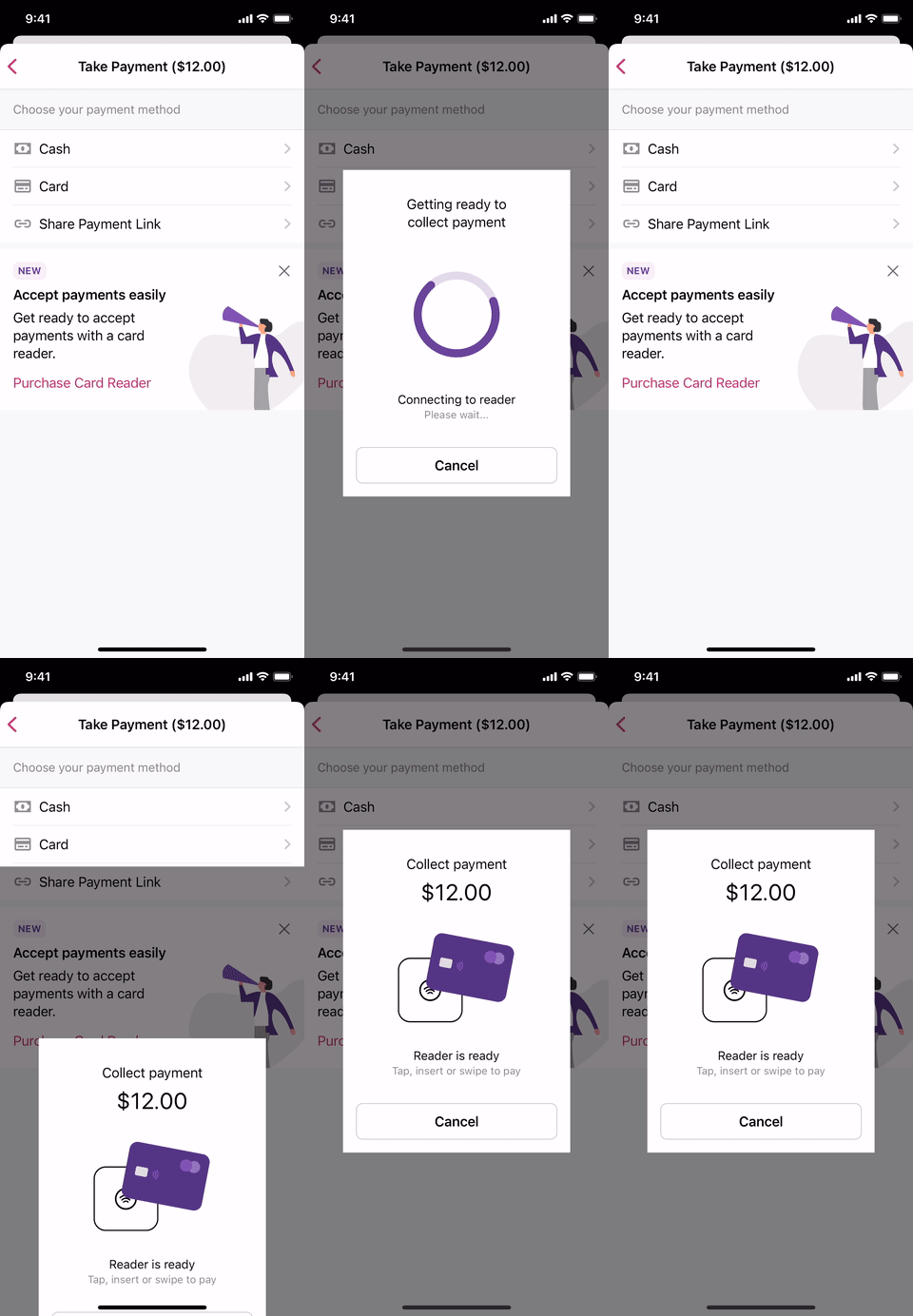
Reader is readyscreen used to show immediately when you tapCardon the Payment Method screen, to start the card payment, when a card reader is connected, or immediately after a reader is connected.This led to a slightly jarring payment experience for the merchant and their customers, as we prompted the merchant to ask their customer to tap their card before the reader is actually ready. There are network-bound operations which happen in this state, so the delay could be tens of seconds in a bad case. On fast Wifi, it's still noticeable at 1-2 seconds of delay
In this PR, we add a
Getting ready to collect paymentscreen with a spinner at this point, and then show theReader is readyscreen when the Payment Intent has been returned.Testing instructions
Navigate to
Menu > Payments > Collect PaymentEnter an amount, tap
Next, thenTake Payment.Be ready to tap your card immediately on seeing
Reader is readyon the phoneSelect
Cardas the payment method.Observe that a spinner shows for a few seconds.
Observe that
Reader is readythen shows on the phone, at the same time as the green light goes steady on the M2 reader.Observe that the card can be read immediately.
To see this more clearly, set a breakpoint in Proxyman/Charles on
https://api.stripe.com/v1/payment_intents, and observe thatReader is readydisplays before that returns, but you can't tap your card until after you let the breakpoint run.N.B. This affects the Interac refund flow as well, so Interac payment and refunds should be tested. Try both with and without a connected reader.
I noticed that the
Tap/Swipe/Insertcard alert would not work in the current code, and logged #8116 to fix this. This is not a regression of this PR.Screenshots
preparing-reader-spinner.mp4
N.B. ignore the tipping screen: it's leftover from the WisePad configuration I added in my HACK week project and won't show for anyone else.
RELEASE-NOTES.txtif necessary.