[Jetpack Content Migration Flow] Add Help Screen #19618
Conversation


 salimbraksa
force-pushed
the
task/migration-support-screen
branch
from
salimbraksa
force-pushed
the
task/migration-support-screen
branch
from
16e8e41 to
bedc8b4
Compare
salimbraksa
force-pushed
the
task/migration-support-screen
branch
from
bedc8b4 to
6cf8bea
Compare

You can test the changes in Jetpack from this Pull Request by:
|
You can test the changes in WordPress from this Pull Request by:
|
salimbraksa
force-pushed
the
task/migration-support-screen
branch
from
2a60c8a to
3a3f519
Compare

 Gio2018
left a comment
Gio2018
left a comment
Gio2018
left a comment
There was a problem hiding this comment.
Thanks for working on this @salimbraksa !
Left a few comments, let me know when the state is final so I can do a full review!
| private struct Strings { | ||
| static let alertDefaultTitle = AppConstants.Logout.alertTitle | ||
| static let alertUnsavedTitleSingular = NSLocalizedString("You have changes to %d post that hasn't been uploaded to your site. Logging out now will delete those changes. Log out anyway?", | ||
| comment: "Warning displayed before logging out. The %d placeholder will contain the number of local posts (SINGULAR!)") | ||
| static let alertUnsavedTitlePlural = NSLocalizedString("You have changes to %d posts that haven’t been uploaded to your site. Logging out now will delete those changes. Log out anyway?", | ||
| comment: "Warning displayed before logging out. The %d placeholder will contain the number of local posts (PLURAL!)") | ||
| static let alertCancelAction = NSLocalizedString("Cancel", comment: "Verb. A button title. Tapping cancels an action.") | ||
| static let alertLogoutAction = NSLocalizedString("Log Out", comment: "Button for confirming logging out from WordPress.com account") | ||
| } |
There was a problem hiding this comment.
Should we use the new reverse dns notation here?
There was a problem hiding this comment.
Since the log out logic is already implemented in MeViewController, I re-used the same logic for the support screen, so those strings aren't new. I think if we change the keys, then translators will have to provide a new translations for those strings, right? If so, is there way to change the keys without losing the existing translation?
There was a problem hiding this comment.
I see. It's fine for me to keep them as they are, just pinging @AliSoftware since I saw a recent issue with localized strings, to make sure this won't cause any

There was a problem hiding this comment.
Thanks for the ping!
Using the exact same strings as the MeViewController is fine… as long as you are really sure that they are used in the same kind of UI context (and that they should thus have the exact same translations in both places, because they really are about the exact same thing)
- That being said, instead of copy/pasting the strings and comments in there, and thus duplicating the declaration of those
NSLocalizedStrings(between the ones in theMeViewControllerand the ones here) — which could lead to a later PR changing the comment here, but not in the other place, and lead to more confusion / discrepancies by not having a single source of truth for those code declarations), I'd instead suggest to reference the existing constants fromMeViewController(or move those constants into a common class / file / ViewModel / what have you, as long as you declare them only once and reference them from both places) - This might also be a more "dangerous" assumption to make for shorter copies (like "Cancel" and "Log Out") which seems like words that are small and common enough to be used in many other places in the app. So if another place in the app has
NSLocalizedString("Cancel", comment: "Some completely different context"), maybe the translators would be tempted to translate it differently for one context than for the other, but if you use the same key for too many different contexts and places in the code, that might lead to translation inconsistencies, like what happened here in the past.
The last point and example is one more key reason why semantic keys are helpful and that it could still be a good idea to switch to them here 😉
If so, is there way to change the keys without losing the existing translation?
Not automatically… but almost.
It happens that GlotPress has a system they call "translation memory", and when it detects a source (English) copy for which they already had a translation for in the past, even if for a different key,… then it is automatically suggested to translators:
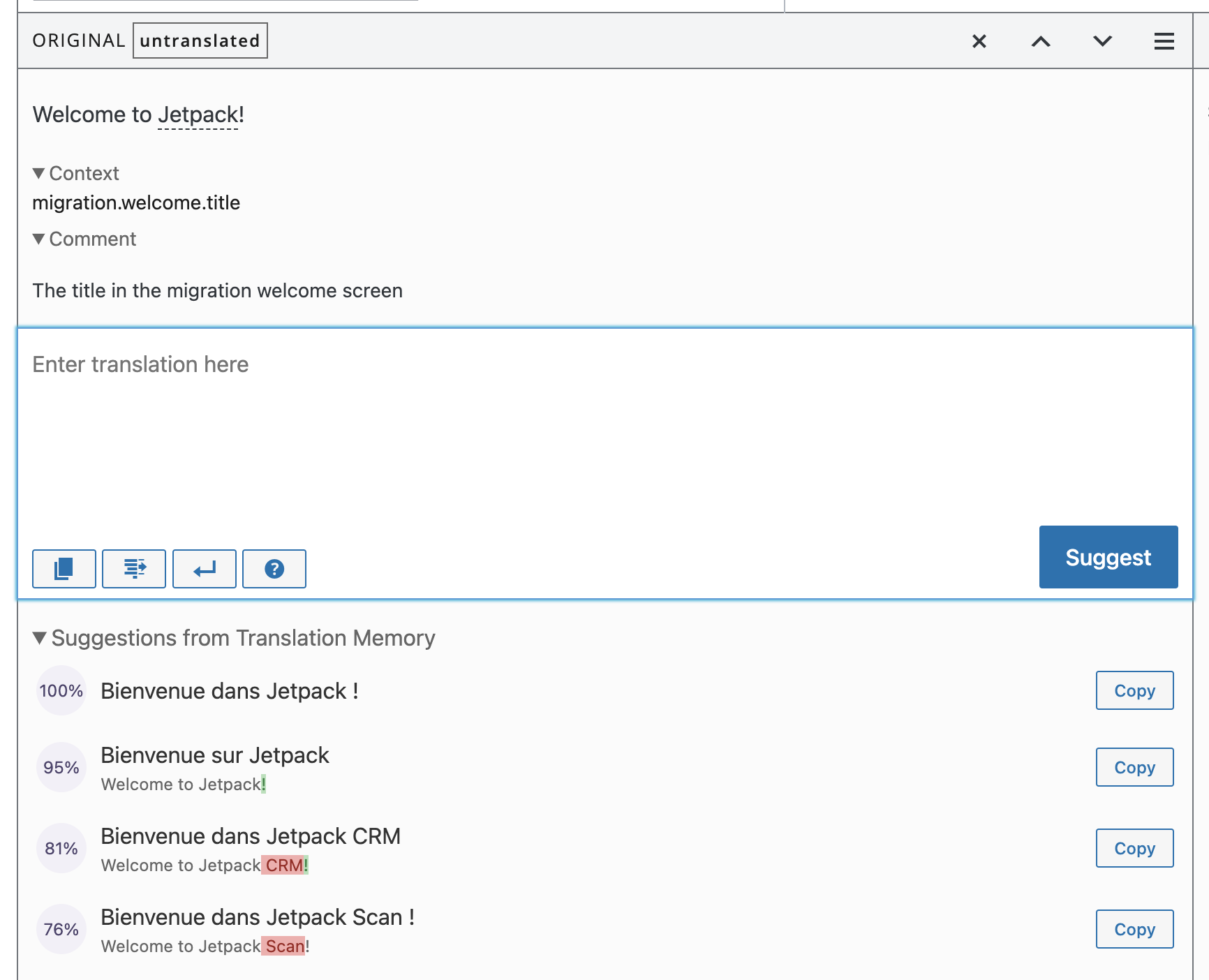
See how this recent key in GlotPress is not translated yet… but the "Suggestions from Translation Memory" section already have translations for it, one click away to be used via the "Copy" buttons
This means that, yes, if you change the key in this NSLocalizedString call to start using semantic keys here instead, the translation for that new key will start as empty / untranslated the first time that new key will be imported into GlotPress… but then it will be only one click away for polyglots to translate (picking if from the suggested translation from Translation Memory) as opposed to having to re-translate it from scratch. So that new key will get the existing translation from the old key pretty quickly, so I'd say in the end that's not that big a deal.
There was a problem hiding this comment.
Thanks for clarifying @AliSoftware 🙇
I'd instead suggest to reference the existing constants from MeViewController (or move those constants into a common class / file / ViewModel / what have you, as long as you declare them only once and reference them from both places)
I totally agree with this and the log out logic duplication is temporary. Right now the type LogOutActionHandler is used only in SupportTableViewController but I'll open another PR so that MeViewController uses it as well. As a result, those strings declaration will no longer be duplicated.
| static let wpAccount = NSLocalizedString("WordPress.com Account", comment: "WordPress.com sign-out section header title") | ||
| static let logOutButtonTitle = NSLocalizedString("Log Out", comment: "Button for confirming logging out from WordPress.com account") |
There was a problem hiding this comment.
same consideration here about the strings
salimbraksa
force-pushed
the
task/migration-support-screen
branch
from
39fe89d to
56cad8f
Compare

| tableView.tableFooterView = UIView() // remove empty cells | ||
| if let headerConfig = configuration.meHeaderConfiguration { | ||
| let headerView = MeHeaderView() | ||
| headerView.update(with: headerConfig) |
There was a problem hiding this comment.
Ideally, the MeHeaderView should be initialized with the config param, but the MeHeaderView is used elsewhere and would require some refactoring to be done.

 twstokes
left a comment
twstokes
left a comment
twstokes
left a comment
There was a problem hiding this comment.
This is looking really good to me @salimbraksa! Nice work. 👏 I'll let @Gio2018 have the final say on the review since he started it.
I tested:
- Light / Dark mode
- a11y / Dynamic Type
- Accessing the Contact Support view
- Comparing the differences between the view from the migration flow and within the app
One observation:
When the Support view is accessed within the app we allow a landscape orientation. It appears that we don't allow landscape when coming from the migration flow. However, when I rotate my device the Status Bar and the Home Bar still rotate. This is minor, but I wanted to bring it up in case we wanted to address it.
There was a problem hiding this comment.
This works great @salimbraksa !
Left a few code comments; other than that I agree with what @twstokes observes:
When the Support view is accessed within the app we allow a landscape orientation. It appears that we don't allow landscape when coming from the migration flow. However, when I rotate my device the Status Bar and the Home Bar still rotate. This is minor, but I wanted to bring it up in case we wanted to address it.
Particularly, I agree that it's minor, but we can probably do a small change to fix the status bar.
This could be something like this:
- In
MigrationViewControllerFactorywe define a subclass ofUINavigationController - We override the
supportedInterfaceOrientationsproperty of this subclass, to only support.portraiton iPhone - inside
makeSupportViewControllerRouterwe use the above subclass instead ofUINavigationController
wdyt?
| extension MeHeaderView.Configuration { | ||
|
|
||
| init(account: WPAccount) { | ||
| self.init( | ||
| gravatarEmail: account.email, | ||
| username: account.username, | ||
| displayName: account.displayName | ||
| ) | ||
| } | ||
| } |
There was a problem hiding this comment.
Likely a matter of personal preference, so feel free to ignore this comment, but I find it a bit confusing to have a nested typer that then has an extension outside the containing type. Maybe we could move Configuration outside MeHeaderView? or just add the initializer in the type (or initializers, if we want to preserve the init with all the params)?
There was a problem hiding this comment.
Regarding the nested type, it is inspired from some UIKit types, like UIButton.Configuration, but there are other types that aren't nested, like UINavigationBarAppearance, so I guess it's a matter of personal preference.
Would like to hear what @twstokes thinks about this and if he prefers Configuration to be outside MeHeaderView then we make it a convention moving forward.
There was a problem hiding this comment.
👋 I personally don't mind nesting types that are tightly coupled with a parent type (e.g. Error, Configuration), though I recall the defaults of SwiftLint complaining and there being discussions as to why.
What jumps out to me most is
extension MeHeaderView.Configuration { and extension SupportTableViewController.Configuration {.
Since they have the same scope and are in the same file I'd bundle them with the type definition like @Gio2018 proposes:
or just add the initializer in the type (or initializers, if we want to preserve the init with all the params)?
then we make it a convention moving forward.
That'd be great to land on one!
There was a problem hiding this comment.
The only reason behind the MeHeaderView.Configuration is add a convenience init without removing the default one the compiler generates. Here is an article about adding convenience inits to structs.
That being said, I pushed a commit 4417b15 adding the following changes:
- Moved the
Configurationtype outside its parent type. For bothMeHeaderViewandSupportTableViewController. The types are namedMeHeaderViewConfigurationandSupportTableViewControllerrespectively. - I kept the convenience
init(account: WPAccount)inextension MeHeaderViewConfigurationso that the default init isn't removed. - I bundled
static func currentAccountConfiguration()withSupportTableViewControllerConfiguration. Previously it was in a separate extension.
There was a problem hiding this comment.
so that the default init isn't removed.
These changes make sense, but I wanted to ask: Is the default init needed somewhere in the codebase currently?
There was a problem hiding this comment.
For now, the default init is only used by the convenience init init(account: WPAccount). Having the default init can also help us mock MeHeaderViewConfiguration in case we need to write unit tests.
| } | ||
| } | ||
|
|
||
| extension SupportTableViewController.Configuration { |
There was a problem hiding this comment.
same considerations to Configuration in MeHeaderView apply here
salimbraksa
force-pushed
the
task/migration-support-screen
branch
from
b5ad613 to
69738d0
Compare

|
Thanks @twstokes @Gio2018 for your feedback and catching the orientation issue. This commit 69738d0 resolves the orientation issue by tweaking the The idea is that |
Gio2018
left a comment
Gio2018
left a comment
There was a problem hiding this comment.
This works as described, but, because we are only supporting portrait on iPhone in the migration flow, the animations between landscape and portrait feel a bit odd, particularly when we go back to the welcome screen (see animation below)
I think it would be preferable to just not support landscape at all, but since this could just be my personal feeling, I'll let @shaunandrews and @osullivanchris chime in for this.
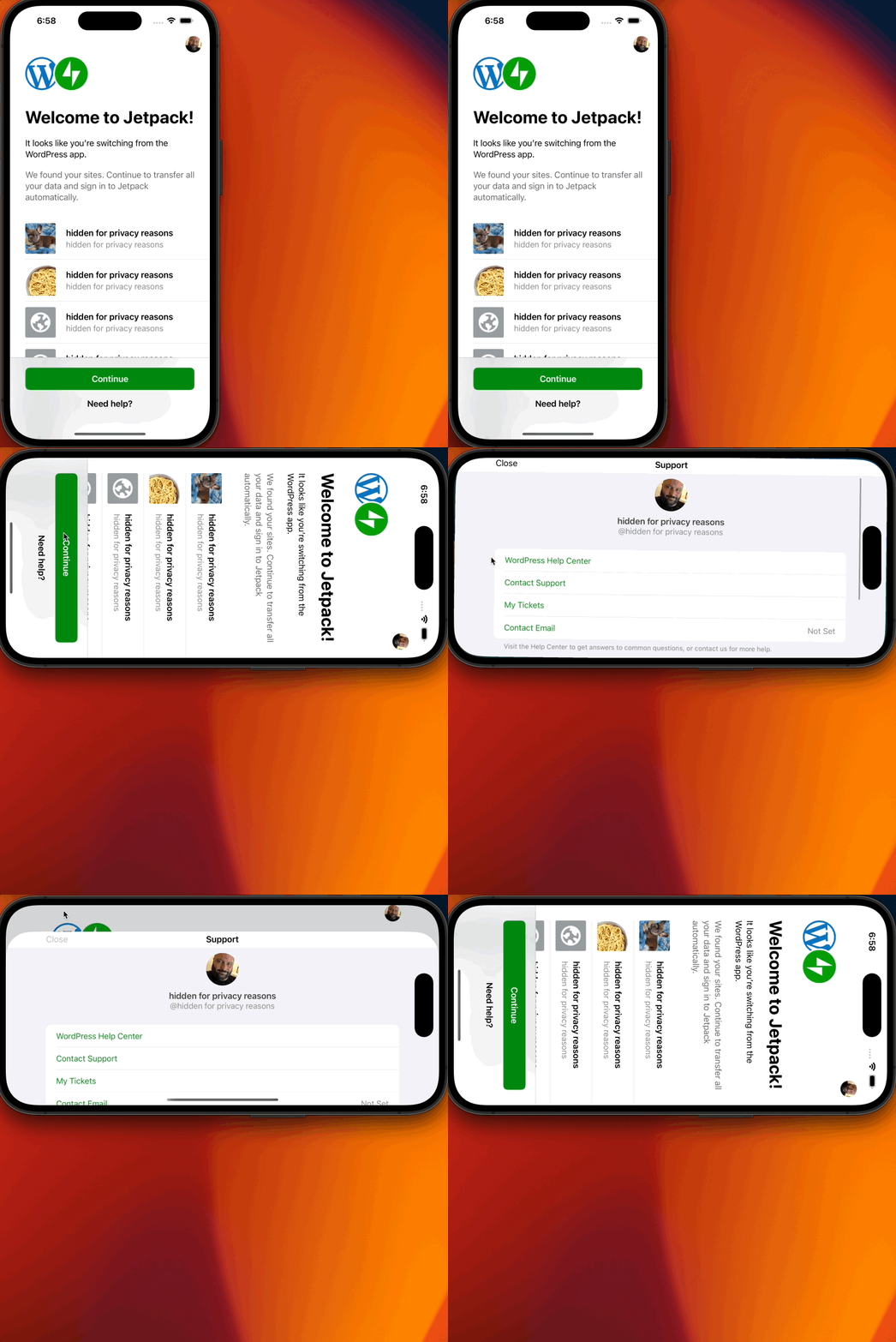

I see what you mean. It looks a bit funky in this case. But, maybe someone has a valid reason to type in landscape mode. Maybe when they want to write to support, or if they're on iPad. I think its overkill to add a portrait lock to those views. When they go back to the welcome screen its interesting that it displays in landscape for a moment then realising its locked to portrait. If it could immediately be in portrait mode that might be better. But not worth spending lots of time on. |
That's a good point 👍
I can look into this and see if it's easily doable. But I guess it's not blocking this PR, right? @Gio2018 |

I second this, and thought it more as a feature since the Support view already supports landscape well. |

|
Thanks for reviewing this @osullivanchris !! A couple of additional thoughts
in this case, we are not restricting to portrait only. The main reasoning behind avoiding landscape on iPhone was because most of the content of the migration views was not going to be visible and required to scroll. But then again, I can see both sides |
yes not a blocker at all! |
|
Yep no blockers here for me. Whether we leave it as is, lock it to portrait (on iPhone), or do the small tweak that I suggested, I don't think the risk is high here. I'd prefer to ship as is rather than spend more than an hour on any fix 😄 |


Fixes #19617
Description
Display support screen when the user taps "Need help?" or "Me" avatar button in the Migration Welcome screen. This support screen is the same as the existing support screen except with few visual changes:
These visual changes are applied only when the support screen is accessed from the Migration flow.
Upcoming PR
Since the Log Out logic is already implemented in
MeViewController, this PR is re-using that logic, see LogOutActionHandler. But this PR doesn't refactorMeViewControllerto use this new handler object, so the Log Out logic is duplicated for now. Will open another PR to fix this.Screenshots
Test Instructions:
Support Screen during Migration flow
JetpackWindowManager.swiftfileshouldShowMigrationUIvalue totrueSupport Screen outside Migration flow
Regression Notes
Potential unintended areas of impact
It's worth testing that the existing support screen wasn't impacted. See Test Instructions > Support Screen outside Migration flow.
What I did to test those areas of impact (or what existing automated tests I relied on)
None.
What automated tests I added (or what prevented me from doing so)
None.
PR submission checklist:
RELEASE-NOTES.txtif necessary.