README.md
Pynamite is a python library for aws's dynamodb database.
It aims to make your dynamo database as easy to use as a python dictionary.
With single table design kept front and center, it keeps the basic boto3 interface, without the bloat.
It provides magic to autoencode keys and values to avoid dynamodb keywords and the bloat that comes with UpdateExpression, ExpressionAttributeValues, ExpressionAttributeNames, so you don't even have to know what tehse things are anymore..
What is dynamodb? Dynamodb is a nosql database service by AWS. It is fast key/value store is highly scalable and ideal for read heavy databases when you have knwn access patterns.

Used in production, with a narrow scope. Things within the scope work very well, see TODO.md
Help improve this project with your feedback.
# from github
pip install git+https://github.com/xzava/pynamite.git --upgrade

# from pypi.org (Coming soon)
# pip install pynamite

# or for development
git clone https://github.com/xzava/pynamite.git
cd pynamite
python setup.py developNext, set up credentials (in e.g. ~/.aws_key_location):
Note: AWS looks in ~.aws if no environment envs are supplied. This is where the aws cli tool saves credentials
# ~/aws_key_location.sh


# REQUIRED..
export AWS_ACCESS_KEY_ID='XXXXXXX__YOUR_KEY__XXXXXXX'
export AWS_SECRET_ACCESS_KEY='xxxxxxxxxxx__YOUR_SECRET__xxxxxxxxxxxxxx'
export AWS_REGION_NAME='us-east-1'
export DEBUG='development'

# OPTIONAL..
export DYNAMO_TABLE_NAME='TABLE_NAME'
export AWS_DEFAULT_REGION='us-east-1'

echo "SUCCESS: AWS KEYS HAVE BEEN LOADED"
source ~/.aws_key_location.shNote: Set the DEBUG env to 'development' to show verbose messages.

Open the above image in a new tab for the full size.
# Using the bookmarks datamodel from nosql workbench examples

>>> from pynamite import dynamo
>>> db = dynamo.DB('bookmarks')
>>> db.get(["123", "CUST#123"])
{
  "email": "[email protected]",
  "fullName": "Shirley Rodriguez",
  "userPreferences": {"language": "en", "sort": "date", "sortDirection": "ascending"}
}
>>> db.get(["123", "https://aws.amazon.com"], "createDate, folder, url")
{
  "createDate": "2020-03-25T09:16:46-07:00",
  "folder": "Cloud",
  "url": "https://aws.amazon.com"
}
>>> db.update(["123", "https://aws.amazon.com"], {
  "updateDate": "2020-03-25T09:16:46-07:00",
  "folder": "Work"
})
>>> db.get_partition("123")
[
  {
    'PK': '123',
    'SK': 'CUST#123',
    'userPreferences': {
      'language': 'en',
      'sortDirection': 'ascending',
      'sort': 'date'
    },
    'email': '[email protected]',
    'fullName': 'Shirley Rodriguez'
  },
  {
    'PK': '123',
    'SK': 'https://aws.amazon.com',
    'updateDate': '2020-03-25T09:16:46-07:00',
    'createDate': '2020-03-25T09:16:46-07:00',
    'description': 'Amazon Web Services',
    'folder': 'Cloud',
    'url': 'https://aws.amazon.com',
    'title': 'AWS'
  },
  {
    'PK': '123',
    'SK': 'https://console.aws.amazon.com',
    'updateDate': '2020-03-25T09:16:43-07:00',
    'createDate': '2020-03-25T09:16:43-07:00',
    'description': 'Web console',
    'folder': 'Cloud',
    'url': 'https://console.aws.amazon.com',
    'title': 'AWS Console'
  }
]

# Note: Here we are using dot notation to seperate the PK and SK
>>> db.get("321.CUST#321", "userPreferences.language")
{'userPreferences': {'language': 'zh'}}

# This key doesn't exist, nothing is returned.
>>> db.get("321.CUST#321", "userPreferences.gpsLocation")
{}The last example db.get("321.CUST#321", "userPreferences.gpsLocation") you are requesting a filter from AWS.
They process this filter on all data found matching the lookup 321.CUST#321
In this case nothing is returned, however you still get charged the same amount compared to requesting the full record because they do the filtering AFTER they have read the record(s).
The benefit is bandwidth/network traffic, and they also might be able to filter the keys quicker than you can.
This datamodel the "SK" should ideally be URL#https://aws.amazon.com rather than https://aws.amazon.com
So a user can query all bookmarks from a user in one command, ie get all records for user "123" with a sort key that starts with "URL#"

- Two users create an account
- A user creates a channel
- A user verified their email
- A user creates a video on their channel
- They some views and subscribers
>>> from pynamite import dynamo
>>> from pynamite.expression import Increment, Decrement, SetRemove

# Connect to existing DynamoDB table named 'youtubeclone.com'
>>> db = dynamo.DB('youtubeclone.com')

# Create two users
>>> db.update(["USER", "#ACTIVE#ACC_45438981"], {"firstname": "John", "email": "[email protected]", "verified": True})
>>> db.update(["USER", "#ACTIVE#ACC_15464279"], {"firstname": "Penny", "email": "[email protected]", "verified": False})

# Get a user
# dot symbol seperates PK form SK and hash symbol is potentional search terms for the SK (Sort Key)
>>> db.get("USER.#ACTIVE#ACC_45438981")
{
	"PK": "USER",
	"SK": "#ACTIVE#ACC_45438981",
	"firstname": "John",
	"verified": True,
	"email": "[email protected]",
	"_created": "2022-04-02T10:52:04.976474",
	"_updated": ""
}

# User creates a channel
>>> db.update(["CHANNEL", "#penny_makes_things"], {"author": "ACC_15464279", "videos": 0, "subscribers": 0, "channel": "penny_makes_things"})

# Update a user record, they have verified their email & return full item
>>> db.update(["USER", "#ACTIVE#ACC_15464279"], {"verified": True}, ReturnValues="ALL_NEW")
{
	"PK": "USER",
	"SK": "#ACTIVE#ACC_15464279",
	"firstname":"Penny",
	"author": "ACC_15464279"
	"channel": "penny_makes_things",
	"verified": True,
	"email": "[email protected]",
	"_created": "2022-04-02T10:52:04.976474",
	"_updated": "2022-04-02T10:58:03.172424"
}

# User adds a video to their channel
>>> db.update(["VIDEO", "#VID_15464279"], {"Title": "How to make soup", "views": 0, "author": "ACC_15464279", "channel": "penny_makes_things"})

# Increment channel attr videos plus 1
>>> db.update(["CHANNEL", "#penny_makes_things"], {"videos": Increment("videos")})

# User video gets 3 views
>>> db.update(["VIDEO", "#VID_15464279"], {"views": Increment("views")})
>>> db.update(["VIDEO", "#VID_15464279"], {"views": Increment("views")})
>>> db.update(["VIDEO", "#VID_15464279"], {"views": Increment("views")})

# User gets two subscribers, update their channel model
>>> db.update(["CHANNEL", "#penny_makes_things"], {"subscribers": Increment("subscribers")})
>>> db.update(["CHANNEL", "#penny_makes_things"], {"subscribers": Increment("subscribers")})

# Get video information
>>> db.get(["VIDEO", "#VID_15464279"])
{
    'PK': 'VIDEO',
    'SK': '#VID_15464279',
    'Title': 'How to make soup',
    'views': Decimal('3'),
    'channel': 'penny_makes_things',
    'author': 'ACC_15464279'
    "_created": "2022-04-02T10:52:04.976474",
    "_updated": "2022-04-02T10:58:03.172424"
}

# Get channel information
>>> db.get("CHANNEL.#penny_makes_things")
{
  "PK": "CHANNEL",
  "SK": "#penny_makes_things",
	"author": "ACC_15464279",
	"videos": 1,
	"subscribers": 2,
	"channel": "penny_makes_things",
	"_created": "2022-04-02T10:52:04.976474",
	"_updated": "2022-04-02T10:58:03.172424"
}

# User is naughty..
>>> db.update("VIDEO.#VID_15464279", {"__shadow_ban_level": {"MODERATE"}})
{
  '__shadow_ban_level': {'MODERATE'},
  '_updated': '2022-05-01T23:14:48.210980'
}

# TODO: Finish SetRemove

# Elon Musk buys company
>>> db.update("VIDEO.#VID_15464279", {"__shadow_ban_level": dynamo.SetRemove("__shadow_ban_level", "MODERATE")})
{
	"__shadow_ban_level": {}
}


>>> dynamo.show_schema(db)from pynanite import dynamo
from pprint import pprint
db = dynamo.DB('USER')
db.put('example.record', {'count': 0})
# {'PK': 'example', 'SK': 'hello', 'size': 132}
example = db.get('example.record')
pprint(example)
# {
# 'SK': 'hello',
# 'PK': 'example',
# 'count': Decimal('0'),
# '_created': '2022-04-14T00:52:29.862785',
# '_updated': '2022-04-14T00:52:29.862785'
# }
pprint(dynamo.remove_meta(example))
# {
# 'count': Decimal('0'),
# }
pprint(db.update('example.record', {'count': dynamo.Increment('count')}))
# {'_updated': '2022-04-14T00:55:21.683986', 'count': Decimal('1')}
pprint(db.update('example.record', {'count': dynamo.Increment('count')}))
# {'_updated': '2022-04-14T01:05:23.290422', 'count': Decimal('2')}
pprint(db.update('example.record', {'count': dynamo.Increment('count', 8)}))
# {'_updated': '2022-04-14T01:05:28.290422', 'count': Decimal('10')}
pprint(db.update('example.record', {'count': dynamo.Decrement('count')}))
# {'_updated': '2022-04-14T01:05:28.290422', 'count': Decimal('9')}
pprint(db.update('example.record', {'count': dynamo.Decrement('count', 9)}))
# {'_updated': '2022-04-14T01:05:28.290422', 'count': Decimal('0')}from pynanite import dynamo
db = dynamo.DB('youtubeclone.com')
with db.batch() as batch:
batch.update("VIDEO.#VID_15464279", {
"video_id": "VID_15464279",
"Title": "How to make soup",
"views": 0,
"author": "ACC_15464279",
"channel": "penny_makes_things"
})
batch.update("CHANNEL.#penny_makes_things", {"videos": Increment("videos")})
# FUTRUE PIPE LINE
# TODO: Would be nice to have a abort option to exit the with without sending anything
batch.abort()
# TODO: Might auto save batch when the with __exit__ is called, or maybe manually save it.
batch.save()
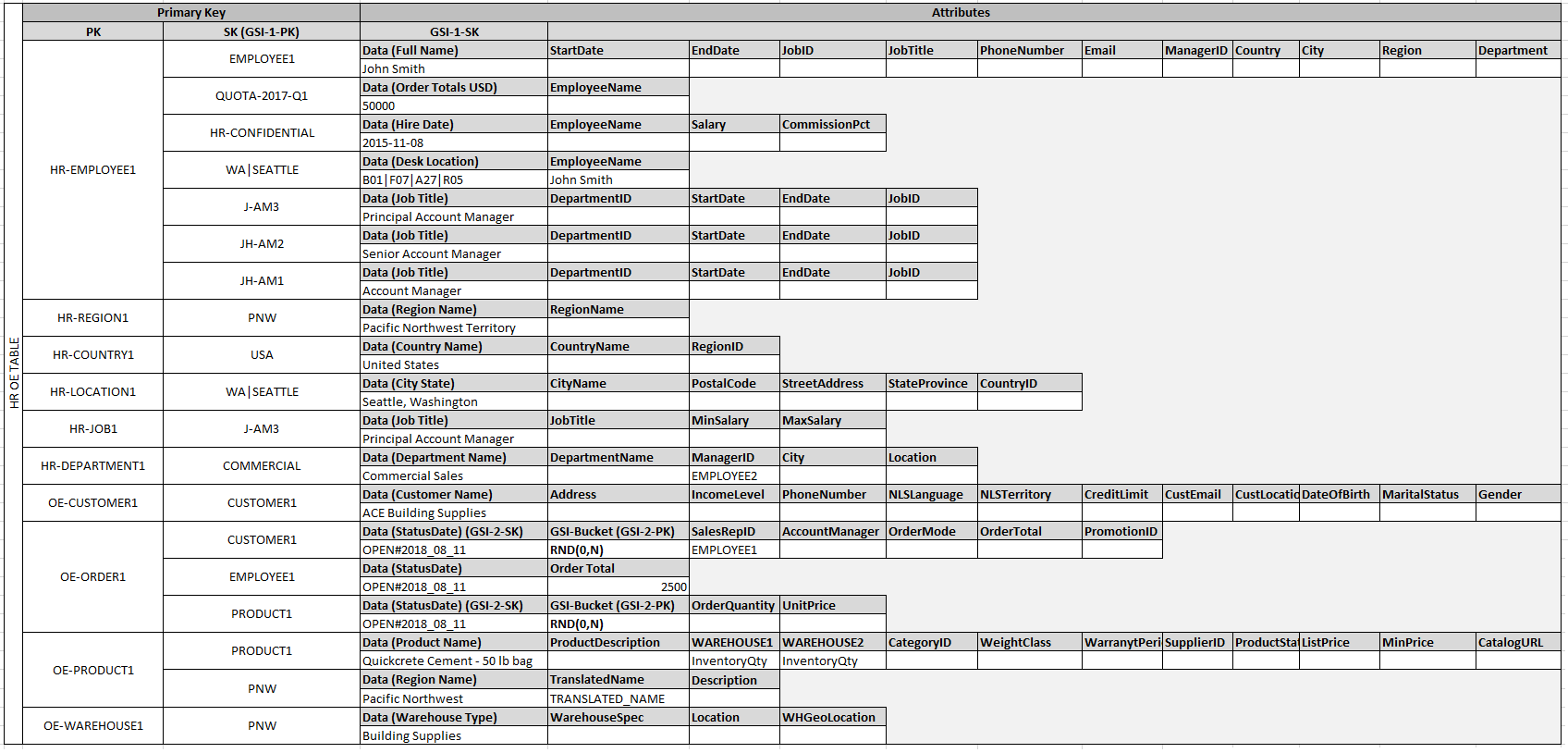
 # FUTRUE PIPE LINE

create_nosql_workbench(filename="table.json")
TODO: fill this out
# Its okay to use query on small partions, if its large then you might need to set up a gsi (Global Secondary Index)
>>> db.query("123")

# Scan should never be used, you are attemping to read every single item in your database. (very expensive if used in production)
>>> db.scan("123")- Interface
- aws expression magic
boto3 and dynamoDB in general is heavy and hard to learn, this library acts as a wrapper using the same interface but keeping it simple.
You can interact with the DynamoDB like python dict, meaning you can get things up and running quicker.
Other libraries focus on adhock .query and .scan which is NOT how dynamodb is meant to be used.
DynamoDB is not a SQL database using these .query() and especially .query() should be the exception and not the norm. IE access patterns should be built into the datamodel, and GSI (Global Secondary index) should be used for common read heavy access patterns.
This library supports single table design, and nosql style data modeling.
-
Connect pynamite to pandas
-
Add datamodel support, likly using attrs
-
Add callback transactions, ie if a video record is added automatically update the channel record to increment "videos" dynamoDB supports this use case using lambda functions
-
Add a video showing examples, one thing I had trouble was finding dynamoDB example functions.
-
Have a local version that saves it in sqlite, AWS also have their own local version.
>>> db.
db.PK              db.info(
db.SK              db.put(
db.delete(         db.records
db.describe        db.scan(
db.get(            db.status
db.get_partition(  db.table
db.help            db.update(


>>> dynamo.
describe_all(
dynamo_connection(
table_connection(
list_tables(
create_table(
show_schema(
show_partition(
query(
user_get_attrs(
collect_expression(
[Create a venv first]

git clone https://github.com/xzava/pynamite.git
cd pynamite

python setup.py develop
python setup.py develop pynamite[testing]

pip install -r requirements_dev.txt


python -m pytest


python setup.py develop --uninstall


python setup.py develop easy_install pynamite[testing]
pip install git+https://github.com/xzava/pynamite.git --upgrade
pip uninstall pynamite

python setup.py develop --uninstall
pip install pytest
python -m pytest