This package provides a set of add-ons and helpers for pymatgen, tailored to research performed in the Inverse Materials Design group.
API Documentation: https://yantar92.github.io/IMDgroup-pymatgen/
Unlike standard pymatgen tools, this library is specifically designed to handle huge numbers of VASP outputs efficiently.
- Persistent Caching: The core
IMDGVaspDirclass implements a persistent disk cache (stored in~/.cache/imdgVASPDIRcacheorXDG_CACHE_HOME). - Lazy Loading: Parsed VASP data is cached automatically. Subsequent analysis of the same directories is orders of magnitude faster, making it feasible to analyze thousands of calculations repeatedly without re-parsing XML or OUTCAR files.
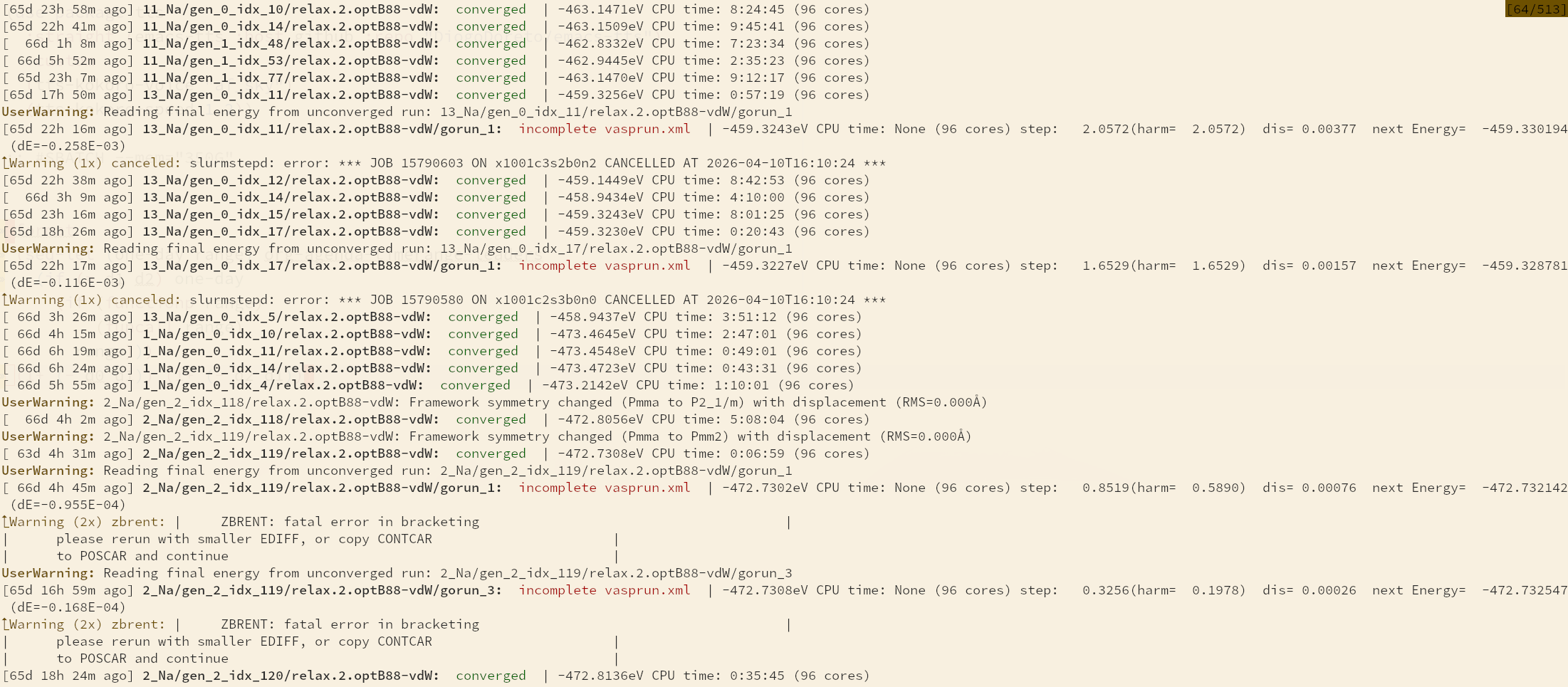
The library proactively monitors VASP calculations for common pitfalls, essential for reliable high-throughput workflows:
-
VASP Warnings: Automatically parses logs (e.g.,
vasp.out,slurm*.out) to surface execution warnings like convergence failures or grid errors. -
Structural Integrity: Checks for physical anomalies during relaxation to catch problems early:
- Large Displacements: Warns if atoms move significantly more than expected (e.g., indicating bond breaking or phase instability).
- Symmetry Changes: Detects if the framework symmetry breaks during relaxation, which often indicates a failed calculation or unwanted phase transition.
- Stress & Forces: Monitors for unexpected hydrostatic stress or excessive residual forces.
Example output:
While heavily based on pymatgen, this library introduces several key
differences:
imdg analyzevspmg analyze- The
imdg analyzecommand is built on the cachingIMDGVaspDirclass. - It focuses on relative changes: instead of just reporting
absolute values, it calculates changes between the initial and
final structures (e.g., volume change
%vol, lattice parameter changes%a,%b,%c, and total atomic displacementdispl). - It supports grouping runs by identical
INCARparameters to easily compare different calculation settings.
- The
- Enhanced Input Sets: New input sets like
IMDDerivedInputSetallow deriving new calculations (relaxations, strains, NEB) directly from existing output directories, preserving context/history.
You can get help for any command directly in the terminal:
# General help and list of subcommands
imdg --help

# Help for a specific subcommand (e.g., arguments for analyze)
imdg analyze --help
imdg derive . ins --help
All classes and functions are documented with docstrings. You can
access them using Python's built-in help() function:
from IMDgroup.pymatgen.io.vasp.vaspdir import IMDGVaspDir
help(IMDGVaspDir)
git clone https://git.sr.ht/~yantar92/IMDgroup-pymatgen
cd IMDgroup-pymatgen
pip install .
The package installs command line tool: imdg - the master script for
VASP workflows.
Monitor the status of VASP calculations in the current or specified directories.
# Check status of all runs in current directory and subdirectories
imdg status

# Only show problematic runs (warnings or failures)
imdg status --problematic

# Exclude specific directories using regex
imdg status --exclude "test_runs"
Features:
- Identifies running SLURM jobs.
- Checks convergence (electronic, ionic, and multi-step sequences).
- Parses and highlights VASP warnings (e.g., convergence failures, internal errors).
- Displays NEB image convergence summaries.
Summarize key properties of VASP outputs in a tabular format. This tool uses caching to quickly re-analyze large directory trees.
# Analyze all runs in the current directory
imdg analyze

# Report specific fields only
imdg analyze --fields energy e_per_atom displ

# Group results by similar INCAR parameters
imdg analyze --group
Available Fields:
energy,e_per_atom: Final reliable energy and energy per atom.%vol: Percentage change in volume between initial and final structure.displ: Average atomic displacement between initial and final structure.%a,%b,%c,%alpha,%beta,%gamma: Percentage change in lattice parameters.total_mag: Total magnetization.max_force: Maximum atomic force in the final step (eV/Å).
Generate fresh VASP inputs from various sources.
# Create input from Materials Project ID
imdg create mp-48

# Create input from a CIF/POSCAR file
imdg create structure.cif

# Create a box with a single atom
imdg create "Li 10x10x10"
This is the primary tool for chaining VASP calculations. It creates new input sets derived from existing VASP directories (inputs or outputs), allowing for complex workflows like relaxation chains, strain application, or NEB setup.
# Derive a new calculation in 'new_dir' based on 'old_dir'
imdg derive old_dir --output new_dir <subcommand> [args]
-
relax: Set up relaxation (ISIF 2-7).imdg derive . --output relax_run relax RELAX_POS_SHAPE_VOL -
scf: Set up static self-consistent field calculation. -
kpoints: Change K-point density.imdg derive . --output dense_kpoints kpoints --density 5000 -
strain: Apply lattice strain (e.g., for elastic constants).imdg derive . --output strain_run strain --amin 0.98 --amax 1.02 --asteps 3 -
perturb: Perturb atomic positions (e.g., to break symmetry). -
supercell: Generate a supercell. -
functional: Switch DFT functional (e.g.,PBE,PBE+D3-BJ,optB88-vdW). -
incar: Modify specific INCAR tags.imdg derive . --output high_prec incar PREC:Accurate EDIFF:1e-7 -
fix: Apply selective dynamics constraints. -
ins: Insert atoms/molecules into voids (seepmg-insert-molecule). -
fill: Fill sites based on relaxed unique insertion points. -
atat: Generate input for ATAT (Alloy Theoretic Automated Toolkit) from a VASP run.
imdg derive includes specialized tools for Nudged Elastic Band (NEB) calculations.
# Simple NEB between current dir and target dir
imdg derive . neb target_dir --nimages 5

# Complex diffusion analysis: find all unique paths between stable sites
imdg derive prototype_dir neb_diffusion --diffusion_points site1_dir site2_dir site3_dir --nimages 5
The neb_diffusion subcommand analyzes the topology of interstitial
sites and automatically generates unique diffusion paths between them.
Compare structures or input parameters between directories.
# Compare structures in directories, grouping identical ones
imdg diff structure dir1 dir2 dir3

# Compare INCAR files, showing differences
imdg diff incar dir1 dir2
Generate visual summaries of calculations.
Visualize converged NEB trajectories as CIF files.
imdg visualize neb
imdg visualize neb scans the directory tree for NEB runs. For each
converged NEB run, it writes a NEB_trajectory_converged.cif file
containing all images along the minimum-energy path.
Visualise ATAT cluster-expansion results.
# Requires running inside an ATAT directory
imdg visualize atat [--plot_extra <dirs>] \
  [--cmin <min>] [--cmax <max>]
Output files (written inside each ATAT directory):
atat-summary-test.png/atat-summary-test.svg: Six-panel summary figure (fitted energies, calculated energies, calculated-vs-fitted, fit residuals, sublattice deviation, ECI-vs-cluster-diameter).fit2.out:fit.outaugmented with asublattice deviationcolumn (NaN for unconverged runs or when sublattice flip is detected).<extradir>.out: Extra energy points from--plot_extradirs (only when the option is used).
Plot a formation-energy convex hull from VASP outputs or a pickle file.
# From a directory tree of VASP calculations
imdg visualize hull . --ion Li [options]

# From a pickle file containing a DataFrame with ASE Atoms
imdg visualize hull results.pkl --ion Na [options]
Output files (written in the current working directory):
formation_en.<format>(default:formation_en.png): Phase diagram plot (density--dpi, default 600). Aformation_en.svgis also saved unless the requested format is svg.formation_en.txt: All entries (both ground state and above hull) in space-separated columns: ID, Energy, Concentration, Formation Energy (meV/atom), Energy above hull (meV/atom), Formula.formation_en_gs.txt: Same format, ground-state entries only.formation_en_min.txt: Minimum-energy entry per reduced composition: ID, Energy, Formation energy (meV/atom), Energy above hull (meV/atom), Reduced formula.
The command reads entries from VASP directories recursively
(optionally filtered with --include / --exclude) or from a pickle
file. Pure-element references for both the working ion (--ion) and
the host matrix must be present in the data.
Plot a voltage profile from VASP outputs or a pickle file.
# From a directory tree of VASP calculations
imdg visualize voltage . --ion Li [options]

# From a pickle file
imdg visualize voltage results.pkl --ion K [options]
Output files (written in the directory specified on the command line):
voltage.<format>(default:voltage.png): Voltage profile plot. Avoltage.svgis also saved unless the requested format is svg.voltage.out: Voltage profile data in space-separated columns: x (working-ion fraction), voltage (V), capacity (mAh/g, normalised by the most-discharged host).
The command uses pymatgen's InsertionElectrode machinery on the
same entry-reading pipeline as hull. The x-axis of the plot can be
set with --xaxis (choices: frac_x, x_form, capacity_grav,
capacity_vol).
Systematically insert a molecule or atom into a host structure at various positions and orientations, making sure to cover all viable positions without overlaps.
# Insert water molecule into host.cif, stepping 0.5A grid, rotating 45 degrees
pmg-insert-molecule water.xyz host.cif output_dir --step 0.5 --anglestep 45
There is also imdg ins subcommand counterpart that can directly use VASP
folder as input.
from IMDgroup.pymatgen.core.structure import IMDStructure
s=IMDStructure.from_file('str.out') # Vacancies will be replaced with "X" atom species
The IMDGVaspDir class provides a dictionary-like interface to VASP
directories with aggressive caching to handle high-throughput analysis
on file systems like Lustre.
from IMDgroup.pymatgen.io.vasp.vaspdir import IMDGVaspDir

# Initialize (data will be loaded from cache if available)
vdir = IMDGVaspDir("path/to/vasp/calculation")

# Access parsed pymatgen objects
structure = vdir.structure
energy = vdir.final_energy
incar = vdir["INCAR"]

# Check convergence
if vdir.converged:
    print("Calculation converged!")

# Handling NEB directories
if vdir.nebp:
    for image_dir in vdir.neb_dirs():
        print(f"Image {image_dir.path}: {image_dir.final_energy}")
Find void space and insert species.
from IMDgroup.pymatgen.transformations.insert_molecule import InsertMoleculeTransformation

transformer = InsertMoleculeTransformation(
    molecule='Li',  # or Molecule object
    step=0.2,       # Grid spacing in Angstroms
    proximity_threshold=0.75
)

# Get list of all unique insertion structures
inserts = transformer.all_inserts('host_structure.cif')
Generate all symmetrically equivalent configurations of a structure.
from IMDgroup.pymatgen.transformations.symmetry_clone import SymmetryCloneTransformation
from pymatgen.core import Structure

host = Structure.from_file("host.cif")
# Structure with one interstitial site
defect = Structure.from_file("defect.cif")

# Generate all symmetrically equivalent defects
# relative to the host symmetry
trans = SymmetryCloneTransformation(sym_operations=host)
clones = trans.get_all_clones(defect)
The get_neb_pairs function automates the discovery of unique
diffusion paths in a material.
from IMDgroup.pymatgen.diffusion.neb import get_neb_pairs

# Given a list of stable interstitial sites (structures) and the host prototype
# calculate all unique hops between them.
pairs = get_neb_pairs(
    structures=stable_sites_list,
    prototype=host_structure,
    cutoff='auto',         # Automatically determine max hop distance
    remove_compound=True   # Remove multi-step paths if single steps exist
)

for start, end in pairs:
    print(f"Path from {start} to {end}")
We acknowledge financial support from the National Centre for Research and Development (NCBR) under project WPC3/2022/50/KEYTECH/2024. Computational resources were provided by the Polish high-performance computing infrastructure PLGrid, including access to the LUMI supercomputer—owned by the EuroHPC Joint Undertaking and hosted by CSC in Finland together with the LUMI Consortium—through allocation PLL/2024/07/017633, as well as additional resources at the PLGrid HPC centres ACK Cyfronet AGH and WCSS under allocation PLG/2024/017498.