This project is a Pokédex Single Page Application built in React for the assignment
https://github.com/symmetry-systems/joining-symmetry/blob/main/assignments.md
It uses Apollo Client to query the PokeAPI GraphQL Endpoint Beta for data
https://beta.pokeapi.co/graphql/console/
You can view a deployed version of the app at
https://ymk-pokedex.netlify.app/
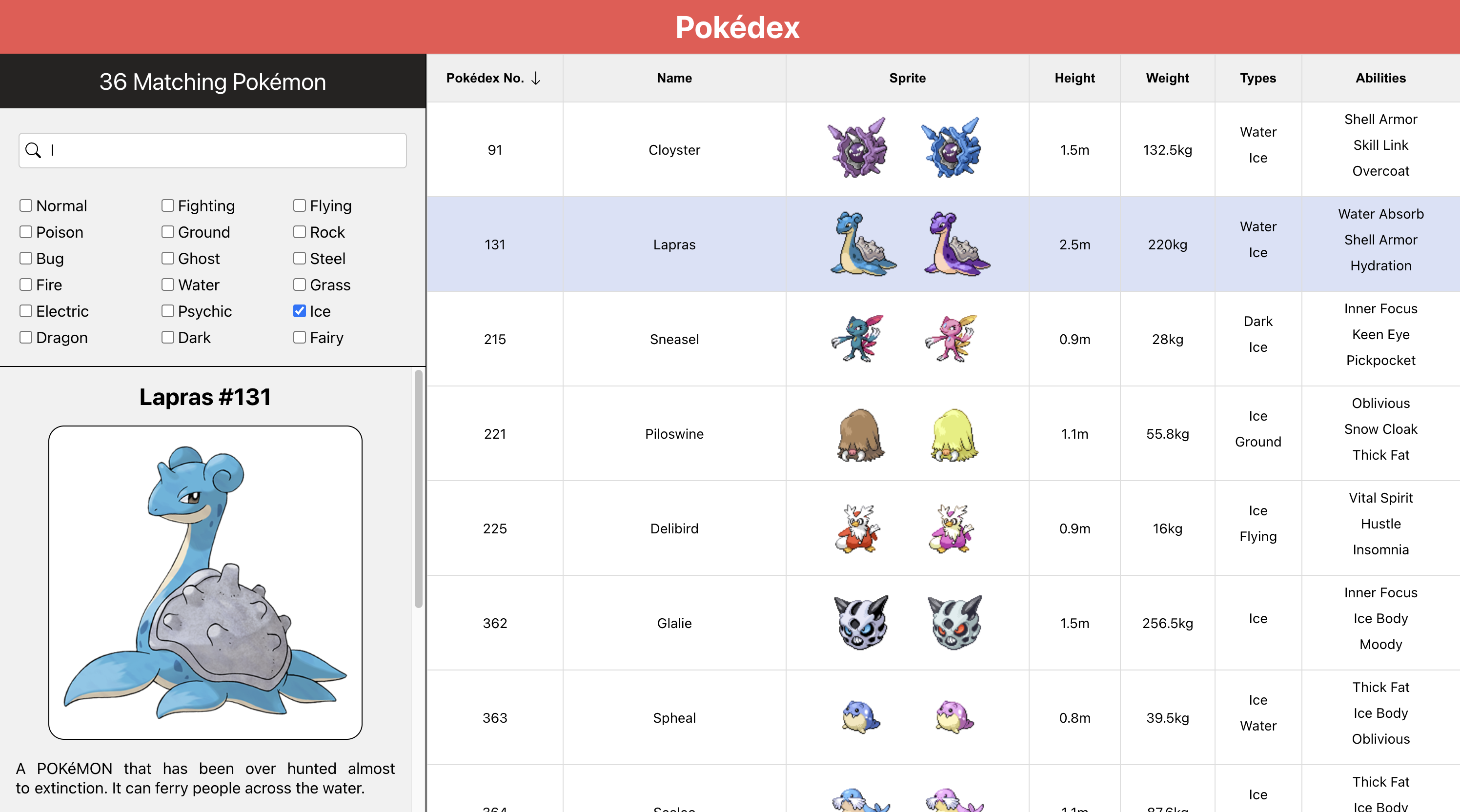
When you first load the app you will see a paginated list of Pokémon initially sorted by Pokédex entry number. The current page size is 50 entries. You can load more entries by clicking the "Load More" button at the button of the Pokémon list. The "Load More" button will only appear if there are more pages of Pokémon available.
The Pokémon list displays in order the Pokémon's Pokédex entry number, Name, Game Sprites for both normal and shiny variants if available, Height, Weight, Types, and Abilities. You can hover over the ability names to see a tooltip with an explanation of the ability effect if it is available in the API.
The Pokémon list can be sorted by Pokédex entry number, Name, and Height by clicking the table headers. Sorting can be done in both ascending and descending order as indicated by the arrow icon in the header. Sorting can be done concurrently with filtering.
At the top of the left sidebar you will see filter options for the Pokémon list along with the current number of matching Pokédex entries for the currently selected filters. By default, no filters are selected, so the matching number will reflect all Pokémon entries available in the API.
You can filter the Pokémon list via either a name search, or by Pokémon type, or both. Filters work concurrently and filtered results can be sorted as well. When some filters are active, the match number at the top of the sidebar will reflect how many Pokémon available in the API match the current filters. All filter results may not be rendered in the Pokémon list initially as the filtered results are also paginated, but you can load more filter result pages via the "Load More" button.
You can click on an entry row in the Pokémon list to display more information on that pokemon in the bottom half of the side bar. Currently this info panel displays the Pokémon name, entry number, official artwork, and flavor text. Many of the later Pokémon entries in the Pokédex do not have flavor text to be shown below the Pokémon image.
Next underneath the Pokémon image is a bar chart displaying the base stats of the currently selected Pokémon.
After that is a list of all the moves that a Pokémon can learn. The moves can be sorted by any field and are secondarily sorted by level. Sorting in this table is handled in the client instead of by the graphQL server because the list is small and doesn't need to be paginated. I've reused the same table for both this list and the Pokémon list.
- Clone the repository locally
- Copy the contents of
.env.sampleinto a new.envfile in the root of the project - From the root of the directory run
npm ioryarn install - From the root of the directory run
npm run startoryarn run start
In the project directory, you can run:
Runs the app in the development mode.
Open http://localhost:3000 to view it in the browser.
The page will reload if you make edits.
You will also see any lint errors in the console.
Launches the test runner in the interactive watch mode.
See the section about running tests for more information.
Builds the app for production to the build folder.
It correctly bundles React in production mode and optimizes the build for the best performance.
The build is minified and the filenames include the hashes.
Your app is ready to be deployed!
See the section about deployment for more information.
This project was bootstrapped with Create React App.
You can learn more in the Create React App documentation.