


Copilot Chat is a sophisticated mobile application featuring an AI-powered conversational assistant. Built with Flutter and Dart, it seamlessly integrates with Google's Gemini API to deliver intelligent, context-aware conversations with modern UI/UX design optimized for both Android and iOS platforms.
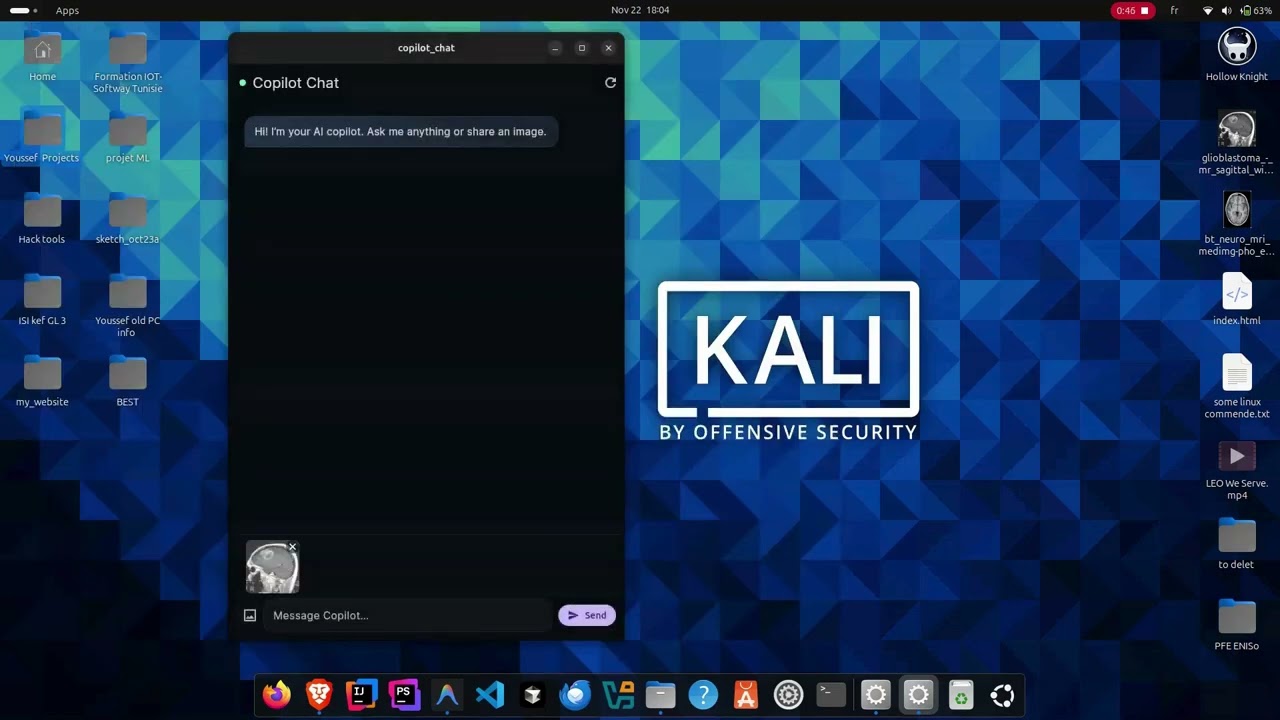
See AI-driven conversations powered by Gemini API with a modern, intuitive interface
Features • Installation • Usage • Contributing

Advanced AI-powered chat system utilizing Google Gemini API for natural language understanding:
Core Capabilities:
- Multi-turn Dialogues: Maintains conversation context across multiple exchanges
- Fast Response Time: Real-time processing with minimal latency
- Contextual Understanding: Remembers previous messages for coherent conversations
- Natural Language: Human-like responses with proper grammar and tone
- Smart Suggestions: Provides relevant follow-up questions
Benefits:
- Seamless conversation flow
- Accurate context retention
- Relevant and helpful responses
- Adaptive to user's communication style
Professional mobile-first design following Material Design 3 principles:
- Android Support: Material Design components with native Android feel
- iOS Compatibility: Cupertino widgets for authentic iOS experience
- Responsive Layout: Adapts to different screen sizes and orientations
- Smooth Animations: 60+ FPS fluid transitions and interactions
- Dark & Light Themes: System-adaptive or manual theme selection
- Custom Typography: Readable fonts optimized for mobile screens
- Color Schemes: Professionally designed color palettes
- Touch Optimization: Large tap targets and gesture-friendly interface
- Chat Bubbles: Distinct user and AI message styles
- Loading Indicators: Elegant animations during API calls
- Message Actions: Copy, share, and delete functionality
- Smooth Scrolling: Optimized chat list performance
Comprehensive input options for enhanced user experience:
- Text Input: Multi-line text field with character counter
- Image Upload:
- Camera integration for instant photo capture
- Gallery access for existing images
- Image preview before sending
- AI image analysis with Gemini Vision
- Voice Input: (Optional) Speech-to-text integration
- File Attachments: (Optional) Document support
Optimized specifically for mobile devices:
- Offline Mode: Cache conversations for offline viewing
- Push Notifications: Real-time alerts for responses
- Biometric Security: Fingerprint/Face ID protection
- Auto-save: Automatic conversation backup
- Search Function: Find previous messages quickly
- Export Options: Share or export chat history
Built with privacy and security as core principles:
- Encrypted Communication: Secure HTTPS API calls
- Local Data Protection: Encrypted local storage
- No Tracking: Privacy-first approach with no analytics
- Secure API Keys: Environment-based key management
- Session Management: Automatic logout and data clearing
- Permission Controls: Minimal required permissions
Engineered for speed and efficiency:
- Lazy Loading: Load messages on-demand for better performance
- Image Caching: Efficient image storage and retrieval
- Memory Management: Optimized resource usage
- Fast Startup: Quick app launch time
- Smooth Scrolling: Optimized list rendering
- Battery Efficient: Minimal background processing






| Component | Technology | Purpose |
|---|---|---|
| Framework | Flutter 3.0+ | Cross-platform UI development |
| Language | Dart 3.0+ | Application programming language |
| AI Engine | Gemini API | Natural language processing |
| State Management | Provider/Riverpod/BLoC | App state handling |
| Storage | SharedPreferences/Hive | Local data persistence |
| Networking | HTTP/Dio | API communication |
| Image Handling | ImagePicker | Camera and gallery access |
Ensure you have the following installed:
- Flutter SDK 3.0 or higher (Download)
- Dart SDK 3.0+ (Included with Flutter)
- Android Studio or Xcode (For platform-specific development)
- Gemini API Key (Get API Key)
- Clone the Repository
   git clone https://github.com/youssef-ben-letaifa/copilot-chat-dart.git
cd copilot-chat-dart- Install Flutter Dependencies
flutter pub get-
Setup Environment Variables
Create a
.envfile in the root directory:
GEMINI_API_KEY=your_api_key_hereAdd to pubspec.yaml:
   flutter:
     assets:
- .env- Verify Installation
   flutter doctor
flutter devices-
Platform-Specific Setup
For Android:
   cd android
   ./gradlew clean
   cd ..
For iOS:
   cd ios
   pod install
cd ..Run the application on your preferred platform:
flutter run- Splash Screen: Displays app logo and initializes components
- API Verification: Validates Gemini API key configuration
- Permission Requests: Camera and storage permissions if needed
- Welcome Tutorial: Brief introduction to app features
Main Features:
- Chat Interface: Primary conversation screen
- Image Upload: Tap camera icon to add images
- Message Actions: Long-press messages for options
- Settings: Access app preferences and configurations
Gestures:
- Swipe Right: Return to previous screen
- Long Press: Show message options menu
- Pull to Refresh: Reload conversation
- Double Tap: Quick actions
Edit lib/config/app_config.dart:
class AppConfig {
  static const String apiEndpoint = 'https://generativelanguage.googleapis.com';
  static const String geminiModel = 'gemini-pro';
  static const int maxTokens = 2048;
  static const double temperature = 0.7;
}- Basic chat functionality
- Gemini API integration
- Image input support
- Dark/Light themes
- Cross-platform support
- Voice input/output
- Multi-language support (Arabic, French, English)
- Chat export functionality
- Conversation categorization
- Custom AI personalities
- Offline mode with caching
- Cloud synchronization
- Widget support
- Advanced formatting (tables, code blocks)
- Plugin system
Update .env file:
GEMINI_API_KEY=your_api_key_here
GEMINI_MODEL=gemini-pro
GEMINI_VISION_MODEL=gemini-pro-vision
MAX_TOKENS=2048
TEMPERATURE=0.7Modify lib/config/theme_config.dart:
static ThemeData lightTheme = ThemeData(
  useMaterial3: true,
  colorScheme: ColorScheme.fromSeed(
    seedColor: Colors.blue,
    brightness: Brightness.light,
  ),
);Configure provider in lib/main.dart:
MultiProvider(
  providers: [
    ChangeNotifierProvider(create: (_) => ChatProvider()),
    ChangeNotifierProvider(create: (_) => ThemeProvider()),
  ],
  child: MyApp(),
);Flutter Doctor Issues:
flutter doctor -v
flutter clean
flutter pub get
API Key Not Working:
# Verify .env file exists and contains correct key
cat .env

# Reload environment variables
flutter run --dart-define=GEMINI_API_KEY=your_key
Build Errors:
# Android
cd android && ./gradlew clean && cd ..
flutter build apk

# iOS
cd ios && pod install && cd ..
flutter build ios
Performance Issues:
- Enable release mode:
flutter run --release - Reduce image quality before uploading
- Clear app cache and rebuild
- Check device specifications
We welcome contributions from the community! Here's how you can help:
- Fork the Repository
git clone https://github.com/youssef-ben-letaifa/copilot-chat-dart.git- Create Feature Branch
git checkout -b feature/YourFeatureName-
Make Your Changes
- Follow Dart style guidelines
- Add comments for complex logic
- Update documentation
-
Test Your Changes
   flutter test
   flutter analyze
dart format lib/- Commit and Push
   git commit -m "feat: Add your feature description"
git push origin feature/YourFeatureName- Create Pull Request
- Follow Effective Dart style guide
- Write unit tests for new features
- Update documentation as needed
- Maintain code consistency
- Test on both Android and iOS
- 🐛 Bug fixes
- ✨ New features
- 📝 Documentation improvements
- 🌍 Translations
- 🎨 UI/UX enhancements
- ⚡ Performance optimizations
MIT License
Copyright (c) 2025 Youssef BEN LETAIFA
Permission is hereby granted, free of charge, to any person obtaining a copy of this software and associated documentation files (the "Software"), to deal in the Software without restriction, including without limitation the rights to use, copy, modify, merge, publish, distribute, sublicense, and/or sell copies of the Software, and to permit persons to whom the Software is furnished to do so, subject to the following conditions:
The above copyright notice and this permission notice shall be included in all copies or substantial portions of the Software.
THE SOFTWARE IS PROVIDED "AS IS", WITHOUT WARRANTY OF ANY KIND, EXPRESS OR IMPLIED, INCLUDING BUT NOT LIMITED TO THE WARRANTIES OF MERCHANTABILITY, FITNESS FOR A PARTICULAR PURPOSE AND NONINFRINGEMENT. IN NO EVENT SHALL THE AUTHORS OR COPYRIGHT HOLDERS BE LIABLE FOR ANY CLAIM, DAMAGES OR OTHER LIABILITY, WHETHER IN AN ACTION OF CONTRACT, TORT OR OTHERWISE, ARISING FROM, OUT OF OR IN CONNECTION WITH THE SOFTWARE OR THE USE OR OTHER DEALINGS IN THE SOFTWARE.
Youssef BEN LETAIFA
- GitHub: @youssef-ben-letaifa
- LinkedIn: Youssef Ben Letaifa
- Portfolio: youssef-ben-letaifa.github.io
- Email: youssef.benletaifa@intek.u-jendouba.tn
This application is designed for educational and demonstration purposes. While it integrates with production APIs, users should:
- Review and comply with Gemini API Terms of Service
- Implement appropriate rate limiting for production use
- Handle sensitive data according to privacy regulations
- Monitor API usage and associated costs
Always test thoroughly before deploying to production environments.


